Authentication is the gatekeeper of every backend system. Get it wrong, and your users’ data is exposed. Get it right, and it is invisible — users log in, get access, and everything just works. In this lesson, we will implement three authentication strategies from scratch: JWT tokens, server-side sessions, and OAuth 2.0 with Passport.js.
Password Hashing with bcrypt
Before any authentication strategy, you need to store passwords securely. Never store plaintext passwords. Never use MD5 or SHA-256 for passwords. Use bcrypt — a purpose-built password hashing algorithm that is intentionally slow and includes a salt.
const bcrypt = require('bcrypt');

const SALT_ROUNDS = 12; // Higher = slower = more secure

// Hash a password before storing
async function hashPassword(plaintext) {
  return bcrypt.hash(plaintext, SALT_ROUNDS);
}

// Verify a password during login
async function verifyPassword(plaintext, hash) {
  return bcrypt.compare(plaintext, hash);
}

// Usage
const hash = await hashPassword('mySecretPassword');
// $2b$12$LJ3m4ys3Lg9Y5BGXaK5Hhu2LhKFXyMBqQjOBJuLm... (60 chars)

const isValid = await verifyPassword('mySecretPassword', hash);
// true
bcrypt automatically generates a unique salt for each password and embeds it in the hash. The SALT_ROUNDS parameter controls how many iterations the algorithm performs — 12 rounds means 2^12 = 4,096 iterations, which takes roughly 250ms on modern hardware. This deliberate slowness makes brute-force attacks impractical.
JWT Authentication
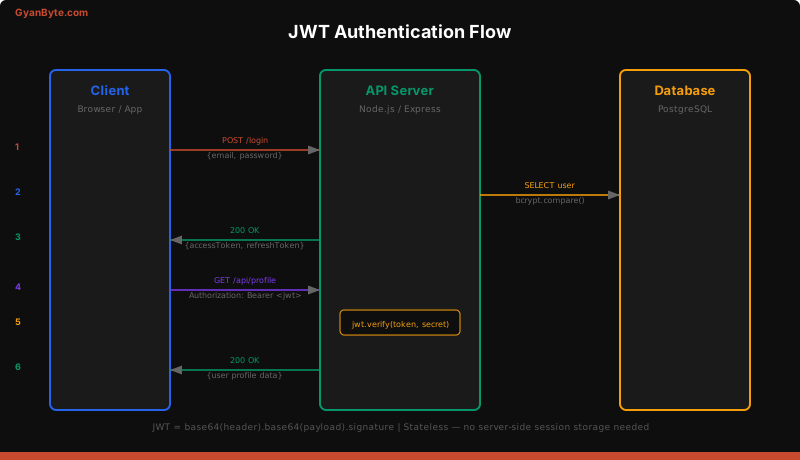
JSON Web Tokens (JWTs) are the most popular authentication mechanism for APIs. A JWT is a signed, base64-encoded string containing a header, payload, and signature.
How JWTs Work
- The user sends credentials (email + password) to your login endpoint
- Your server verifies the credentials and creates a JWT signed with a secret key
- The client stores the JWT and sends it with every subsequent request in the
Authorizationheader - Your server verifies the JWT signature on each request — no database lookup needed
Implementing JWT Auth
const jwt = require('jsonwebtoken');
const bcrypt = require('bcrypt');

const ACCESS_SECRET = process.env.JWT_ACCESS_SECRET;
const REFRESH_SECRET = process.env.JWT_REFRESH_SECRET;

// Generate tokens
function generateTokens(user) {
  const accessToken = jwt.sign(
    { sub: user.id, email: user.email, role: user.role },
    ACCESS_SECRET,
    { expiresIn: '15m' }  // Short-lived
  );

  const refreshToken = jwt.sign(
    { sub: user.id },
    REFRESH_SECRET,
    { expiresIn: '7d' }   // Long-lived
  );

  return { accessToken, refreshToken };
}

// Login endpoint
app.post('/api/auth/login', async (req, res) => {
  const { email, password } = req.body;

  // Find user in database
  const user = await db.query(
    'SELECT * FROM users WHERE email = $1',
    [email]
  );

  if (!user || !(await bcrypt.compare(password, user.password_hash))) {
    return res.status(401).json({ error: 'Invalid credentials' });
  }

  const tokens = generateTokens(user);

  // Set refresh token as httpOnly cookie
  res.cookie('refreshToken', tokens.refreshToken, {
    httpOnly: true,
    secure: true,        // HTTPS only
    sameSite: 'strict',  // CSRF protection
    maxAge: 7 * 24 * 60 * 60 * 1000  // 7 days
  });

  res.json({ accessToken: tokens.accessToken });
});
The Access + Refresh Token Pattern
Using a single long-lived token is risky — if it is stolen, the attacker has access for the entire token lifetime. The access + refresh pattern solves this:
- Access token — short-lived (15 minutes), sent in the
Authorizationheader. If stolen, the window of attack is small. - Refresh token — long-lived (7 days), stored in an httpOnly cookie. Used only to get a new access token.
// Refresh token endpoint
app.post('/api/auth/refresh', async (req, res) => {
  const { refreshToken } = req.cookies;

  if (!refreshToken) {
    return res.status(401).json({ error: 'No refresh token' });
  }

  try {
    const payload = jwt.verify(refreshToken, REFRESH_SECRET);

    // Check if refresh token is in the database (not revoked)
    const storedToken = await db.query(
      'SELECT * FROM refresh_tokens WHERE token = $1 AND user_id = $2',
      [refreshToken, payload.sub]
    );

    if (!storedToken) {
      return res.status(401).json({ error: 'Token revoked' });
    }

    const user = await db.query(
      'SELECT * FROM users WHERE id = $1',
      [payload.sub]
    );

    const tokens = generateTokens(user);

    // Rotate refresh token — invalidate old, store new
    await db.query('DELETE FROM refresh_tokens WHERE token = $1', [refreshToken]);
    await db.query(
      'INSERT INTO refresh_tokens (token, user_id) VALUES ($1, $2)',
      [tokens.refreshToken, user.id]
    );

    res.cookie('refreshToken', tokens.refreshToken, {
      httpOnly: true,
      secure: true,
      sameSite: 'strict',
      maxAge: 7 * 24 * 60 * 60 * 1000
    });

    res.json({ accessToken: tokens.accessToken });
  } catch (err) {
    res.status(401).json({ error: 'Invalid refresh token' });
  }
});
JWT Verification Middleware
Protect routes by verifying the access token on every request:
function authenticate(req, res, next) {
  const authHeader = req.headers.authorization;
  if (!authHeader?.startsWith('Bearer ')) {
    return res.status(401).json({ error: 'Missing token' });
  }

  const token = authHeader.split(' ')[1];

  try {
    const payload = jwt.verify(token, ACCESS_SECRET);
    req.user = payload;
    next();
  } catch (err) {
    if (err.name === 'TokenExpiredError') {
      return res.status(401).json({ error: 'Token expired' });
    }
    res.status(401).json({ error: 'Invalid token' });
  }
}

// Role-based authorization
function authorize(...roles) {
  return (req, res, next) => {
    if (!roles.includes(req.user.role)) {
      return res.status(403).json({ error: 'Insufficient permissions' });
    }
    next();
  };
}

// Usage
app.get('/api/profile', authenticate, (req, res) => {
  res.json({ user: req.user });
});

app.delete('/api/users/:id', authenticate, authorize('admin'), (req, res) => {
  // Only admins can delete users
});
Session-Based Authentication
Sessions store authentication state on the server. When a user logs in, the server creates a session, stores it (typically in Redis), and sends a session ID cookie to the client.
const session = require('express-session');
const RedisStore = require('connect-redis').default;
const { createClient } = require('redis');

// Create Redis client
const redisClient = createClient({ url: process.env.REDIS_URL });
redisClient.connect();

app.use(session({
  store: new RedisStore({ client: redisClient }),
  secret: process.env.SESSION_SECRET,
  resave: false,
  saveUninitialized: false,
  cookie: {
    secure: true,        // HTTPS only
    httpOnly: true,      // Not accessible via JavaScript
    sameSite: 'strict',  // CSRF protection
    maxAge: 24 * 60 * 60 * 1000  // 24 hours
  }
}));

// Login — create session
app.post('/api/auth/login', async (req, res) => {
  const { email, password } = req.body;
  const user = await findUserByEmail(email);

  if (!user || !(await bcrypt.compare(password, user.password_hash))) {
    return res.status(401).json({ error: 'Invalid credentials' });
  }

  // Store user data in session
  req.session.userId = user.id;
  req.session.role = user.role;

  res.json({ message: 'Logged in', user: { id: user.id, name: user.name } });
});

// Logout — destroy session
app.post('/api/auth/logout', (req, res) => {
  req.session.destroy((err) => {
    if (err) {
      return res.status(500).json({ error: 'Logout failed' });
    }
    res.clearCookie('connect.sid');
    res.json({ message: 'Logged out' });
  });
});

// Session authentication middleware
function requireSession(req, res, next) {
  if (!req.session.userId) {
    return res.status(401).json({ error: 'Not authenticated' });
  }
  next();
}

app.get('/api/profile', requireSession, async (req, res) => {
  const user = await findUserById(req.session.userId);
  res.json({ user });
});
JWT vs Sessions — Comparison
| Criteria | JWT | Sessions |
|---|---|---|
| State | Stateless (token contains data) | Stateful (server stores session) |
| Storage | Client-side (memory, cookie, localStorage) | Server-side (Redis, database) |
| Scalability | Scales easily — no shared state | Requires shared session store |
| Revocation | Hard — token is valid until expiry | Easy — delete session from store |
| Size | Larger (payload + signature) | Small (just a session ID cookie) |
| Best for | APIs, microservices, mobile apps | Traditional web apps, SSR |
| CSRF risk | Low (if in Authorization header) | Higher (cookies sent automatically) |
| XSS risk | High (if in localStorage) | Low (httpOnly cookies) |
The Practical Answer
Use JWTs when you are building APIs consumed by mobile apps, SPAs, or microservices. Use sessions when you are building a traditional server-rendered web application. Many production systems use both — sessions for the web app, JWTs for the API.
OAuth 2.0 with Passport.js
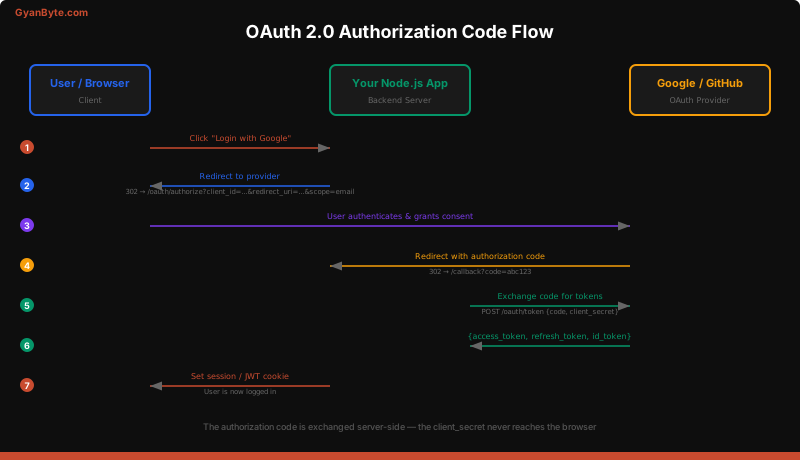
OAuth 2.0 lets users log in with their existing accounts (Google, GitHub, Facebook) instead of creating a new password. Your app never sees the user’s password — the OAuth provider handles authentication.
Setting Up Google OAuth with Passport.js
npm install passport passport-google-oauth20 express-sessionconst passport = require('passport');
const GoogleStrategy = require('passport-google-oauth20').Strategy;
// Configure Google strategy
passport.use(new GoogleStrategy({
clientID: process.env.GOOGLE_CLIENT_ID,
clientSecret: process.env.GOOGLE_CLIENT_SECRET,
callbackURL: '/api/auth/google/callback'
},
async (accessToken, refreshToken, profile, done) => {
try {
// Find or create user in your database
let user = await db.query(
'SELECT * FROM users WHERE google_id = $1',
[profile.id]
);
if (!user) {
user = await db.query(
`INSERT INTO users (google_id, name, email, avatar)
VALUES ($1, $2, $3, $4) RETURNING *`,
[
profile.id,
profile.displayName,
profile.emails[0].value,
profile.photos[0].value
]
);
}
return done(null, user);
} catch (err) {
return done(err, null);
}
}
));
// Serialize/deserialize user for session
passport.serializeUser((user, done) => done(null, user.id));
passport.deserializeUser(async (id, done) => {
const user = await db.query('SELECT * FROM users WHERE id = $1', [id]);
done(null, user);
});
// Initialize Passport
app.use(passport.initialize());
app.use(passport.session());
// Routes
app.get('/api/auth/google',
passport.authenticate('google', { scope: ['profile', 'email'] })
);
app.get('/api/auth/google/callback',
passport.authenticate('google', { failureRedirect: '/login' }),
(req, res) => {
// Successful authentication
res.redirect('/dashboard');
}
);OAuth Without Passport (Manual Implementation)
For API-first applications, you may want to handle OAuth manually to return JWTs instead of creating sessions:
const axios = require('axios');

// Step 1: Redirect to Google
app.get('/api/auth/google', (req, res) => {
  const params = new URLSearchParams({
    client_id: process.env.GOOGLE_CLIENT_ID,
    redirect_uri: `${process.env.BASE_URL}/api/auth/google/callback`,
    response_type: 'code',
    scope: 'openid email profile',
    access_type: 'offline',
    prompt: 'consent'
  });

  res.redirect(`https://accounts.google.com/o/oauth2/v2/auth?${params}`);
});

// Step 2: Handle callback — exchange code for tokens
app.get('/api/auth/google/callback', async (req, res) => {
  const { code } = req.query;

  // Exchange authorization code for tokens
  const { data } = await axios.post('https://oauth2.googleapis.com/token', {
    code,
    client_id: process.env.GOOGLE_CLIENT_ID,
    client_secret: process.env.GOOGLE_CLIENT_SECRET,
    redirect_uri: `${process.env.BASE_URL}/api/auth/google/callback`,
    grant_type: 'authorization_code'
  });

  // Get user info from Google
  const { data: profile } = await axios.get(
    'https://www.googleapis.com/oauth2/v2/userinfo',
    { headers: { Authorization: `Bearer ${data.access_token}` } }
  );

  // Find or create user, generate your own JWT
  const user = await findOrCreateUser(profile);
  const tokens = generateTokens(user);

  // Return JWT to client
  res.cookie('refreshToken', tokens.refreshToken, {
    httpOnly: true, secure: true, sameSite: 'strict'
  });

  // Redirect to frontend with access token
  res.redirect(`${process.env.FRONTEND_URL}/auth/callback?token=${tokens.accessToken}`);
});
Security Best Practices
Authentication is only as strong as your weakest security practice. Follow these rules:
1. Always Use httpOnly Cookies for Tokens
// GOOD — httpOnly cookies cannot be accessed by JavaScript
res.cookie('token', jwt, {
  httpOnly: true,   // Not accessible via document.cookie
  secure: true,     // Only sent over HTTPS
  sameSite: 'strict'
});

// BAD — localStorage is accessible to any JavaScript on the page
// If you have an XSS vulnerability, the attacker can steal the token
localStorage.setItem('token', jwt); // Don't do this for sensitive tokens
2. CSRF Protection
If you use cookies, you need CSRF protection. The sameSite: 'strict' cookie flag handles most cases. For additional protection:
const csrf = require('csurf');

app.use(csrf({ cookie: true }));

// Include CSRF token in forms
app.get('/form', (req, res) => {
  res.json({ csrfToken: req.csrfToken() });
});
3. Rate Limit Authentication Endpoints
const rateLimit = require('express-rate-limit');

const authLimiter = rateLimit({
  windowMs: 15 * 60 * 1000,  // 15 minutes
  max: 10,                     // 10 attempts per window
  message: { error: 'Too many login attempts. Try again in 15 minutes.' },
  standardHeaders: true,
  legacyHeaders: false
});

app.post('/api/auth/login', authLimiter, loginHandler);
app.post('/api/auth/register', authLimiter, registerHandler);
4. Token Rotation
Always rotate refresh tokens on use. When a refresh token is used to get a new access token, issue a new refresh token and invalidate the old one. This limits the damage if a refresh token is compromised.
5. Input Validation
Never trust client input. Validate email format, enforce password complexity, and sanitize all inputs:
const { body, validationResult } = require('express-validator');

app.post('/api/auth/register', [
  body('email').isEmail().normalizeEmail(),
  body('password')
    .isLength({ min: 8 })
    .matches(/^(?=.*[a-z])(?=.*[A-Z])(?=.*\d)/)
    .withMessage('Must contain uppercase, lowercase, and number'),
  body('name').trim().isLength({ min: 2, max: 50 }).escape()
], async (req, res) => {
  const errors = validationResult(req);
  if (!errors.isEmpty()) {
    return res.status(400).json({ errors: errors.array() });
  }
  // ... create user
});
6. Secure Headers
const helmet = require('helmet');
app.use(helmet()); // Sets security headers automatically

// Key headers helmet sets:
// X-Content-Type-Options: nosniff
// X-Frame-Options: DENY
// Strict-Transport-Security: max-age=15552000
// Content-Security-Policy: ...
Key Takeaways
- bcrypt for passwords — never store plaintext, never use generic hashing algorithms. Use 12+ salt rounds.
- Access + refresh token pattern — short-lived access tokens (15 min) with long-lived refresh tokens (7 days) stored in httpOnly cookies.
- Sessions for web apps, JWTs for APIs — sessions are easier to revoke, JWTs scale better across services.
- OAuth delegates authentication — your app never touches the user’s password. Use Passport.js for quick setup or implement manually for full control.
- Security is layers — httpOnly cookies, CSRF protection, rate limiting, input validation, secure headers. No single measure is sufficient.
- Rotate refresh tokens on every use to limit the blast radius of compromised tokens.
In the next lesson, we will connect to databases — PostgreSQL with connection pooling, MongoDB with Mongoose, and Redis for caching and sessions.