Every backend engineer needs to build APIs. Whether you are shipping a mobile app, a single-page application, or an internal microservice, REST APIs are the backbone of modern software. In this lesson, we will build APIs with the two most popular Node.js frameworks — Express.js and Nest.js — and understand when to choose each one.
Express.js — The Minimal Foundation
Express is the most widely used Node.js web framework. It is minimal, unopinionated, and provides just enough to handle HTTP requests and responses. Everything else — validation, authentication, database access — you add yourself through middleware and libraries.
Setting Up Express
const express = require('express');
const app = express();

// Built-in middleware for parsing JSON bodies
app.use(express.json());

// Built-in middleware for parsing URL-encoded bodies
app.use(express.urlencoded({ extended: true }));

app.listen(3000, () => {
  console.log('Server running on port 3000');
});
Routing
Express routing maps HTTP methods and URL paths to handler functions. Each handler receives req (the request object), res (the response object), and next (a function to pass control to the next middleware).
// GET all users
app.get('/api/users', (req, res) => {
  res.json({ users: [] });
});

// GET a single user by ID
app.get('/api/users/:id', (req, res) => {
  const { id } = req.params;
  res.json({ user: { id, name: 'John' } });
});

// POST create a new user
app.post('/api/users', (req, res) => {
  const { name, email } = req.body;
  // ... save to database
  res.status(201).json({ user: { id: 1, name, email } });
});

// PUT update a user
app.put('/api/users/:id', (req, res) => {
  const { id } = req.params;
  const { name, email } = req.body;
  res.json({ user: { id, name, email } });
});

// DELETE a user
app.delete('/api/users/:id', (req, res) => {
  res.status(204).send();
});
For larger applications, use the Express Router to group related routes:
// routes/users.js
const router = require('express').Router();

router.get('/', getAllUsers);
router.get('/:id', getUserById);
router.post('/', createUser);
router.put('/:id', updateUser);
router.delete('/:id', deleteUser);

module.exports = router;

// app.js
app.use('/api/users', require('./routes/users'));
Middleware — The Power of Express
Middleware is what makes Express powerful. A middleware function has access to req, res, and next. It can modify the request, send a response, or pass control to the next middleware.
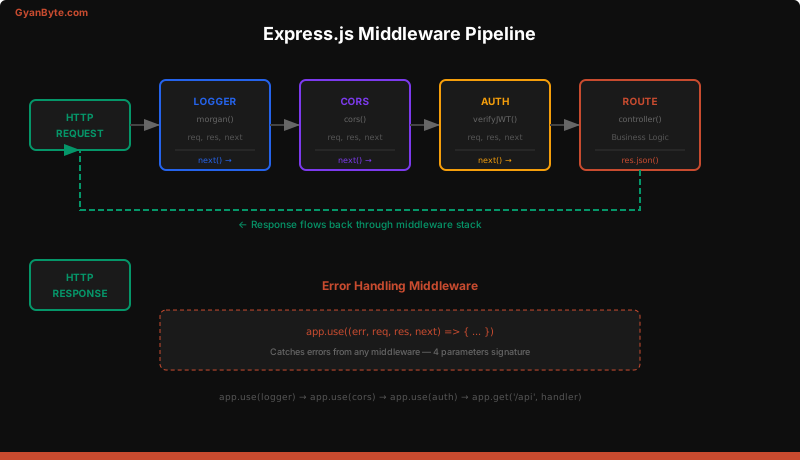
Middleware executes in the order it is registered. This order matters — a logger must come before route handlers, and an error handler must come after.
// Application-level middleware
const morgan = require('morgan');
const cors = require('cors');
const helmet = require('helmet');

app.use(helmet());           // Security headers
app.use(cors());              // CORS support
app.use(morgan('combined'));  // Request logging
app.use(express.json());      // Body parsing

// Custom middleware — runs on every request
app.use((req, res, next) => {
  req.requestTime = Date.now();
  next();
});

// Route-specific middleware
const authenticate = (req, res, next) => {
  const token = req.headers.authorization?.split(' ')[1];
  if (!token) {
    return res.status(401).json({ error: 'No token provided' });
  }
  try {
    req.user = jwt.verify(token, process.env.JWT_SECRET);
    next();
  } catch (err) {
    res.status(401).json({ error: 'Invalid token' });
  }
};

// Apply middleware to specific routes
app.get('/api/profile', authenticate, (req, res) => {
  res.json({ user: req.user });
});
Building a Complete CRUD API with Express
Here is a production-style Express API for a tasks resource:
const express = require('express');
const { v4: uuidv4 } = require('uuid');

const app = express();
app.use(express.json());

// In-memory store (replace with database in production)
let tasks = [];

// GET /api/tasks — List all tasks
app.get('/api/tasks', (req, res) => {
  const { status, limit = 20, offset = 0 } = req.query;
  let filtered = tasks;
  if (status) {
    filtered = tasks.filter(t => t.status === status);
  }
  res.json({
    data: filtered.slice(offset, offset + parseInt(limit)),
    total: filtered.length
  });
});

// GET /api/tasks/:id — Get a single task
app.get('/api/tasks/:id', (req, res) => {
  const task = tasks.find(t => t.id === req.params.id);
  if (!task) {
    return res.status(404).json({ error: 'Task not found' });
  }
  res.json({ data: task });
});

// POST /api/tasks — Create a task
app.post('/api/tasks', (req, res) => {
  const { title, description } = req.body;

  if (!title || title.trim().length === 0) {
    return res.status(400).json({ error: 'Title is required' });
  }

  const task = {
    id: uuidv4(),
    title: title.trim(),
    description: description?.trim() || '',
    status: 'pending',
    createdAt: new Date().toISOString(),
    updatedAt: new Date().toISOString()
  };

  tasks.push(task);
  res.status(201).json({ data: task });
});

// PUT /api/tasks/:id — Update a task
app.put('/api/tasks/:id', (req, res) => {
  const index = tasks.findIndex(t => t.id === req.params.id);
  if (index === -1) {
    return res.status(404).json({ error: 'Task not found' });
  }

  const { title, description, status } = req.body;
  tasks[index] = {
    ...tasks[index],
    ...(title && { title: title.trim() }),
    ...(description !== undefined && { description: description.trim() }),
    ...(status && { status }),
    updatedAt: new Date().toISOString()
  };

  res.json({ data: tasks[index] });
});

// DELETE /api/tasks/:id — Delete a task
app.delete('/api/tasks/:id', (req, res) => {
  const index = tasks.findIndex(t => t.id === req.params.id);
  if (index === -1) {
    return res.status(404).json({ error: 'Task not found' });
  }
  tasks.splice(index, 1);
  res.status(204).send();
});
Error Handling in Express
Express has a special error-handling middleware signature with four parameters. Any error thrown or passed to next(err) will be caught by this handler.
// Async error wrapper — catches rejected promises
const asyncHandler = (fn) => (req, res, next) => {
  Promise.resolve(fn(req, res, next)).catch(next);
};

// Use it on routes
app.get('/api/tasks', asyncHandler(async (req, res) => {
  const tasks = await db.query('SELECT * FROM tasks');
  res.json({ data: tasks });
}));

// Global error handler — must be registered LAST
app.use((err, req, res, next) => {
  console.error(err.stack);

  const statusCode = err.statusCode || 500;
  const message = err.isOperational
    ? err.message
    : 'Internal server error';

  res.status(statusCode).json({
    error: message,
    ...(process.env.NODE_ENV === 'development' && { stack: err.stack })
  });
});
Nest.js — Structure at Scale
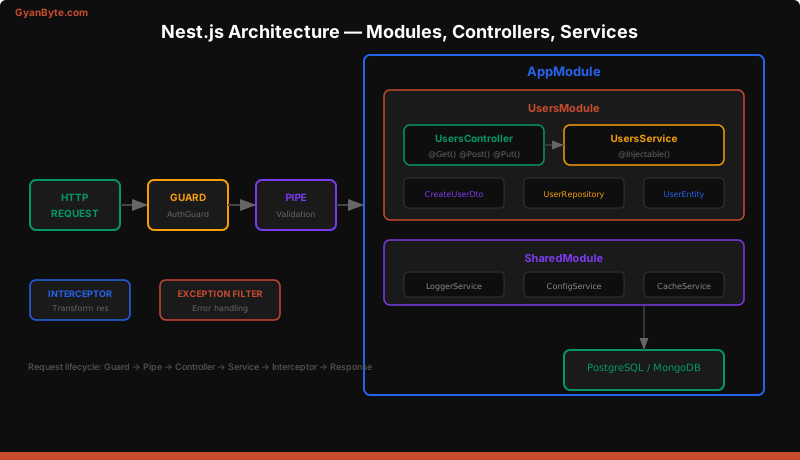
Nest.js is a TypeScript-first framework that brings structure, dependency injection, and decorators to Node.js. Under the hood, it uses Express (or optionally Fastify) as the HTTP layer, but it adds an architectural layer inspired by Angular.
Core Concepts
Nest.js organizes code into modules, each containing controllers (handle HTTP), services (business logic), and providers (any injectable dependency).
Setting Up a Nest.js Project
npm i -g @nestjs/cli
nest new my-api
cd my-api
npm run start:dev
Controllers — Handle HTTP
Controllers are decorated classes that map routes to methods:
// users.controller.ts
import {
  Controller, Get, Post, Put, Delete,
  Param, Body, Query, HttpCode
} from '@nestjs/common';
import { UsersService } from './users.service';
import { CreateUserDto, UpdateUserDto } from './dto';

@Controller('api/users')
export class UsersController {
  constructor(private readonly usersService: UsersService) {}

  @Get()
  findAll(@Query('limit') limit: number = 20) {
    return this.usersService.findAll(limit);
  }

  @Get(':id')
  findOne(@Param('id') id: string) {
    return this.usersService.findOne(id);
  }

  @Post()
  @HttpCode(201)
  create(@Body() createUserDto: CreateUserDto) {
    return this.usersService.create(createUserDto);
  }

  @Put(':id')
  update(@Param('id') id: string, @Body() updateUserDto: UpdateUserDto) {
    return this.usersService.update(id, updateUserDto);
  }

  @Delete(':id')
  @HttpCode(204)
  remove(@Param('id') id: string) {
    return this.usersService.remove(id);
  }
}
Services — Business Logic
Services are injectable classes that contain the actual business logic. They are independent of HTTP — making them testable and reusable.
// users.service.ts
import { Injectable, NotFoundException } from '@nestjs/common';
import { InjectRepository } from '@nestjs/typeorm';
import { Repository } from 'typeorm';
import { User } from './entities/user.entity';
import { CreateUserDto, UpdateUserDto } from './dto';

@Injectable()
export class UsersService {
  constructor(
    @InjectRepository(User)
    private readonly userRepo: Repository<User>,
  ) {}

  async findAll(limit: number): Promise<User[]> {
    return this.userRepo.find({ take: limit });
  }

  async findOne(id: string): Promise<User> {
    const user = await this.userRepo.findOne({ where: { id } });
    if (!user) {
      throw new NotFoundException(`User ${id} not found`);
    }
    return user;
  }

  async create(dto: CreateUserDto): Promise<User> {
    const user = this.userRepo.create(dto);
    return this.userRepo.save(user);
  }

  async update(id: string, dto: UpdateUserDto): Promise<User> {
    await this.findOne(id); // Throws if not found
    await this.userRepo.update(id, dto);
    return this.findOne(id);
  }

  async remove(id: string): Promise<void> {
    const result = await this.userRepo.delete(id);
    if (result.affected === 0) {
      throw new NotFoundException(`User ${id} not found`);
    }
  }
}
DTOs and Validation
Data Transfer Objects define the shape of incoming data. Combined with class-validator, they provide automatic validation:
// dto/create-user.dto.ts
import { IsEmail, IsString, MinLength, IsOptional } from 'class-validator';

export class CreateUserDto {
  @IsString()
  @MinLength(2)
  name: string;

  @IsEmail()
  email: string;

  @IsString()
  @MinLength(8)
  password: string;

  @IsOptional()
  @IsString()
  bio?: string;
}
Enable global validation in main.ts:
import { ValidationPipe } from '@nestjs/common';

app.useGlobalPipes(new ValidationPipe({
  whitelist: true,       // Strip unknown properties
  forbidNonWhitelisted: true,  // Throw on unknown properties
  transform: true,       // Auto-transform types
}));
Now, any request to POST /api/users with an invalid body automatically returns a 400 Bad Request with detailed error messages — no manual validation code needed.
Modules — Organize Your Application
Modules group related controllers, services, and providers. Every Nest.js app has a root AppModule:
// users.module.ts
import { Module } from '@nestjs/common';
import { TypeOrmModule } from '@nestjs/typeorm';
import { UsersController } from './users.controller';
import { UsersService } from './users.service';
import { User } from './entities/user.entity';

@Module({
  imports: [TypeOrmModule.forFeature([User])],
  controllers: [UsersController],
  providers: [UsersService],
  exports: [UsersService], // Available to other modules
})
export class UsersModule {}

// app.module.ts
@Module({
  imports: [
    TypeOrmModule.forRoot({ /* db config */ }),
    UsersModule,
    AuthModule,
    TasksModule,
  ],
})
export class AppModule {}
Express vs Nest.js — When to Use Which
| Criteria | Express | Nest.js |
|---|---|---|
| Learning curve | Low — minimal API | Medium — decorators, DI, modules |
| TypeScript | Optional (needs setup) | First-class, built-in |
| Structure | You decide everything | Opinionated, Angular-style |
| Dependency Injection | Manual or third-party | Built-in container |
| Validation | Manual with Joi/Zod | Built-in with class-validator |
| Testing | Manual setup with Jest | Built-in testing module |
| Performance | Slightly faster (less overhead) | Minimal overhead vs Express |
| Best for | Prototypes, small APIs, microservices | Large teams, complex domains, enterprise |
| Ecosystem | Massive (most middleware available) | Growing (uses Express middleware) |
Choose Express When
- You need a quick prototype or small API
- Your team prefers minimal frameworks
- You want full control over architecture
- You are building a simple microservice
Choose Nest.js When
- You are building a large, complex application
- Your team is familiar with Angular or Spring Boot
- You want enforced structure and conventions
- You need built-in support for WebSockets, GraphQL, microservices
Project Structure Best Practices
Regardless of framework, organize your code by feature, not by type:
src/
├── modules/
│   ├── users/
│   │   ├── users.controller.ts
│   │   ├── users.service.ts
│   │   ├── users.module.ts
│   │   ├── dto/
│   │   │   ├── create-user.dto.ts
│   │   │   └── update-user.dto.ts
│   │   ├── entities/
│   │   │   └── user.entity.ts
│   │   └── __tests__/
│   │       ├── users.controller.spec.ts
│   │       └── users.service.spec.ts
│   ├── auth/
│   │   ├── auth.controller.ts
│   │   ├── auth.service.ts
│   │   ├── guards/
│   │   │   └── jwt-auth.guard.ts
│   │   └── strategies/
│   │       └── jwt.strategy.ts
│   └── tasks/
│       └── ...
├── common/
│   ├── middleware/
│   ├── filters/
│   ├── interceptors/
│   └── pipes/
├── config/
│   └── database.config.ts
├── app.module.ts
└── main.ts
This structure scales well. Each module is self-contained — you can move it, test it independently, or extract it into a separate microservice later.
Key Takeaways
- Express is minimal and flexible — you compose behavior through middleware. It is the right choice when you want control and simplicity.
- Nest.js provides structure through modules, controllers, services, and dependency injection. It scales better for large teams and complex applications.
- Middleware order matters in Express — register logging and parsing before routes, error handlers after.
- Always validate input — use DTOs with class-validator in Nest.js, or Zod/Joi in Express.
- Organize by feature, not by type. Keep related code together.
- Use async error handlers in Express to avoid unhandled promise rejections crashing your server.
In the next lesson, we will add authentication to our API — JWT tokens, sessions, and OAuth with Passport.js.