Node.js powers some of the highest-traffic systems on the internet — Netflix, PayPal, LinkedIn, and Uber all run substantial portions of their backend on it. But Node.js does something that surprises most developers coming from Java or Python: it handles thousands of concurrent connections on a single thread.
How? The answer lies in the event loop — a mechanism that coordinates asynchronous I/O operations without creating a thread per request. In this lesson, we will tear apart the Node.js architecture layer by layer and understand exactly how it works.
The Three Pillars of Node.js
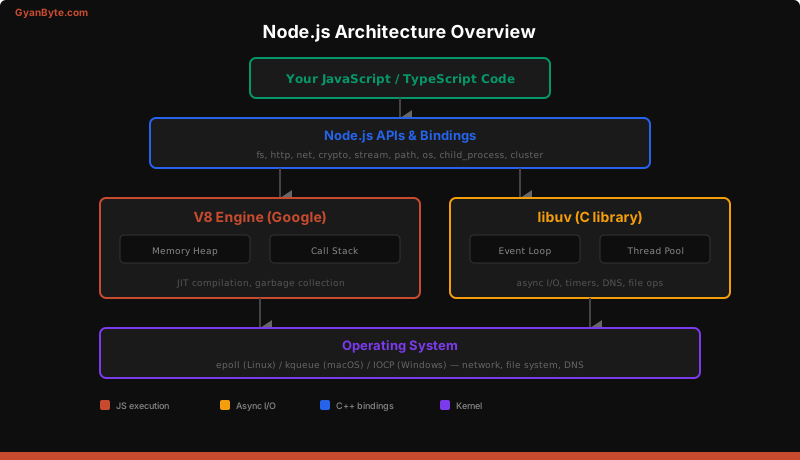
Node.js is not a language — it is a runtime. It combines three core components to execute JavaScript on the server:
V8 Engine
V8 is Google’s open-source JavaScript engine, written in C++. It is the same engine that runs in Chrome. V8’s job is straightforward: parse JavaScript, compile it to machine code using JIT (Just-In-Time) compilation, and execute it.
V8 provides two critical pieces:
- The Call Stack — a LIFO data structure that tracks function execution. When you call a function, a frame is pushed onto the stack. When the function returns, the frame is popped.
- The Memory Heap — where objects, strings, and closures are allocated. V8’s garbage collector (Orinoco) manages memory automatically.
V8 is single-threaded. It can only execute one piece of JavaScript at a time. This is the “single-threaded” part of Node.js that everyone talks about.
libuv
libuv is a C library that provides Node.js with asynchronous I/O. It is the secret weapon that makes Node.js non-blocking despite being single-threaded.
libuv provides:
- The Event Loop — the central mechanism that orchestrates async operations
- Thread Pool — a pool of 4 worker threads (configurable via
UV_THREADPOOL_SIZE, up to 1024) used for operations that cannot be done asynchronously at the OS level (DNS lookups, file system operations, certain crypto operations) - OS-level async primitives — epoll on Linux, kqueue on macOS, IOCP on Windows
Node.js Bindings (C++ Addons)
The bindings layer connects JavaScript to C/C++ libraries. When you call fs.readFile(), JavaScript does not read the file — it calls a C++ binding that delegates to libuv, which uses OS-level system calls.
The Event Loop — Phase by Phase
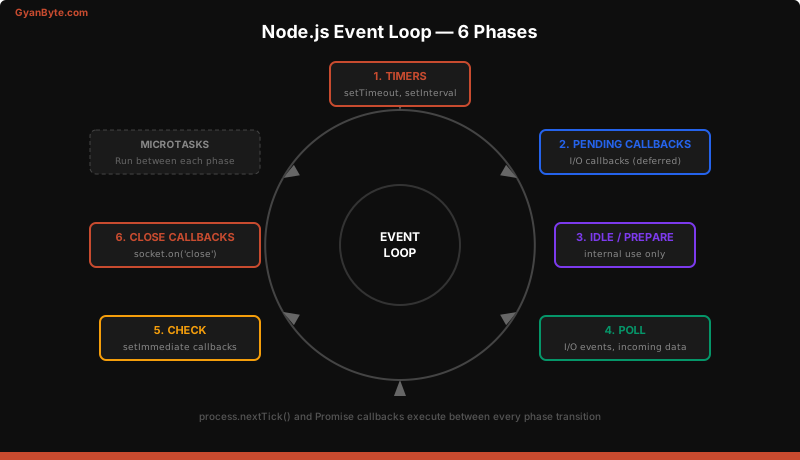
The event loop is not a simple while(true) loop. It has six distinct phases, each with its own queue of callbacks. On every iteration (called a “tick”), the loop visits each phase in order.
Phase 1: Timers
Executes callbacks scheduled by setTimeout() and setInterval(). A timer specifies a minimum delay, not a guaranteed exact delay. If the poll phase takes longer than expected, timer callbacks will fire late.
// This callback executes in the Timers phase
setTimeout(() => {
  console.log('Timer fired after ~100ms');
}, 100);

// setInterval also fires here
setInterval(() => {
  console.log('Repeating every 1 second');
}, 1000);
Phase 2: Pending Callbacks
Executes I/O callbacks that were deferred to the next loop iteration. This includes some system-level callbacks like TCP error callbacks (e.g., ECONNREFUSED).
Phase 3: Idle / Prepare
Internal use only. Node.js uses this phase for internal bookkeeping. You will never interact with this phase directly.
Phase 4: Poll
The poll phase does two things:
- Calculates how long it should block and wait for I/O
- Processes events in the poll queue (completed I/O callbacks)
This is where most of the action happens. When you read a file, make an HTTP request, or query a database, the callback fires in the poll phase.
const fs = require('fs');

// This callback fires in the Poll phase
fs.readFile('/etc/hosts', 'utf8', (err, data) => {
  console.log('File read complete');
});

// Network callbacks also fire in the Poll phase
const http = require('http');
http.get('http://example.com', (res) => {
  console.log('HTTP response received');
});
Phase 5: Check
Executes setImmediate() callbacks. setImmediate() is designed to run a callback after the poll phase completes. This makes it useful when you want to execute something after I/O but before any timers fire.
setImmediate(() => {
  console.log('This runs in the Check phase');
});
Phase 6: Close Callbacks
Executes close event callbacks, such as socket.on('close', ...). If a socket or handle is closed abruptly (e.g., socket.destroy()), the close event fires here.
const net = require('net');
const server = net.createServer((socket) => {
  socket.on('close', () => {
    // This callback fires in the Close Callbacks phase
    console.log('Socket closed');
  });
});
Call Stack, Callback Queue, and Microtask Queue
Understanding how these three structures interact is essential.
The call stack is synchronous — it executes functions one at a time. When an async operation completes (file read, timer, network response), its callback is placed in the appropriate callback queue based on the event loop phase.
But there is a special queue that has higher priority than any phase: the microtask queue.
Microtask Queue
Microtasks are processed between every phase of the event loop. There are two types:
process.nextTick()callbacks — processed first- Promise callbacks (
.then(),.catch(),awaitcontinuations) — processed second
console.log('1 - Start');

setTimeout(() => console.log('2 - setTimeout'), 0);

Promise.resolve().then(() => console.log('3 - Promise'));

process.nextTick(() => console.log('4 - nextTick'));

console.log('5 - End');

// Output:
// 1 - Start
// 5 - End
// 4 - nextTick
// 3 - Promise
// 2 - setTimeout
The synchronous code (1 and 5) runs first because it is on the call stack. Then process.nextTick fires before the Promise because nextTick has its own dedicated queue that drains first. The Promise fires next as a microtask. Finally, setTimeout fires in the Timers phase.
process.nextTick vs setImmediate vs setTimeout
These three functions are the most commonly confused scheduling mechanisms in Node.js. Here is the definitive guide:
| Function | When it fires | Queue |
|---|---|---|
process.nextTick(cb) |
Before the next event loop phase | Microtask queue (highest priority) |
Promise.then(cb) |
Before the next event loop phase | Microtask queue (after nextTick) |
setImmediate(cb) |
In the Check phase (after Poll) | Check phase queue |
setTimeout(cb, 0) |
In the Timers phase (next tick) | Timers phase queue |
// Inside an I/O callback, setImmediate always fires before setTimeout
const fs = require('fs');

fs.readFile(__filename, () => {
  setTimeout(() => console.log('timeout'), 0);
  setImmediate(() => console.log('immediate'));
});

// Output (always deterministic inside I/O):
// immediate
// timeout
Inside an I/O callback, setImmediate always fires first because the event loop is already in the Poll phase — the Check phase (where setImmediate fires) comes before the Timers phase on the next iteration.
Outside of an I/O callback, the order between setTimeout(fn, 0) and setImmediate is non-deterministic because it depends on process performance.
When to Use What
process.nextTick— Use sparingly. Good for ensuring a callback fires before any I/O. Common in library internals for making APIs consistently async. Beware: recursivenextTickcalls starve the event loop.setImmediate— Prefer this for deferring work. It is cooperative with the event loop and will not starve I/O.setTimeout(fn, 0)— Rarely what you want. UsesetImmediateinstead for deferred execution.
Worker Threads for CPU-Bound Tasks
Node.js is single-threaded for JavaScript execution, but that does not mean you are stuck. For CPU-heavy work — image processing, video transcoding, complex calculations, data parsing — use Worker Threads.
// main.js
const { Worker } = require('worker_threads');

function runHeavyComputation(data) {
  return new Promise((resolve, reject) => {
    const worker = new Worker('./worker.js', {
      workerData: data
    });

    worker.on('message', resolve);
    worker.on('error', reject);
    worker.on('exit', (code) => {
      if (code !== 0) {
        reject(new Error(`Worker stopped with exit code ${code}`));
      }
    });
  });
}

// Non-blocking — the event loop keeps handling requests
const result = await runHeavyComputation({ numbers: [1, 2, 3, 4, 5] });
// worker.js
const { parentPort, workerData } = require('worker_threads');
// CPU-intensive work runs here — on a separate thread
const sum = workerData.numbers.reduce((a, b) => a + b, 0);
parentPort.postMessage({ sum });Worker threads run in separate V8 isolates with their own event loop. They communicate with the main thread via message passing — no shared memory headaches (unless you deliberately use SharedArrayBuffer).
Common Pitfalls — Blocking the Event Loop
The golden rule of Node.js: never block the event loop. Since JavaScript execution is single-threaded, any long-running synchronous operation blocks everything — no HTTP requests are handled, no callbacks fire, no timers execute.
Pitfall 1: Synchronous File Operations
// BAD — blocks the event loop
const data = fs.readFileSync('/large-file.csv', 'utf8');

// GOOD — non-blocking
const data = await fs.promises.readFile('/large-file.csv', 'utf8');
Pitfall 2: CPU-Intensive Loops
// BAD — blocks for seconds on large arrays
function processData(items) {
  return items.map(item => expensiveTransform(item));
}

// GOOD — chunk the work and yield to the event loop
async function processDataChunked(items, chunkSize = 1000) {
  const results = [];
  for (let i = 0; i < items.length; i += chunkSize) {
    const chunk = items.slice(i, i + chunkSize);
    results.push(...chunk.map(item => expensiveTransform(item)));
    // Yield to the event loop between chunks
    await new Promise(resolve => setImmediate(resolve));
  }
  return results;
}
Pitfall 3: JSON.parse on Large Payloads
JSON.parse() is synchronous and runs on the main thread. Parsing a 50MB JSON blob will freeze your server. Use streaming JSON parsers like stream-json for large payloads, or offload to a worker thread.
Pitfall 4: Recursive process.nextTick
// BAD — starves the event loop, nothing else runs
function bad() {
  process.nextTick(bad);
}

// GOOD — cooperative with the event loop
function good() {
  setImmediate(good);
}
Monitoring the Event Loop
In production, you want to detect event loop lag — when the loop takes too long to cycle through its phases:
// Simple event loop lag monitor
let lastCheck = Date.now();

setInterval(() => {
  const now = Date.now();
  const lag = now - lastCheck - 1000; // Expected interval is 1000ms
  if (lag > 100) {
    console.warn(`Event loop lag: ${lag}ms`);
  }
  lastCheck = now;
}, 1000);
For production monitoring, use the perf_hooks module or libraries like event-loop-stats and clinic.js to profile and visualize event loop behavior.
Key Takeaways
- Node.js = V8 + libuv + bindings. V8 executes JavaScript, libuv handles async I/O, bindings connect them to the OS.
- The event loop has 6 phases — Timers, Pending, Idle/Prepare, Poll, Check, Close. Each phase drains its queue before moving to the next.
- Microtasks (nextTick + Promises) run between every phase — they have the highest priority.
- Inside I/O callbacks,
setImmediatealways fires beforesetTimeout(fn, 0). - Use Worker Threads for CPU-bound tasks — never block the main thread with heavy computation.
- Monitor event loop lag in production to catch performance regressions early.
Understanding the event loop is not just academic — it directly impacts how you structure middleware, handle errors, manage database connections, and design your application’s concurrency model. Every lesson in this course builds on this foundation.