A production Node.js application that swallows errors silently or logs unstructured text to stdout is a ticking time bomb. When something breaks at 3 AM, you need to know exactly what failed, which request triggered it, and whether the error is something your code can recover from or a fundamental bug that needs a deploy. This lesson covers the full error handling and logging pipeline — from throwing structured errors to getting an alert on your phone.
Custom Error Classes
The built-in Error class tells you almost nothing useful for API responses. You need errors that carry HTTP status codes, error codes for clients, and a flag that distinguishes operational errors (expected failures) from programmer errors (bugs).
class AppError extends Error {
  constructor(message, statusCode, errorCode, isOperational = true) {
    super(message);
    this.name = this.constructor.name;
    this.statusCode = statusCode;
    this.errorCode = errorCode;
    this.isOperational = isOperational;
    Error.captureStackTrace(this, this.constructor);
  }
}

class NotFoundError extends AppError {
  constructor(resource = 'Resource') {
    super(`${resource} not found`, 404, 'NOT_FOUND');
  }
}

class ValidationError extends AppError {
  constructor(message, details = []) {
    super(message, 400, 'VALIDATION_ERROR');
    this.details = details;
  }
}

class UnauthorizedError extends AppError {
  constructor(message = 'Authentication required') {
    super(message, 401, 'UNAUTHORIZED');
  }
}

class ForbiddenError extends AppError {
  constructor(message = 'Insufficient permissions') {
    super(message, 403, 'FORBIDDEN');
  }
}

class ConflictError extends AppError {
  constructor(message = 'Resource already exists') {
    super(message, 409, 'CONFLICT');
  }
}
Every error your application throws should extend AppError. This gives you a single place to check instanceof AppError in your error handler and know the error is something your code anticipated.
Operational vs Programmer Errors
This distinction is the most important concept in Node.js error handling:
Operational errors are expected failures. A user submits invalid input, a database query times out, a third-party API returns 503. Your code anticipated these. You log them, send a clean response, and move on. The isOperational flag is true.
Programmer errors are bugs. You access a property on undefined, pass the wrong type to a function, or have a logic error. These are unexpected. The isOperational flag is false (or the error is not an AppError at all).
The difference matters for recovery strategy. Operational errors: handle and continue. Programmer errors: log, alert, and potentially restart the process because the application state may be corrupted.
function handleError(error) {
  if (error.isOperational) {
    // Log and continue — the app is fine
    logger.warn({ err: error }, error.message);
    return;
  }

  // Programmer error — the app may be in a bad state
  logger.fatal({ err: error }, 'Programmer error detected');
  // Alert on-call, consider graceful shutdown
  process.exit(1);
}
Express Async Error Handling
Express does not catch errors thrown inside async route handlers. If you await something that rejects and you do not have a try/catch, the error vanishes and the request hangs until timeout.
The simplest fix is the express-async-errors package. Import it once at the top of your app and Express will catch async errors automatically:
import 'express-async-errors';
import express from 'express';

const app = express();

app.get('/users/:id', async (req, res) => {
  const user = await userService.findById(req.params.id);
  if (!user) throw new NotFoundError('User');
  res.json(user);
});
If you prefer not to add a dependency, write a wrapper:
const asyncHandler = (fn) => (req, res, next) => {
  Promise.resolve(fn(req, res, next)).catch(next);
};

app.get('/users/:id', asyncHandler(async (req, res) => {
  const user = await userService.findById(req.params.id);
  if (!user) throw new NotFoundError('User');
  res.json(user);
}));
Both approaches forward rejected promises to Express’s error handling middleware.
Global Error Handler Middleware
Every Express app needs a centralized error handler. This is the single place where all errors are formatted, logged, and sent as responses.
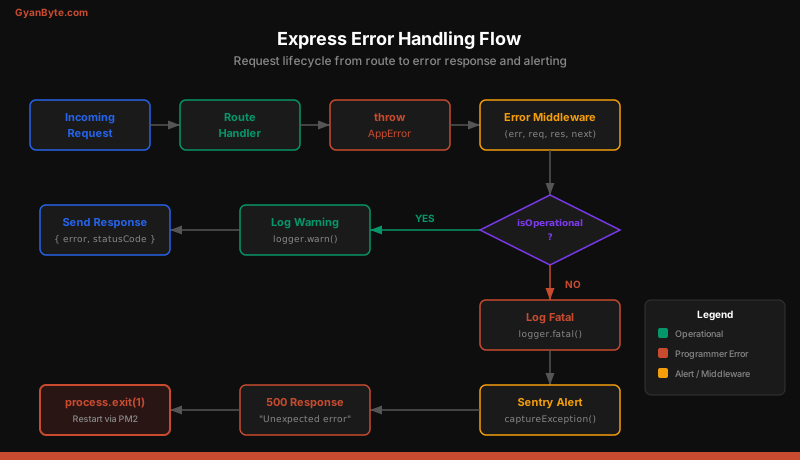
function errorHandler(err, req, res, next) {
  // Default to 500 for unexpected errors
  const statusCode = err.statusCode || 500;
  const errorCode = err.errorCode || 'INTERNAL_ERROR';
  const message = err.isOperational
    ? err.message
    : 'An unexpected error occurred';

  // Log the error
  const logPayload = {
    err,
    requestId: req.id,
    method: req.method,
    url: req.originalUrl,
    statusCode,
  };

  if (statusCode >= 500) {
    logger.error(logPayload, err.message);
  } else {
    logger.warn(logPayload, err.message);
  }

  // Send structured response
  res.status(statusCode).json({
    error: {
      code: errorCode,
      message,
      ...(err.details && { details: err.details }),
      ...(process.env.NODE_ENV === 'development' && {
        stack: err.stack,
      }),
    },
  });

  // Report to Sentry for 5xx errors
  if (statusCode >= 500) {
    Sentry.captureException(err);
  }
}

// Must be registered after all routes
app.use(errorHandler);
Notice that the error handler never exposes internal error messages for 500 errors. Leaking stack traces or database error details to clients is a security risk.
Structured Logging with Pino and Winston
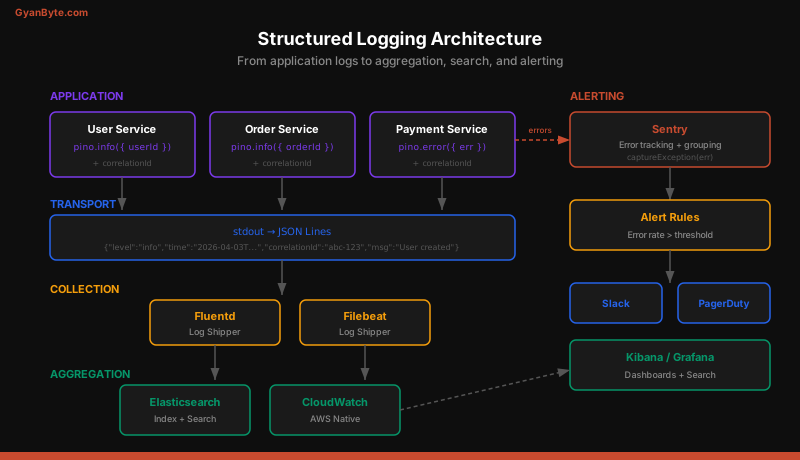
Unstructured log lines like console.log('User created:', userId) are nearly impossible to search and aggregate. Production logging must be structured JSON.
Pino — Fast and Lightweight
Pino is the fastest Node.js logger. It writes JSON to stdout and lets your deployment infrastructure (Docker, Kubernetes, CloudWatch) handle transport.
import pino from 'pino';

const logger = pino({
  level: process.env.LOG_LEVEL || 'info',
  formatters: {
    level(label) {
      return { level: label };
    },
  },
  timestamp: pino.stdTimeFunctions.isoTime,
  redact: ['req.headers.authorization', 'req.body.password'],
});

// Usage
logger.info({ userId: '123', action: 'signup' }, 'User created');
// Output: {"level":"info","time":"2026-04-03T...","userId":"123","action":"signup","msg":"User created"}
Winston — Flexible Transports
Winston is better if you need multiple transports (file, HTTP, database) or custom formatting:
import winston from 'winston';

const logger = winston.createLogger({
  level: process.env.LOG_LEVEL || 'info',
  format: winston.format.combine(
    winston.format.timestamp(),
    winston.format.errors({ stack: true }),
    winston.format.json()
  ),
  defaultMeta: { service: 'user-service' },
  transports: [
    new winston.transports.Console(),
    new winston.transports.File({
      filename: 'logs/error.log',
      level: 'error',
    }),
  ],
});
For most production workloads, Pino is the better choice. It is 5-10x faster than Winston because it defers serialization and writes asynchronously.
Log Levels and When to Use Each
| Level | When to Use | Example |
|---|---|---|
fatal |
App is about to crash | Unhandled exception, out of memory |
error |
Operation failed, needs attention | Database connection lost, payment failed |
warn |
Something unexpected but recoverable | Deprecated API used, retry succeeded |
info |
Normal operations worth recording | Server started, user signed up, order placed |
debug |
Detailed diagnostic info | SQL queries, cache hits/misses, request payloads |
trace |
Extremely verbose, rarely used | Function entry/exit, variable values |
Production should run at info level. Drop to debug temporarily when investigating issues. Never run trace in production — the volume will overwhelm your log pipeline.
Correlation IDs for Request Tracing
When a single user request touches multiple services, you need a way to trace it. A correlation ID (also called request ID or trace ID) is a unique identifier attached to every log line for a given request.
import { randomUUID } from 'crypto';
import { AsyncLocalStorage } from 'async_hooks';

const asyncLocalStorage = new AsyncLocalStorage();

// Middleware to create/propagate correlation ID
function correlationMiddleware(req, res, next) {
  const correlationId =
    req.headers['x-correlation-id'] || randomUUID();
  req.id = correlationId;
  res.setHeader('x-correlation-id', correlationId);

  asyncLocalStorage.run({ correlationId }, () => next());
}

// Logger that automatically includes correlation ID
function getLogger() {
  const store = asyncLocalStorage.getStore();
  return logger.child({
    correlationId: store?.correlationId,
  });
}

// Usage in any service
function findUser(id) {
  const log = getLogger();
  log.info({ userId: id }, 'Looking up user');
  // Every log line automatically includes correlationId
}
AsyncLocalStorage is the key technology here. It propagates context through the entire async call chain without manually passing a logger or request ID through every function.
Error Reporting with Sentry
Logging captures the details. Sentry captures the context, groups similar errors, tracks frequency, and sends alerts.
import * as Sentry from '@sentry/node';

Sentry.init({
  dsn: process.env.SENTRY_DSN,
  environment: process.env.NODE_ENV,
  tracesSampleRate: 0.1, // 10% of transactions
  beforeSend(event) {
    // Scrub sensitive data
    if (event.request?.headers) {
      delete event.request.headers['authorization'];
    }
    return event;
  },
});

// Express integration
app.use(Sentry.Handlers.requestHandler());
app.use(Sentry.Handlers.tracingHandler());

// Routes go here...

// Sentry error handler BEFORE your error handler
app.use(Sentry.Handlers.errorHandler());
app.use(errorHandler);
Sentry groups errors by stack trace, so the same bug from 1,000 different requests shows up as a single issue with a count. You can set alert rules: “If this new error happens more than 10 times in 5 minutes, page the on-call engineer.”
Uncaught Exception and Unhandled Rejection Handlers
These are your last line of defense. If an error escapes all try/catch blocks and middleware, these global handlers catch it before the process dies silently.
process.on('uncaughtException', (error) => {
  logger.fatal({ err: error }, 'Uncaught exception');
  Sentry.captureException(error);

  // Give Sentry time to flush, then exit
  setTimeout(() => process.exit(1), 1000);
});

process.on('unhandledRejection', (reason, promise) => {
  logger.fatal({ err: reason }, 'Unhandled rejection');
  Sentry.captureException(reason);

  // Treat unhandled rejections as fatal
  setTimeout(() => process.exit(1), 1000);
});
Starting with Node.js 15, unhandled rejections crash the process by default. This is the correct behavior — an unhandled rejection means your error handling has a gap. Fix the gap rather than suppressing the crash.
Always exit after an uncaught exception. The process state is unknown and continuing could cause data corruption. Your process manager (PM2, systemd, Kubernetes) will restart the process automatically.
Logging Best Practices
What to log:
- Request method, URL, status code, duration for every request
- Business events: user signup, order placed, payment processed
- Error details with full stack traces
- External service calls with latency
- Database query timing (at debug level)
What NOT to log:
- Passwords, tokens, API keys, credit card numbers
- Full request/response bodies (use Pino’s
redactoption) - Personal data that violates GDPR/CCPA
- Health check requests (they pollute logs with noise)
Formatting rules:
- Always use structured JSON, never string interpolation
- Include timestamps in ISO 8601 format
- Add service name and version to every log line
- Use consistent field names (
userId, not sometimesuser_idand sometimesuid)
Operational rules:
- Set log level via environment variable, not code changes
- Rotate log files or use stdout with a log aggregator
- Set up alerts on error rate spikes, not individual errors
- Keep logs for 30-90 days depending on compliance requirements
Putting It All Together
A production-ready Express application wires these pieces together at startup:
import 'express-async-errors';
import express from 'express';
import * as Sentry from '@sentry/node';
import { correlationMiddleware } from './middleware/correlation.js';
import { errorHandler } from './middleware/error-handler.js';
import { requestLogger } from './middleware/request-logger.js';

Sentry.init({ dsn: process.env.SENTRY_DSN });

const app = express();

app.use(Sentry.Handlers.requestHandler());
app.use(correlationMiddleware);
app.use(requestLogger);

// ... routes

app.use(Sentry.Handlers.errorHandler());
app.use(errorHandler);

// Global handlers
process.on('uncaughtException', /* ... */);
process.on('unhandledRejection', /* ... */);
The order matters. Correlation middleware runs first so every subsequent log has a request ID. The request logger records start time. Routes throw structured errors. Sentry captures them. Your error handler logs and responds. Every log line is JSON with a correlation ID that ties the entire request lifecycle together.
This is what production error handling looks like. Not a try/catch around every function — a pipeline that catches, classifies, logs, responds, and alerts in a single coherent flow.