By now you have all the pieces — transports (Lessons 2–3), STT (Lesson 4), the LLM brain (Lesson 6), TTS (Lesson 5). The question is how to wire them together into a smooth, real-time, interruptible conversation. You could do it by hand, but you’d quickly discover that the glue — streaming audio between stages, handling interruptions, managing timing and buffers, coordinating VAD — is most of the hard work, and it’s the same for every voicebot. That’s what an orchestration framework like Pipecat is for, and this lesson shows the model it uses and why it’s worth adopting.
The Pipeline-of-Frames Model
Pipecat models a voicebot as exactly the loop from Lesson 1, made concrete as a pipeline: a series of stages that audio and text flow through as “frames.”
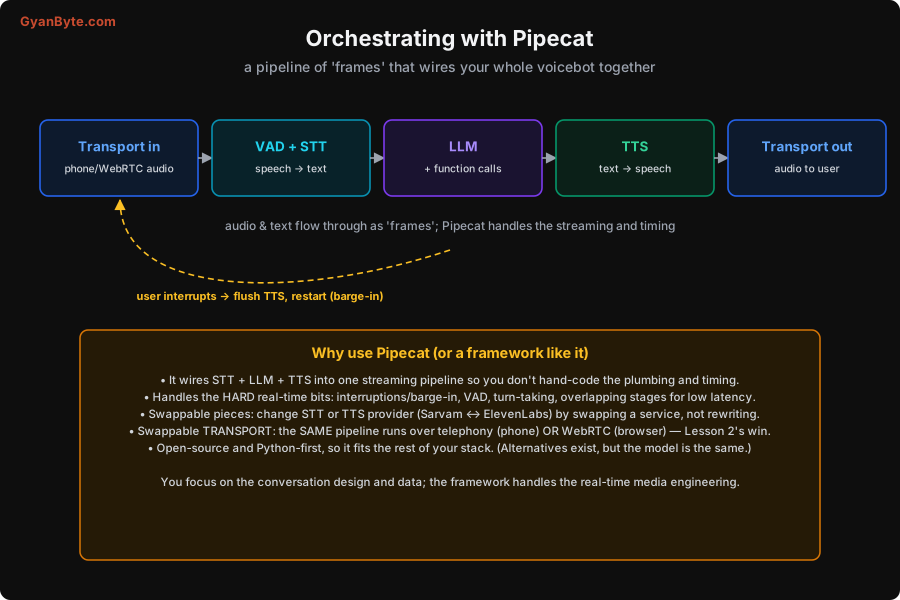
The pipeline reads left to right: Transport in (phone or WebRTC audio) → VAD + STT (speech to text) → LLM (which may call functions) → TTS (text to speech) → Transport out (audio back to the user). Audio frames and text frames flow through these stages, and Pipecat handles the streaming and timing so the stages overlap (Lesson 1’s “stream everything”) rather than running one-after-another. And the dashed loop in the picture is the important part: when the user interrupts, the framework flushes the TTS, stops the current reply, and restarts the listen — barge-in, handled for you.
What the Framework Does for You
The reason to use Pipecat (or a similar framework) rather than hand-wiring is that it handles the genuinely hard, real-time, every-voicebot-needs-it parts:
- It wires STT + LLM + TTS into one streaming pipeline. You declare the stages; it manages the frames flowing between them, including the overlapping that gets you low latency. You don’t write the buffering and coordination code.
- It handles the hard real-time bits. Interruptions/barge-in (flush TTS, restart — Lesson 8), VAD and turn-taking, and overlapping stages. These are fiddly, timing-sensitive, and easy to get subtly wrong by hand; the framework has solved them.
- Its pieces are swappable. Want to try Sarvam STT instead of Deepgram, or Sarvam TTS instead of ElevenLabs (Lessons 4–5, 11)? You swap a service in the pipeline, not rewrite your bot. This makes experimenting with quality and cost cheap.
- Its transport is swappable — the big one (Lesson 2). The same pipeline runs over a telephony transport (provider WebSocket) or a WebRTC transport (browser). Build the conversation once; offer it on phone and browser by changing the transport, not the brain.
- It’s open-source and Python-first, so it slots into the rest of a typical AI stack (your LLM calls, your RAG, your data) without friction.
The division of labour is the point: you focus on the conversation design and the data (Lessons 6, 9, 10); the framework handles the real-time media engineering. That’s a good trade — the media engineering is hard, generic, and not where your product’s value lives; the conversation and the data are where you win.
A Feel for the Code
Without turning this into an API reference (which would date quickly — check current Pipecat docs), the shape of building with it is: you construct a pipeline by listing the stages — a transport, a VAD/STT service, an LLM service (with your system prompt and tools, Lesson 6), a TTS service, and the output transport — and run it. Each service is a pluggable object you configure (which provider, which voice, which model). Your custom logic — the system prompt, the functions the LLM can call, your knowledge lookups (Lesson 9) — plugs into the LLM stage. The framework runs the loop, streams frames, and fires events (user started/stopped speaking, transcript ready, interruption) you can hook into.
The practical consequence for how you work: you spend your time on what the bot says and does and knows, and on testing the conversation (Lesson 12), rather than on audio plumbing. When you want to change cost or quality, you swap a service (Lesson 11). When you want a new channel, you swap a transport (Lesson 2). That modularity, delivered by the framework, is what makes a voicebot maintainable.
A note on alternatives: Pipecat is a strong, popular choice, but it’s not the only orchestration option (others exist, and some providers offer end-to-end voice-agent platforms). The model — a streaming pipeline with swappable services and transports, handling interruptions and timing for you — is what matters, and it’s the same idea across tools. Pick one; don’t hand-roll the real-time glue.
Pitfalls to Avoid
- Hand-wiring the real-time plumbing. Streaming, buffering, timing, interruptions and VAD are hard and generic. Use a framework; spend your effort on the conversation.
- Baking providers into your code. If swapping STT or TTS means a rewrite, you can’t tune cost/quality. Use the framework’s swappable services (Lessons 4–5, 11).
- Coupling the pipeline to one transport. If phone vs browser means two codebases, you’ve lost Lesson 2’s win. Keep transport swappable.
- Skipping barge-in handling. It’s hard to do by hand and essential (Lesson 8). Let the framework flush-and-restart on interruption.
- Treating the framework as the product. The framework is plumbing; your value is the conversation design, tools, data and testing. Focus there.
- Relying on an out-of-date API from a tutorial. These frameworks evolve fast. Check current docs for exact usage; rely on the model, not a pinned snippet.
Quick Recap
- Pipecat models a voicebot as a pipeline of frames: Transport in → VAD+STT → LLM (+tools) → TTS → Transport out, with streaming and timing handled for you.
- It handles the hard real-time bits (barge-in, VAD, turn-taking, overlapping stages) so you don’t hand-code them.
- Its services are swappable (change STT/TTS provider to tune cost/quality) and its transport is swappable (same pipeline over phone or browser — Lesson 2).
- You focus on conversation design, tools and data; the framework handles the media engineering. Alternatives exist, but the model is the same — don’t hand-roll the glue.
Next lesson: making it feel genuinely human by attacking the two things people notice most — latency (with a worked budget) and barge-in.