Between the ears (STT) and the voice (TTS) sits the brain: the LLM that decides what the bot says and does. You might think prompting it is the easy, familiar part — it’s just an LLM, and you’ve used chatbots. But a chatbot prompt makes a bad voicebot, because a spoken conversation has completely different constraints from a text chat. This lesson is about those differences, and about the thing that turns a voicebot from a talker into a doer: function calling.
Voice Prompting ≠ Chat Prompting
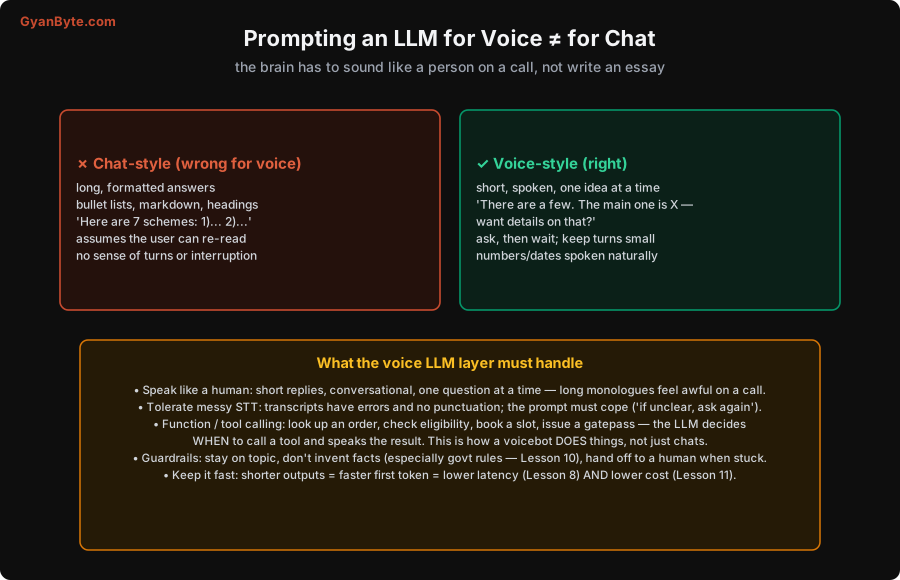
Think about the difference in medium. In chat, the user can re-read, scan a bulleted list, scroll back. On a call, the words go by once, in your ear, and a long answer is a torture. So:
- Chat-style (wrong for voice): long, formatted answers; bullet lists, markdown, headings; “Here are 7 schemes: 1)… 2)… 3)…“. This is unlistenable on a call — by scheme 3 the user has forgotten scheme 1.
- Voice-style (right): short, conversational, one idea at a time. “There are a few. The main one is the housing scheme — want me to tell you about that one?” Ask a question, then wait. Keep each turn small, and let the conversation branch based on what the user actually wants.
So your system prompt must explicitly instruct the model to talk like a person on a phone: short replies, no formatting (it’ll be spoken, not displayed), one question at a time, natural spoken phrasing of numbers and dates (which also helps TTS, Lesson 5). This is a real prompt-engineering discipline — “respond as if speaking out loud on a phone call; keep it to one or two sentences; ask one thing at a time” — and it transforms how the bot feels.
Tolerating Messy STT
The transcript your LLM receives is not clean text. STT (Lesson 4) produces output with recognition errors, no punctuation, and sometimes garbled code-mixed phrases — “mujhe ghar ki yojna chahiye” might come through slightly wrong, or a name might be mangled. A prompt that assumes perfect input will confidently act on misheard words.
So instruct the model to cope with ambiguity: if the input is unclear or doesn’t make sense, ask the user to repeat or clarify rather than guessing. “I didn’t quite catch that — are you asking about the housing scheme?” is far better than acting on a mis-transcription. Building this tolerance into the prompt (and the conversation design) is what makes a voicebot robust to the real, messy audio of a phone call, especially in noisy conditions or strong accents.
Function Calling: How the Bot Does Things
This is the feature that elevates a voicebot from a talking FAQ to something genuinely useful. Function (tool) calling lets the LLM invoke your code — the LLM decides when a tool is needed, your system runs it, and the LLM speaks the result. This is how a voicebot acts:
- Look up an order status (“your order shipped yesterday, arriving Thursday”).
- Check eligibility against rules in your database (“you are eligible for this scheme because…”, Lesson 10).
- Book or reschedule an appointment.
- Issue a gatepass, log a visitor, notify a host (the visitor-management use case, Lesson 10).
- Send an SMS with details after the call.
The LLM doesn’t do these itself — it recognises “the user wants their order status,” calls your get_order_status function, and then turns the structured result into a spoken reply. This is also the bridge to correct, up-to-date facts (Lesson 9): rather than hoping the model knows an answer, it asks your systems and speaks what they return. Designing good tools (clear names, right granularity) and prompting the model to use them well is core voicebot work.
Guardrails: Don’t Invent, Stay on Topic, Know When to Quit
LLMs are fluent, which is dangerous when fluency is mistaken for correctness. For a voicebot — especially one explaining government rules, eligibility, or anything with real consequences — guardrails are essential:
- Don’t invent facts. Never let the model make up a scheme rule, an eligibility criterion, or an amount. Ground factual claims in your data (structured lookups or RAG, Lesson 9), and prompt it to say “let me check” and use a tool rather than guess. An invented government entitlement isn’t a cute hallucination; it’s harmful misinformation to a citizen.
- Stay on topic. Keep the bot within its purpose; don’t let it wander into unrelated advice or be talked off-task.
- Know when to hand off. When the bot is stuck, the user is frustrated, or the matter is sensitive, it should escalate to a human (Lesson 12) gracefully, not loop forever. A good escape hatch is a feature, not a failure.
Keep It Short — for Speed and Cost
A happy alignment to end on: making replies short, which you want for listenability anyway, also helps two other things:
- Speed. Shorter outputs mean faster time-to-first-token and less for TTS to synthesize — directly lowering your turn latency (Lesson 8). A smaller, faster model often beats a bigger one for the snappy feel voice needs.
- Cost. Fewer output tokens and less TTS audio means less money per turn (Lesson 11). Voice is cost-sensitive, and verbose replies pay double (LLM tokens and TTS).
So “say less, well” is the guiding principle for the voice brain: short, spoken, grounded, and ready to act via tools. It makes the bot feel better, respond faster, and cost less — all at once.
Pitfalls to Avoid
- Chat-style prompting. Long, formatted, multi-point answers are unlistenable on a call. Prompt for short, spoken, one-idea-at-a-time replies.
- Assuming clean input. STT transcripts are messy and unpunctuated. Prompt the model to ask for clarification when unclear, not guess.
- No function calling. Without tools the bot can only chat, not do. Give it tools to look up, book, check eligibility, issue passes — grounded in your systems.
- Letting it invent facts. Fluent ≠ correct. Ground factual claims (Lesson 9); never hallucinate government rules or amounts.
- No escalation path. A bot that can’t hand off to a human loops frustrated users forever. Build a graceful escape hatch (Lesson 12).
- Verbose replies. They’re hard to listen to, slower (more tokens + TTS), and costlier. Say less, well — it helps experience, latency and cost together.
Quick Recap
- Voice prompting is the opposite of chat: short, spoken, one idea at a time, ask-then-wait — no lists or markdown the user can’t re-read.
- The prompt must tolerate messy STT (ask to clarify when unclear) and use function/tool calling so the bot does things (lookups, bookings, eligibility, gatepass) grounded in your systems.
- Guardrails are essential: don’t invent facts (ground them, Lesson 9), stay on topic, and hand off to a human when stuck.
- Short replies win three ways at once: easier to listen to, faster (Lesson 8), and cheaper (Lesson 11).
Next lesson: wiring STT, the LLM, and TTS into one real-time, interruptible pipeline — without hand-coding the hard parts — using Pipecat.