Lesson 2 said “the audio reaches your server as a stream.” This lesson is about how — the transport. You’ll meet two technologies constantly in voice work, WebSocket and WebRTC, and people often blur them together or reach for the wrong one. They both move data in real time, but they were built for genuinely different jobs, and knowing which to use where is a core piece of voicebot engineering. (You asked specifically about these — here’s the clear version.)
WebSocket vs WebRTC: Different Tools
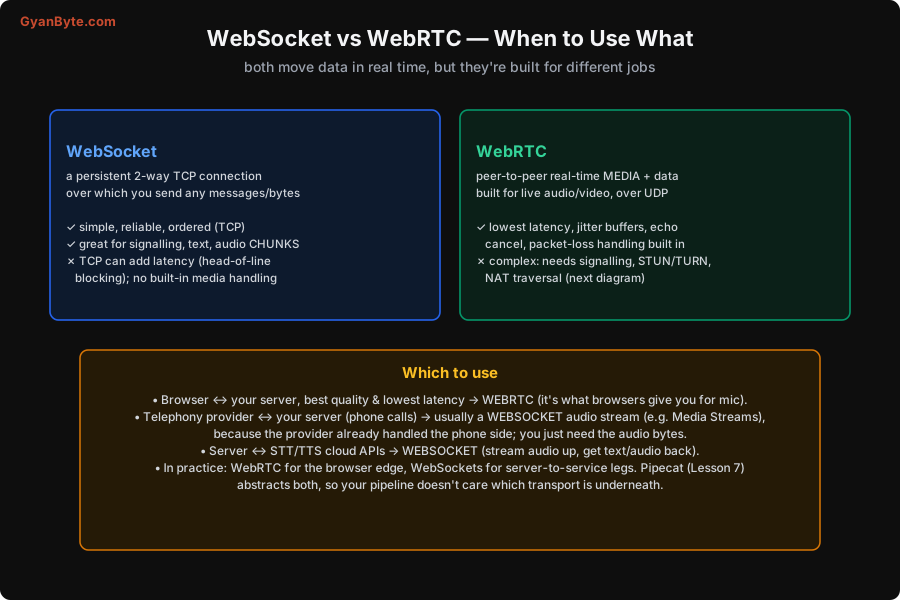
WebSocket is a persistent, two-way connection over TCP. Once opened (upgraded from an HTTP request), either side can send messages — text or binary bytes — at any time, and they arrive reliably and in order. It’s wonderfully simple: it’s just a pipe you push bytes through. That makes it great for signalling (coordination messages), text, and streaming audio chunks (which is exactly how telephony providers like Twilio hand you call audio — a WebSocket of audio frames). The downsides come from TCP: because TCP guarantees order and delivery, a lost packet blocks everything behind it until it’s retransmitted (“head-of-line blocking”), which can add latency and jitter to real-time audio; and WebSocket has no built-in media handling — no jitter buffer, no echo cancellation, no packet-loss concealment. You get a reliable byte pipe and nothing audio-specific.
WebRTC is purpose-built for real-time media (live audio and video) between peers, typically over UDP. It comes with everything audio needs baked in: jitter buffers (smoothing out variable network timing), echo cancellation (so you don’t hear yourself), packet-loss concealment (hiding dropped packets gracefully), and adaptive bitrate. Because it’s UDP-based, a lost packet doesn’t block everything behind it — for live audio, a slightly glitchy now beats a perfect late, which is the right trade for conversation. The result is the lowest latency and best real-time audio available in a browser. The cost is complexity: WebRTC needs a separate signalling channel to set up the call, and — the famously hard part — it needs to get through NATs.
WebRTC’s Hard Part: NAT Traversal
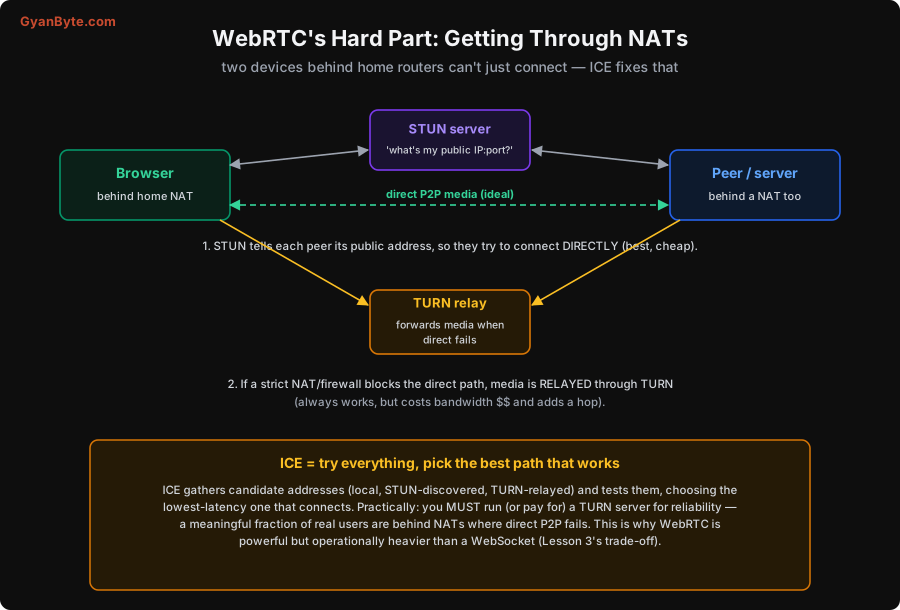
The complexity of WebRTC is mostly one problem: two devices, each behind a home router (a NAT, which hides many private devices behind one public IP), can’t just directly address each other. Solving this is what ICE/STUN/TURN are for, and it’s worth understanding because it’s where WebRTC deployments succeed or fail.
Three pieces work together:
- STUN is a lightweight server that answers one question: “what’s my public IP and port?” Each peer asks a STUN server, learns its public address, and the two peers try to connect directly to each other. When this works (often it does), you get a direct peer-to-peer media path — lowest latency, and cheap (no relay bandwidth).
- TURN is the fallback for when direct doesn’t work. Some NATs and corporate firewalls are strict enough that no direct path exists. In that case, media is relayed through a TURN server — both peers send to the relay, which forwards. It always works, but it costs you bandwidth (the media flows through your server) and adds a hop of latency.
- ICE is the orchestration: it gathers all the candidate ways to connect (local addresses, STUN-discovered public addresses, TURN relays), tests them, and picks the best one that actually connects — preferring direct over relayed.
The practical takeaway that bites teams: you must run (or pay for) a TURN server for reliability. A meaningful fraction of real users are behind NATs/firewalls where direct P2P fails, and without TURN their calls simply won’t connect. This operational weight — signalling, STUN, and especially TURN — is the real reason WebRTC is more work than a WebSocket, and why you only take it on where its low-latency media is worth it: the browser edge.
When to Use Which
Here’s the rule that resolves almost every case in a voicebot:
- Browser ↔ your server → WebRTC. It’s what browsers give you for microphone access, and you want its low latency and built-in audio handling (echo cancel especially — essential for barge-in, Lesson 8) at the user edge.
- Telephony provider ↔ your server → usually a WebSocket. The provider already handled the hard phone-network side (and the NAT/media complexity on that end); it just streams you the call audio as chunks, which a WebSocket carries fine. You don’t need WebRTC here because you’re not doing browser-to-browser media.
- Your server ↔ STT/TTS cloud APIs → WebSocket. You stream audio up to the STT service and get text back, or stream text to TTS and get audio back, over WebSockets. These are server-to-service legs where simplicity and reliability win and the NAT problem doesn’t exist.
So a typical voicebot uses both: WebRTC at the browser edge (where low-latency media matters and you’re crossing NATs), and WebSockets for the server-to-provider and server-to-API legs (where a simple reliable byte stream is exactly right). The good news, echoing Lesson 2: you rarely hand-code either. Pipecat (Lesson 7) provides transports for WebRTC and for telephony WebSockets, so your pipeline consumes an abstract audio stream and doesn’t care which transport is underneath. Understanding the difference matters for choosing and debugging; the framework handles the wiring.
Pitfalls to Avoid
- Using WebSocket where you need WebRTC’s media handling. For browser mic audio you want echo cancellation and jitter buffering; a raw WebSocket gives you none of that. Use WebRTC at the browser edge.
- Reaching for WebRTC on server-to-service legs. Talking to an STT/TTS API or receiving a provider’s call audio doesn’t need WebRTC’s P2P machinery — a WebSocket is simpler and right.
- Forgetting TURN. Without a TURN server, users behind strict NATs can’t connect at all. Budget and deploy TURN for any real WebRTC use.
- Ignoring echo on phone calls. Without echo cancellation the bot hears itself and “interrupts itself” (Lesson 8). WebRTC handles this; on telephony, rely on the provider/your pipeline.
- Underestimating WebRTC’s operational weight. Signalling + STUN + TURN is real infrastructure. Take it on only at the browser edge where it earns its keep.
- Hand-coding transports. Use a framework (Pipecat) that abstracts WebRTC and WebSocket transports so your pipeline stays transport-agnostic (Lesson 7).
Quick Recap
- WebSocket: a persistent, reliable, ordered 2-way TCP byte pipe — simple, great for signalling, text, and audio chunks; but TCP can add latency and it has no audio-specific features.
- WebRTC: purpose-built real-time media over UDP with jitter buffers, echo cancellation and loss concealment — lowest latency, but complex, needing signalling and NAT traversal.
- NAT traversal (ICE): STUN finds your public address for a direct path; TURN relays media when direct fails (always works, costs bandwidth); ICE picks the best working path. You must run TURN for reliability.
- Rule: WebRTC for the browser edge, WebSockets for telephony-provider and STT/TTS-API legs. Most voicebots use both; Pipecat abstracts them.
Next lesson: the first pipeline component in detail — speech-to-text — streaming transcripts, endpointing, and the Indian-language reality that makes provider choice (Sarvam and friends) matter.