A voicebot is only useful if people can actually reach it, and there are two ways they will: they’ll call a phone number, or they’ll click something in a browser or app. These two channels feel similar to the user (they talk, the bot talks back) but underneath they’re quite different pieces of plumbing, and understanding the difference — and the design that handles both cleanly — saves you from building your bot twice.
The Two Channels
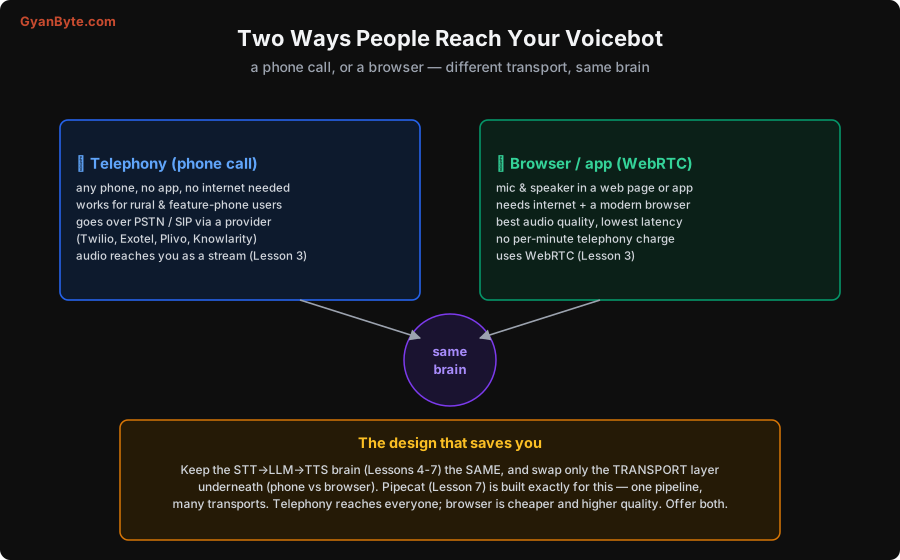
Telephony (a phone call). The user dials a number from any phone — a smartphone, a ₹1,000 feature phone, a landline. This is the channel’s superpower: it needs no app, no internet, no smartphone, which in India is enormous. The people who most need a government-schemes helpline or a service hotline often don’t have a data connection or an app — but they have a phone that can make a call. The trade-off is that call audio is lower fidelity (narrowband), you pay a per-minute telephony charge, and you reach your server through a telephony provider (Twilio, Exotel, Plivo, Knowlarity, and others).
Browser / app (WebRTC). The user talks through the microphone in a web page or mobile app, using WebRTC (Lesson 3) — the technology browsers give you for real-time audio. This gives the best audio quality and lowest latency, and crucially no per-minute telephony cost (it’s just internet). The trade-off is that it needs a modern browser or app and an internet connection — so it reaches a narrower (usually more urban, more connected) audience.
Neither is “better” — they serve different users. A support bot for an app’s existing users leans browser; a citizen helpline leans phone; many real deployments offer both, so people reach the same bot whichever way suits them.
How a Phone Call Reaches Your Code
The browser case is relatively direct (the browser connects to your server over WebRTC, Lesson 3). The telephony case has more hops, and it’s worth seeing them, because “a phone call” has to somehow become audio bytes in your Python program.
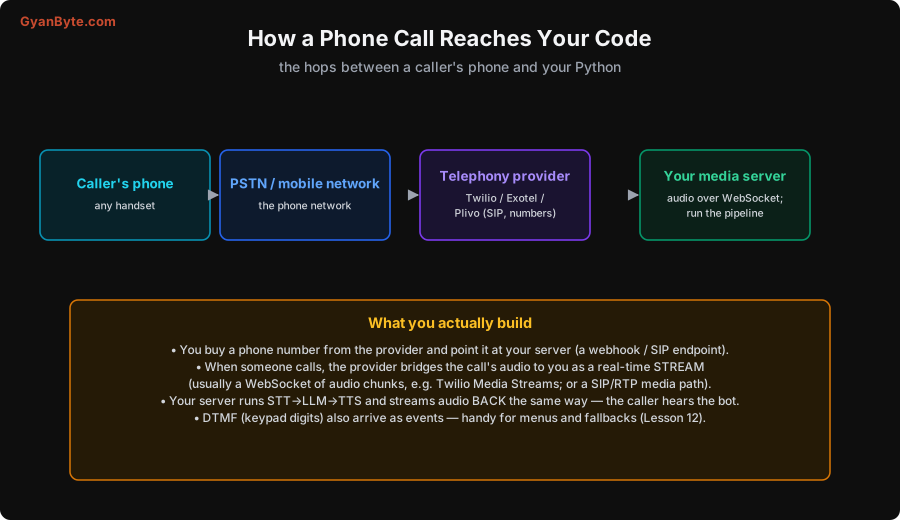
The chain: the caller’s phone → the PSTN / mobile network (the ordinary phone system) → your telephony provider → your media server. What you actually build and configure:
- Buy a number and point it at your server. You get a phone number from the provider and configure it to hand incoming calls to your application (via a webhook, or a SIP endpoint you run).
- The provider bridges the audio to you as a real-time stream. When someone calls, the provider takes the call’s audio and sends it to your server live — commonly as a WebSocket of audio chunks (Twilio’s “Media Streams” is the well-known example), or over a SIP/RTP media path. This is the key handoff: the messy phone-network side is the provider’s problem; you just receive audio bytes.
- You run the pipeline and stream audio back. Your server feeds that audio into STT→LLM→TTS (Lesson 1) and streams the bot’s audio back the same way, so the caller hears it.
- DTMF comes as events. When the caller presses keypad digits (DTMF tones), those arrive as events too — useful for menus (“press 1 for English”), fallbacks, and capturing numbers reliably when speech is hard (Lesson 12).
The important mental model: the telephony provider abstracts the entire phone network into a stream of audio you read and write. You don’t deal with SIP trunks and codecs at the lowest level (unless you want to); you deal with an audio stream, which is why the next lesson’s transport question (WebSocket vs WebRTC) is really “how does that audio stream reach me.”
The Design That Saves You: Shared Brain, Swappable Transport
Here’s the architectural payoff, and it’s the reason to think about channels early. The STT→LLM→TTS brain is identical regardless of channel — the bot’s conversation logic doesn’t care whether the audio came from a phone or a browser. So the right design is:
- Keep the brain transport-agnostic. Your STT, LLM prompting, knowledge, and TTS (Lessons 4–9) are written once, against a clean audio-in/audio-out interface.
- Swap only the transport layer underneath. A telephony transport (provider WebSocket) or a WebRTC transport (browser) plugs into the same pipeline. You add a channel by adding a transport, not by rebuilding the bot.
This is exactly what Pipecat (Lesson 7) is built for — one pipeline, many transports — and it’s why we treat the transport as a swappable edge rather than something baked into your bot. The practical consequence: you can develop and test entirely in the browser (fast, free, no phone charges), then flip on a phone number for the same bot when you’re ready, with no change to the conversation logic. And you can offer both channels to users at once — telephony to reach everyone, browser for quality and cost — from a single codebase.
A couple of practical notes:
- Latency differs by channel. WebRTC (browser) is lowest-latency; telephony adds the phone-network hops. Your latency budget (Lesson 8) is a bit tighter on phone, so test on the real channel.
- Audio quality differs. Phone audio is narrowband and can be noisy; your STT choice (Lesson 4) matters more there. Browser audio is clean.
- Cost differs. Telephony has a per-minute charge (Lesson 11) that browser avoids — a real factor at scale.
Pitfalls to Avoid
- Building the bot twice — once for phone, once for browser. Share the brain; swap only the transport (Lesson 7).
- Assuming everyone has a smartphone/internet. For many Indian use cases, phone (no app, no data) is the channel that actually reaches your users. Don’t default to browser-only.
- Hand-rolling the phone network. Use a telephony provider; they turn the PSTN into a simple audio stream. Don’t build SIP infrastructure you don’t need.
- Forgetting DTMF. Keypad input is a reliable fallback when speech fails (noisy line, accents) and great for menus. Handle the events.
- Testing only in the browser. Phone audio is narrower and noisier and has more latency; validate on a real call before launch.
- Ignoring the cost difference. Telephony’s per-minute charge is real (Lesson 11); factor the channel mix into your budget.
Quick Recap
- Two channels: telephony (phone call, PSTN/SIP via a provider) reaches everyone — no app, no internet — vital for rural/feature-phone users; browser/app (WebRTC) gives the best quality and lowest latency with no telephony charge but needs internet.
- A phone call reaches your code via a provider that bridges the call’s audio to your server as a real-time stream (often a WebSocket, e.g. Media Streams); DTMF arrives as events.
- The winning design: keep the STT→LLM→TTS brain the same and swap only the transport — Pipecat (Lesson 7) is built for this. Develop in-browser, flip on a phone number later, offer both.
- Mind the per-channel differences in latency, audio quality and cost; test on the real channel.
Next lesson: the transport question underneath both channels — WebSocket vs WebRTC — what each is, the NAT-traversal problem WebRTC solves, and a clear rule for when to use which.