A Kafka cluster that’s been designed well (good keys, right durability, sensible retention) still needs to be operated — and operating Kafka is mostly about watching a small number of signals and reacting, plus a handful of sizing and tuning decisions. The good news is that healthy Kafka is boring: it rarely lags and keeps its replicas in sync. This lesson is what to watch, how to size, what to tune, and what to avoid.
Watch consumer lag above all
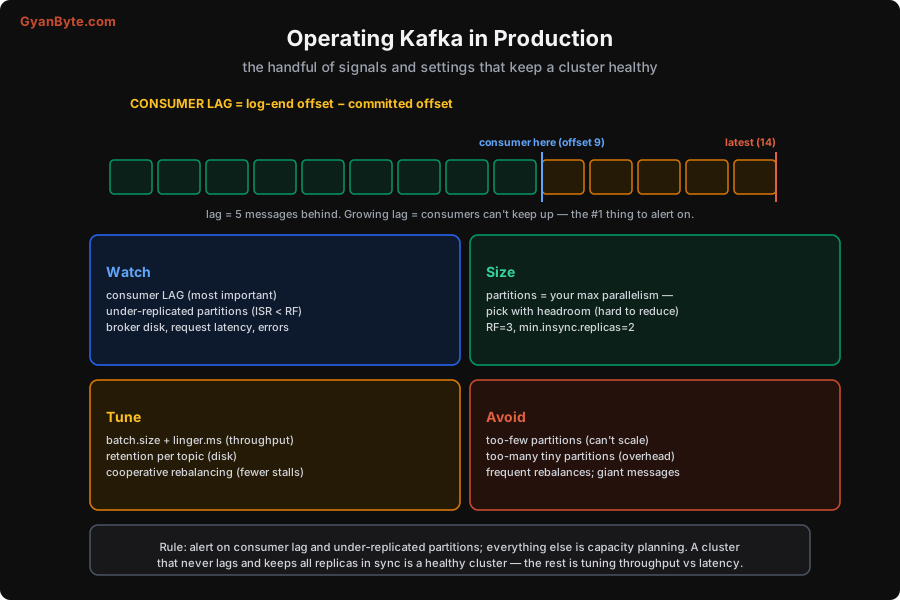
The single most important production signal is consumer lag — the gap between the latest message in a partition (the log-end offset) and where a consumer has committed. If the latest offset is 14 and the consumer has processed up to 9, its lag is 5. A little lag is normal; growing lag is the alarm: it means a consumer group can’t keep up with the incoming rate, and the gap will widen until something breaks — or worse, until unread data ages past retention and is deleted before the consumer reads it (Lesson 7). Consumer lag is the number one thing to alert on. Rising lag means: speed up the consumers (optimise processing, add consumers up to the partition count, Lesson 4), or the producers are outpacing what the group can handle.
The second signal is under-replicated partitions — partitions where the ISR is smaller than the replication factor (Lesson 6). This means a replica has fallen behind or a broker is down, so you’ve lost redundancy and are closer to data loss than you want. Alert on it and investigate promptly (slow broker, disk full, network issue). After those two, watch broker disk (retention + RF fills it — Lesson 7), request latency, and error rates. But the headline is simple: alert on consumer lag and under-replicated partitions; almost everything else is capacity planning.
Sizing: partitions and durability
Two sizing decisions dominate, both covered earlier and worth repeating because they’re hard to change later:
- Partitions = your maximum consumer parallelism (Lesson 4). Pick with headroom, because adding partitions later remaps keys (Lesson 2) and is disruptive. Think about peak consumer throughput, not just today’s. For a busy topic, a few dozen partitions is common; very high throughput wants more. But don’t go wild — thousands of tiny partitions add overhead and slow failover.
- Durability = RF=3,
acks=all,min.insync.replicas=2(Lesson 6). The standard safe setup. Lower only for genuinely disposable data where you’ve accepted the loss risk.
Broker count then follows from throughput and storage: more brokers spread partitions, their replicas, and the disk load. Balance partitions and replicas evenly across brokers so no single broker is a hotspot.
Tuning: the throughput-vs-latency dials
Most Kafka tuning is trading throughput against latency, and the main knobs are ones we’ve met:
- Producer
batch.size+linger.ms(Lesson 3): larger batches and a few ms of linger boost throughput at a small latency cost. Plus compression (lz4/zstd) to cut network and disk. - Retention per topic (Lesson 7): set it to what you actually replay, per topic, to control the disk bill — not one blanket value.
- Cooperative (incremental) rebalancing (Lesson 4): the modern default; avoids stop-the-world pauses when the group membership changes. Keep consumers fast so they don’t trigger rebalances by missing
max.poll.interval.ms. - Consumer
fetch.min.bytes/max.poll.records: tune how much each poll pulls to balance throughput and processing latency.
Start with sensible defaults, measure (especially lag and end-to-end latency), and tune only where the numbers tell you to — don’t speculatively twist every knob.
What to avoid
The common operational mistakes, collected:
- Too few partitions — caps consumer parallelism; you can’t scale out no matter how many consumers you add (Lesson 4). Size with headroom.
- Too many tiny partitions — real overhead (memory, open files, metadata) and slower failover when a broker dies. There’s a middle ground.
- Frequent rebalances — usually caused by consumers being too slow (exceeding
max.poll.interval.ms) and getting evicted, which pauses consumption. Keep processing fast or raise the interval; use cooperative rebalancing. - Giant messages — large payloads strain the network, disk and memory. Keep messages small; put big blobs in object storage with a reference in Kafka.
- Ignoring lag until it’s a crisis — by the time lag is huge, you may be losing data to retention. Alert early on the rate of lag growth.
The operational philosophy mirrors the observability course: instrument the few signals that reflect real health (lag, under-replication), alert on those, and treat the rest as capacity planning. A Kafka cluster that never lags and keeps every replica in sync is a healthy cluster — the rest is tuning the throughput/latency trade and provisioning for growth. With production covered, the final lesson steps back to the big picture: the patterns Kafka fits, and the honest cases where it’s the wrong tool.
Pitfalls to Avoid
- Not alerting on consumer lag. Growing lag means consumers can’t keep up and can lead to data loss (unread data ages out of retention). It’s the #1 signal — alert on the trend, not just a threshold.
- Ignoring under-replicated partitions. ISR < RF means lost redundancy and proximity to data loss. Alert and fix promptly (slow/down broker, full disk).
- Too few partitions for growth. The partition count caps consumer parallelism and is disruptive to increase. Size with headroom up front.
- Thousands of tiny partitions. Overhead in memory, file handles and metadata, plus slower failover. Find the middle — enough for parallelism, not so many it hurts.
- Frequent rebalances from slow consumers. Consumers exceeding
max.poll.interval.msget evicted, pausing the group. Keep processing fast, raise the interval, use cooperative rebalancing. - Giant messages / no compression. Big uncompressed payloads waste network and disk and can exceed message-size limits. Compress; keep messages small; externalise blobs.
Quick Recap
- Watch, in order: consumer lag (log-end − committed; the #1 alert — growing lag = can’t keep up, and risks data loss to retention), then under-replicated partitions (ISR < RF = lost redundancy), then disk, latency, errors.
- Size: partitions = max parallelism (headroom; hard to increase); RF=3, acks=all, min.insync.replicas=2. Spread partitions/replicas evenly across brokers.
- Tune the throughput/latency trade: producer
batch.size+linger.ms+ compression, per-topic retention, cooperative rebalancing, consumer fetch settings. Measure first. - Avoid: too few partitions (can’t scale), too many tiny ones (overhead/failover), frequent rebalances (slow consumers), giant messages. Healthy Kafka never lags and keeps replicas in sync.
Next lesson, the last: the big picture — patterns where Kafka shines, and when NOT to use it.