

In Lesson 1, you built a playground that talks to LLMs. But those models only know what they were trained on — they can’t answer questions about your company, your products, or your docs. This lesson fixes that.
We’ll build a customer support chatbot that answers questions using your own knowledge base. The secret sauce? Retrieval-Augmented Generation (RAG) — the most important pattern in applied AI engineering.
Overview of Adaptation Techniques
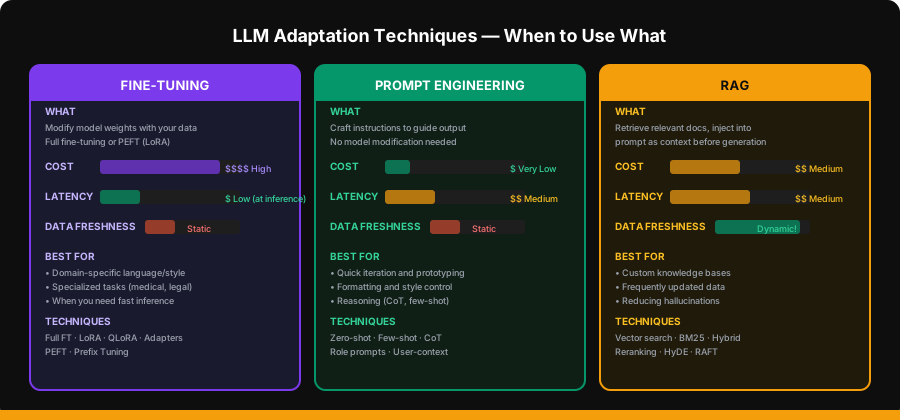
There are three main ways to make an LLM work with your specific domain:
Fine-Tuning
Fine-tuning modifies the model’s weights using your data. It’s powerful but expensive.
Full fine-tuning updates all parameters — requires significant GPU resources and large datasets. Typically reserved for large organizations with specialized needs.
Parameter-Efficient Fine-Tuning (PEFT) updates only a small subset of parameters:
# LoRA (Low-Rank Adaptation) — conceptual example
# Instead of updating the full weight matrix W (d × d),
# LoRA learns two small matrices A (d × r) and B (r × d) where r << d
# Effective update: W' = W + A × B

from peft import LoraConfig, get_peft_model

config = LoraConfig(
    r=16,                    # rank — lower = fewer params, less expressive
    lora_alpha=32,           # scaling factor
    target_modules=["q_proj", "v_proj"],  # which layers to adapt
    lora_dropout=0.05,
    task_type="CAUSAL_LM",
)

model = get_peft_model(base_model, config)
print(f"Trainable params: {model.num_parameters(only_trainable=True):,}")
# Typically <1% of total parameters
When to fine-tune: You need a model that speaks in a specific domain language (medical, legal), or you need the absolute lowest inference latency because there’s no retrieval step.
When NOT to fine-tune: Your data changes frequently, you need factual accuracy with citations, or you’re prototyping (fine-tuning is slow and expensive to iterate on).
Prompt Engineering
Prompt engineering is the cheapest and fastest adaptation technique. No model modification needed — you just write better instructions.
Zero-Shot Prompting
Give the model a task with no examples:
zero_shot_prompt = """You are a customer support agent for TechCorp.

Answer the customer's question based on your knowledge.
If you're unsure, say so honestly.

Customer: How do I reset my password?"""
Few-Shot Prompting
Provide examples of the desired input-output format:
few_shot_prompt = """You are a customer support agent for TechCorp.
Answer questions using the exact format shown below.

Example 1:
Customer: What are your business hours?
Agent: Our support team is available Monday–Friday, 9 AM–6 PM EST.
You can also reach us 24/7 through our help center at help.techcorp.com.

Example 2:
Customer: How do I cancel my subscription?
Agent: To cancel your subscription:
1. Go to Settings → Billing
2. Click "Cancel Subscription"
3. Confirm cancellation
Your access continues until the end of your billing period.

Now answer:
Customer: How do I upgrade my plan?"""
Chain-of-Thought (CoT) Prompting
Ask the model to reason step-by-step before answering:
cot_prompt = """You are a technical support agent. When diagnosing issues,
think through the problem step-by-step before giving your answer.

Customer: My app keeps crashing when I try to upload files larger than 10MB.

Think step by step:
1. What could cause file upload crashes?
2. Is the 10MB threshold significant?
3. What are the most likely causes?
4. What should the customer try?

Based on your reasoning, provide a clear answer to the customer."""
Role-Specific and User-Context Prompting
Tailor the system prompt based on who’s asking:
def build_system_prompt(user_tier: str, user_history: list) -> str:
    base = "You are a customer support agent for TechCorp."

    tier_context = {
        "free": "This is a free-tier user. Be helpful but mention upgrade options when relevant.",
        "pro": "This is a Pro subscriber. They have priority support. Be thorough and detailed.",
        "enterprise": "This is an Enterprise client. They have a dedicated account manager (Sarah). "
                      "Escalate complex issues to their account team.",
    }

    recent_issues = "\n".join(
        f"- {h['date']}: {h['summary']}" for h in user_history[-3:]
    )

    return f"""{base}

Customer tier: {tier_context.get(user_tier, tier_context['free'])}

Recent support history:
{recent_issues}

Rules:
- Be empathetic and professional
- If the issue seems related to a recent ticket, acknowledge it
- Never share internal pricing or roadmap details"""
When to Use What
| Scenario | Best Approach |
|---|---|
| Quick prototype | Prompt engineering |
| Custom knowledge base | RAG |
| Domain-specific language | Fine-tuning |
| Frequently updated data | RAG |
| Style/format control | Prompt engineering (or fine-tuning) |
| Maximum accuracy with citations | RAG |
| Lowest inference latency | Fine-tuning |
| Combination of all | RAG + prompt engineering (most common) |
RAG Overview
RAG combines the best of retrieval systems and generative models. Instead of asking the LLM to answer from memory, you first retrieve relevant documents, then ask the LLM to answer based on those documents.
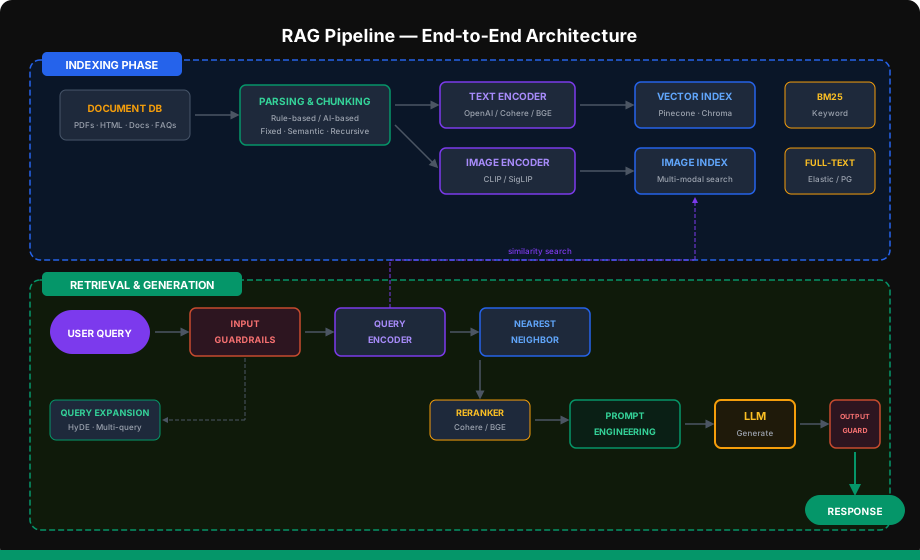
The pipeline has two major phases: Indexing (offline, done once) and Retrieval + Generation (online, per query).
Retrieval Phase
Document Parsing
Raw documents come in many formats. You need to extract clean text before anything else.
# document_parser.py
from pathlib import Path


def parse_markdown(path: str) -> str:
    return Path(path).read_text(encoding="utf-8")


def parse_pdf(path: str) -> str:
    from pypdf import PdfReader
    reader = PdfReader(path)
    return "\n\n".join(page.extract_text() or "" for page in reader.pages)


def parse_html(path: str) -> str:
    from bs4 import BeautifulSoup
    html = Path(path).read_text(encoding="utf-8")
    soup = BeautifulSoup(html, "html.parser")
    for tag in soup(["script", "style", "nav", "footer"]):
        tag.decompose()
    return soup.get_text(separator="\n", strip=True)


def parse_document(path: str) -> str:
    ext = Path(path).suffix.lower()
    parsers = {
        ".md": parse_markdown,
        ".txt": parse_markdown,
        ".pdf": parse_pdf,
        ".html": parse_html,
    }
    parser = parsers.get(ext)
    if not parser:
        raise ValueError(f"Unsupported format: {ext}")
    return parser(path)
Chunking Strategies
Large documents need to be split into chunks that fit in the LLM’s context and are semantically meaningful.
# chunker.py
from dataclasses import dataclass


@dataclass
class Chunk:
    text: str
    metadata: dict


def fixed_size_chunker(text: str, chunk_size: int = 500,
                       overlap: int = 50, source: str = "") -> list[Chunk]:
    """Simple character-based chunking with overlap."""
    chunks = []
    start = 0
    while start < len(text):
        end = start + chunk_size
        chunk_text = text[start:end]
        chunks.append(Chunk(
            text=chunk_text,
            metadata={"source": source, "start": start, "end": end}
        ))
        start = end - overlap
    return chunks


def recursive_chunker(text: str, chunk_size: int = 500,
                      overlap: int = 50, source: str = "") -> list[Chunk]:
    """Split on natural boundaries: paragraphs → sentences → words."""
    separators = ["\n\n", "\n", ". ", " "]

    def split_recursive(text: str, sep_idx: int = 0) -> list[str]:
        if len(text) <= chunk_size:
            return [text]
        if sep_idx >= len(separators):
            return [text[i:i + chunk_size] for i in range(0, len(text), chunk_size - overlap)]

        sep = separators[sep_idx]
        parts = text.split(sep)
        result = []
        current = ""
        for part in parts:
            candidate = current + sep + part if current else part
            if len(candidate) <= chunk_size:
                current = candidate
            else:
                if current:
                    result.append(current)
                if len(part) > chunk_size:
                    result.extend(split_recursive(part, sep_idx + 1))
                else:
                    current = part
        if current:
            result.append(current)
        return result

    texts = split_recursive(text)
    return [
        Chunk(text=t.strip(), metadata={"source": source, "chunk_idx": i})
        for i, t in enumerate(texts) if t.strip()
    ]


def semantic_chunker(text: str, model: str = "text-embedding-3-small",
                     threshold: float = 0.3, source: str = "") -> list[Chunk]:
    """Split based on semantic similarity between consecutive sentences."""
    import numpy as np
    from openai import OpenAI

    client = OpenAI()
    sentences = [s.strip() for s in text.split(". ") if s.strip()]

    if len(sentences) <= 1:
        return [Chunk(text=text, metadata={"source": source})]

    response = client.embeddings.create(model=model, input=sentences)
    embeddings = np.array([e.embedding for e in response.data])

    similarities = [
        np.dot(embeddings[i], embeddings[i + 1])
        / (np.linalg.norm(embeddings[i]) * np.linalg.norm(embeddings[i + 1]))
        for i in range(len(embeddings) - 1)
    ]

    chunks = []
    current_sentences = [sentences[0]]
    for i, sim in enumerate(similarities):
        if sim < threshold:
            chunks.append(Chunk(
                text=". ".join(current_sentences) + ".",
                metadata={"source": source, "chunk_idx": len(chunks)}
            ))
            current_sentences = [sentences[i + 1]]
        else:
            current_sentences.append(sentences[i + 1])

    if current_sentences:
        chunks.append(Chunk(
            text=". ".join(current_sentences) + ".",
            metadata={"source": source, "chunk_idx": len(chunks)}
        ))
return chunks| Strategy | Pros | Cons | Best For |
|---|---|---|---|
| Fixed-size | Simple, predictable | Breaks mid-sentence | Quick prototyping |
| Recursive | Respects boundaries | May produce uneven chunks | General-purpose (recommended default) |
| Semantic | Meaningful boundaries | Requires embeddings call | High-quality knowledge bases |
Indexing: Embedding Models and Vector Stores
Embedding models convert text into dense vectors that capture semantic meaning. Similar texts end up close together in vector space.
# indexer.py
import chromadb
from openai import OpenAI
from chunker import Chunk

client = OpenAI()
chroma = chromadb.PersistentClient(path="./chroma_db")


def embed_texts(texts: list[str], model: str = "text-embedding-3-small") -> list[list[float]]:
    response = client.embeddings.create(model=model, input=texts)
    return [e.embedding for e in response.data]


def index_chunks(chunks: list[Chunk], collection_name: str = "support_docs"):
    collection = chroma.get_or_create_collection(
        name=collection_name,
        metadata={"hnsw:space": "cosine"},
    )

    batch_size = 100
    for i in range(0, len(chunks), batch_size):
        batch = chunks[i:i + batch_size]
        texts = [c.text for c in batch]
        embeddings = embed_texts(texts)

        collection.add(
            ids=[f"chunk_{i + j}" for j in range(len(batch))],
            documents=texts,
            embeddings=embeddings,
            metadatas=[c.metadata for c in batch],
        )

    print(f"Indexed {len(chunks)} chunks into '{collection_name}'")
    return collection
Embedding model comparison:
| Model | Dimensions | Cost (per 1M tokens) | Quality |
|---|---|---|---|
text-embedding-3-small (OpenAI) |
1536 | $0.02 | Good |
text-embedding-3-large (OpenAI) |
3072 | $0.13 | Better |
embed-v4.0 (Cohere) |
1024 | $0.10 | Excellent |
BGE-large-en (open-source) |
1024 | Free | Very Good |
nomic-embed-text (Ollama) |
768 | Free (local) | Good |
Indexing Strategies Beyond Vector Search
Vector search isn’t the only option. A production RAG system often combines multiple strategies:
| Strategy | How It Works | Strengths |
|---|---|---|
| Keyword (BM25) | TF-IDF term matching | Exact term matches, acronyms |
| Full-text | Elasticsearch / PostgreSQL full-text | Boolean queries, fuzzy matching |
| Vector | Embedding similarity | Semantic meaning, paraphrases |
| Knowledge-based | Entity extraction + graph | Relationships, structured queries |
| Hybrid | Vector + keyword combined | Best of both worlds |
Generation Phase
Search Methods
When a user asks a question, you need to find the most relevant chunks. Two main approaches:
Exact Nearest Neighbor — compares the query to every single vector. Perfect accuracy but O(n) — too slow for large datasets.
Approximate Nearest Neighbor (ANN) — uses clever data structures (HNSW, IVF) to find almost the best matches in O(log n). The standard for production.
# retriever.py
import chromadb
from openai import OpenAI

client = OpenAI()
chroma = chromadb.PersistentClient(path="./chroma_db")


def retrieve(query: str, collection_name: str = "support_docs",
             top_k: int = 5) -> list[dict]:
    collection = chroma.get_collection(collection_name)

    response = client.embeddings.create(
        model="text-embedding-3-small",
        input=[query],
    )
    query_embedding = response.data[0].embedding

    results = collection.query(
        query_embeddings=[query_embedding],
        n_results=top_k,
    )

    return [
        {
            "text": doc,
            "metadata": meta,
            "distance": dist,
        }
        for doc, meta, dist in zip(
            results["documents"][0],
            results["metadatas"][0],
            results["distances"][0],
        )
    ]


def hybrid_retrieve(query: str, collection_name: str = "support_docs",
                    top_k: int = 5) -> list[dict]:
    """Combine vector search with keyword matching."""
    vector_results = retrieve(query, collection_name, top_k=top_k * 2)

    query_terms = set(query.lower().split())
    for result in vector_results:
        text_terms = set(result["text"].lower().split())
        keyword_overlap = len(query_terms & text_terms) / max(len(query_terms), 1)
        semantic_score = 1 - result["distance"]
        result["hybrid_score"] = 0.7 * semantic_score + 0.3 * keyword_overlap

    vector_results.sort(key=lambda x: x["hybrid_score"], reverse=True)
    return vector_results[:top_k]
Reranking
Initial retrieval casts a wide net. A reranker applies a more expensive cross-encoder model to re-score the top results:
# reranker.py
import cohere

co = cohere.Client()


def rerank(query: str, documents: list[dict], top_k: int = 3) -> list[dict]:
    texts = [d["text"] for d in documents]

    response = co.rerank(
        model="rerank-v3.5",
        query=query,
        documents=texts,
        top_n=top_k,
    )

    return [
        {**documents[r.index], "relevance_score": r.relevance_score}
        for r in response.results
    ]
Prompt Engineering for RAGs
The RAG prompt is where retrieval meets generation. Structure matters:
# rag_prompt.py

def build_rag_prompt(query: str, context_docs: list[dict],
                     system_instructions: str = "") -> list[dict]:
    context_block = "\n\n---\n\n".join(
        f"[Source: {doc['metadata'].get('source', 'unknown')}]\n{doc['text']}"
        for doc in context_docs
    )

    system = f"""You are a helpful customer support agent for TechCorp.

{system_instructions}

IMPORTANT RULES:
1. Answer ONLY based on the provided context documents
2. If the context doesn't contain enough information, say "I don't have enough information to answer that. Let me connect you with a human agent."
3. Cite your sources by referencing the document name
4. Be concise but thorough
5. If the customer seems frustrated, acknowledge their frustration first

CONTEXT DOCUMENTS:
{context_block}"""

    return [
        {"role": "system", "content": system},
        {"role": "user", "content": query},
    ]
Query Expansion
Sometimes the user’s query is too short or ambiguous. Query expansion generates better search queries:
# query_expansion.py
from openai import OpenAI

client = OpenAI()


def expand_query_hyde(query: str) -> str:
    """HyDE: Hypothetical Document Embeddings.
    Generate a hypothetical answer, then search with that instead."""
    response = client.chat.completions.create(
        model="gpt-4o-mini",
        messages=[{
            "role": "system",
            "content": "Write a short, factual paragraph that would answer the following question. "
                       "Do not say 'I don't know'. Just write what the answer would look like."
        }, {
            "role": "user",
            "content": query,
        }],
        temperature=0.0,
        max_tokens=150,
    )
    return response.choices[0].message.content


def expand_query_multi(query: str, n: int = 3) -> list[str]:
    """Generate multiple search queries from different angles."""
    response = client.chat.completions.create(
        model="gpt-4o-mini",
        messages=[{
            "role": "system",
            "content": f"Generate {n} different search queries that would help answer the user's question. "
                       "Each query should approach the topic from a different angle. "
                       "Return one query per line, no numbering."
        }, {
            "role": "user",
            "content": query,
        }],
        temperature=0.7,
        max_tokens=200,
    )
    return [q.strip() for q in response.choices[0].message.content.strip().split("\n") if q.strip()]
RAFT: Training Technique for RAGs
RAFT (Retrieval-Augmented Fine-Tuning) combines fine-tuning with RAG training. Instead of training the model on clean prompt-response pairs, you train it on prompts that include retrieved context — including some irrelevant “distractor” documents.
The key insight: the model learns to identify which retrieved documents are relevant and which to ignore, making it more robust to noisy retrieval.
# Conceptual RAFT training data format
raft_example = {
    "messages": [
        {
            "role": "system",
            "content": "Answer based on the provided documents."
        },
        {
            "role": "user",
            "content": """Documents:
[Doc 1 - RELEVANT] Our Pro plan costs $29/month and includes...
[Doc 2 - DISTRACTOR] Company holiday schedule for 2026...
[Doc 3 - DISTRACTOR] How to set up SSO with Okta...
[Doc 4 - RELEVANT] Upgrading from Free to Pro gives you...

Question: How much does the Pro plan cost and what does it include?"""
        },
        {
            "role": "assistant",
            "content": "Based on the documentation, the Pro plan costs $29/month. "
                       "When you upgrade from Free to Pro, you get... [cites Doc 1 and Doc 4]"
        }
    ]
}
RAFT is most useful when you’ve already built a RAG pipeline and want to squeeze out more accuracy without changing your retrieval system.
RAG Evaluation
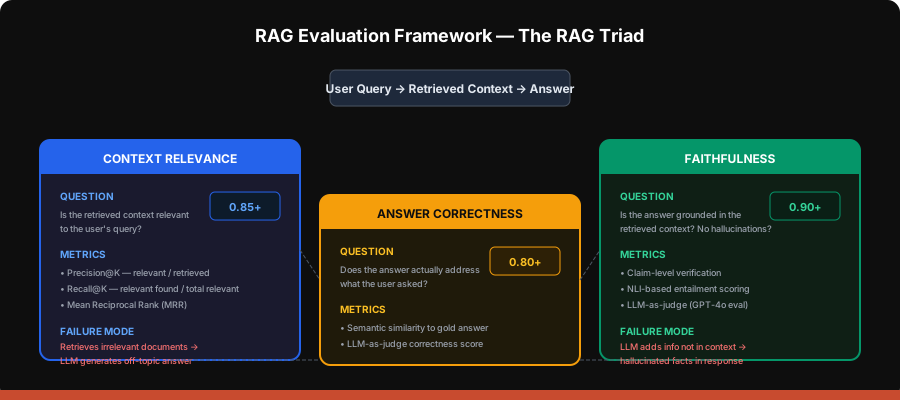
How do you know your RAG system is working well? The RAG Triad provides three complementary evaluation dimensions.
Implementing RAG Evaluation
# rag_evaluator.py
from openai import OpenAI

client = OpenAI()


def evaluate_context_relevance(query: str, contexts: list[str]) -> float:
    """Score how relevant the retrieved contexts are to the query."""
    prompt = f"""Rate the relevance of each context to the query on a scale of 0-1.

Query: {query}

Contexts:
{chr(10).join(f'[{i+1}] {c[:200]}...' for i, c in enumerate(contexts))}

For each context, respond with just the number (0-1). One per line."""

    response = client.chat.completions.create(
        model="gpt-4o-mini",
        messages=[{"role": "user", "content": prompt}],
        temperature=0.0,
    )

    scores = []
    for line in response.choices[0].message.content.strip().split("\n"):
        try:
            scores.append(float(line.strip().split()[-1]))
        except (ValueError, IndexError):
            continue
    return sum(scores) / len(scores) if scores else 0.0


def evaluate_faithfulness(answer: str, contexts: list[str]) -> float:
    """Score whether the answer is grounded in the provided contexts."""
    context_block = "\n\n".join(contexts)
    prompt = f"""Evaluate whether the following answer is faithful to the provided context.
A faithful answer only contains information that can be verified from the context.

Context:
{context_block}

Answer:
{answer}

Score from 0 to 1:
- 1.0 = every claim in the answer is supported by the context
- 0.5 = some claims are supported, some are not
- 0.0 = the answer contradicts or fabricates beyond the context

Respond with just the score."""

    response = client.chat.completions.create(
        model="gpt-4o-mini",
        messages=[{"role": "user", "content": prompt}],
        temperature=0.0,
    )
    try:
        return float(response.choices[0].message.content.strip())
    except ValueError:
        return 0.0


def evaluate_answer_correctness(query: str, answer: str,
                                 ground_truth: str) -> float:
    """Score whether the answer correctly addresses the query."""
    prompt = f"""Compare the answer to the ground truth for the given query.

Query: {query}
Ground Truth: {ground_truth}
Answer: {answer}

Score from 0 to 1:
- 1.0 = answer captures all key points from ground truth
- 0.5 = partially correct
- 0.0 = incorrect or irrelevant

Respond with just the score."""

    response = client.chat.completions.create(
        model="gpt-4o-mini",
        messages=[{"role": "user", "content": prompt}],
        temperature=0.0,
    )
    try:
        return float(response.choices[0].message.content.strip())
    except ValueError:
        return 0.0


def evaluate_rag_triad(query: str, contexts: list[str], answer: str,
                       ground_truth: str = "") -> dict:
    """Run all three evaluations and return scores."""
    scores = {
        "context_relevance": evaluate_context_relevance(query, contexts),
        "faithfulness": evaluate_faithfulness(answer, contexts),
    }
    if ground_truth:
        scores["answer_correctness"] = evaluate_answer_correctness(
            query, answer, ground_truth
        )
    scores["overall"] = sum(scores.values()) / len(scores)
    return scores
Evaluation targets
| Metric | Target | Action if Below |
|---|---|---|
| Context Relevance | > 0.85 | Improve retrieval: better embeddings, hybrid search, reranking |
| Faithfulness | > 0.90 | Improve prompt: stricter grounding instructions, lower temperature |
| Answer Correctness | > 0.80 | Improve both: better retrieval + better prompting |
Project: The Complete Customer Support Chatbot
Now let’s wire everything together into a working chatbot.
Step 1: Prepare Your Knowledge Base
# ingest.py
import os
from document_parser import parse_document
from chunker import recursive_chunker
from indexer import index_chunks

DOCS_DIR = "./knowledge_base"

all_chunks = []
for filename in os.listdir(DOCS_DIR):
    filepath = os.path.join(DOCS_DIR, filename)
    if not os.path.isfile(filepath):
        continue

    print(f"Parsing: {filename}")
    text = parse_document(filepath)
    chunks = recursive_chunker(text, chunk_size=500, overlap=50, source=filename)
    all_chunks.extend(chunks)
    print(f"  → {len(chunks)} chunks")

print(f"\nTotal chunks: {len(all_chunks)}")
collection = index_chunks(all_chunks)
Create a sample knowledge base in ./knowledge_base/:
<!-- knowledge_base/pricing.md -->
# TechCorp Pricing

## Free Plan
- 5 projects
- 1 GB storage
- Community support
- Basic analytics

## Pro Plan — $29/month
- Unlimited projects
- 50 GB storage
- Priority email support (24h response)
- Advanced analytics and custom dashboards
- API access (10,000 requests/month)

## Enterprise Plan — Custom Pricing
- Everything in Pro
- Unlimited storage
- Dedicated account manager
- SLA guarantees (99.9% uptime)
- SSO and SAML authentication
- Custom integrations
- Phone support
<!-- knowledge_base/troubleshooting.md -->
# Common Issues and Solutions
## File Upload Failures
If uploads fail for files larger than 10MB:
1. Check your plan limits (Free: 10MB max, Pro: 100MB, Enterprise: 1GB)
2. Ensure stable internet connection
3. Try a different browser
4. Clear browser cache and cookies
5. If issue persists, contact support with the error code
## Password Reset
1. Go to techcorp.com/reset-password
2. Enter your email address
3. Check your inbox (and spam folder) for the reset link
4. Link expires in 24 hours
5. If you don't receive the email, contact [email protected]
## Slow Dashboard Loading
- Clear browser cache
- Disable browser extensions
- Check status.techcorp.com for service status
- Try incognito/private browsing
- Reduce date range in analytics filtersStep 2: Build the RAG Chatbot
# chatbot.py
from openai import OpenAI
from retriever import hybrid_retrieve
from reranker import rerank
from rag_prompt import build_rag_prompt
from query_expansion import expand_query_multi

client = OpenAI()


class SupportChatbot:
    def __init__(self, collection_name: str = "support_docs",
                 model: str = "gpt-4o-mini"):
        self.collection_name = collection_name
        self.model = model
        self.conversation_history = []

    def answer(self, query: str, use_reranker: bool = True,
               use_query_expansion: bool = False) -> dict:
        search_query = query
        expanded_queries = []

        if use_query_expansion:
            expanded_queries = expand_query_multi(query, n=3)
            all_results = []
            for eq in [query] + expanded_queries:
                all_results.extend(hybrid_retrieve(eq, self.collection_name, top_k=3))
            seen = set()
            results = []
            for r in all_results:
                if r["text"] not in seen:
                    seen.add(r["text"])
                    results.append(r)
        else:
            results = hybrid_retrieve(query, self.collection_name, top_k=5)

        if use_reranker and len(results) > 0:
            results = rerank(query, results, top_k=3)

        messages = build_rag_prompt(
            query=query,
            context_docs=results,
            system_instructions="Always be empathetic and professional.",
        )

        response = client.chat.completions.create(
            model=self.model,
            messages=messages,
            temperature=0.3,
            max_tokens=512,
        )

        answer = response.choices[0].message.content

        self.conversation_history.append({"role": "user", "content": query})
        self.conversation_history.append({"role": "assistant", "content": answer})

        return {
            "answer": answer,
            "sources": [r["metadata"].get("source", "unknown") for r in results],
            "num_chunks_retrieved": len(results),
            "expanded_queries": expanded_queries,
        }


if __name__ == "__main__":
    bot = SupportChatbot()

    questions = [
        "How much does the Pro plan cost?",
        "My file uploads keep failing, what should I do?",
        "How do I reset my password?",
        "What's the difference between Pro and Enterprise?",
    ]

    for q in questions:
        print(f"\n{'='*60}")
        print(f"Customer: {q}")
        result = bot.answer(q)
        print(f"\nAgent: {result['answer']}")
        print(f"\nSources: {result['sources']}")
Step 3: Evaluate Your Chatbot
# evaluate.py
from chatbot import SupportChatbot
from rag_evaluator import evaluate_rag_triad

bot = SupportChatbot()

test_cases = [
    {
        "query": "How much does the Pro plan cost?",
        "ground_truth": "The Pro plan costs $29/month and includes unlimited projects, "
                        "50 GB storage, priority email support, advanced analytics, and "
                        "API access with 10,000 requests/month."
    },
    {
        "query": "My uploads are failing for large files",
        "ground_truth": "Check your plan's file size limits (Free: 10MB, Pro: 100MB, "
                        "Enterprise: 1GB). Also try: stable internet, different browser, "
                        "clear cache, or contact support with error code."
    },
    {
        "query": "How do I reset my password?",
        "ground_truth": "Go to techcorp.com/reset-password, enter your email, check inbox "
                        "(and spam) for reset link. Link expires in 24 hours."
    },
]

print("RAG Evaluation Results")
print("=" * 70)

for tc in test_cases:
    result = bot.answer(tc["query"])
    contexts = [r["text"] for r in result.get("_raw_chunks", [])]
    if not contexts:
        from retriever import hybrid_retrieve
        raw = hybrid_retrieve(tc["query"], top_k=3)
        contexts = [r["text"] for r in raw]

    scores = evaluate_rag_triad(
        query=tc["query"],
        contexts=contexts,
        answer=result["answer"],
        ground_truth=tc["ground_truth"],
    )

    print(f"\nQuery: {tc['query']}")
    print(f"  Context Relevance: {scores['context_relevance']:.2f}")
    print(f"  Faithfulness:      {scores['faithfulness']:.2f}")
    if "answer_correctness" in scores:
        print(f"  Answer Correctness: {scores['answer_correctness']:.2f}")
    print(f"  Overall:           {scores['overall']:.2f}")
RAGs’ Overall Design Patterns
Production Architecture Checklist
A production RAG system needs more than just retrieval + generation:
| Component | Purpose | Tools |
|---|---|---|
| Input Guardrails | Block prompt injection, PII detection | Guardrails AI, custom regex |
| Query Expansion | Better retrieval for vague queries | HyDE, multi-query, step-back |
| Hybrid Search | Combine semantic + keyword | Vector DB + BM25 |
| Reranking | Re-score retrieved chunks | Cohere Rerank, BGE Reranker |
| Context Compression | Remove irrelevant parts of chunks | LLMLingua, extractive summary |
| Output Guardrails | Block hallucinations, enforce format | NLI check, JSON schema validation |
| Caching | Reduce latency and cost | Redis (exact + semantic cache) |
| Observability | Track retrieval quality, latency | LangSmith, Phoenix, custom logging |
Common RAG Failure Modes
| Failure | Symptom | Fix |
|---|---|---|
| Chunks too large | Context stuffed with irrelevant info | Reduce chunk size, use reranker |
| Chunks too small | Missing context, incomplete answers | Increase chunk size or overlap |
| Bad embeddings | Semantically similar docs not retrieved | Use better embedding model |
| No keyword match | Exact terms/acronyms missed | Add BM25/hybrid search |
| Hallucination | Answer includes info not in context | Stricter prompt, lower temperature |
| Stale data | Outdated info served to users | Refresh index pipeline, track doc versions |
Key Takeaways
- RAG is the default pattern for giving LLMs access to custom knowledge — prefer it over fine-tuning for most use cases
- Chunking strategy matters — recursive chunking is a solid default; semantic chunking for high-stakes applications
- Hybrid search + reranking consistently outperforms pure vector search
- Evaluate with the RAG triad — context relevance, faithfulness, and answer correctness
- Prompt engineering is your most cost-effective lever — few-shot examples, chain-of-thought, and role-specific prompts can dramatically improve output quality
- Build guardrails from day one — input validation and output verification prevent embarrassing failures in production
What’s Next
In the next lesson, we’ll build an “Ask-the-Web” agent — similar to Perplexity — that can search the live internet, call external tools, and synthesize answers with citations. You’ll learn tool calling, agentic loops, and how to orchestrate multi-step tasks.