

In Lesson 2, your chatbot could answer questions from a static knowledge base. But what if the user asks about something that happened yesterday? Or needs information from across the web? You need an agent — an LLM that can take actions in the world.
This lesson teaches you how to build agents, starting with the fundamentals and ending with a Perplexity-style “Ask-the-Web” agent.
Agents Overview
Agents vs. Agentic Systems vs. LLMs
These terms get used loosely. Let’s be precise:
- LLM call — a single request-response. No memory, no tools, no loops. “Translate this to French.”
- Agentic system — any system where an LLM makes decisions about what to do next. Could be a simple workflow or a complex agent.
- Agent — an agentic system with a loop: the LLM observes, reasons, acts, and repeats until the task is done. It has autonomy over its control flow.
The key distinction: in a workflow, the developer decides the steps. In an agent, the LLM decides the steps.
Agency Levels
The spectrum from zero autonomy to full autonomy:
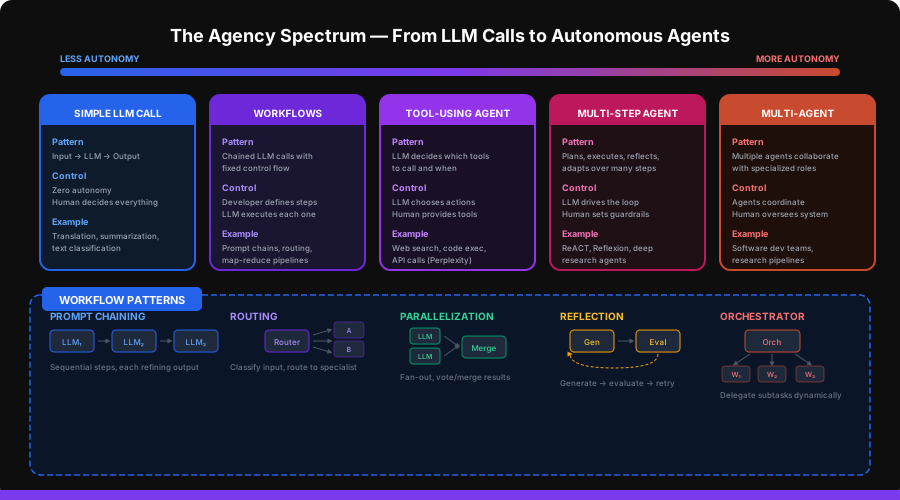
| Level | Pattern | Who Decides Steps | Example |
|---|---|---|---|
| 0 | Simple LLM call | Developer | Translation, classification |
| 1 | Workflow | Developer | Prompt chains, map-reduce |
| 2 | Tool-using agent | LLM (constrained) | Perplexity, ChatGPT plugins |
| 3 | Multi-step agent | LLM (autonomous) | Deep research, code agents |
| 4 | Multi-agent system | Multiple LLMs | Software dev teams, research pipelines |
For most production applications, Level 2 (tool-using agent) hits the sweet spot of capability and reliability.
Workflows
Before building agents, understand the workflow patterns they’re built on. These are the building blocks.
Prompt Chaining
Pass the output of one LLM call as input to the next:
from openai import OpenAI

client = OpenAI()


def chain(messages_sequence: list[list[dict]]) -> str:
    """Execute a sequence of LLM calls, passing output forward."""
    result = ""
    for i, messages in enumerate(messages_sequence):
        if result and "{previous_output}" in messages[-1]["content"]:
            messages[-1]["content"] = messages[-1]["content"].replace(
                "{previous_output}", result
            )
        response = client.chat.completions.create(
            model="gpt-4o-mini", messages=messages, temperature=0.3,
        )
        result = response.choices[0].message.content
    return result


answer = chain([
    [{"role": "user", "content": "List 5 key facts about quantum computing."}],
    [{"role": "user", "content": "For each fact below, rate its importance 1-10 and explain why:\n\n{previous_output}"}],
    [{"role": "user", "content": "Synthesize the most important points into a 2-sentence summary:\n\n{previous_output}"}],
])
Routing
Classify the input and route to specialized handlers:
def route(query: str) -> str:
    """Route query to the right specialist."""
    response = client.chat.completions.create(
        model="gpt-4o-mini",
        messages=[{
            "role": "system",
            "content": "Classify this query into exactly one category: "
                       "BILLING, TECHNICAL, ACCOUNT, GENERAL. Respond with just the category."
        }, {
            "role": "user",
            "content": query,
        }],
        temperature=0.0,
    )
    category = response.choices[0].message.content.strip().upper()

    handlers = {
        "BILLING": billing_specialist,
        "TECHNICAL": technical_specialist,
        "ACCOUNT": account_specialist,
        "GENERAL": general_handler,
    }
    handler = handlers.get(category, general_handler)
    return handler(query)
Parallelization
Fan out work to multiple LLM calls and merge results:
import asyncio
from openai import AsyncOpenAI

async_client = AsyncOpenAI()


async def parallel_analyze(text: str) -> dict:
    """Analyze text from multiple angles simultaneously."""
    prompts = {
        "sentiment": f"Rate the sentiment of this text from -1 to 1:\n{text}",
        "topics": f"List the 3 main topics in this text:\n{text}",
        "summary": f"Summarize this text in one sentence:\n{text}",
    }

    async def call(key: str, prompt: str) -> tuple[str, str]:
        response = await async_client.chat.completions.create(
            model="gpt-4o-mini",
            messages=[{"role": "user", "content": prompt}],
            temperature=0.0,
        )
        return key, response.choices[0].message.content

    tasks = [call(k, p) for k, p in prompts.items()]
    results = await asyncio.gather(*tasks)
    return dict(results)


# Voting: run the same prompt N times and take majority
async def vote(prompt: str, n: int = 3) -> str:
    """Run the same prompt multiple times and take majority vote."""
    tasks = [
        async_client.chat.completions.create(
            model="gpt-4o-mini",
            messages=[{"role": "user", "content": prompt}],
            temperature=0.7,
        )
        for _ in range(n)
    ]
    responses = await asyncio.gather(*tasks)
    answers = [r.choices[0].message.content.strip() for r in responses]

    from collections import Counter
    return Counter(answers).most_common(1)[0][0]
Reflection
Generate, evaluate, and retry:
def reflect_and_improve(task: str, max_iterations: int = 3) -> str:
    """Generate → evaluate → improve loop."""
    response = client.chat.completions.create(
        model="gpt-4o-mini",
        messages=[{"role": "user", "content": task}],
    )
    draft = response.choices[0].message.content

    for i in range(max_iterations):
        eval_response = client.chat.completions.create(
            model="gpt-4o-mini",
            messages=[{
                "role": "user",
                "content": f"""Evaluate this response and identify specific improvements needed.
If the response is good enough, respond with exactly "APPROVED".

Task: {task}

Response: {draft}

Evaluation:"""
            }],
            temperature=0.3,
        )
        evaluation = eval_response.choices[0].message.content

        if "APPROVED" in evaluation:
            break

        improve_response = client.chat.completions.create(
            model="gpt-4o-mini",
            messages=[{
                "role": "user",
                "content": f"""Improve this response based on the feedback.

Original task: {task}
Current response: {draft}
Feedback: {evaluation}

Improved response:"""
            }],
        )
        draft = improve_response.choices[0].message.content

    return draft
Orchestrator-Worker
A central LLM dynamically creates and delegates subtasks:
def orchestrate(task: str) -> str:
    """Break a task into subtasks and delegate to workers."""
    plan_response = client.chat.completions.create(
        model="gpt-4o",
        messages=[{
            "role": "system",
            "content": "Break this task into 2-5 independent subtasks. "
                       "Return as a JSON array of strings."
        }, {
            "role": "user",
            "content": task,
        }],
        response_format={"type": "json_object"},
    )

    import json
    plan = json.loads(plan_response.choices[0].message.content)
    subtasks = plan.get("subtasks", plan.get("tasks", []))

    results = []
    for subtask in subtasks:
        response = client.chat.completions.create(
            model="gpt-4o-mini",
            messages=[{"role": "user", "content": subtask}],
        )
        results.append({
            "subtask": subtask,
            "result": response.choices[0].message.content,
        })

    synthesis = client.chat.completions.create(
        model="gpt-4o",
        messages=[{
            "role": "system",
            "content": "Synthesize these worker results into a coherent final answer."
        }, {
            "role": "user",
            "content": f"Original task: {task}\n\nWorker results:\n" +
                       "\n\n".join(f"**{r['subtask']}**\n{r['result']}" for r in results)
        }],
    )
    return synthesis.choices[0].message.content
Tools
Tools are what give agents the ability to interact with the outside world. Without tools, an LLM can only generate text. With tools, it can search the web, run code, call APIs, and more.
Tool Calling
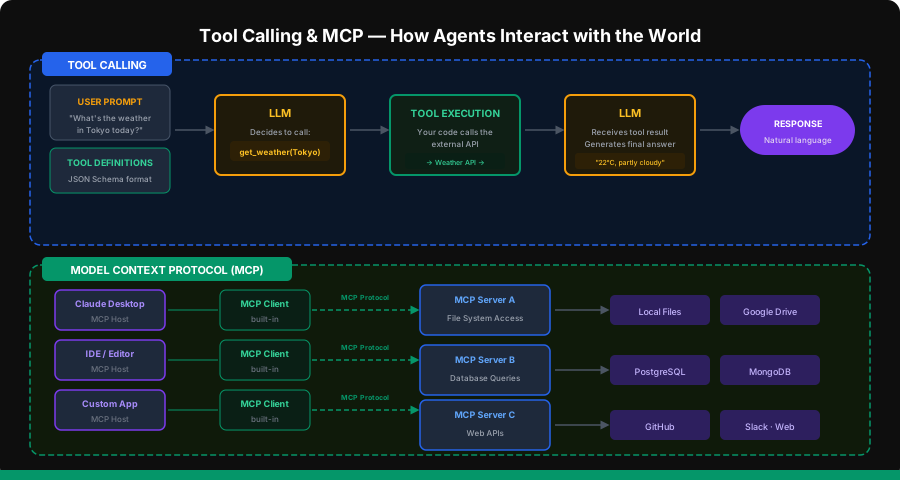
Tool calling is a native feature of modern LLMs. You define tools as JSON schemas, and the model decides when and how to call them.
Defining Tools
# tools.py
import json
import httpx

TOOLS = [
    {
        "type": "function",
        "function": {
            "name": "web_search",
            "description": "Search the web for current information. Use this when you need up-to-date facts, news, or data not in your training.",
            "parameters": {
                "type": "object",
                "properties": {
                    "query": {
                        "type": "string",
                        "description": "The search query"
                    },
                    "num_results": {
                        "type": "integer",
                        "description": "Number of results to return (default 5)",
                        "default": 5
                    }
                },
                "required": ["query"]
            }
        }
    },
    {
        "type": "function",
        "function": {
            "name": "fetch_webpage",
            "description": "Fetch and extract text content from a URL.",
            "parameters": {
                "type": "object",
                "properties": {
                    "url": {
                        "type": "string",
                        "description": "The URL to fetch"
                    }
                },
                "required": ["url"]
            }
        }
    },
    {
        "type": "function",
        "function": {
            "name": "calculate",
            "description": "Evaluate a mathematical expression.",
            "parameters": {
                "type": "object",
                "properties": {
                    "expression": {
                        "type": "string",
                        "description": "Math expression to evaluate, e.g. '2 * 3 + 4'"
                    }
                },
                "required": ["expression"]
            }
        }
    }
]
Tool Formatting Best Practices
Good tool descriptions are critical — the LLM uses them to decide when to call each tool:
# Good: specific, describes when to use
{
    "name": "web_search",
    "description": "Search the web for current information. Use when you need "
                   "up-to-date facts, recent news, or data not in your training.",
}

# Bad: vague, doesn't help the LLM decide
{
    "name": "web_search",
    "description": "Searches the web.",
}
Tool Execution
You (the developer) execute the tool calls — the LLM only requests them:
# tool_executor.py
import json
import httpx
from bs4 import BeautifulSoup


def execute_tool(name: str, arguments: dict) -> str:
    """Execute a tool call and return the result as a string."""
    if name == "web_search":
        return web_search(arguments["query"], arguments.get("num_results", 5))
    elif name == "fetch_webpage":
        return fetch_webpage(arguments["url"])
    elif name == "calculate":
        return calculate(arguments["expression"])
    else:
        return json.dumps({"error": f"Unknown tool: {name}"})


def web_search(query: str, num_results: int = 5) -> str:
    """Search using Tavily API (or any search API)."""
    import os
    response = httpx.post(
        "https://api.tavily.com/search",
        json={
            "api_key": os.getenv("TAVILY_API_KEY"),
            "query": query,
            "max_results": num_results,
            "include_raw_content": False,
        },
        timeout=15,
    )
    results = response.json().get("results", [])
    return json.dumps([
        {"title": r["title"], "url": r["url"], "snippet": r["content"][:300]}
        for r in results
    ])


def fetch_webpage(url: str) -> str:
    """Fetch a webpage and extract text content."""
    response = httpx.get(url, timeout=15, follow_redirects=True)
    soup = BeautifulSoup(response.text, "html.parser")
    for tag in soup(["script", "style", "nav", "footer", "header"]):
        tag.decompose()
    text = soup.get_text(separator="\n", strip=True)
    return text[:3000]


def calculate(expression: str) -> str:
    """Safely evaluate a math expression."""
    allowed = set("0123456789+-*/.() ")
    if not all(c in allowed for c in expression):
        return json.dumps({"error": "Invalid expression"})
    try:
        result = eval(expression)  # safe: only math chars allowed
        return json.dumps({"result": result})
    except Exception as e:
        return json.dumps({"error": str(e)})
MCP — Model Context Protocol
MCP is an open standard (by Anthropic) for connecting AI models to external data and tools. Instead of every app implementing its own tool integrations, MCP provides a universal protocol.
The architecture has three parts:
- MCP Host — the AI application (Claude Desktop, an IDE, your custom app)
- MCP Client — built into the host, speaks the MCP protocol
- MCP Server — exposes tools and data sources via the protocol
# Example: creating an MCP server with Python
from mcp.server.fastmcp import FastMCP

mcp = FastMCP("My Search Server")


@mcp.tool()
def search_docs(query: str) -> str:
    """Search the internal documentation."""
    # Your search logic here
    return f"Results for: {query}"


@mcp.tool()
def get_user_info(user_id: str) -> str:
    """Look up user information by ID."""
    # Database query here
    return f"User info for: {user_id}"


if __name__ == "__main__":
    mcp.run(transport="stdio")
MCP servers can be configured in Claude Desktop or any MCP-compatible host. The key benefit: build a tool once, use it across any AI application.
Multi-Step Agents
Now we move from workflows (fixed steps) to agents (dynamic steps). The LLM drives the loop.
ReACT — Reason + Act
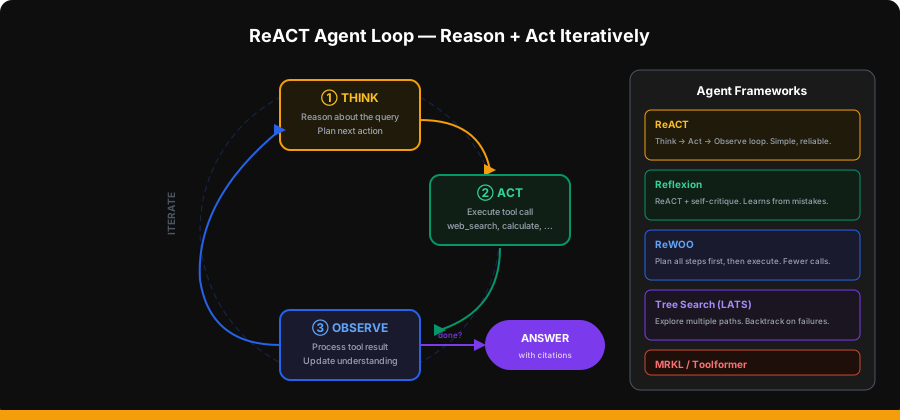
ReACT is the most widely used agent framework. The loop:
- Think — reason about the current state and what to do next
- Act — call a tool
- Observe — process the tool’s result
- Repeat until the task is done
# react_agent.py
import json
from openai import OpenAI
from tools import TOOLS
from tool_executor import execute_tool

client = OpenAI()

SYSTEM_PROMPT = """You are a helpful research assistant that can search the web to answer questions.

When answering:
1. Search for relevant, recent information
2. Read important pages for details
3. Synthesize a comprehensive answer with citations
4. Include source URLs for every claim

If your first search doesn't find what you need, try different search queries.
Always cite your sources with [Source Title](URL) format."""


def react_agent(query: str, max_steps: int = 10) -> str:
    messages = [
        {"role": "system", "content": SYSTEM_PROMPT},
        {"role": "user", "content": query},
    ]

    for step in range(max_steps):
        response = client.chat.completions.create(
            model="gpt-4o",
            messages=messages,
            tools=TOOLS,
            tool_choice="auto",
        )
        msg = response.choices[0].message
        messages.append(msg)

        if msg.tool_calls:
            for tool_call in msg.tool_calls:
                name = tool_call.function.name
                args = json.loads(tool_call.function.arguments)
                print(f"  Step {step + 1}: {name}({args})")

                result = execute_tool(name, args)

                messages.append({
                    "role": "tool",
                    "tool_call_id": tool_call.id,
                    "content": result,
                })
        else:
            return msg.content

    return messages[-1].content if messages[-1].role == "assistant" else "Max steps reached."
Planning Autonomy
Different agents give the LLM different levels of planning freedom:
| Approach | Planning | Execution | Trade-off |
|---|---|---|---|
| ReACT | One step at a time | Immediate | Simple but may wander |
| ReWOO | Plan all steps first | Then execute in order | Fewer LLM calls, less adaptive |
| Reflexion | Plan + self-critique | Re-plan after reflection | Better quality, more expensive |
| Tree Search (LATS) | Explore multiple paths | Backtrack on failures | Best quality, most expensive |
Reflexion — Learning from Mistakes
Reflexion adds a self-critique step after each attempt:
def reflexion_agent(query: str, max_attempts: int = 3) -> str:
    """ReACT + self-critique loop."""
    reflections = []

    for attempt in range(max_attempts):
        reflection_context = ""
        if reflections:
            reflection_context = "\n\nPrevious attempts and reflections:\n" + \
                "\n".join(f"Attempt {i+1}: {r}" for i, r in enumerate(reflections))

        answer = react_agent(query + reflection_context, max_steps=8)

        critique = client.chat.completions.create(
            model="gpt-4o",
            messages=[{
                "role": "user",
                "content": f"""Evaluate this answer for quality, accuracy, and completeness.

Question: {query}
Answer: {answer}

Is this answer:
1. Complete — covers all aspects of the question?
2. Accurate — claims are well-supported?
3. Well-sourced — includes citations?

If all three are YES, respond with "APPROVED".
Otherwise, explain what needs improvement."""
            }],
            temperature=0.2,
        )
        evaluation = critique.choices[0].message.content

        if "APPROVED" in evaluation:
            return answer

        reflections.append(evaluation)

    return answer
Multi-Agent Systems
When a single agent isn’t enough, you can coordinate multiple specialized agents.
Challenges
- Communication — agents need a shared protocol to exchange information
- Coordination — who does what? How to avoid duplicate work?
- Error handling — what happens when one agent fails?
- Cost — every agent call costs money. Multi-agent systems multiply costs.
Use Cases
| System | Agents | Communication |
|---|---|---|
| Research team | Searcher, Analyst, Writer | Sequential handoff |
| Code review | Coder, Reviewer, Tester | Feedback loops |
| Customer support | Classifier, Specialist, Escalation | Routing |
| Data pipeline | Extractor, Cleaner, Analyzer | Pipeline |
A2A — Agent-to-Agent Protocol
Google’s A2A protocol is to multi-agent communication what MCP is to tool calling — a standardized way for agents to discover each other, exchange tasks, and communicate results.
# Conceptual multi-agent system
class ResearchTeam:
    def __init__(self):
        self.searcher = react_agent  # web search specialist
        self.analyst = None          # data analysis specialist
        self.writer = None           # synthesis specialist

    def research(self, topic: str) -> str:
        raw_findings = self.searcher(f"Find key facts and data about: {topic}")

        analysis = client.chat.completions.create(
            model="gpt-4o",
            messages=[{
                "role": "system",
                "content": "You are a data analyst. Identify patterns, contradictions, "
                           "and key insights from the raw research findings."
            }, {
                "role": "user",
                "content": f"Analyze these findings about '{topic}':\n\n{raw_findings}"
            }],
        ).choices[0].message.content

        report = client.chat.completions.create(
            model="gpt-4o",
            messages=[{
                "role": "system",
                "content": "You are a research writer. Create a clear, well-structured "
                           "report with citations from the analysis."
            }, {
                "role": "user",
                "content": f"Write a report about '{topic}':\n\n"
                           f"Raw findings:\n{raw_findings}\n\n"
                           f"Analysis:\n{analysis}"
            }],
        ).choices[0].message.content

        return report
Evaluation of Agents
Agent evaluation is harder than evaluating a single LLM call because agents take multiple steps and interact with the environment.
What to Measure
| Metric | What It Measures | How |
|---|---|---|
| Task success rate | Does the agent complete the task? | Binary: success/failure on test set |
| Step efficiency | How many steps does it take? | Count tool calls per task |
| Cost per task | How much does each task cost? | Sum token costs across all LLM calls |
| Latency | How long does it take? | End-to-end wall clock time |
| Faithfulness | Are claims grounded in tool results? | LLM-as-judge on source attribution |
| Error recovery | Can it handle tool failures? | Inject failures, measure recovery |
Evaluation Framework
# agent_evaluator.py
import time
from dataclasses import dataclass


@dataclass
class AgentEvalResult:
    query: str
    answer: str
    steps: int
    latency_seconds: float
    success: bool
    faithfulness_score: float
    cost_estimate: float


def evaluate_agent(agent_fn, test_cases: list[dict]) -> list[AgentEvalResult]:
    results = []

    for tc in test_cases:
        start = time.time()
        try:
            answer = agent_fn(tc["query"])
            success = True
        except Exception:
            answer = "FAILED"
            success = False
        elapsed = time.time() - start

        faithfulness = evaluate_faithfulness_simple(answer, tc.get("expected_topics", []))

        results.append(AgentEvalResult(
            query=tc["query"],
            answer=answer,
            steps=0,
            latency_seconds=elapsed,
            success=success,
            faithfulness_score=faithfulness,
            cost_estimate=0.0,
        ))

    avg_success = sum(r.success for r in results) / len(results)
    avg_latency = sum(r.latency_seconds for r in results) / len(results)
    avg_faith = sum(r.faithfulness_score for r in results) / len(results)

    print(f"Success rate: {avg_success:.0%}")
    print(f"Avg latency: {avg_latency:.1f}s")
    print(f"Avg faithfulness: {avg_faith:.2f}")

    return results


def evaluate_faithfulness_simple(answer: str, expected_topics: list[str]) -> float:
    if not expected_topics:
        return 1.0
    found = sum(1 for t in expected_topics if t.lower() in answer.lower())
    return found / len(expected_topics)
Project: The “Ask-the-Web” Agent
Time to build the full Perplexity-style agent. It searches the web, reads pages, and synthesizes answers with citations.
Complete Implementation
# ask_the_web.py
import json
import os
from openai import OpenAI
from tool_executor import execute_tool

client = OpenAI()

TOOLS = [
    {
        "type": "function",
        "function": {
            "name": "web_search",
            "description": "Search the web for current information. Returns titles, URLs, and snippets.",
            "parameters": {
                "type": "object",
                "properties": {
                    "query": {"type": "string", "description": "Search query"},
                    "num_results": {"type": "integer", "default": 5}
                },
                "required": ["query"]
            }
        }
    },
    {
        "type": "function",
        "function": {
            "name": "fetch_webpage",
            "description": "Fetch and extract text content from a specific URL for detailed reading.",
            "parameters": {
                "type": "object",
                "properties": {
                    "url": {"type": "string", "description": "URL to fetch"}
                },
                "required": ["url"]
            }
        }
    },
    {
        "type": "function",
        "function": {
            "name": "calculate",
            "description": "Evaluate a mathematical expression for precise calculations.",
            "parameters": {
                "type": "object",
                "properties": {
                    "expression": {"type": "string", "description": "Math expression"}
                },
                "required": ["expression"]
            }
        }
    }
]

SYSTEM_PROMPT = """You are an AI research assistant, similar to Perplexity.
Your job is to answer questions accurately using web search.

## Your Process
1. Analyze the question — what information do you need?
2. Search the web — use specific, targeted search queries
3. Read key pages — fetch important URLs for detailed information
4. Synthesize — combine findings into a clear, comprehensive answer

## Output Format
- Start with a direct answer to the question
- Follow with supporting details and context
- End with a "Sources" section listing all URLs used
- Use markdown formatting for readability
- Format citations inline as [1], [2], etc.

## Rules
- ALWAYS search before answering — never rely on training data alone
- If results are thin, try alternative search queries
- Cross-reference multiple sources for accuracy
- Clearly distinguish facts from speculation
- If you cannot find reliable information, say so"""


class AskTheWeb:
    def __init__(self, model: str = "gpt-4o"):
        self.model = model
        self.step_log = []

    def ask(self, question: str, max_steps: int = 12) -> dict:
        self.step_log = []
        messages = [
            {"role": "system", "content": SYSTEM_PROMPT},
            {"role": "user", "content": question},
        ]

        for step in range(max_steps):
            response = client.chat.completions.create(
                model=self.model,
                messages=messages,
                tools=TOOLS,
                tool_choice="auto",
            )
            msg = response.choices[0].message
            messages.append(msg)

            if msg.tool_calls:
                for tc in msg.tool_calls:
                    name = tc.function.name
                    args = json.loads(tc.function.arguments)
                    self.step_log.append({"step": step + 1, "tool": name, "args": args})
                    print(f"  [{step + 1}] {name}: {json.dumps(args)[:100]}")

                    result = execute_tool(name, args)
                    messages.append({
                        "role": "tool",
                        "tool_call_id": tc.id,
                        "content": result,
                    })
            else:
                return {
                    "answer": msg.content,
                    "steps": self.step_log,
                    "total_steps": len(self.step_log),
                }

        final = messages[-1]
        return {
            "answer": final.content if hasattr(final, "content") and final.content else "Reached max steps.",
            "steps": self.step_log,
            "total_steps": len(self.step_log),
        }


if __name__ == "__main__":
    agent = AskTheWeb()

    questions = [
        "What are the latest developments in nuclear fusion energy in 2026?",
        "Compare the pricing of GPT-4o vs Claude Sonnet vs Gemini 2.5 Pro",
        "What's the current population of Tokyo and how has it changed in the last decade?",
    ]

    for q in questions:
        print(f"\n{'='*70}")
        print(f"Question: {q}\n")
        result = agent.ask(q)
        print(f"\nAnswer:\n{result['answer']}")
        print(f"\nSteps taken: {result['total_steps']}")
Adding a FastAPI Endpoint
# server.py
from fastapi import FastAPI
from fastapi.responses import StreamingResponse
from pydantic import BaseModel
from ask_the_web import AskTheWeb
import json

app = FastAPI(title="Ask-the-Web Agent")
agent = AskTheWeb()


class AskRequest(BaseModel):
    question: str
    max_steps: int = 12


@app.post("/ask")
async def ask(req: AskRequest):
    result = agent.ask(req.question, req.max_steps)
    return result


@app.post("/ask/stream")
async def ask_stream(req: AskRequest):
    def event_stream():
        # Stream step-by-step progress
        for step_info in agent.step_log:
            yield f"data: {json.dumps({'type': 'step', 'data': step_info})}\n\n"
        result = agent.ask(req.question, req.max_steps)
        yield f"data: {json.dumps({'type': 'answer', 'data': result['answer']})}\n\n"
        yield "data: [DONE]\n\n"

    return StreamingResponse(event_stream(), media_type="text/event-stream")
Test It
# Install dependencies
pip install openai httpx beautifulsoup4 tavily-python fastapi uvicorn

# Set API keys
export OPENAI_API_KEY=sk-your-key
export TAVILY_API_KEY=tvly-your-key  # Get free at tavily.com

# Run
python ask_the_web.py
Key Takeaways
- Agents = LLMs with loops and tools — the LLM decides what to do next, not the developer
- Start with workflows, graduate to agents — prompt chains and routing solve most problems; reach for agents only when you need dynamic step selection
- Tool design matters as much as prompt design — clear tool descriptions help the LLM choose the right tool at the right time
- ReACT is the workhorse — Think → Act → Observe is simple, debuggable, and effective for most agent tasks
- MCP standardizes tool integration — build tools once, use them across any MCP-compatible host
- Multi-agent systems multiply both power and complexity — use them when a single agent genuinely can’t handle the task scope
- Always evaluate agents — task success rate, step efficiency, cost, and faithfulness are all critical metrics
What’s Next
In the next lesson, we’ll build a Deep Research system that goes beyond single searches. It will plan research strategies, search the web across multiple dimensions, use reasoning models for synthesis, and produce comprehensive reports — similar to the deep research features in ChatGPT and Gemini.