

Every AI engineer needs to understand what’s happening under the hood of the models they use. Before we write a single line of code, we’ll build a mental model of how LLMs work — from raw data to deployed chatbot. Then we’ll build a playground that lets you experiment with multiple models side by side.
LLM Overview and Foundations
Large Language Models sit at the intersection of several nested fields. Understanding where they fit helps you make better engineering decisions.
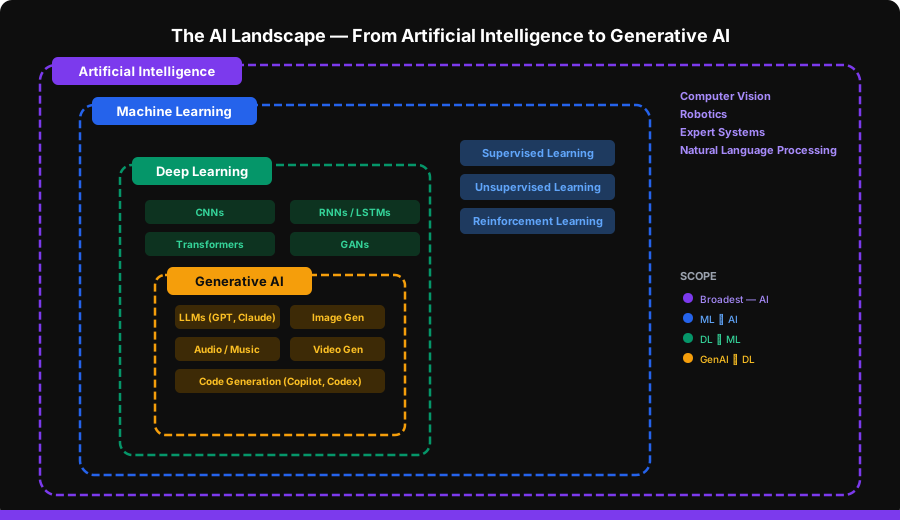
Artificial Intelligence is the broadest umbrella — any system that mimics human cognitive functions. Machine Learning is the subset that learns from data rather than following hardcoded rules. Deep Learning uses neural networks with many layers. And Generative AI — where LLMs live — is the subset of deep learning focused on creating new content.
As AI engineers, we work primarily in the Generative AI layer, but understanding the full stack helps when debugging, optimizing, or choosing the right approach for a problem.
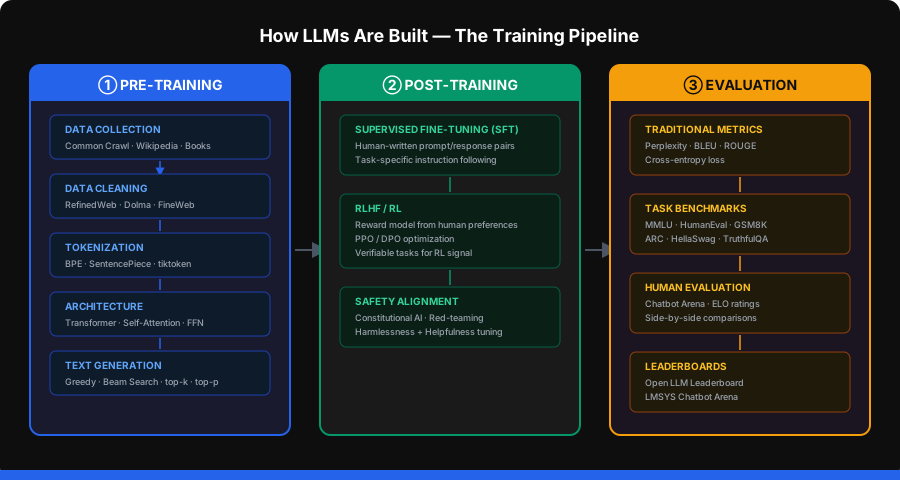
Pre-Training: Building the Foundation
Pre-training is where a model learns language. It’s the most expensive phase — costing millions of dollars in compute — and it determines the model’s base capabilities.
Data Collection
LLMs are trained on massive text corpora:
- Common Crawl — petabytes of web data scraped over years
- Wikipedia — high-quality, structured knowledge
- Books — long-form reasoning and narrative
- Code repositories — GitHub, Stack Overflow
- Scientific papers — arXiv, PubMed
The quality and diversity of training data directly impacts model capability. Garbage in, garbage out — at trillion-token scale.
Data Cleaning
Raw web data is noisy. Modern training pipelines use sophisticated cleaning:
| Dataset | Approach | Output Size |
|---|---|---|
| RefinedWeb | Aggressive deduplication + quality filtering | 600B tokens |
| Dolma | Open, reproducible pipeline by AI2 | 3T tokens |
| FineWeb | HuggingFace’s curated Common Crawl subset | 15T tokens |
Cleaning typically removes: duplicate content, boilerplate HTML, toxic text, personally identifiable information, and low-quality pages.
Tokenization
Models don’t see text — they see tokens. Byte Pair Encoding (BPE) is the dominant approach:
# Tokenization with tiktoken (OpenAI's tokenizer)
import tiktoken

enc = tiktoken.encoding_for_model("gpt-4o")
tokens = enc.encode("Hello, world! This is tokenization.")
print(f"Text: 'Hello, world! This is tokenization.'")
print(f"Tokens: {tokens}")
print(f"Token count: {len(tokens)}")
# Decode individual tokens to see the splits
for t in tokens:
    print(f"  {t} → '{enc.decode([t])}'")
Key tokenization facts for AI engineers:
- GPT-4o uses ~100K vocabulary size
- Common English words = 1 token; rare words get split
- Spaces are often included in the token (
thenotthe) - Different languages have wildly different token efficiencies
- Token count directly impacts cost and latency
Architecture: The Transformer
Every modern LLM is built on the Transformer architecture (Vaswani et al., 2017). The key innovations:
- Self-Attention — each token attends to every other token, capturing long-range dependencies
- Positional Encoding — since attention is permutation-invariant, position info is injected explicitly
- Feed-Forward Networks — dense layers that process each position independently
- Layer Normalization — stabilizes training of very deep networks
The major model families:
| Family | Creator | Architecture | Notable Models |
|---|---|---|---|
| GPT | OpenAI | Decoder-only | GPT-4o, o1, o3 |
| Claude | Anthropic | Decoder-only | Opus, Sonnet, Haiku |
| Gemini | Decoder-only | 2.5 Pro, 2.5 Flash | |
| Llama | Meta | Decoder-only | Llama 3.1, 3.2, 4 |
| Mistral | Mistral AI | Decoder-only (MoE) | Mistral Large, Mixtral |
Text Generation: How LLMs Produce Output
LLMs generate text one token at a time. At each step, the model outputs a probability distribution over all possible next tokens. How you sample from that distribution matters:
# Conceptual view of text generation strategies
import numpy as np

def greedy_decode(logits):
    """Always pick the highest probability token. Deterministic but repetitive."""
    return np.argmax(logits)

def top_k_sample(logits, k=50):
    """Sample from the top-k most likely tokens."""
    top_k_indices = np.argsort(logits)[-k:]
    top_k_probs = softmax(logits[top_k_indices])
    return np.random.choice(top_k_indices, p=top_k_probs)

def top_p_sample(logits, p=0.9):
    """Sample from the smallest set of tokens whose cumulative probability >= p."""
    sorted_indices = np.argsort(logits)[::-1]
    sorted_probs = softmax(logits[sorted_indices])
    cumsum = np.cumsum(sorted_probs)
    cutoff = np.searchsorted(cumsum, p) + 1
    candidates = sorted_indices[:cutoff]
    candidate_probs = sorted_probs[:cutoff]
    candidate_probs /= candidate_probs.sum()
    return np.random.choice(candidates, p=candidate_probs)
Temperature scales the logits before sampling — lower values (0.1) make output more focused and deterministic, higher values (1.5) make it more creative and random:
| Temperature | Behavior | Use Case |
|---|---|---|
| 0.0 | Greedy / deterministic | Code generation, factual Q&A |
| 0.3–0.5 | Slightly creative | Business writing, summaries |
| 0.7–0.9 | Balanced | General chat, brainstorming |
| 1.0–1.5 | Highly creative | Creative writing, idea generation |
Post-Training: Making Models Useful
A pre-trained model can predict the next token, but it can’t follow instructions or have a conversation. Post-training bridges that gap.
Supervised Fine-Tuning (SFT)
Human annotators write thousands of ideal prompt-response pairs. The model is fine-tuned on these examples to learn:
- How to follow instructions
- Proper formatting and structure
- When to refuse harmful requests
- Conversation turn-taking
# SFT training data format (simplified)
sft_examples = [
    {
        "messages": [
            {"role": "system", "content": "You are a helpful assistant."},
            {"role": "user", "content": "What is photosynthesis?"},
            {"role": "assistant", "content": "Photosynthesis is the process by which plants convert sunlight, water, and carbon dioxide into glucose and oxygen..."}
        ]
    },
    # ... thousands more examples
]
Reinforcement Learning from Human Feedback (RLHF)
RLHF is what makes models actually good at conversation:
- Collect comparisons — humans rank multiple model outputs for the same prompt
- Train a reward model — learns to predict human preferences
- Optimize with RL — typically PPO (Proximal Policy Optimization) or DPO (Direct Preference Optimization)
More recent approaches use verifiable tasks — math problems, code challenges — where correctness can be checked automatically, reducing the need for human annotators.
Evaluation: Measuring Model Quality
How do you know if a model is good? There’s no single answer.
Traditional Metrics
- Perplexity — how surprised the model is by test data (lower = better)
- BLEU / ROUGE — n-gram overlap with reference text (translation, summarization)
- Cross-entropy loss — the training objective itself
Task-Specific Benchmarks
| Benchmark | What It Tests | Top Scores |
|---|---|---|
| MMLU | Multi-task knowledge (57 subjects) | ~90%+ |
| HumanEval | Code generation (Python) | ~95%+ |
| GSM8K | Grade-school math reasoning | ~95%+ |
| ARC | Science reasoning | ~95%+ |
| TruthfulQA | Resistance to common misconceptions | ~75%+ |
Human Evaluation and Leaderboards
The most trusted evaluations come from humans:
- LMSYS Chatbot Arena — blind side-by-side comparisons, ELO-rated
- Open LLM Leaderboard (HuggingFace) — standardized open-source benchmarks
- Holistic Evaluation of Language Models (HELM) — Stanford’s comprehensive evaluation framework
Project: Build the LLM Playground
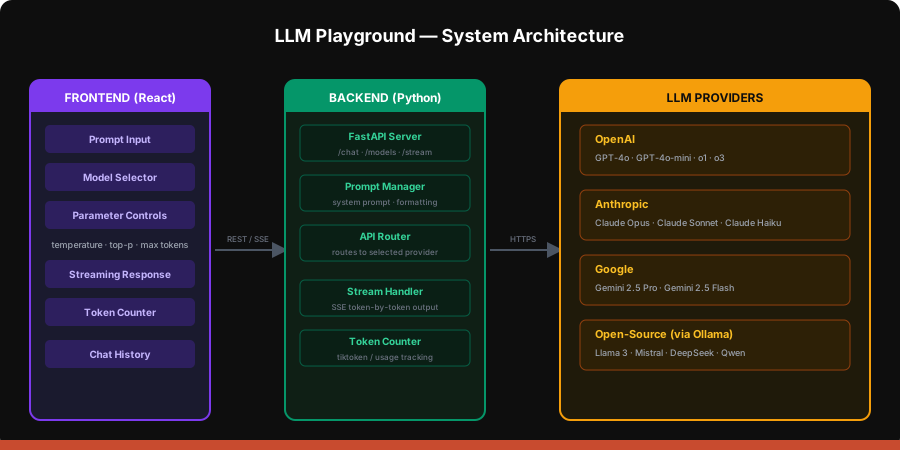
Now let’s build something. Our playground will support multiple LLM providers, streaming responses, and parameter tuning.
Project Setup
mkdir llm-playground && cd llm-playground
python -m venv venv
source venv/bin/activate  # Windows: venv\Scripts\activate

pip install fastapi uvicorn openai anthropic google-genai tiktoken python-dotenv
Create your .env file:
OPENAI_API_KEY=sk-your-key-here
ANTHROPIC_API_KEY=sk-ant-your-key-here
GOOGLE_API_KEY=your-key-here
The Multi-Provider LLM Client
This is the core abstraction — a unified interface across providers:
# llm_client.py
import os
from dotenv import load_dotenv
from openai import OpenAI
from anthropic import Anthropic
from google import genai

load_dotenv()

MODELS = {
    "gpt-4o": {"provider": "openai", "name": "GPT-4o"},
    "gpt-4o-mini": {"provider": "openai", "name": "GPT-4o Mini"},
    "claude-sonnet-4-20250514": {"provider": "anthropic", "name": "Claude Sonnet"},
    "claude-haiku-4-20250414": {"provider": "anthropic", "name": "Claude Haiku"},
    "gemini-2.5-flash": {"provider": "google", "name": "Gemini 2.5 Flash"},
}

openai_client = OpenAI()
anthropic_client = Anthropic()
google_client = genai.Client(api_key=os.getenv("GOOGLE_API_KEY"))


def chat(model_id: str, messages: list, temperature: float = 0.7,
         top_p: float = 1.0, max_tokens: int = 1024):
    provider = MODELS[model_id]["provider"]

    if provider == "openai":
        response = openai_client.chat.completions.create(
            model=model_id,
            messages=messages,
            temperature=temperature,
            top_p=top_p,
            max_tokens=max_tokens,
        )
        return {
            "content": response.choices[0].message.content,
            "usage": {
                "input_tokens": response.usage.prompt_tokens,
                "output_tokens": response.usage.completion_tokens,
            }
        }

    elif provider == "anthropic":
        system_msg = next(
            (m["content"] for m in messages if m["role"] == "system"), None
        )
        chat_messages = [m for m in messages if m["role"] != "system"]
        response = anthropic_client.messages.create(
            model=model_id,
            system=system_msg or "You are a helpful assistant.",
            messages=chat_messages,
            temperature=temperature,
            top_p=top_p,
            max_tokens=max_tokens,
        )
        return {
            "content": response.content[0].text,
            "usage": {
                "input_tokens": response.usage.input_tokens,
                "output_tokens": response.usage.output_tokens,
            }
        }

    elif provider == "google":
        contents = [
            genai.types.Content(
                role="user" if m["role"] == "user" else "model",
                parts=[genai.types.Part(text=m["content"])]
            )
            for m in messages if m["role"] != "system"
        ]
        response = google_client.models.generate_content(
            model=model_id,
            contents=contents,
            config=genai.types.GenerateContentConfig(
                temperature=temperature,
                top_p=top_p,
                max_output_tokens=max_tokens,
            ),
        )
        return {
            "content": response.text,
            "usage": {
                "input_tokens": response.usage_metadata.prompt_token_count,
                "output_tokens": response.usage_metadata.candidates_token_count,
            }
        }
Streaming Responses
Streaming is critical for UX — users see tokens appear in real time instead of waiting for the full response:
# llm_stream.py
import os
from dotenv import load_dotenv
from openai import OpenAI
from anthropic import Anthropic
from google import genai

load_dotenv()

openai_client = OpenAI()
anthropic_client = Anthropic()
google_client = genai.Client(api_key=os.getenv("GOOGLE_API_KEY"))


def stream_chat(model_id: str, messages: list, temperature: float = 0.7,
                top_p: float = 1.0, max_tokens: int = 1024):
    """Generator that yields text chunks for streaming."""
    from llm_client import MODELS
    provider = MODELS[model_id]["provider"]

    if provider == "openai":
        stream = openai_client.chat.completions.create(
            model=model_id,
            messages=messages,
            temperature=temperature,
            top_p=top_p,
            max_tokens=max_tokens,
            stream=True,
        )
        for chunk in stream:
            if chunk.choices[0].delta.content:
                yield chunk.choices[0].delta.content

    elif provider == "anthropic":
        system_msg = next(
            (m["content"] for m in messages if m["role"] == "system"), None
        )
        chat_messages = [m for m in messages if m["role"] != "system"]
        with anthropic_client.messages.stream(
            model=model_id,
            system=system_msg or "You are a helpful assistant.",
            messages=chat_messages,
            temperature=temperature,
            top_p=top_p,
            max_tokens=max_tokens,
        ) as stream:
            for text in stream.text_stream:
                yield text

    elif provider == "google":
        contents = [
            genai.types.Content(
                role="user" if m["role"] == "user" else "model",
                parts=[genai.types.Part(text=m["content"])]
            )
            for m in messages if m["role"] != "system"
        ]
        response = google_client.models.generate_content_stream(
            model=model_id,
            contents=contents,
            config=genai.types.GenerateContentConfig(
                temperature=temperature,
                top_p=top_p,
                max_output_tokens=max_tokens,
            ),
        )
        for chunk in response:
            if chunk.text:
                yield chunk.text
FastAPI Backend
# server.py
import json
from fastapi import FastAPI, Request
from fastapi.middleware.cors import CORSMiddleware
from fastapi.responses import StreamingResponse
from pydantic import BaseModel
from llm_client import chat, MODELS
from llm_stream import stream_chat

app = FastAPI(title="LLM Playground")
app.add_middleware(
    CORSMiddleware,
    allow_origins=["*"],
    allow_methods=["*"],
    allow_headers=["*"],
)


class ChatRequest(BaseModel):
    model: str
    messages: list[dict]
    temperature: float = 0.7
    top_p: float = 1.0
    max_tokens: int = 1024
    stream: bool = False


@app.get("/models")
def list_models():
    return [
        {"id": k, "name": v["name"], "provider": v["provider"]}
        for k, v in MODELS.items()
    ]


@app.post("/chat")
async def chat_endpoint(req: ChatRequest):
    if req.stream:
        def event_stream():
            for chunk in stream_chat(
                req.model, req.messages,
                req.temperature, req.top_p, req.max_tokens
            ):
                yield f"data: {json.dumps({'text': chunk})}\n\n"
            yield "data: [DONE]\n\n"

        return StreamingResponse(event_stream(), media_type="text/event-stream")

    result = chat(
        req.model, req.messages,
        req.temperature, req.top_p, req.max_tokens
    )
    return result


if __name__ == "__main__":
    import uvicorn
    uvicorn.run(app, host="0.0.0.0", port=8000)
Token Counting
Understanding tokens is essential for cost management:
# token_counter.py
import tiktoken


def count_tokens(text: str, model: str = "gpt-4o") -> int:
    try:
        enc = tiktoken.encoding_for_model(model)
    except KeyError:
        enc = tiktoken.get_encoding("cl100k_base")
    return len(enc.encode(text))


def estimate_cost(input_tokens: int, output_tokens: int, model: str) -> float:
    pricing = {
        "gpt-4o":                {"input": 2.50, "output": 10.00},
        "gpt-4o-mini":           {"input": 0.15, "output": 0.60},
        "claude-sonnet-4-20250514": {"input": 3.00, "output": 15.00},
        "claude-haiku-4-20250414":  {"input": 0.80, "output": 4.00},
        "gemini-2.5-flash":      {"input": 0.15, "output": 0.60},
    }
    if model not in pricing:
        return 0.0
    p = pricing[model]
    return (input_tokens * p["input"] + output_tokens * p["output"]) / 1_000_000


# Quick test
if __name__ == "__main__":
    text = "What is the meaning of life, the universe, and everything?"
    tokens = count_tokens(text)
    print(f"Text: {text}")
    print(f"Tokens: {tokens}")
    print(f"Estimated cost (GPT-4o): ${estimate_cost(tokens, 200, 'gpt-4o'):.6f}")
Testing the Playground
Run the server and test it:
# Start the server
python server.py
# Test non-streaming
curl -X POST http://localhost:8000/chat \
-H "Content-Type: application/json" \
-d '{
"model": "gpt-4o-mini",
"messages": [
{"role": "system", "content": "You are a helpful assistant."},
{"role": "user", "content": "Explain transformers in 2 sentences."}
],
"temperature": 0.7,
"max_tokens": 256
}'# Test streaming
curl -N -X POST http://localhost:8000/chat \
-H "Content-Type: application/json" \
-d '{
"model": "claude-haiku-4-20250414",
"messages": [
{"role": "user", "content": "Write a haiku about neural networks."}
],
"temperature": 0.9,
"stream": true
}'Experimenting with Parameters
Try these experiments to build intuition:
# experiments.py
from llm_client import chat

prompt = [
    {"role": "system", "content": "You are a creative writer."},
    {"role": "user", "content": "Write a one-sentence story about a robot."}
]

print("=== Temperature Comparison ===\n")
for temp in [0.0, 0.5, 1.0, 1.5]:
    result = chat("gpt-4o-mini", prompt, temperature=temp)
    print(f"temp={temp}: {result['content']}\n")

print("=== Top-p Comparison ===\n")
for top_p in [0.1, 0.5, 0.9, 1.0]:
    result = chat("gpt-4o-mini", prompt, top_p=top_p, temperature=1.0)
    print(f"top_p={top_p}: {result['content']}\n")

print("=== Model Comparison ===\n")
comparison_prompt = [
    {"role": "user", "content": "What is quantum computing in exactly 2 sentences?"}
]
for model in ["gpt-4o-mini", "claude-haiku-4-20250414", "gemini-2.5-flash"]:
    result = chat(model, comparison_prompt, temperature=0.3)
    print(f"{model}:")
    print(f"  Response: {result['content']}")
    print(f"  Tokens: {result['usage']}\n")
Chatbot Overall Design
Now that you understand the pieces, here’s how production chatbots are designed:
The Conversation Loop
Every chatbot follows this pattern:
User Input → Preprocessing → LLM Call → Post-processing → Response
     ↑                                                        |
     └────────────── Chat History ────────────────────────────┘
Preprocessing includes:
- Adding the system prompt
- Truncating conversation history to fit context window
- Injecting relevant context (RAG — we’ll build this in Lesson 2)
Post-processing includes:
- Parsing structured output (JSON mode)
- Safety filtering
- Citation extraction
- Token usage tracking
System Prompts
The system prompt is the most important lever you have as an AI engineer:
system_prompts = {
    "customer_support": """You are a customer support agent for Acme Corp.
Rules:
- Be polite and professional
- If you don't know the answer, say so clearly
- Never make up product information
- Always offer to escalate to a human if the customer is frustrated""",

    "code_assistant": """You are a senior software engineer.
Rules:
- Write clean, production-ready code
- Always include error handling
- Explain your reasoning briefly
- If the requirement is ambiguous, ask for clarification""",

    "creative_writer": """You are a creative writing assistant.
Rules:
- Match the user's desired tone and style
- Offer alternatives when possible
- Use vivid, specific language
- Avoid clichés""",
}
Context Window Management
Every model has a limited context window. As conversations grow, you need a strategy:
def manage_context(messages: list, max_tokens: int = 8000) -> list:
    """Keep conversation within token budget."""
    from token_counter import count_tokens

    system = [m for m in messages if m["role"] == "system"]
    history = [m for m in messages if m["role"] != "system"]

    system_tokens = sum(count_tokens(m["content"]) for m in system)
    budget = max_tokens - system_tokens

    trimmed = []
    total = 0
    for msg in reversed(history):
        msg_tokens = count_tokens(msg["content"])
        if total + msg_tokens > budget:
            break
        trimmed.insert(0, msg)
        total += msg_tokens

    return system + trimmed
Key Takeaways
- LLMs are trained in stages — pre-training (language understanding), post-training (instruction following via SFT + RLHF), and evaluation (benchmarks + human judgment)
- Temperature and top-p control creativity — low values for factual tasks, high values for creative tasks
- Tokens are the currency — they determine cost, latency, and context limits
- Streaming is essential for UX — users expect real-time token output
- The system prompt is your most powerful tool — it shapes everything about how the model behaves
- Build provider-agnostic — abstracting across providers gives you flexibility to switch models without rewriting your app
What’s Next
In the next lesson, we’ll build a Customer Support Chatbot using RAG (Retrieval-Augmented Generation). You’ll learn how to give your LLM access to custom knowledge bases using vector databases and embedding models — so it can answer questions about your data, not just its training data.