

AI video generation went from “cool demo” to “usable in production” in 2024-2025. You can now generate cinematic 1080p video from a text prompt for a few dollars per clip. But “a few dollars” adds up fast when you’re producing content at scale — and the difference between a naive approach and an optimized pipeline can be $90 vs $10 for the same 60-second video.
This guide covers every major video generation model, what each one costs, what it’s actually good at, and the production engineering strategies that let you build a cost-effective video pipeline.
The Model Landscape
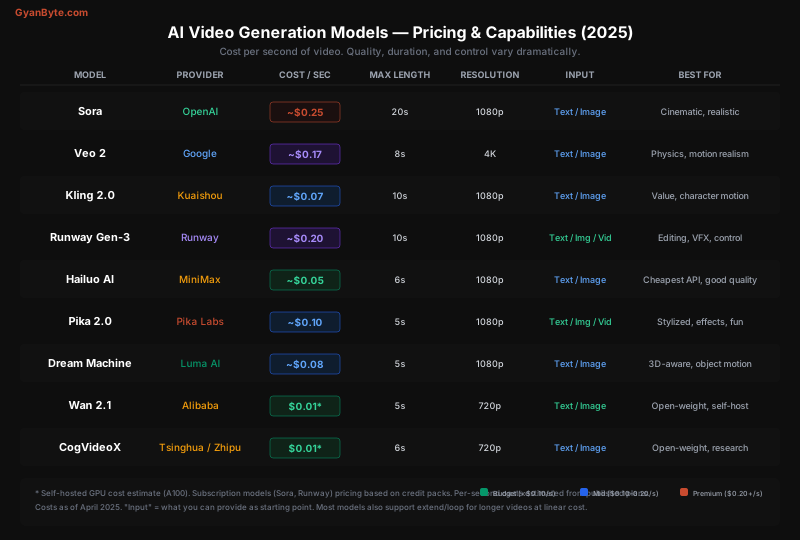
Quick Comparison
| Model | Provider | Cost/Sec | Max Length | Resolution | Input Types |
|---|---|---|---|---|---|
| Sora | OpenAI | ~$0.25 | 20s | 1080p | Text, Image |
| Veo 2 | ~$0.17 | 8s | 4K | Text, Image | |
| Kling 2.0 | Kuaishou | ~$0.07 | 10s | 1080p | Text, Image |
| Runway Gen-3 | Runway | ~$0.20 | 10s | 1080p | Text, Image, Video |
| Hailuo AI | MiniMax | ~$0.05 | 6s | 1080p | Text, Image |
| Pika 2.0 | Pika Labs | ~$0.10 | 5s | 1080p | Text, Image, Video |
| Dream Machine | Luma AI | ~$0.08 | 5s | 1080p | Text, Image |
| Wan 2.1 | Alibaba | ~$0.01* | 5s | 720p | Text, Image |
| CogVideoX | Zhipu AI | ~$0.01* | 6s | 720p | Text, Image |
* Self-hosted GPU cost estimate
Key observation: Video generation is 10-100x more expensive than image generation per asset. A single 5-second clip at standard quality costs $0.25-$5.00 — that’s 5-100 images worth. This makes cost optimization critical.
Model Deep Dive
Sora (OpenAI)
Sora is OpenAI’s flagship video model and currently produces the most cinematic output. It understands camera language — dolly shots, rack focus, slow motion, aerial views — better than any competitor.
Pricing: Available via ChatGPT Pro ($200/month, limited generations) or API. The API charges by resolution and duration:
Resolution      5s          10s         20s
────────────────────────────────────────────
480p            $0.25       $0.50       $1.00
720p            $0.50       $1.00       $2.00
1080p           $1.25       $2.50       $5.00
Best for: Brand films, commercials, hero content where quality is non-negotiable.
from openai import OpenAI

client = OpenAI()

# Text-to-video
response = client.video.create(
    model="sora",
    prompt="Slow-motion close-up of coffee being poured into a ceramic cup, "
           "steam rising, warm morning light streaming through a window, "
           "shallow depth of field, cinematic color grading",
    duration=5,
    resolution="1080p",
    aspect_ratio="16:9"
)

# Image-to-video (more control, fewer retries)
response = client.video.create(
    model="sora",
    prompt="Slowly zoom out while the steam rises, natural camera shake",
    image="https://your-bucket.s3.amazonaws.com/coffee-shot.png",
    duration=5,
    resolution="1080p"
)

video_url = response.data[0].urlStrengths: Best cinematic quality, 20-second max duration (longest), good text comprehension.
Weaknesses: Expensive ($5 for a 20s 1080p clip), slow (2-5 minutes per generation), occasional physics artifacts with fast motion.
Veo 2 (Google DeepMind)
Veo 2 is Google’s answer to Sora. It stands out for physics realism — objects interact convincingly, lighting is photographic, and it’s the only model that outputs 4K natively.
Pricing: Available via Vertex AI. Billed per second of generation at the selected resolution:
Resolution      5s          8s (max)
────────────────────────────────────
720p            $0.35       $0.56
1080p           $0.70       $1.12
4K              $1.05       $1.36*
*4K may require additional processing time.
Best for: Product videos, marketing content, anything where objects need to look physically accurate.
from google.cloud import aiplatform

# Veo 2 via Vertex AI
client = aiplatform.gapic.PredictionServiceClient()

response = client.predict(
    endpoint="projects/your-project/locations/us-central1/publishers/google/models/veo-002",
    instances=[{
        "prompt": "Product showcase: wireless headphones rotating on a glass "
                  "surface, studio lighting with soft reflections, "
                  "premium commercial aesthetic",
        "duration_seconds": 8,
        "resolution": "4k",
        "aspect_ratio": "16:9"
    }]
)Strengths: Best physics, 4K output, strong product photography aesthetic, Google Cloud integration.
Weaknesses: Max 8 seconds (short), limited availability, slower than some competitors.
Kling 2.0 (Kuaishou)
Kling is the value champion. At roughly $0.07/second, it produces surprisingly good 1080p video — not quite Sora quality, but 70-80% of the way there at a third of the price.
Pricing: Credit-based system. Via API (Replicate, fal.ai):
Duration    Standard      Professional
──────────────────────────────────────
5s          $0.35         $0.70
10s         $0.70         $1.40
Best for: Social media content, B-roll, any volume work where Sora quality isn’t justified.
import replicate

# Kling 2.0 via Replicate
output = replicate.run(
    "kuaishou/kling-v2",
    input={
        "prompt": "A woman walking through a neon-lit Tokyo street at night, "
                  "rain reflections on the pavement, handheld camera feel",
        "duration": 5,
        "aspect_ratio": "9:16",  # Vertical for social
        "mode": "standard"       # or "professional" for 2x cost
    }
)
video_url = output["video"]Strengths: Best cost/quality ratio, good character motion, 10s max duration, fast generation.
Weaknesses: Occasional character consistency issues, less cinematic than Sora/Veo.
Runway Gen-3 Alpha
Runway’s differentiation is control. While other models are primarily prompt-driven, Runway offers tools for fine-grained editing:
- Motion Brush: Paint where things should move
- Camera Controls: Specify pan, zoom, tilt, roll
- Video-to-Video: Transform existing footage
- Inpainting: Edit specific parts of a video
Pricing: Credit-based. ~$0.20/second for Gen-3 Alpha, cheaper for older models.
Model           Standard      Turbo
──────────────────────────────────
Gen-3 Alpha     $0.20/s       $0.10/s
Gen-2           $0.10/s       $0.05/s
Best for: VFX work, video editing pipelines, when you need precise control over camera and motion.
import requests

# Runway API — video generation with camera control
response = requests.post(
    "https://api.runwayml.com/v1/video/generate",
    headers={"Authorization": f"Bearer {RUNWAY_API_KEY}"},
    json={
        "model": "gen3a",
        "prompt": "Massive medieval castle on a cliff overlooking the sea, "
                  "dramatic sunset, birds flying",
        "duration": 10,
        "resolution": "1080p",
        "camera": {
            "movement": "push_in",   # dolly forward
            "speed": "slow",
            "angle": "low"           # dramatic low angle
        }
    }
)
video_url = response.json()["output"]["video_url"]
Hailuo AI (MiniMax)
Hailuo is the budget pick for API-first workflows. At ~$0.05/second, it’s the cheapest model with good quality available via API.
Pricing: ~$0.30-0.50 per 6-second clip via API.
Best for: High-volume generation, social media factories, when cost matters more than cinematic perfection.
Pika 2.0
Pika excels at stylized and creative content. Its “Pikaffects” feature adds physics-based effects (melt, inflate, explode, crush) that are unique to the platform.
Best for: Fun social content, memes, creative effects that other models can’t do.
Open-Weight Models (Wan 2.1, CogVideoX)
For self-hosted pipelines, Wan 2.1 (Alibaba) and CogVideoX (Zhipu/Tsinghua) are the leading open-weight video models. Quality is 1-2 tiers below Sora/Veo, but cost approaches zero at scale.
# Self-hosted Wan 2.1 with diffusers
from diffusers import WanPipeline
import torch

pipe = WanPipeline.from_pretrained(
    "Wan-AI/Wan2.1-T2V-14B",
    torch_dtype=torch.float16
).to("cuda")

# Enable memory optimizations for consumer GPUs
pipe.enable_model_cpu_offload()
pipe.enable_vae_tiling()

video_frames = pipe(
    prompt="Timelapse of a flower blooming in a garden, "
           "soft natural light, macro lens",
    num_frames=81,    # ~5s at 16fps
    guidance_scale=5.0,
    num_inference_steps=50
).frames[0]

# Export to video
from diffusers.utils import export_to_video
export_to_video(video_frames, "flower_bloom.mp4", fps=16)
Self-hosting cost math:
GPU             Cost/Hour    Clips/Hour (5s)    Cost/Clip
──────────────────────────────────────────────────────────
A100 80GB       $3.80        ~15-20             $0.19-$0.25
H100            $5.50        ~30-40             $0.14-$0.18
RTX 4090*       $0.15        ~5-8               $0.02-$0.03

* electricity only, excluding hardware cost
Self-hosting makes sense above ~500 clips/month if quality requirements are moderate.
The Cost-Optimized Production Pipeline
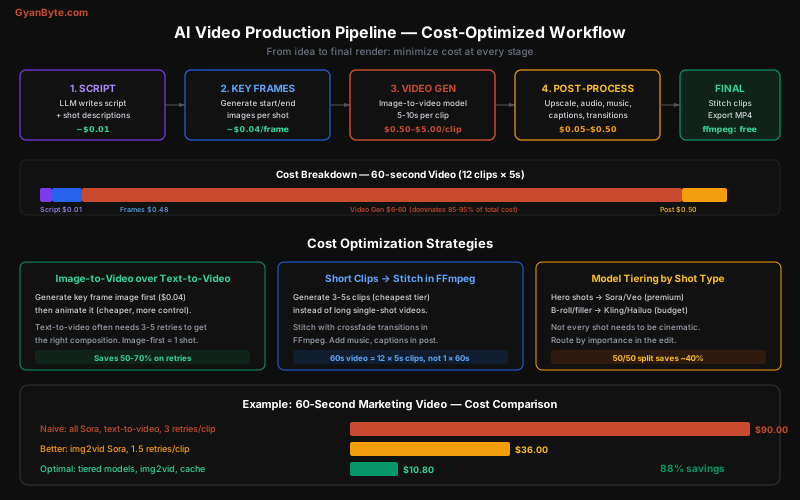
The biggest mistake people make is treating AI video generation as a single step. A professional pipeline has 5 stages, and the expensive video generation step should be as optimized as possible.
Stage 1: Script with LLM (~$0.01)
Use an LLM to write the script and generate shot descriptions:
import anthropic

client = anthropic.Anthropic()

response = client.messages.create(
    model="claude-sonnet-4-6",
    max_tokens=2000,
    messages=[{
        "role": "user",
        "content": """Write a 60-second video script for a coffee brand ad.
        Format each shot as:

        SHOT [number] ([duration]s):
        Visual: [detailed visual description for AI video generation]
        Audio: [music/voiceover direction]
        Camera: [camera movement]

        Make it cinematic, warm, cozy. 12 shots total, 5s each."""
    }]
)

# Cost: ~$0.01 (Sonnet, ~500 output tokens)
# Output: 12 shot descriptions ready for video generation
Stage 2: Key Frame Images (~$0.04/frame)
This is the most important optimization. Instead of text-to-video (expensive, unpredictable), generate a key frame image first, then animate it:
from openai import OpenAI

client = OpenAI()

# Generate starting frame for each shot
shots = [
    "Close-up of coffee beans being ground, warm morning light",
    "Steam rising from a ceramic cup, bokeh background",
    "Hands wrapping around a warm mug, cozy sweater sleeves",
    # ... 12 shots
]

key_frames = []
for shot in shots:
    response = client.images.generate(
        model="dall-e-3",
        prompt=shot,
        size="1792x1024",  # 16:9 for video
        quality="hd"
    )
    key_frames.append(response.data[0].url)
    # Cost: $0.08/frame × 12 = $0.96

# Why image-first?
# 1. You can review composition BEFORE spending $$ on video
# 2. Image generation has no "motion artifacts" to debug
# 3. Image-to-video has higher first-try success rate
# 4. One bad text-to-video retry costs more than the image
Stage 3: Video Generation — Model Tiering
Route each shot to the cheapest model that meets its quality requirements:
from enum import Enum
from dataclasses import dataclass

class ShotImportance(Enum):
    HERO = "hero"       # Opening shot, key moment, close-up
    STANDARD = "standard"  # Normal narrative shot
    BROLL = "broll"     # Transitional, background, filler

@dataclass
class Shot:
    description: str
    duration: int
    importance: ShotImportance
    key_frame_url: str

def route_to_video_model(shot: Shot) -> dict:
    """Route shot to optimal model based on importance."""

    routing = {
        ShotImportance.HERO: {
            "model": "sora",
            "resolution": "1080p",
            "estimated_cost": shot.duration * 0.25,
        },
        ShotImportance.STANDARD: {
            "model": "kling-v2",
            "resolution": "1080p",
            "estimated_cost": shot.duration * 0.07,
        },
        ShotImportance.BROLL: {
            "model": "hailuo",
            "resolution": "1080p",
            "estimated_cost": shot.duration * 0.05,
        },
    }

    return routing[shot.importance]

# 12-shot video, 5s each:
# 3 hero shots (Sora):     3 × 5s × $0.25 = $3.75
# 5 standard (Kling):      5 × 5s × $0.07 = $1.75
# 4 B-roll (Hailuo):       4 × 5s × $0.05 = $1.00
# Total video gen:         $6.50
# vs. all Sora:            12 × 5s × $0.25 = $15.00 → 57% savings
Stage 4: Post-Processing (~$0.50)
Add audio, transitions, captions, and upscaling:
#!/bin/bash
# Stitch clips with crossfade transitions using FFmpeg

# Create concat file
for i in $(seq 1 12); do
    echo "file 'clip_${i}.mp4'" >> concat.txt
done

# Concatenate with 0.5s crossfade between clips
ffmpeg -f concat -safe 0 -i concat.txt \
    -filter_complex "
        [0:v][1:v]xfade=transition=fade:duration=0.5:offset=4.5[v01];
        [v01][2:v]xfade=transition=fade:duration=0.5:offset=9[v02]
    " \
    -c:v libx264 -preset slow -crf 18 \
    output_stitched.mp4

# Add background music
ffmpeg -i output_stitched.mp4 -i background_music.mp3 \
    -filter_complex "[1:a]volume=0.3[music];[0:a][music]amix=inputs=2" \
    -c:v copy -c:a aac \
    final_video.mp4

# Add captions with whisper-generated SRT
ffmpeg -i final_video.mp4 -vf subtitles=captions.srt \
    -c:a copy final_with_captions.mp4
For AI voiceover, use ElevenLabs or OpenAI TTS:
from openai import OpenAI

client = OpenAI()

# Generate voiceover
response = client.audio.speech.create(
    model="tts-1-hd",
    voice="onyx",
    input="Every great morning starts with a perfect cup..."
)

response.stream_to_file("voiceover.mp3")
# Cost: ~$0.03 per 1K characters ($15/1M characters)
# 60s voiceover ≈ 150 words ≈ ~$0.015
Stage 5: Final Assembly (Free)
FFmpeg handles the final render — stitching, audio mixing, format conversion — at zero cost.
Cost Comparison: Full 60-Second Video
Approach                           Video Gen    Other      Total
─────────────────────────────────────────────────────────────────
Naive (all Sora, txt2vid, 3 tries) $90.00      $1.00      $91.00
Moderate (Sora img2vid, 1.5 tries) $33.75      $1.50      $35.25
Tiered (Sora hero + Kling + Hai)   $6.50       $1.50      $8.00
Budget (all Kling, img2vid)        $4.20       $1.00      $5.20
Self-hosted (Wan 2.1 on A100)      $0.60       $0.50      $1.10
Hybrid (AI + stock footage mix)    $2.50       $0.50      $3.00
The optimized tiered approach is 11x cheaper than the naive approach for comparable quality.
Which Model for Which Content?
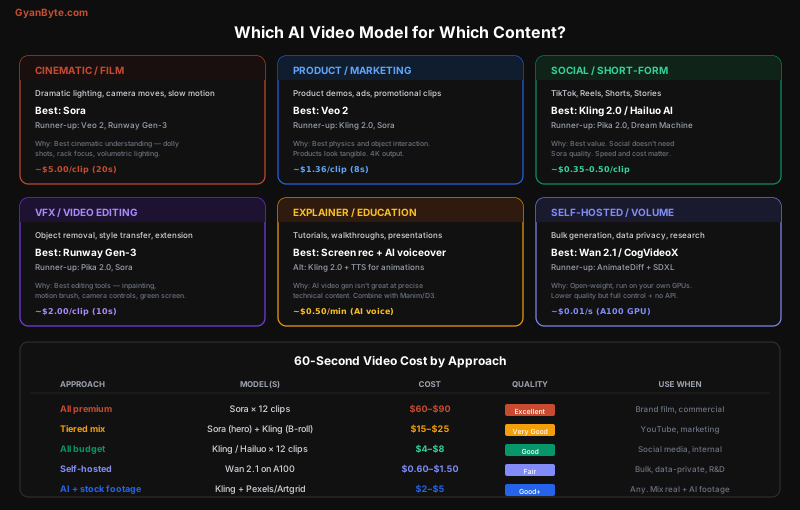
Decision Framework
What kind of video are you making?
│
├─ Brand film / commercial (quality is everything)
│  └─ Sora for hero shots, Veo 2 for product shots
│     Budget: $15-90 per 60s
│
├─ YouTube / marketing video
│  └─ Tiered: Sora (hero) + Kling (standard) + Hailuo (B-roll)
│     Budget: $5-15 per 60s
│
├─ Social media (TikTok, Reels, Shorts)
│  └─ Kling 2.0 or Hailuo AI (best value)
│     Budget: $0.35-0.70 per 5s clip
│
├─ VFX / editing existing footage
│  └─ Runway Gen-3 (motion brush, camera controls)
│     Budget: $2/clip
│
├─ Creative / stylized effects
│  └─ Pika 2.0 (Pikaffects — melt, inflate, explode)
│     Budget: $0.50/clip
│
├─ Explainer / educational
│  └─ Screen recording + AI voiceover (ElevenLabs/OpenAI TTS)
│     Use Kling for animated segments only
│     Budget: $2-5 per minute
│
├─ Bulk / volume (1000+ clips)
│  └─ Self-hosted Wan 2.1 or CogVideoX
│     Budget: $0.01-0.03 per second
│
└─ Hybrid approach
   └─ Mix AI-generated + stock footage (Pexels, Artgrid)
      AI for hero shots, stock for B-roll
      Budget: $2-5 per 60s
Advanced Strategies
Extend and Loop for Longer Videos
Most models max out at 5-20 seconds. For longer content, extend clips:
# Generate a 5s clip, then extend it
def generate_extended_clip(prompt: str, target_duration: int = 20) -> str:
    """Generate a longer clip by extending in 5s increments."""

    # Initial 5s generation
    clip = generate_video(prompt, duration=5, model="kling-v2")
    current_duration = 5

    while current_duration < target_duration:
        # Use the last frame as input for the next segment
        last_frame = extract_last_frame(clip)

        extension = generate_video(
            prompt=f"Continue the motion smoothly: {prompt}",
            image=last_frame,
            duration=5,
            model="kling-v2"
        )

        clip = stitch_clips(clip, extension, crossfade=0.5)
        current_duration += 4.5  # 0.5s overlap for crossfade

    return clip

# Cost: 4 × $0.35 = $1.40 for 20s (Kling)
# vs. Sora 20s = $5.00
Prompt Engineering for Video
Video prompts need more specificity than image prompts. Always include:
# Bad prompt (vague, will need retries)
bad_prompt = "A city at night"

# Good prompt (specific, first-try success)
good_prompt = (
    "Aerial drone shot slowly descending over Tokyo's Shibuya crossing "
    "at night, neon signs reflecting on wet pavement after rain, "
    "crowds of people with umbrellas crossing in all directions, "
    "smooth cinematic camera movement, shallow depth of field, "
    "film grain, 24fps look, warm and cool color contrast"
)

# Prompt template for consistent results
template = """
{scene_description},
Camera: {camera_movement},
Lighting: {lighting_style},
Style: {visual_style},
Mood: {mood},
Duration: {duration}s
"""
Caching and Deduplication
For applications that generate similar videos repeatedly (e.g., personalized product demos):
import hashlib

def get_or_generate_video(prompt: str, params: dict) -> str:
    """Cache generated videos by prompt + params hash."""

    cache_key = hashlib.sha256(
        f"{prompt}:{sorted(params.items())}".encode()
    ).hexdigest()

    # Check CDN/S3 cache
    cached = check_cache(cache_key)
    if cached:
        return cached  # $0.00 — never regenerate

    # Generate and store permanently
    video_url = generate_video(prompt, **params)
    permanent_url = upload_to_s3(video_url, f"videos/{cache_key}.mp4")
    set_cache(cache_key, permanent_url, ttl=None)  # Never expire

    return permanent_url

# Video storage is cheap: ~$0.023/GB/month on S3
# A 5s 1080p clip ≈ 5-10MB ≈ $0.0002/month to store
# Regenerating costs $0.35-$5.00 — always cache
Batch Processing with Budget Controls
from dataclasses import dataclass, field
from datetime import datetime
import asyncio

@dataclass
class VideoJob:
    id: str
    prompt: str
    model: str
    priority: int
    estimated_cost: float
    key_frame_url: str | None = None

class VideoBatchProcessor:
    def __init__(self, daily_budget: float = 50.0, max_concurrent: int = 3):
        self.daily_budget = daily_budget
        self.spent_today = 0.0
        self.semaphore = asyncio.Semaphore(max_concurrent)
        self.queue: list[VideoJob] = []

    async def submit(self, job: VideoJob):
        if self.spent_today + job.estimated_cost > self.daily_budget:
            # Downgrade to cheaper model
            job.model = self._downgrade_model(job.model)
            job.estimated_cost = self._recalculate_cost(job)

        self.queue.append(job)
        self.queue.sort(key=lambda j: j.priority)

    def _downgrade_model(self, model: str) -> str:
        downgrades = {
            "sora": "kling-v2",
            "veo-2": "kling-v2",
            "kling-v2": "hailuo",
            "runway-gen3": "hailuo",
        }
        return downgrades.get(model, model)

    async def process_all(self):
        results = []
        for job in self.queue:
            async with self.semaphore:
                result = await self._generate(job)
                self.spent_today += job.estimated_cost
                results.append(result)
        return results
Audio: The Missing Half
Video without audio feels wrong. Here’s the audio stack:
| Need | Tool | Cost |
|---|---|---|
| Voiceover | ElevenLabs, OpenAI TTS | $0.01-0.03/100 words |
| Background music | Suno, Udio | $0.05-0.10/track |
| Sound effects | ElevenLabs SFX, Freesound | $0.01/effect or free |
| Voice cloning | ElevenLabs | $5-22/month subscription |
# Generate a custom music track with Suno
import requests

response = requests.post(
    "https://api.suno.ai/v1/generate",
    headers={"Authorization": f"Bearer {SUNO_API_KEY}"},
    json={
        "prompt": "Warm acoustic guitar background music, "
                  "coffee shop ambiance, gentle and uplifting, "
                  "60 seconds, suitable for a brand video",
        "duration": 60,
        "instrumental": True
    }
)
# Cost: ~$0.05-0.10 per track
# Much cheaper than stock music licenses ($15-50/track)
Production Cost Summary
For a complete 60-second marketing video:
Component              Budget      Standard     Premium
──────────────────────────────────────────────────────────
Script (LLM)           $0.01       $0.01        $0.05
Key frames (images)    $0.36       $0.96        $0.96
Video generation       $1.50       $6.50        $30.00
Voiceover (TTS)        $0.02       $0.03        $0.50*
Music (AI-generated)   $0.05       $0.10        $0.10
Post-production        Free        Free         Free
──────────────────────────────────────────────────────────
TOTAL                  ~$2         ~$8          ~$32

* Premium uses ElevenLabs voice clone
Compare this to traditional video production:
Traditional 60s video:
  Freelance videographer:  $500-$2,000
  Stock footage:           $100-$500
  Editor:                  $200-$800
  Music license:           $30-$100
  Voiceover artist:        $100-$300
  ────────────────────────
  Total:                   $930-$3,700
AI video is 100-500x cheaper — and getting better every quarter.
Key Takeaways
-
Video generation is 10-100x more expensive than image generation. A 5-second clip costs $0.25-$5. Optimization matters here more than anywhere else in generative AI.
-
Image-to-video beats text-to-video. Generate a key frame first ($0.04), verify the composition, then animate it. This eliminates expensive retries from bad compositions.
-
Tier your models. Don’t use Sora for B-roll. Hero shots get the premium model; everything else gets Kling or Hailuo. A 50/50 split saves ~40%.
-
Sora and Veo 2 lead on quality. Sora for cinematic, Veo 2 for photorealistic products. Runway Gen-3 leads for editing and VFX control.
-
Kling 2.0 and Hailuo are the value picks. 70-80% of Sora’s quality at 30% of the cost. Good enough for social media and most marketing.
-
Self-host for volume. Wan 2.1 and CogVideoX on A100s bring costs to ~$0.01/second. Worth it above 500 clips/month.
-
Post-production is (almost) free. FFmpeg handles stitching, transitions, audio mixing, and captions at zero cost. Keep your expensive steps in generation only.
-
Cache everything permanently. Regenerating a video costs $0.35-5.00. Storing it on S3 costs $0.0002/month. The math is obvious.
-
Don’t forget audio. AI voiceover ($0.01-0.03/100 words) and AI music ($0.05-0.10/track) make the video feel complete at negligible cost.
-
The hybrid approach wins. Mix AI-generated hero shots with stock footage for B-roll. This gives you the best quality-to-cost ratio while keeping the final product looking professional.


