Authentication — proving who someone is — is the front door of your application, and it’s where the worst and most public breaches tend to happen. When a company’s password database leaks and it turns out they stored passwords badly, that’s the story that makes the newspapers and destroys trust overnight. The good news is that authentication is a largely solved problem: there are well-known right answers, and your main job is to use them rather than invent your own. This lesson walks through the three pieces every backend engineer must get right — storing passwords, adding a second factor, and keeping users logged in.
A rule before we start, and it applies to this whole lesson: use a reputable library or identity provider, don’t hand-roll authentication. The algorithms below are worth understanding so you make good choices and spot bad ones, but in production you should lean on well-maintained libraries (or an identity provider / auth service) that have had far more scrutiny than your weekend code. Understanding the “why” is what lets you use them correctly.
Storing Passwords: Slow Is the Whole Point
Start with the non-negotiables. Never store passwords in plain text (obviously). Never store them with reversible encryption (if you can decrypt them, so can whoever steals your key). Store only a one-way hash, so that even you can’t recover the original — you only ever check whether a login attempt hashes to the same value.
But which hash matters enormously, and here’s the counterintuitive part: for passwords you want a slow hash, not a fast one. General-purpose hashes like MD5 and SHA-256 are designed to be fast, which is exactly wrong for passwords, because “fast to hash” means “fast to brute-force.” I measured this on a plain machine to make it concrete:
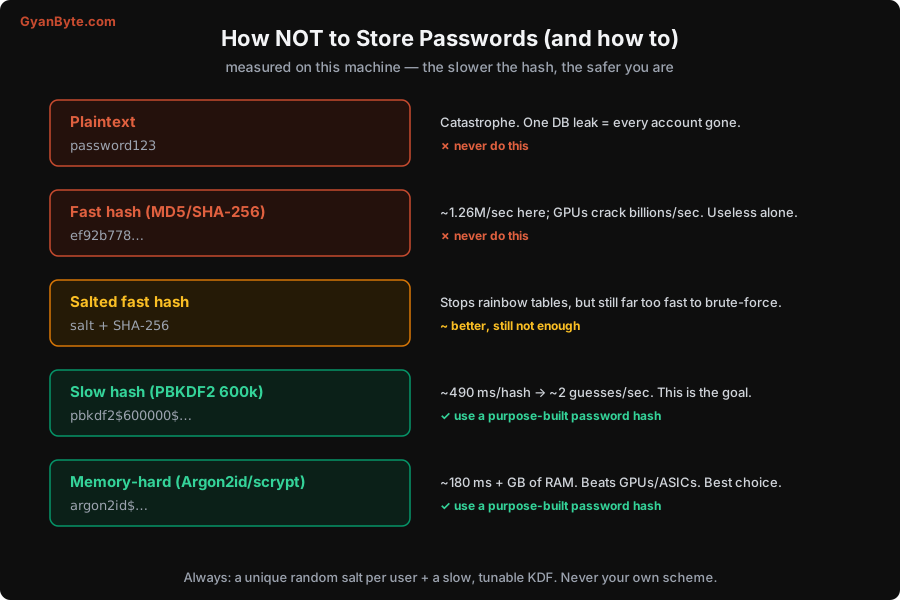
The numbers tell the story:
- Plain SHA-256: about 1.26 million hashes per second in a single thread on this machine — and a real attacker with GPUs does billions per second. Against a leaked database of fast-hashed passwords, common passwords fall in seconds.
- A salt (a unique random value stored per user, hashed along with the password) is essential but not sufficient. It defeats precomputed “rainbow tables” and ensures two users with the same password get different hashes — but a salted fast hash is still cracked one password at a time at that same brutal speed.
- A slow, purpose-built password hash is the real defense. I measured PBKDF2-HMAC-SHA256 at 600,000 iterations ≈ 490 ms per hash — which drops an attacker to roughly two guesses per second, per password. That turns a feasible attack into an infeasible one.
- Memory-hard hashes (Argon2id, scrypt) go further: scrypt measured ~180 ms and demands a lot of RAM, which blunts the GPU/ASIC advantage attackers rely on. These are the current best choice.
So the rule is simple: hash passwords with Argon2id (preferred), scrypt, or bcrypt; or PBKDF2-SHA256 with a high iteration count (OWASP suggests 600,000+) if you’re limited to it. Always with a unique random salt per user — which good password-hashing libraries generate and embed for you. Tune the cost so a single hash takes a couple of hundred milliseconds on your hardware: slow enough to cripple attackers, fast enough that a login feels instant. Two more practical notes: bcrypt silently ignores input past 72 bytes (pre-hash with SHA-256 if you allow long passphrases), and you should plan to raise the cost factor over the years as hardware gets faster.
While we’re here: let users choose long passphrases, screen new passwords against lists of known-breached ones (there are APIs for this that never see the full password), and don’t impose silly composition rules or forced 90-day rotation — modern guidance (NIST) found those make passwords worse, not better.
MFA: The Single Best Thing You Can Add
Even a perfectly hashed password has a weakness: it’s one secret, and secrets get phished, reused across sites, or guessed. Multi-factor authentication (MFA) fixes this by requiring two or more different kinds of proof.
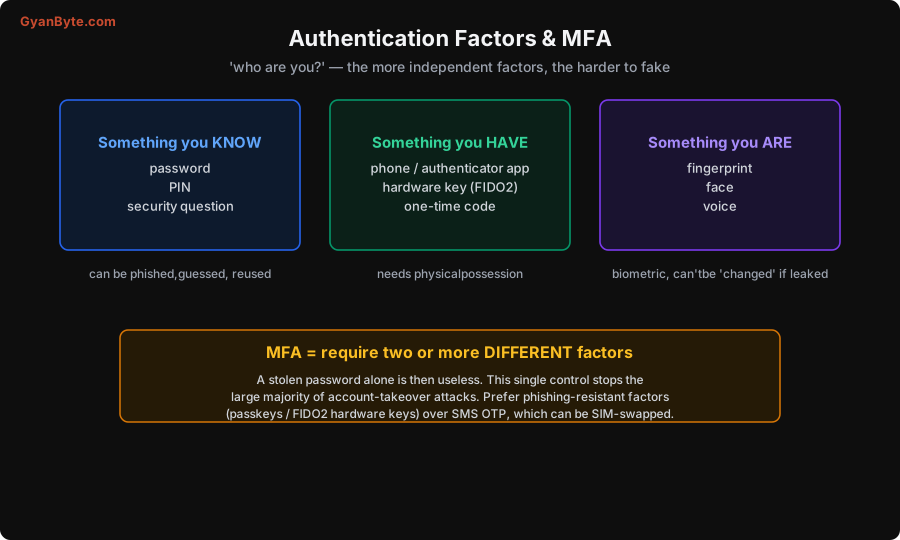
The three categories are something you know (a password), something you have (a phone, an authenticator app, a hardware key), and something you are (a fingerprint or face). MFA means combining factors from different categories, so that compromising one isn’t enough. The impact is dramatic: a stolen or phished password, on its own, becomes useless — and account-takeover is overwhelmingly a password-stealing game, so MFA stops the large majority of it. If you add one control to an authentication system, add MFA.
Not all second factors are equal, though. From weakest to strongest: SMS one-time codes are better than nothing but can be intercepted via SIM-swap; authenticator-app TOTP codes are solidly better; and phishing-resistant factors — passkeys and FIDO2 hardware keys — are the gold standard, because they’re cryptographically bound to your actual site and simply can’t be handed to a fake one. Passkeys are now mainstream and worth offering; they also move users off passwords entirely, which removes the whole password-storage problem from the equation for those accounts.
Sessions vs Tokens: The Revocation Trade-off
Once a user proves who they are, you need to remember that across requests without asking for the password each time. There are two broad approaches, and the real difference between them is how easily you can revoke access.
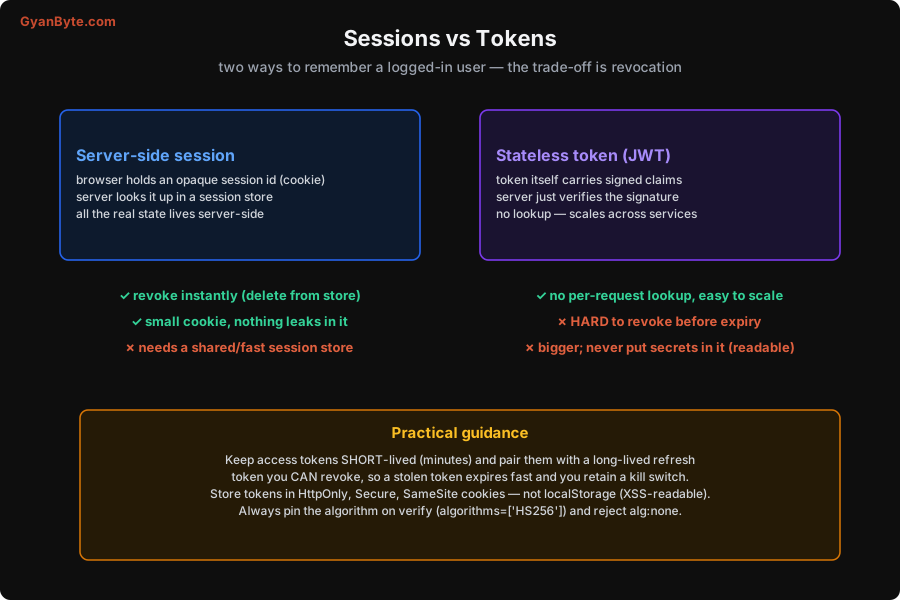
Server-side sessions: on login, the server creates a session, stores the state (who you are, when you logged in) in a session store, and hands the browser an opaque, random session id in a cookie. Every request, the server looks that id up. The win is instant revocation — to log someone out everywhere, or kill a stolen session, you just delete it from the store. The cost is that you need a fast, shared session store (Redis, a database), which every request hits.
Stateless tokens (JWT): instead of storing state, you give the client a signed token that contains the claims (“user: asha, role: editor, expires: …”). The server just verifies the signature on each request — no lookup, which scales beautifully across many services. The catch is the mirror image of the session’s strength: because there’s no server-side state, a valid token is valid until it expires, and you can’t easily revoke it mid-life. If it’s stolen, the attacker has access until expiry.
Neither is “more secure” in the abstract; they trade revocation for scalability. The practical pattern that gets most of both:
- Keep access tokens short-lived (minutes), so a stolen one expires quickly on its own.
- Pair them with a long-lived refresh token that you can revoke (it’s checked against server state when used) — so you retain a kill switch.
- Store tokens in HttpOnly, Secure, SameSite cookies, never in
localStorage—localStorageis readable by any JavaScript, so one XSS bug (Lesson 5) hands over the token. HttpOnly keeps scripts from reading it at all.
JWTs specifically have a few sharp edges that cause real breaches, so commit these to memory:
- Always pin the algorithm on verification — tell your library exactly which algorithm to expect (
algorithms=['HS256']). Historically, verifiers trusted thealgfield inside the token, so an attacker could setalg: noneand submit a token with no signature, or swap a symmetric/asymmetric algorithm, and sail through. I demonstrated thealg:noneforgery in the experiments: a token with admin claims and an empty signature is accepted by any verifier that honours the token’s own header. Rejectnoneand pin the algorithm. - A JWT is signed, not encrypted — anyone can base64-decode and read it. Never put secrets in the payload.
- Validate expiry, issuer, and audience, not just the signature.
Pitfalls to Avoid
- Storing passwords with a fast hash (or no hash). MD5/SHA-256 are far too fast; a leak is cracked quickly. Use Argon2id/scrypt/bcrypt or high-iteration PBKDF2, always salted.
- Rolling your own auth or crypto. Use vetted libraries or an identity provider; understand them, don’t reinvent them.
- Skipping MFA. It’s the single highest-impact control against account takeover. Offer it, prefer phishing-resistant factors.
- Storing tokens in localStorage. One XSS and the token is gone. Use HttpOnly, Secure, SameSite cookies.
- Trusting a JWT’s own
algheader. Pin the expected algorithm and rejectalg:none, or you invite signature-bypass forgery. - Long-lived, non-revocable access tokens. Keep access tokens short; back them with a revocable refresh token so you have a kill switch.
- Leaking which accounts exist. Make “wrong password” and “no such user” indistinguishable, and rate-limit login (Lesson 8) to blunt brute-force.
Quick Recap
- Store passwords as a one-way, salted, slow hash (Argon2id/scrypt/bcrypt, or PBKDF2 at 600k+). Measured: a slow hash cuts an attacker from ~1.26M/sec to ~2 guesses/sec.
- Add MFA — two or more different factors. It renders a stolen password useless and stops most account takeovers. Prefer passkeys/FIDO2 over SMS.
- Choose sessions vs tokens by your revocation needs: sessions revoke instantly but need a store; JWTs scale but resist revocation.
- Use the hybrid: short-lived access token + revocable refresh token, in HttpOnly SameSite cookies.
- For JWTs: pin the algorithm, reject
alg:none, never store secrets in them, validate expiry/issuer/audience.
Next lesson: being logged in is not the same as being allowed. We’ll cover authorization — least privilege, RBAC vs ABAC, and the single most common serious API bug, IDOR/BOLA.