Every good defender starts by learning to see their own system the way an attacker does. Not because you’re going to attack anything — this is a defensive course, and you only ever test systems you own or are authorised to test — but because you cannot protect against what you cannot imagine. An attacker looks at your login form and thinks “what happens if I put a quote in here?” They look at your invoice URL and think “what if I change the number?” They look at your error page and think “what did that stack trace just tell me?” This lesson is about building that reflex, and about the vocabulary (CIA, AAA, STRIDE) that lets you apply it systematically instead of by luck.
The encouraging news, which runs through this whole course, is that real attacks are mostly boring. The headline breaches are rarely someone breaking your encryption with exotic maths. They’re a password stored as plain text, an API that forgot to check who owns a record, a secret pushed to a public repo, a dependency three years out of date, a cloud permission set to *. Boring and repeatable — which means a handful of solid, learnable habits stops the large majority of them. That’s the deal this course offers.
What “Secure” Actually Means
“Make it secure” is too vague to act on. Security engineers break it into three concrete properties — the CIA triad — plus the machinery you use to achieve them.
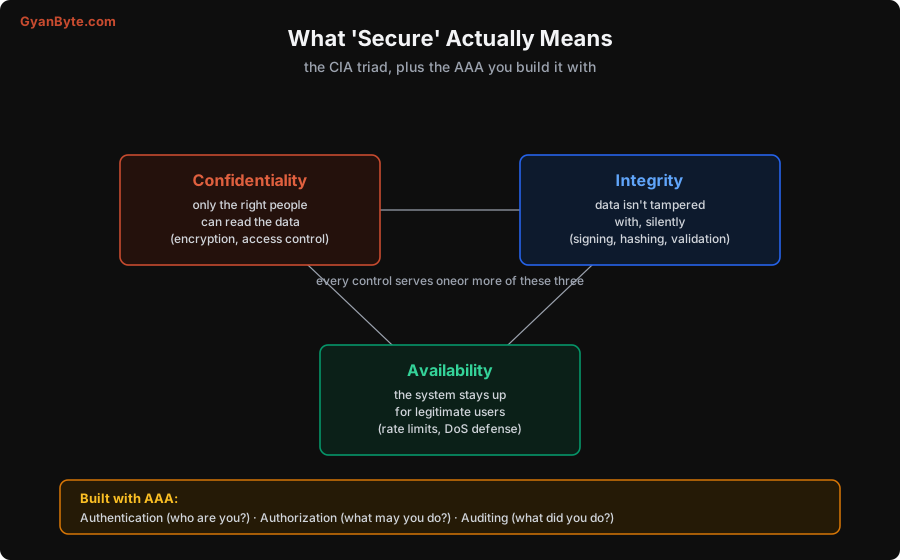
- Confidentiality — only the people who should read the data can read it. Broken by a database leak, an over-broad API response, logs that print a token. Built with encryption and access control.
- Integrity — data and code aren’t modified by anyone unauthorised, and if they are, you can tell. Broken by injection, by a tampered API request, by a man-in-the-middle rewriting traffic. Built with validation, signing, and hashing.
- Availability — the system stays up and usable for legitimate users. Broken by a denial-of-service flood, a resource-exhaustion bug, a single over-loaded endpoint. Built with rate limits, quotas, timeouts, and redundancy.
Every security control you’ll ever add serves one or more of these three. When you’re unsure whether something matters, ask: which of confidentiality, integrity, or availability does this protect, and what happens to that property if I skip it?
You achieve the CIA properties with three activities, conventionally called AAA:
- Authentication — establishing who you are (Lesson 2). A password, a token, a passkey.
- Authorization — deciding what you’re allowed to do (Lesson 3). Being logged in is not the same as being allowed.
- Auditing — recording what was done, so you can detect and investigate (Lesson 11).
Keep authentication and authorization firmly separate in your head: one asks “who are you?”, the other “may you do this?“. Confusing them is the source of a huge class of bugs, as you’ll see in Lesson 3.
Threat Modeling: Asking “What Could Go Wrong?”
Threat modeling sounds heavyweight, but at its core it’s a cheap, structured conversation you have at design time — on a whiteboard, before you write code. You draw how data flows through your system, you find the trust boundaries (the lines where data crosses from a less-trusted zone to a more-trusted one — the internet to your API, your API to your database, one service to another), and at each boundary you ask what an attacker could do. The whole point is to find problems while they’re still cheap to fix: a flaw caught in a design discussion costs almost nothing; the same flaw caught after a breach costs you customers, money, and sleep (Lesson 12 shows just how steep that curve is).
The classic checklist for “what could go wrong at this boundary” is STRIDE, a mnemonic from Microsoft. It’s useful precisely because it’s a checklist — it stops you from only imagining the attacks you happen to think of.
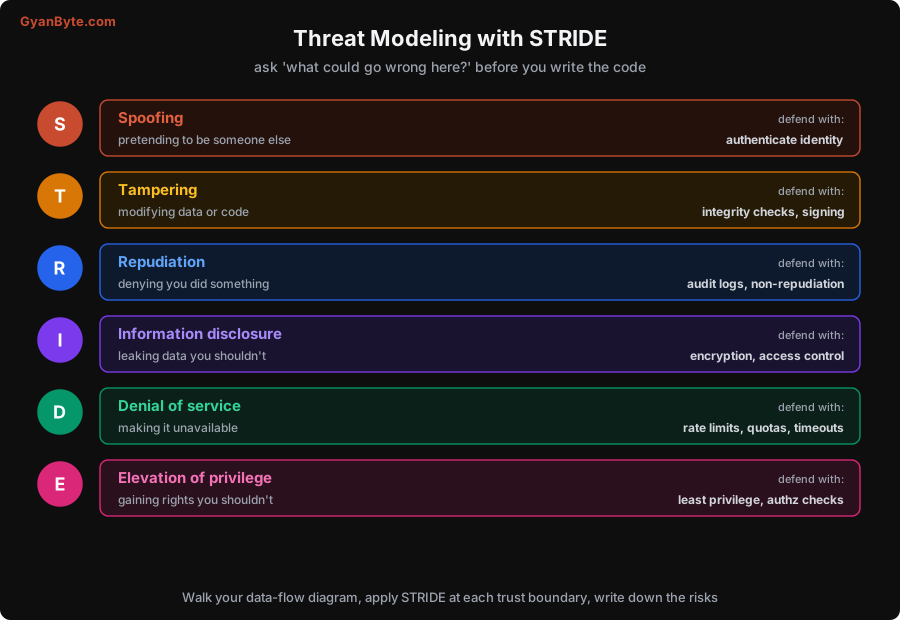
Walk through each letter at each trust boundary:
- S — Spoofing: can someone pretend to be a user, a service, or a server they’re not? Defend by authenticating identity (strong auth, verified certificates).
- T — Tampering: can someone modify data in transit, at rest, or the code itself? Defend with integrity checks, signing, TLS, input validation.
- R — Repudiation: can someone do something and then credibly deny it? Defend with trustworthy audit logs (Lesson 11).
- I — Information disclosure: can someone read data they shouldn’t — through an error message, an API, a log, a side channel? Defend with encryption and access control.
- D — Denial of service: can someone make the system unavailable? Defend with rate limits, quotas, timeouts, and capacity planning.
- E — Elevation of privilege: can someone gain rights they shouldn’t have — a normal user becoming admin? Defend with least privilege and authorization checks on every action.
You don’t need a formal document for every change. For a small feature, STRIDE is a five-minute mental pass: “this new endpoint takes a user id — can someone pass a different user’s id (elevation / disclosure)? Can they spam it (DoS)? Is the input going into a query (tampering / injection)?” For a big new system, it’s worth drawing the diagram and writing the risks down with owners. Either way, the habit is the same: before building, ask what an attacker would try, and decide your answer in advance.
The Attacker’s Three Assumptions
Beyond the formal tools, thinking like an attacker comes down to internalising three assumptions that most developers resist because they’re inconvenient — and that are nonetheless true.
1. Every input is hostile until proven otherwise. Not just the obvious text box. Every byte that crosses a trust boundary — URL parameters, headers, cookies, uploaded files, JSON bodies, data from another service, even data you read back from your own database that a user once put there — is attacker-controlled until you’ve validated it. The developer sees “the username field”; the attacker sees “a place I can type a quote, a script tag, a path, a huge string, or a null byte and see what breaks.” Treating all input as hostile is the root reflex behind Lessons 4 and 5.
2. Things will fail, so don’t let a failure open the door. Attackers love error states, because error handling is where developers are sloppy. What does your code do when the token is malformed, the database is down, the third-party call times out? If the answer is “it falls through and allows the request,” you have a problem. Fail closed, not open: when in doubt, deny. A login system that logs everyone in when the auth server is unreachable is worse than one that logs no one in.
3. Attackers don’t play by your intended flow. You designed a nice three-step wizard; the attacker calls step three directly. You hid the admin button in the UI; the attacker calls the admin endpoint anyway. The client is not under your control — anyone can craft any request with curl. Every security decision has to be enforced on the server, on the actual request, every time. The UI is for users; it is never a security boundary.
Hold these three and most of the specific techniques in this course start to feel like obvious consequences rather than things to memorise.
A Realistic Example
Let me make it concrete with an illustrative example (made up to teach the point). Say you’re adding a “download my invoice” feature: GET /api/invoices/{id} returns a PDF. Walk STRIDE at the trust boundary between the internet and your API:
- Spoofing: is the caller authenticated at all? (Require a valid session/token.)
- Elevation / Information disclosure: the
{id}is attacker-controlled — can user A pass user B’s invoice id and get it? (This is the single most common API bug; Lesson 3. The fix is to check ownership, not just that they’re logged in.) - Tampering: does
{id}flow into a SQL query by string-building? (Injection; Lesson 4. Parameterize it.) - Denial of service: can someone request ten thousand invoices a second and exhaust your PDF generator? (Rate-limit it; Lesson 8.)
- Information disclosure (again): if the invoice doesn’t exist, does the error leak whether that id belongs to someone? (Return a uniform 404.)
Five minutes of this, before writing the handler, catches bugs that would otherwise become incidents. That’s the entire value proposition of thinking like an attacker: it’s cheap, it’s systematic, and it moves the cost of security from “after the breach” to “during design.”
Pitfalls to Avoid
- Treating security as a later phase. It’s a design-time activity. Bolting it on after the fact is far more expensive and far less effective (Lesson 12).
- Only defending against attacks you happen to think of. Use a checklist (STRIDE) so you cover the categories systematically, not just the ones that occur to you.
- Trusting the client. The UI, client-side validation, and hidden buttons are not security. Enforce everything on the server.
- Failing open. When auth or validation errors out, deny by default. A failure should never grant access.
- Assuming “we’re too small to be a target.” Most attacks are automated and untargeted — bots scan the whole internet for the boring mistakes. Being small is not cover.
- Confusing authentication with authorization. Logged in ≠ allowed. Keep the two ideas separate.
Quick Recap
- “Secure” means protecting Confidentiality, Integrity, Availability (the CIA triad), achieved through Authentication, Authorization, Auditing (AAA).
- Threat modeling is a cheap, design-time habit: draw the data flow, find the trust boundaries, and ask what could go wrong at each one.
- STRIDE gives you the categories to check: Spoofing, Tampering, Repudiation, Information disclosure, Denial of service, Elevation of privilege.
- Adopt the attacker’s three assumptions: every input is hostile, things will fail (so fail closed), and attackers ignore your intended flow (so enforce on the server).
- Most breaches are boring and repeatable — which is why a handful of solid habits, taught in the rest of this course, stops the majority of them.
Next lesson: the first and most abused boundary of all — proving who someone is. We’ll store passwords properly (with real numbers showing why it matters), add MFA, and choose between sessions and tokens.