Redis is fast and simple, but its very design — single-threaded, in-memory — means a few specific mistakes cause most of its production incidents. The good news is they’re a short, knowable list. This final lesson is how to operate Redis safely: the single-thread golden rule, the traps that make a fast Redis go slow, what to watch, and the honest cases where Redis is the wrong tool.
The things that cause real incidents
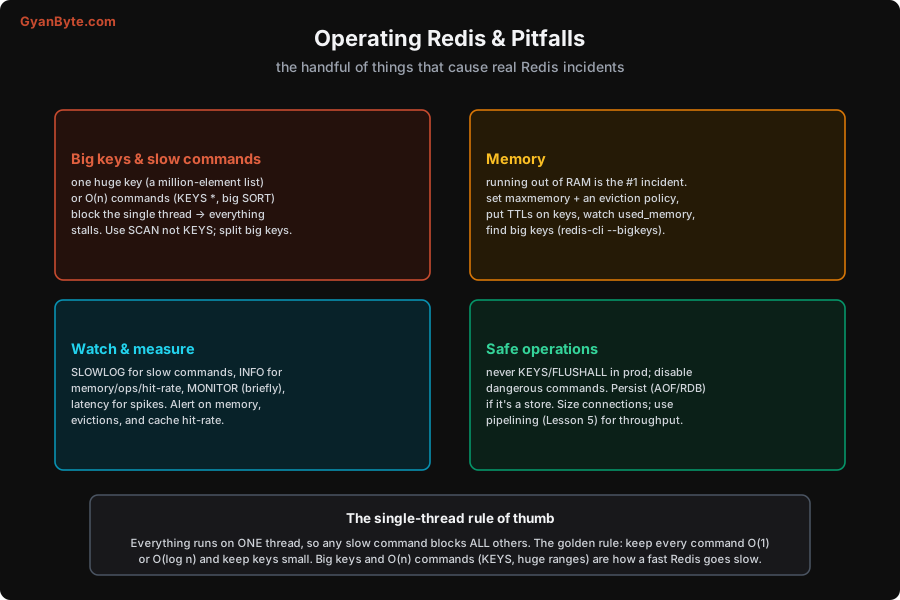
Big keys and slow commands — the single-thread trap. This is the one that surprises people. Because Redis runs commands on one thread, any command that takes a long time blocks every other client for that whole duration. Two ways this happens:
- O(n) commands on big data —
KEYS *(scans the entire keyspace),SMEMBERSon a giant set,LRANGE 0 -1on a huge list, a bigSORT,HGETALLon a huge hash. On a large dataset these take milliseconds to seconds, during which Redis serves nothing else. A singleKEYS *on a big production instance can cause a latency spike for every client. - Big keys — a single key holding a huge value (a list of millions of elements, a giant hash). Operating on it is inherently slow, it’s a memory hog, and it can’t be evicted or expired incrementally (deleting it blocks the thread too — use
UNLINKfor async deletion).
The golden rule: keep every command O(1) or O(log n), and keep keys small. Use SCAN (a cursor that returns keys in small batches) instead of KEYS; use SSCAN/HSCAN/ZSCAN to iterate big collections incrementally; read ranges/pages, not whole collections; split big keys (per-day, per-shard) and cap them (LTRIM, MAXLEN). Big keys and O(n) commands are, more than anything, how a fast Redis goes slow.
Memory — the #1 incident. Covered in Lesson 3, but it belongs on every operations checklist: set maxmemory with headroom, choose an eviction policy that matches the role, TTL transient keys, and hunt big keys (redis-cli --bigkeys). Running out of RAM is the most common Redis outage, and it’s entirely preventable.
Watch and measure. A few built-in tools cover most needs:
SLOWLOG— logs commands that exceeded a latency threshold. The first place to look for “Redis is slow” — it names the offending commands.INFO— memory used, ops/sec, cache hit-rate, connected clients, evictions, replication status. Scrape it into your monitoring.LATENCY(latency monitoring) — tracks latency spikes and their causes.MONITOR— streams every command live (use briefly for debugging only — it’s heavy and slows Redis).
Alert on: memory usage approaching maxmemory, rising evictions (your cache is too small or TTLs too long), a falling cache hit-rate (cache not helping), and under-replicated/failing replicas (Lesson 8). Those few signals catch most problems early.
Safe-operations hygiene. A short list of “don’ts” that prevent self-inflicted outages:
- Never run
KEYS *orFLUSHALL/FLUSHDBin production.KEYSblocks;FLUSHALLdeletes everything. Disable or rename these dangerous commands (rename-command) in production configs. - Persist if it’s a store (Lesson 7), and keep off-box backups.
- Size your connection pool sensibly (too many connections waste memory; too few bottleneck), and use pipelining (Lesson 5) for throughput.
When NOT to use Redis
The honest counterpart to all this power — the cases where Redis is the wrong tool, and what to use instead:
- As your primary database. Redis is the fast layer beside your database, not instead of it. Your system of record — the data you can never lose, that needs rich querying and transactions — belongs in a durable database (the Database Internals course). Redis holds hot copies and ephemeral state.
- For datasets that don’t fit in RAM. Redis keeps everything in memory. If your data is terabytes that mostly sit cold, RAM is the wrong (and expensive) place for it — use a disk-based store, and cache the hot subset in Redis.
- For complex queries and joins. Redis has no SQL, no joins, no ad-hoc querying — you access data by key via the structure you chose up front. If you need to query data many different ways, that’s a database’s job.
- For durable data without persistence/backup. If Redis holds the only copy of something important and you haven’t configured persistence and backups, a failure loses it. Either make it durable (Lesson 7) or keep the source of truth elsewhere.
The recurring theme of the whole course: Redis is brilliant at being an in-memory, data-structure-shaped, fast layer — caching, hot state, counters, leaderboards, rate limits, coordination, light messaging. Use it for those, operate it by the single-thread rule and the memory discipline, and reach for a database when you need durability at scale, rich queries, or data bigger than RAM. Used that way, Redis is one of the highest-leverage pieces of infrastructure you can add to a system.
That’s the course. You now have the full picture of Redis: the in-memory, single-threaded, data-structure model and why it’s fast (measured ~100k ops/sec); the data structures and the patterns they unlock; memory and expiry; caching and its bugs; pipelining (16–25×) and atomicity; pub/sub and streams; persistence; replication, Sentinel and Cluster; distributed locks and coordination; the advanced patterns; and how to operate it safely. Reach for the right structure, keep commands O(1)/O(log n), mind the memory, and Redis will serve you at microsecond speed for years.
Pitfalls to Avoid
KEYS *in production. It scans the whole keyspace on the single thread, stalling every client. UseSCAN(cursor-based) instead; disableKEYSin prod.- Big keys and O(n) commands. A million-element key or
SMEMBERS/LRANGE 0 -1/bigSORTblocks the thread. Keep keys small and commands O(1)/O(log n); use theSCAN-family and ranges;UNLINKfor async delete. - Running out of memory. The #1 incident. Set
maxmemory+ eviction, TTL transient keys, find big keys (--bigkeys). Alert before you hit the cap. - No monitoring. Flying blind means you discover problems as outages. Watch
SLOWLOG,INFO(memory, hit-rate, evictions), and alert on the few key signals. FLUSHALL/FLUSHDBorMONITORin prod.FLUSHALLwipes everything;MONITORslows Redis. Disable/rename dangerous commands; useMONITORonly briefly for debugging.- Using Redis as a primary database. No durability-at-scale guarantees by default, no rich queries, RAM-bound. Keep the system of record in a database; use Redis as the fast layer beside it.
Quick Recap
- The single-thread rule: one slow command blocks everything. Keep every command O(1)/O(log n) and keys small. Big keys and O(n) commands (
KEYS *,SMEMBERS, bigSORT) are how a fast Redis goes slow — useSCAN-family, ranges,UNLINK. - Memory is the #1 incident:
maxmemory+ eviction, TTLs, hunt big keys (--bigkeys). WatchSLOWLOGandINFO; alert on memory, evictions, hit-rate, replica health. - Safe ops: never
KEYS */FLUSHALLin prod (disable them), persist if it’s a store + back up, size connections, pipeline for throughput. - When NOT to use Redis: as your primary database, for data that doesn’t fit in RAM, for complex queries/joins, or for durable data with no persistence/backup. It’s the fast layer beside your database, not instead of it.
That’s the course — reach for the right structure, respect the single thread and the memory, and Redis will serve you at microsecond speed.