This is the capstone lesson. You are going to build a complete, production-ready Task Management API that brings together every concept from this course — TypeScript, Express, PostgreSQL with Prisma, Redis caching, JWT authentication, input validation, structured logging, testing, Docker, and CI/CD. By the end, you will have a deployable project that demonstrates real-world backend engineering practices.
Project Overview
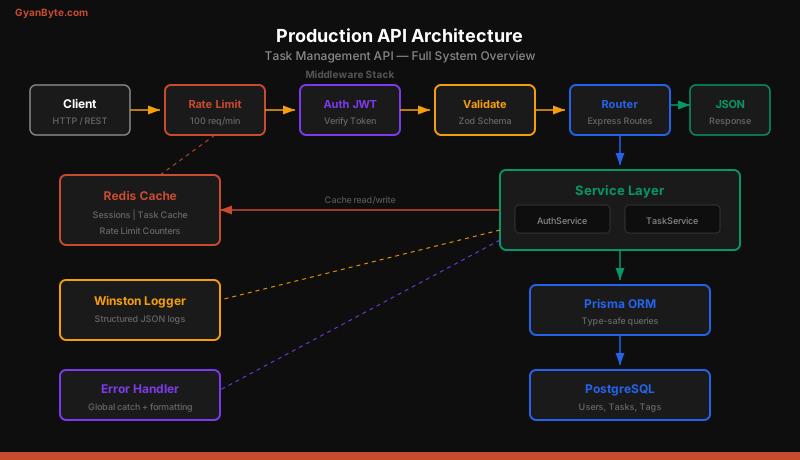
The Task Management API lets users register, log in, create tasks, organize them with tags, and manage their workflow. It is intentionally scoped to be buildable in a weekend while covering every production concern.
Core features:
- User registration and login with JWT access + refresh tokens
- CRUD operations on tasks with ownership authorization
- Tag management for task organization
- Redis caching for frequently accessed data
- Rate limiting per user and per IP
- Structured JSON logging with request correlation IDs
- Comprehensive test coverage (unit + integration)
Project Structure
The project uses a feature-based (modular) structure instead of the traditional MVC layout. Each module contains its own controller, service, routes, validation schema, and tests. This keeps related code together and makes it easy to add new modules without touching unrelated files.
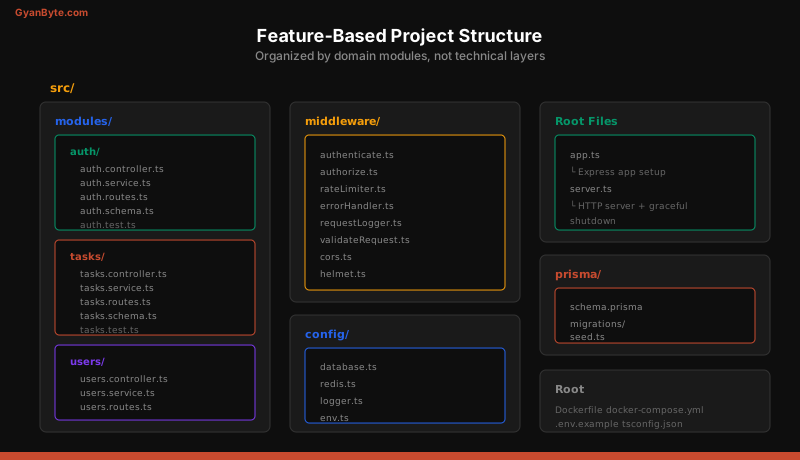
task-api/
├── src/
│   ├── modules/
│   │   ├── auth/
│   │   │   ├── auth.controller.ts
│   │   │   ├── auth.service.ts
│   │   │   ├── auth.routes.ts
│   │   │   ├── auth.schema.ts
│   │   │   └── auth.test.ts
│   │   ├── tasks/
│   │   │   ├── tasks.controller.ts
│   │   │   ├── tasks.service.ts
│   │   │   ├── tasks.routes.ts
│   │   │   ├── tasks.schema.ts
│   │   │   └── tasks.test.ts
│   │   └── users/
│   │       ├── users.controller.ts
│   │       ├── users.service.ts
│   │       └── users.routes.ts
│   ├── middleware/
│   │   ├── authenticate.ts
│   │   ├── authorize.ts
│   │   ├── rateLimiter.ts
│   │   ├── errorHandler.ts
│   │   ├── requestLogger.ts
│   │   └── validateRequest.ts
│   ├── config/
│   │   ├── database.ts
│   │   ├── redis.ts
│   │   ├── logger.ts
│   │   └── env.ts
│   ├── utils/
│   │   ├── ApiError.ts
│   │   ├── asyncHandler.ts
│   │   └── pagination.ts
│   ├── app.ts
│   └── server.ts
├── prisma/
│   ├── schema.prisma
│   ├── migrations/
│   └── seed.ts
├── tests/
│   ├── setup.ts
│   └── helpers.ts
├── Dockerfile
├── docker-compose.yml
├── .github/workflows/deploy.yml
├── .env.example
├── tsconfig.json
└── package.json
Setting Up the Project
Initialize the project with TypeScript and install the core dependencies:
mkdir task-api && cd task-api
npm init -y
npm install express cors helmet morgan compression
npm install @prisma/client ioredis jsonwebtoken bcryptjs zod uuid
npm install winston
npm install -D typescript @types/express @types/node @types/jsonwebtoken
npm install -D @types/bcryptjs @types/cors @types/morgan @types/uuid
npm install -D prisma tsx vitest supertest @types/supertest
Configure TypeScript with tsconfig.json:
{
  "compilerOptions": {
    "target": "ES2022",
    "module": "NodeNext",
    "moduleResolution": "NodeNext",
    "outDir": "./dist",
    "rootDir": "./src",
    "strict": true,
    "esModuleInterop": true,
    "skipLibCheck": true,
    "forceConsistentCasingInFileNames": true,
    "resolveJsonModule": true,
    "declaration": true,
    "declarationMap": true,
    "sourceMap": true
  },
  "include": ["src/**/*"],
  "exclude": ["node_modules", "dist", "tests"]
}
Database Schema with Prisma
The schema defines three models — User, Task, and Tag — with proper relations, indexes, and constraints.
// prisma/schema.prisma
generator client {
  provider = "prisma-client-js"
}

datasource db {
  provider = "postgresql"
  url      = env("DATABASE_URL")
}

model User {
  id           String   @id @default(uuid())
  email        String   @unique
  passwordHash String   @map("password_hash")
  name         String
  role         Role     @default(USER)
  createdAt    DateTime @default(now()) @map("created_at")
  updatedAt    DateTime @updatedAt @map("updated_at")
  tasks        Task[]

  @@map("users")
}

model Task {
  id          String     @id @default(uuid())
  title       String
  description String?
  status      TaskStatus @default(TODO)
  priority    Priority   @default(MEDIUM)
  dueDate     DateTime?  @map("due_date")
  userId      String     @map("user_id")
  user        User       @relation(fields: [userId], references: [id], onDelete: Cascade)
  tags        Tag[]
  createdAt   DateTime   @default(now()) @map("created_at")
  updatedAt   DateTime   @updatedAt @map("updated_at")

  @@index([userId])
  @@index([status])
  @@index([dueDate])
  @@map("tasks")
}

model Tag {
  id    String @id @default(uuid())
  name  String @unique
  color String @default("#2563eb")
  tasks Task[]

  @@map("tags")
}

enum Role {
  USER
  ADMIN
}

enum TaskStatus {
  TODO
  IN_PROGRESS
  DONE
  CANCELLED
}

enum Priority {
  LOW
  MEDIUM
  HIGH
  URGENT
}
Run npx prisma migrate dev --name init to create the database tables and generate the Prisma client.
Environment Configuration
Create a type-safe environment configuration using Zod:
// src/config/env.ts
import { z } from "zod";

const envSchema = z.object({
  NODE_ENV: z.enum(["development", "test", "production"]).default("development"),
  PORT: z.coerce.number().default(3000),
  DATABASE_URL: z.string().url(),
  REDIS_URL: z.string().url(),
  JWT_ACCESS_SECRET: z.string().min(32),
  JWT_REFRESH_SECRET: z.string().min(32),
  JWT_ACCESS_EXPIRY: z.string().default("15m"),
  JWT_REFRESH_EXPIRY: z.string().default("7d"),
  CORS_ORIGIN: z.string().default("http://localhost:3000"),
  RATE_LIMIT_WINDOW_MS: z.coerce.number().default(60000),
  RATE_LIMIT_MAX: z.coerce.number().default(100),
});

export const env = envSchema.parse(process.env);
This validates all environment variables at startup. If any required variable is missing or invalid, the application fails fast with a clear error message instead of crashing later at runtime.
Authentication Module
The auth module handles user registration, login, and token refresh. Passwords are hashed with bcrypt, and the API returns short-lived access tokens with long-lived refresh tokens.
// src/modules/auth/auth.service.ts
import bcrypt from "bcryptjs";
import jwt from "jsonwebtoken";
import { prisma } from "../../config/database.js";
import { env } from "../../config/env.js";
import { ApiError } from "../../utils/ApiError.js";

export class AuthService {
  async register(email: string, password: string, name: string) {
    const existing = await prisma.user.findUnique({ where: { email } });
    if (existing) {
      throw new ApiError(409, "Email already registered");
    }

    const passwordHash = await bcrypt.hash(password, 12);
    const user = await prisma.user.create({
      data: { email, passwordHash, name },
      select: { id: true, email: true, name: true, role: true },
    });

    const tokens = this.generateTokens(user.id, user.role);
    return { user, ...tokens };
  }

  async login(email: string, password: string) {
    const user = await prisma.user.findUnique({ where: { email } });
    if (!user) {
      throw new ApiError(401, "Invalid email or password");
    }

    const isValid = await bcrypt.compare(password, user.passwordHash);
    if (!isValid) {
      throw new ApiError(401, "Invalid email or password");
    }

    const tokens = this.generateTokens(user.id, user.role);
    return {
      user: { id: user.id, email: user.email, name: user.name, role: user.role },
      ...tokens,
    };
  }

  async refreshToken(token: string) {
    try {
      const payload = jwt.verify(token, env.JWT_REFRESH_SECRET) as {
        userId: string;
        role: string;
      };
      return this.generateTokens(payload.userId, payload.role);
    } catch {
      throw new ApiError(401, "Invalid or expired refresh token");
    }
  }

  private generateTokens(userId: string, role: string) {
    const accessToken = jwt.sign({ userId, role }, env.JWT_ACCESS_SECRET, {
      expiresIn: env.JWT_ACCESS_EXPIRY,
    });
    const refreshToken = jwt.sign({ userId, role }, env.JWT_REFRESH_SECRET, {
      expiresIn: env.JWT_REFRESH_EXPIRY,
    });
    return { accessToken, refreshToken };
  }
}
Input Validation with Zod
Every endpoint validates its input using Zod schemas. Invalid requests are rejected before they reach the controller:
// src/modules/auth/auth.schema.ts
import { z } from "zod";

export const registerSchema = z.object({
  body: z.object({
    email: z.string().email("Invalid email address"),
    password: z
      .string()
      .min(8, "Password must be at least 8 characters")
      .regex(/[A-Z]/, "Password must contain an uppercase letter")
      .regex(/[0-9]/, "Password must contain a number"),
    name: z.string().min(1, "Name is required").max(100),
  }),
});

export const loginSchema = z.object({
  body: z.object({
    email: z.string().email(),
    password: z.string().min(1, "Password is required"),
  }),
});

export const refreshSchema = z.object({
  body: z.object({
    refreshToken: z.string().min(1, "Refresh token is required"),
  }),
});
Validation Middleware
A reusable middleware parses the request against a Zod schema:
// src/middleware/validateRequest.ts
import { Request, Response, NextFunction } from "express";
import { AnyZodObject, ZodError } from "zod";
import { ApiError } from "../utils/ApiError.js";

export const validateRequest = (schema: AnyZodObject) => {
  return async (req: Request, _res: Response, next: NextFunction) => {
    try {
      await schema.parseAsync({
        body: req.body,
        query: req.query,
        params: req.params,
      });
      next();
    } catch (error) {
      if (error instanceof ZodError) {
        const messages = error.errors.map((e) => `${e.path.join(".")}: ${e.message}`);
        next(new ApiError(400, "Validation failed", messages));
      } else {
        next(error);
      }
    }
  };
};
Task CRUD with Authorization
The task module enforces that users can only access their own tasks. The service layer checks ownership before every read, update, and delete operation.
// src/modules/tasks/tasks.service.ts
import { prisma } from "../../config/database.js";
import { redis } from "../../config/redis.js";
import { ApiError } from "../../utils/ApiError.js";
import { logger } from "../../config/logger.js";

export class TasksService {
  private CACHE_TTL = 300; // 5 minutes

  async createTask(userId: string, data: CreateTaskInput) {
    const task = await prisma.task.create({
      data: {
        ...data,
        userId,
        tags: data.tagIds
          ? { connect: data.tagIds.map((id) => ({ id })) }
          : undefined,
      },
      include: { tags: true },
    });

    // Invalidate user's task list cache
    await redis.del(`tasks:user:${userId}`);
    logger.info("Task created", { taskId: task.id, userId });
    return task;
  }

  async getTasksByUser(userId: string, page: number, limit: number) {
    const cacheKey = `tasks:user:${userId}:${page}:${limit}`;
    const cached = await redis.get(cacheKey);

    if (cached) {
      logger.debug("Cache hit for tasks list", { userId, page });
      return JSON.parse(cached);
    }

    const [tasks, total] = await Promise.all([
      prisma.task.findMany({
        where: { userId },
        include: { tags: true },
        skip: (page - 1) * limit,
        take: limit,
        orderBy: { createdAt: "desc" },
      }),
      prisma.task.count({ where: { userId } }),
    ]);

    const result = {
      tasks,
      pagination: {
        page,
        limit,
        total,
        totalPages: Math.ceil(total / limit),
      },
    };

    await redis.setex(cacheKey, this.CACHE_TTL, JSON.stringify(result));
    return result;
  }

  async getTaskById(userId: string, taskId: string) {
    const task = await prisma.task.findUnique({
      where: { id: taskId },
      include: { tags: true },
    });

    if (!task) {
      throw new ApiError(404, "Task not found");
    }
    if (task.userId !== userId) {
      throw new ApiError(403, "You do not have access to this task");
    }

    return task;
  }

  async updateTask(userId: string, taskId: string, data: UpdateTaskInput) {
    await this.getTaskById(userId, taskId); // Verify ownership

    const updated = await prisma.task.update({
      where: { id: taskId },
      data: {
        ...data,
        tags: data.tagIds
          ? { set: data.tagIds.map((id) => ({ id })) }
          : undefined,
      },
      include: { tags: true },
    });

    await redis.del(`tasks:user:${userId}`);
    return updated;
  }

  async deleteTask(userId: string, taskId: string) {
    await this.getTaskById(userId, taskId); // Verify ownership
    await prisma.task.delete({ where: { id: taskId } });
    await redis.del(`tasks:user:${userId}`);
  }
}
Rate Limiting Middleware
The rate limiter uses Redis to track request counts per IP address. It supports different limits for authenticated and unauthenticated users:
// src/middleware/rateLimiter.ts
import { Request, Response, NextFunction } from "express";
import { redis } from "../config/redis.js";
import { env } from "../config/env.js";
import { ApiError } from "../utils/ApiError.js";

export const rateLimiter = async (req: Request, _res: Response, next: NextFunction) => {
  const identifier = (req as any).userId || req.ip;
  const key = `ratelimit:${identifier}`;
  const windowMs = env.RATE_LIMIT_WINDOW_MS;
  const maxRequests = env.RATE_LIMIT_MAX;

  try {
    const current = await redis.incr(key);
    if (current === 1) {
      await redis.pexpire(key, windowMs);
    }

    if (current > maxRequests) {
      const ttl = await redis.pttl(key);
      throw new ApiError(429, "Too many requests", [
        `Rate limit exceeded. Try again in ${Math.ceil(ttl / 1000)} seconds.`,
      ]);
    }

    next();
  } catch (error) {
    if (error instanceof ApiError) {
      next(error);
    } else {
      // If Redis is down, allow the request through
      next();
    }
  }
};
Error Handling and Structured Logging
The global error handler catches all errors and returns a consistent JSON response. It distinguishes between operational errors (known, expected) and programmer errors (bugs):
// src/middleware/errorHandler.ts
import { Request, Response, NextFunction } from "express";
import { logger } from "../config/logger.js";
import { ApiError } from "../utils/ApiError.js";
import { env } from "../config/env.js";

export const errorHandler = (
  err: Error,
  req: Request,
  res: Response,
  _next: NextFunction
) => {
  if (err instanceof ApiError) {
    logger.warn("Operational error", {
      statusCode: err.statusCode,
      message: err.message,
      path: req.path,
      method: req.method,
      requestId: (req as any).requestId,
    });

    return res.status(err.statusCode).json({
      status: "error",
      message: err.message,
      errors: err.errors,
    });
  }

  // Programmer error — log full stack trace
  logger.error("Unexpected error", {
    error: err.message,
    stack: err.stack,
    path: req.path,
    method: req.method,
    requestId: (req as any).requestId,
  });

  res.status(500).json({
    status: "error",
    message: env.NODE_ENV === "production" ? "Internal server error" : err.message,
  });
};
The logger uses Winston with JSON formatting for production and colorized console output for development:
// src/config/logger.ts
import winston from "winston";
import { env } from "./env.js";

export const logger = winston.createLogger({
  level: env.NODE_ENV === "production" ? "info" : "debug",
  format: winston.format.combine(
    winston.format.timestamp(),
    winston.format.errors({ stack: true }),
    winston.format.json()
  ),
  defaultMeta: { service: "task-api" },
  transports: [
    new winston.transports.Console({
      format:
        env.NODE_ENV === "production"
          ? winston.format.json()
          : winston.format.combine(
              winston.format.colorize(),
              winston.format.simple()
            ),
    }),
  ],
});
The Request Lifecycle
Every API request passes through a defined sequence of middleware before reaching the business logic and returning a response.
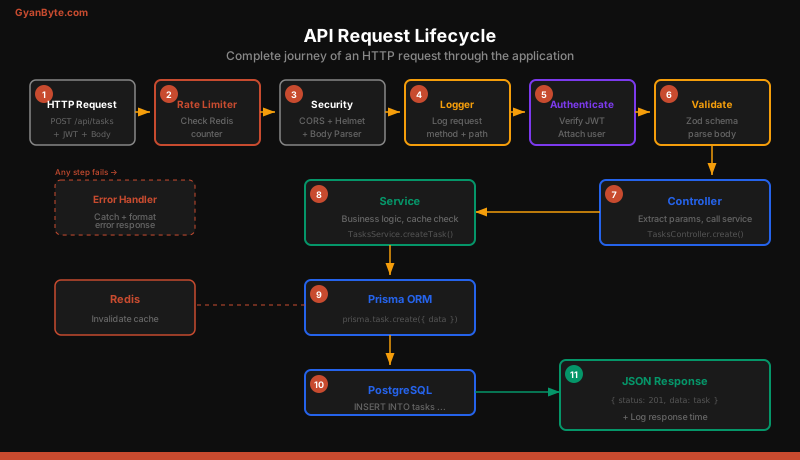
The order matters. Rate limiting runs first to reject abusive traffic before spending resources on authentication. Validation runs after authentication because some validation rules depend on the authenticated user. The error handler wraps everything, catching failures from any stage.
Authentication Middleware
The authenticate middleware extracts the JWT from the Authorization header, verifies it, and attaches the user information to the request:
// src/middleware/authenticate.ts
import { Request, Response, NextFunction } from "express";
import jwt from "jsonwebtoken";
import { env } from "../config/env.js";
import { ApiError } from "../utils/ApiError.js";

export const authenticate = (req: Request, _res: Response, next: NextFunction) => {
  const authHeader = req.headers.authorization;
  if (!authHeader?.startsWith("Bearer ")) {
    throw new ApiError(401, "Access token required");
  }

  const token = authHeader.split(" ")[1];
  try {
    const payload = jwt.verify(token, env.JWT_ACCESS_SECRET) as {
      userId: string;
      role: string;
    };
    (req as any).userId = payload.userId;
    (req as any).userRole = payload.role;
    next();
  } catch {
    throw new ApiError(401, "Invalid or expired access token");
  }
};
Express Application Setup
The app.ts file wires together all middleware and routes:
// src/app.ts
import express from "express";
import cors from "cors";
import helmet from "helmet";
import compression from "compression";
import { v4 as uuidv4 } from "uuid";
import { env } from "./config/env.js";
import { rateLimiter } from "./middleware/rateLimiter.js";
import { requestLogger } from "./middleware/requestLogger.js";
import { errorHandler } from "./middleware/errorHandler.js";
import { authRoutes } from "./modules/auth/auth.routes.js";
import { taskRoutes } from "./modules/tasks/tasks.routes.js";
import { userRoutes } from "./modules/users/users.routes.js";
import { prisma } from "./config/database.js";
import { redis } from "./config/redis.js";

const app = express();

// Request ID for correlation
app.use((req, _res, next) => {
  (req as any).requestId = req.headers["x-request-id"] || uuidv4();
  next();
});

// Security and parsing
app.use(helmet());
app.use(cors({ origin: env.CORS_ORIGIN }));
app.use(compression());
app.use(express.json({ limit: "10kb" }));

// Rate limiting and logging
app.use(rateLimiter);
app.use(requestLogger);

// Health check
app.get("/health", async (_req, res) => {
  try {
    await prisma.$queryRaw`SELECT 1`;
    await redis.ping();
    res.json({ status: "healthy", timestamp: new Date().toISOString() });
  } catch (error) {
    res.status(503).json({ status: "unhealthy" });
  }
});

// API routes
app.use("/api/auth", authRoutes);
app.use("/api/tasks", taskRoutes);
app.use("/api/users", userRoutes);

// 404 handler
app.use((_req, res) => {
  res.status(404).json({ status: "error", message: "Route not found" });
});

// Global error handler
app.use(errorHandler);

export { app };
Testing Setup
The project uses Vitest for both unit and integration tests. Integration tests run against a real PostgreSQL database (in Docker) to catch query issues that mocks would miss.
// tests/setup.ts
import { beforeAll, afterAll, beforeEach } from "vitest";
import { prisma } from "../src/config/database.js";

beforeAll(async () => {
  // Run migrations on test database
  await prisma.$executeRaw`CREATE EXTENSION IF NOT EXISTS "uuid-ossp"`;
});

beforeEach(async () => {
  // Clean all tables between tests
  await prisma.task.deleteMany();
  await prisma.user.deleteMany();
  await prisma.tag.deleteMany();
});

afterAll(async () => {
  await prisma.$disconnect();
});
Integration Test Example
// src/modules/auth/auth.test.ts
import { describe, it, expect } from "vitest";
import supertest from "supertest";
import { app } from "../../app.js";

const request = supertest(app);

describe("POST /api/auth/register", () => {
  it("should register a new user", async () => {
    const res = await request
      .post("/api/auth/register")
      .send({
        email: "[email protected]",
        password: "Password123",
        name: "Test User",
      });

    expect(res.status).toBe(201);
    expect(res.body.user.email).toBe("[email protected]");
    expect(res.body.accessToken).toBeDefined();
    expect(res.body.refreshToken).toBeDefined();
    expect(res.body.user).not.toHaveProperty("passwordHash");
  });

  it("should reject duplicate emails", async () => {
    await request.post("/api/auth/register").send({
      email: "[email protected]",
      password: "Password123",
      name: "Test User",
    });

    const res = await request.post("/api/auth/register").send({
      email: "[email protected]",
      password: "Password456",
      name: "Another User",
    });

    expect(res.status).toBe(409);
    expect(res.body.message).toBe("Email already registered");
  });

  it("should validate password strength", async () => {
    const res = await request.post("/api/auth/register").send({
      email: "[email protected]",
      password: "weak",
      name: "Test User",
    });

    expect(res.status).toBe(400);
    expect(res.body.message).toBe("Validation failed");
  });
});

describe("POST /api/auth/login", () => {
  it("should return tokens for valid credentials", async () => {
    // Register first
    await request.post("/api/auth/register").send({
      email: "[email protected]",
      password: "Password123",
      name: "Test User",
    });

    const res = await request.post("/api/auth/login").send({
      email: "[email protected]",
      password: "Password123",
    });

    expect(res.status).toBe(200);
    expect(res.body.accessToken).toBeDefined();
  });

  it("should reject invalid password", async () => {
    await request.post("/api/auth/register").send({
      email: "[email protected]",
      password: "Password123",
      name: "Test User",
    });

    const res = await request.post("/api/auth/login").send({
      email: "[email protected]",
      password: "WrongPassword1",
    });

    expect(res.status).toBe(401);
  });
});
Docker Setup
The Dockerfile uses multi-stage builds as covered in the previous lesson:
FROM node:20-alpine AS builder
WORKDIR /app
COPY package*.json ./
RUN npm ci
COPY tsconfig.json ./
COPY src ./src
COPY prisma ./prisma
RUN npx prisma generate
RUN npm run build
FROM node:20-alpine
RUN addgroup -S appgroup && adduser -S appuser -G appgroup
WORKDIR /app
COPY package*.json ./
RUN npm ci --omit=dev && npm cache clean --force
COPY /app/dist ./dist
COPY /app/node_modules/.prisma ./node_modules/.prisma
COPY prisma ./prisma
USER appuser
EXPOSE 3000
HEALTHCHECK \
CMD wget --no-verbose --tries=1 --spider http://localhost:3000/health || exit 1
CMD ["node", "dist/server.js"]The docker-compose.yml includes the API, PostgreSQL, and Redis:
version: "3.8"
services:
  api:
    build: .
    ports:
      - "3000:3000"
    environment:
      - NODE_ENV=production
      - DATABASE_URL=postgresql://postgres:postgres@db:5432/taskapi
      - REDIS_URL=redis://redis:6379
      - JWT_ACCESS_SECRET=${JWT_ACCESS_SECRET}
      - JWT_REFRESH_SECRET=${JWT_REFRESH_SECRET}
    depends_on:
      db:
        condition: service_healthy
      redis:
        condition: service_healthy

  db:
    image: postgres:16-alpine
    environment:
      POSTGRES_USER: postgres
      POSTGRES_PASSWORD: postgres
      POSTGRES_DB: taskapi
    volumes:
      - pgdata:/var/lib/postgresql/data
    healthcheck:
      test: ["CMD-SHELL", "pg_isready -U postgres"]
      interval: 5s
      timeout: 3s
      retries: 5

  redis:
    image: redis:7-alpine
    command: redis-server --maxmemory 128mb --maxmemory-policy allkeys-lru
    volumes:
      - redisdata:/data
    healthcheck:
      test: ["CMD", "redis-cli", "ping"]
      interval: 5s
      timeout: 3s
      retries: 5

volumes:
  pgdata:
  redisdata:
GitHub Actions CI/CD
The CI pipeline runs tests against a real PostgreSQL service container, builds the Docker image, and deploys to ECS:
name: CI/CD

on:
  push:
    branches: [main]
  pull_request:
    branches: [main]

jobs:
  test:
    runs-on: ubuntu-latest
    services:
      postgres:
        image: postgres:16-alpine
        env:
          POSTGRES_PASSWORD: testpass
          POSTGRES_DB: testdb
        ports:
          - 5432:5432
        options: >-
          --health-cmd pg_isready
          --health-interval 10s
          --health-timeout 5s
          --health-retries 5
      redis:
        image: redis:7-alpine
        ports:
          - 6379:6379
        options: >-
          --health-cmd "redis-cli ping"
          --health-interval 10s
          --health-timeout 5s
          --health-retries 5
    steps:
      - uses: actions/checkout@v4
      - uses: actions/setup-node@v4
        with:
          node-version: 20
          cache: npm
      - run: npm ci
      - run: npx prisma migrate deploy
        env:
          DATABASE_URL: postgresql://postgres:testpass@localhost:5432/testdb
      - run: npm run lint
      - run: npm test -- --coverage
        env:
          DATABASE_URL: postgresql://postgres:testpass@localhost:5432/testdb
          REDIS_URL: redis://localhost:6379
          JWT_ACCESS_SECRET: test-access-secret-that-is-long-enough
          JWT_REFRESH_SECRET: test-refresh-secret-that-is-long-enough
API Routes Summary
Here is the complete API surface:
| Method | Path | Auth | Description |
|---|---|---|---|
| POST | /api/auth/register |
No | Create new account |
| POST | /api/auth/login |
No | Get access + refresh tokens |
| POST | /api/auth/refresh |
No | Exchange refresh token |
| GET | /api/tasks |
Yes | List user’s tasks (paginated) |
| POST | /api/tasks |
Yes | Create a new task |
| GET | /api/tasks/:id |
Yes | Get a single task |
| PATCH | /api/tasks/:id |
Yes | Update a task |
| DELETE | /api/tasks/:id |
Yes | Delete a task |
| GET | /api/users/me |
Yes | Get current user profile |
| PATCH | /api/users/me |
Yes | Update profile |
| GET | /health |
No | Health check |
Running the Project
# Start infrastructure
docker compose up -d db redis

# Run migrations
npx prisma migrate dev

# Seed sample data (optional)
npx prisma db seed

# Start development server
npx tsx watch src/server.ts

# Run tests
npm test

# Build for production
npm run build

# Run in production mode
docker compose up -d
What to Add Next
This project provides a solid foundation. Here are features you can add to extend it further:
- WebSocket notifications — use Socket.IO to push real-time task updates to connected clients
- File attachments — upload task attachments to S3 with presigned URLs
- Team workspaces — add an Organization model so users can collaborate on shared tasks
- Activity log — record all task changes in an audit trail table
- Email notifications — send task reminders using SQS and SES
- API documentation — generate OpenAPI/Swagger docs from your Zod schemas
- Full-text search — add PostgreSQL
tsvectorsearch on task titles and descriptions - Recurring tasks — implement a cron scheduler for repeating tasks
Each of these features exercises a different backend engineering skill — real-time communication, file storage, multi-tenancy, event-driven architecture, and search indexing.
Course Summary
Over the past 15 lessons, you have built a mental model for production Node.js backend engineering. You understand how the event loop works, how to structure applications with TypeScript, how to design RESTful APIs, how to work with databases and caches, how to handle authentication and authorization, how to write meaningful tests, how to containerize applications, and how to deploy them to AWS.
The key principle throughout has been pragmatism. Use TypeScript for type safety, but do not over-engineer your type system. Write tests that catch real bugs, not tests that achieve 100% coverage on trivial code. Use Redis for caching, but measure whether the cache is actually helping. Choose ECS over Lambda when you need long-running connections, and Lambda over ECS when you need per-invocation billing.
Build projects. Break things. Read the error messages carefully. That is how you become a backend engineer.