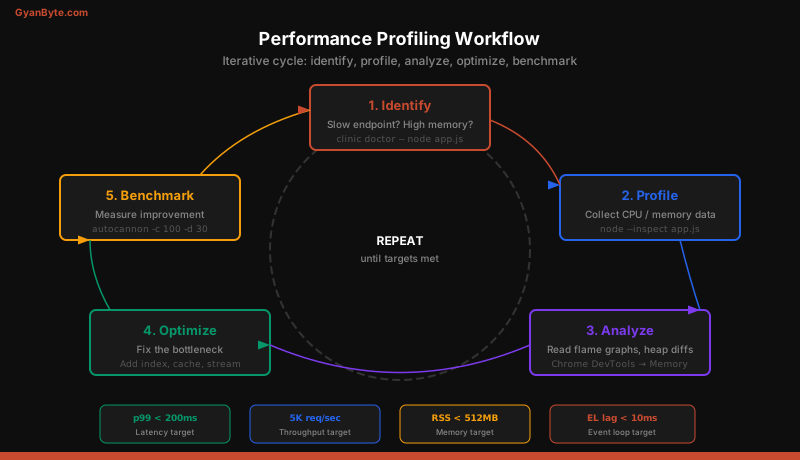
A Node.js server that handles 100 requests per second in development might collapse at 1,000 in production. The single-threaded event loop is powerful but unforgiving — one blocking operation, one memory leak, one missing index can bring the entire process to its knees. This lesson covers how to find bottlenecks, fix them, and verify the improvement with real numbers.
Profiling Tools Overview
Before optimizing anything, you need data. Guessing where the bottleneck is leads to premature optimization in the wrong places. Node.js has excellent profiling tools:
clinic.js — The all-in-one diagnostic suite. It runs your app, collects metrics, and generates an interactive HTML report showing exactly where time is spent.
npm install -g clinic
clinic doctor -- node server.js
clinic flame -- node server.js
clinic bubbleprof -- node server.js
clinic doctoridentifies the type of bottleneck (CPU, I/O, event loop delay, or GC)clinic flamegenerates flame graphs for CPU profilingclinic bubbleprofvisualizes async operations and where time is spent waiting
—inspect flag — Built-in V8 inspector that connects to Chrome DevTools:
node --inspect server.jsOpen chrome://inspect in Chrome, click your process, and you get CPU profiler, memory heap snapshots, and a full debugger.
process.memoryUsage() — Quick programmatic check:
const mem = process.memoryUsage();
console.log({
  rss: `${Math.round(mem.rss / 1024 / 1024)} MB`,
  heapUsed: `${Math.round(mem.heapUsed / 1024 / 1024)} MB`,
  heapTotal: `${Math.round(mem.heapTotal / 1024 / 1024)} MB`,
  external: `${Math.round(mem.external / 1024 / 1024)} MB`,
});
CPU Profiling and Flame Graphs
A flame graph shows you where your application spends CPU time. Each horizontal bar is a function. The wider the bar, the more time spent in that function. Bars stacked on top represent the call stack — the function at the bottom called the one above it.
# Generate a flame graph with clinic
clinic flame -- node server.js

# Or use the built-in profiler
node --prof server.js
# Process the output
node --prof-process isolate-*.log > profile.txt
When reading a flame graph, look for:
- Wide bars at the top — These are leaf functions consuming the most CPU. Optimize these first.
- Flat plateaus — Long stretches of a single function mean it is doing too much synchronous work.
- JSON.parse / JSON.stringify — If these dominate, you are serializing too much data. Consider streaming or reducing payload size.
- Regular expressions — Catastrophic backtracking in regex can freeze the event loop. Look for patterns like
(a+)+b.
Common CPU bottlenecks and fixes:
// BAD: Synchronous JSON parsing of large payload
const data = JSON.parse(largeString); // Blocks event loop

// BETTER: Stream-parse with a library
import { parser } from 'stream-json';
import { streamArray } from 'stream-json/streamers/StreamArray.js';
const pipeline = fs.createReadStream('large.json')
  .pipe(parser())
  .pipe(streamArray());
Memory Leak Detection
Memory leaks in Node.js are insidious. The app works fine for hours, then starts slowing down as garbage collection takes longer, and eventually crashes with an out-of-memory error.
Common causes of memory leaks:
- Growing arrays or maps that are never pruned
- Event listeners added in a loop without removal
- Closures that capture large objects unintentionally
- Global caches without eviction policies
To detect leaks, take heap snapshots over time:
// Expose a debug endpoint (protected, never in production publicly)
import v8 from 'v8';
import fs from 'fs';

app.get('/debug/heapsnapshot', (req, res) => {
  const filename = `/tmp/heap-${Date.now()}.heapsnapshot`;
  const snapshotStream = v8.writeHeapSnapshot(filename);
  res.json({ file: snapshotStream });
});
Take three snapshots: at startup, after 10 minutes of load, and after 30 minutes. Load them into Chrome DevTools Memory tab and compare. Objects that grow between snapshots are likely leaks.
A practical pattern for bounded caches:
// BAD: Unbounded cache grows forever
const cache = new Map();
function getCached(key) {
  if (!cache.has(key)) {
    cache.set(key, expensiveComputation(key));
  }
  return cache.get(key);
}

// GOOD: LRU cache with max size
import { LRUCache } from 'lru-cache';
const cache = new LRUCache({
  max: 500,          // Maximum 500 entries
  ttl: 1000 * 60 * 5, // 5 minute TTL
});
Event Loop Lag Monitoring
The event loop is the heart of Node.js. When it lags, every request slows down. Event loop lag happens when synchronous code or long-running callbacks block the loop from processing the next tick.
// Monitor event loop lag
import { monitorEventLoopDelay } from 'perf_hooks';

const histogram = monitorEventLoopDelay({ resolution: 20 });
histogram.enable();

// Check periodically
setInterval(() => {
  const p99 = histogram.percentile(99) / 1e6; // Convert ns to ms
  const max = histogram.max / 1e6;

  if (p99 > 100) {
    logger.warn({ p99, max }, 'Event loop lag above threshold');
  }

  histogram.reset();
}, 10000);
Healthy event loop lag is under 10ms at p99. If you see spikes above 100ms, something is blocking:
- Synchronous file I/O (
fs.readFileSync) - CPU-intensive computation in the main thread
- Large
JSON.stringifycalls - Regular expression catastrophic backtracking
Array.sort()on huge arrays
Cluster Module for Multi-Core Utilization
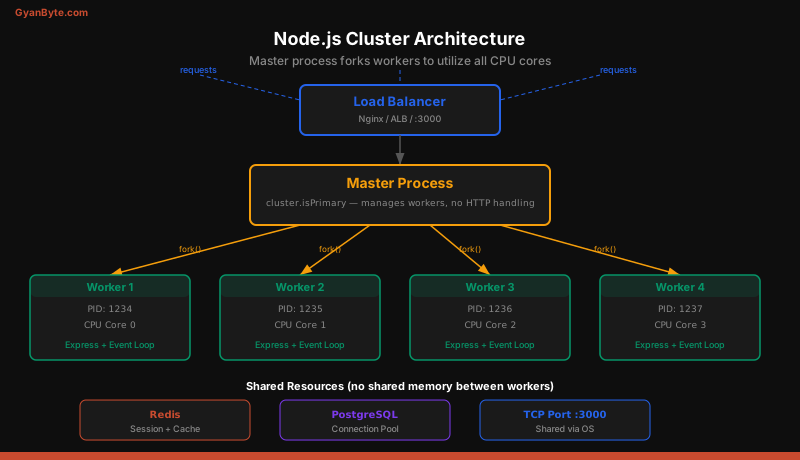
A single Node.js process uses one CPU core. On an 8-core server, 87.5% of your compute capacity is wasted. The cluster module fixes this by forking multiple worker processes.
import cluster from 'cluster';
import { cpus } from 'os';
import process from 'process';

const numCPUs = cpus().length;

if (cluster.isPrimary) {
  console.log(`Primary ${process.pid} starting ${numCPUs} workers`);

  for (let i = 0; i < numCPUs; i++) {
    cluster.fork();
  }

  cluster.on('exit', (worker, code, signal) => {
    console.log(`Worker ${worker.process.pid} died (${signal || code})`);
    // Replace dead workers
    cluster.fork();
  });
} else {
  // Workers share the TCP port
  import('./server.js');
  console.log(`Worker ${process.pid} started`);
}
The operating system distributes incoming connections across workers using round-robin (Linux) or a different strategy (Windows). Each worker is an independent process with its own memory and event loop.
Key considerations:
- Workers do not share memory. Use Redis or a database for shared state.
- Fork
os.cpus().lengthworkers, not more. Over-forking causes context switching overhead. - Always respawn dead workers. A single uncaught exception kills one worker, not the whole cluster.
- Use
pm2in production instead of hand-rolling cluster management:pm2 start server.js -i max.
Worker Threads for CPU-Intensive Tasks
The cluster module spawns full processes. Worker threads are lighter — they run in the same process but with separate V8 instances. Use them for CPU-intensive tasks that would block the event loop.
// main.js
import { Worker } from 'worker_threads';

function runHashWorker(data) {
  return new Promise((resolve, reject) => {
    const worker = new Worker('./hash-worker.js', {
      workerData: data,
    });
    worker.on('message', resolve);
    worker.on('error', reject);
  });
}

app.post('/api/hash', async (req, res) => {
  const result = await runHashWorker(req.body.payload);
  res.json({ hash: result });
});
// hash-worker.js
import { parentPort, workerData } from 'worker_threads';
import crypto from 'crypto';
const hash = crypto
.createHash('sha256')
.update(workerData)
.digest('hex');
parentPort.postMessage(hash);Use worker threads for: image processing, PDF generation, complex calculations, data compression. Do not use them for I/O-bound tasks — the event loop handles I/O efficiently already.
Stream Processing for Large Datasets
Loading a 500MB CSV file into memory to process it is a guaranteed out-of-memory crash under load. Streams process data in chunks, keeping memory usage constant regardless of input size.
// BAD: Load entire file into memory
const data = fs.readFileSync('large.csv', 'utf-8');
const rows = data.split('\n').map(parseRow);

// GOOD: Stream processing with backpressure
import { createReadStream } from 'fs';
import { createInterface } from 'readline';
import { pipeline } from 'stream/promises';
import { Transform } from 'stream';

const processCSV = new Transform({
  objectMode: true,
  transform(line, encoding, callback) {
    try {
      const record = parseRow(line);
      if (record.isValid) this.push(record);
      callback();
    } catch (err) {
      callback(err);
    }
  },
});

const rl = createInterface({
  input: createReadStream('large.csv'),
  crlfDelay: Infinity,
});

for await (const line of rl) {
  await processRow(line);
}
Rules for stream processing:
- Always use
pipeline()instead of.pipe()— it handles errors and cleanup automatically - Use
highWaterMarkto control buffer size - Respect backpressure — if
write()returnsfalse, wait for thedrainevent
Common Performance Anti-Patterns
1. N+1 queries: Fetching a list of items, then querying for each item’s related data in a loop.
// BAD: N+1 — 1 query for users + N queries for orders
const users = await db.query('SELECT * FROM users');
for (const user of users.rows) {
  user.orders = await db.query(
    'SELECT * FROM orders WHERE user_id = $1', [user.id]
  );
}

// GOOD: Single JOIN query
const result = await db.query(`
  SELECT u.*, json_agg(o.*) as orders
  FROM users u
  LEFT JOIN orders o ON o.user_id = u.id
  GROUP BY u.id
`);
2. Missing database indexes: A full table scan on a million-row table takes seconds. Adding an index makes it milliseconds.
-- Check for slow queries
EXPLAIN ANALYZE SELECT * FROM orders WHERE user_id = 'abc-123';

-- Add the missing index
CREATE INDEX idx_orders_user_id ON orders (user_id);
3. Synchronous operations in request handlers:
// BAD: Blocks the event loop for ALL requests
app.get('/report', (req, res) => {
  const data = fs.readFileSync('report.csv');  // BLOCKING
  res.send(processData(data));
});

// GOOD: Async I/O
app.get('/report', async (req, res) => {
  const data = await fs.promises.readFile('report.csv');
  res.send(processData(data));
});
4. Not using connection pools: Opening a new database connection per request adds 20-50ms of latency.
// Use a pool with bounded connections
import pg from 'pg';
const pool = new pg.Pool({
  max: 20,
  idleTimeoutMillis: 30000,
  connectionTimeoutMillis: 2000,
});
Benchmarking with Autocannon
After optimizing, you need numbers to prove the improvement. Autocannon is a fast HTTP benchmarking tool built on Node.js.
npm install -g autocannon

# 10 connections, 30 seconds
autocannon -c 10 -d 30 http://localhost:3000/api/users

# 100 connections with pipelining
autocannon -c 100 -p 10 -d 30 http://localhost:3000/api/users
Always benchmark before and after optimization. Record these metrics:
- Requests/sec — throughput
- Latency p50, p99 — consistency matters more than average
- Errors — optimization that increases errors is not optimization
- Memory RSS — ensure memory stays stable over the benchmark duration
A proper benchmarking workflow:
- Establish a baseline on the current code
- Make one change at a time
- Benchmark again under identical conditions
- Record results in a spreadsheet or PR description
- Only keep changes that show measurable improvement
Production Monitoring Metrics
Profiling is for development. In production, you need continuous monitoring:
import { collectDefaultMetrics, register, Histogram } from 'prom-client';

// Collect Node.js runtime metrics
collectDefaultMetrics();

// Custom HTTP request duration histogram
const httpDuration = new Histogram({
  name: 'http_request_duration_seconds',
  help: 'Duration of HTTP requests in seconds',
  labelNames: ['method', 'route', 'status_code'],
  buckets: [0.01, 0.05, 0.1, 0.5, 1, 5],
});

// Middleware to track request duration
app.use((req, res, next) => {
  const end = httpDuration.startTimer();
  res.on('finish', () => {
    end({
      method: req.method,
      route: req.route?.path || 'unknown',
      status_code: res.statusCode,
    });
  });
  next();
});

// Expose metrics for Prometheus scraping
app.get('/metrics', async (req, res) => {
  res.set('Content-Type', register.contentType);
  res.end(await register.metrics());
});
Key metrics to monitor:
- Request rate — requests per second by route
- Error rate — 4xx and 5xx responses as a percentage
- Latency — p50, p95, p99 by route
- Event loop lag — p99 should be under 10ms
- Heap used — should be stable, not constantly growing
- Active handles/requests — growing handles indicate resource leaks
Connect Prometheus to Grafana for dashboards, and set up alerts for: error rate above 1%, p99 latency above 500ms, event loop lag above 100ms, and heap usage above 80% of available memory.
Performance is not a one-time activity. It is a continuous practice of measuring, identifying bottlenecks, fixing them, and measuring again. The tools covered in this lesson give you the visibility to make informed decisions rather than guessing.