Columnar format (Lesson 4) decides how much of each row a query reads; file layout decides how many files it touches and how evenly the work spreads across workers. Get the layout right and a query over a billion rows reads a few files in milliseconds; get it wrong and the same query scans everything, or one overloaded worker drags the whole job. This lesson is the three layout problems every data engineer must manage — two of them measured.
The Three Layout Problems
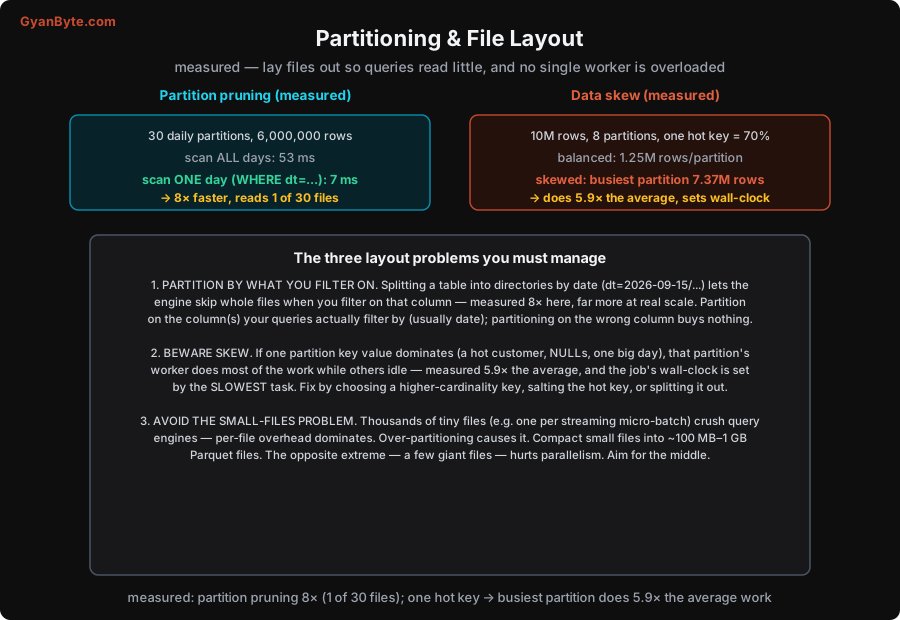
1. Partition by what you filter on (measured: 8×)
Partitioning splits a table into subdirectories by the value of a column — most commonly a date: orders/dt=2026-09-14/..., orders/dt=2026-09-15/.... When a query filters on that column (WHERE dt = '2026-09-15'), the engine does partition pruning: it looks at the directory names and reads only the matching partition’s files, skipping all the others before reading a single byte of data.
I measured this on 30 daily partitions, 6,000,000 rows total:
- Scan all 30 days: 53 ms.
- Scan one day (
WHERE dt = ...): 7 ms — ≈ 8× faster, because it read 1 of 30 files and skipped the other 29 entirely.
At real scale the effect is far larger: filtering one day out of three years of daily partitions reads ~1/1000th of the data. The rule is in the name of the win: partition on the column(s) your queries actually filter by — almost always date/time, sometimes a tenant/region for multi-tenant data. Partitioning on a column nobody filters on buys you nothing (the engine can’t prune) and still costs you the downsides below. And since cloud warehouses charge by bytes scanned, pruning is directly a cost lever (Lesson 12), not just a speed one.
2. Beware skew (measured: 5.9×)
Distributed processing (Lesson 8) splits work across workers by partition key. That only balances if the key values are evenly distributed. When one value dominates — a hot customer who is 70% of your traffic, a flood of NULLs, one enormous day — the worker handling that value does most of the work while the others sit idle. This is data skew, and it is one of the most common causes of mysteriously slow jobs.
I measured it: 10,000,000 rows across 8 partitions, with one hot key holding 70% of rows. A balanced job would put ~1,250,000 rows per partition; instead the busiest partition got 7,372,691 rows — 5.9× the average. And here’s why that number is the one that matters: a distributed job’s wall-clock time is set by its slowest task. Seven workers finishing early doesn’t help if the eighth is still grinding through 5.9× the work — the whole job takes as long as that one straggler. Skew turns parallelism into a lie.
Fixes: choose a higher-cardinality key (one with many evenly-spread values) to partition/shuffle by; salt the hot key (append a random suffix to split one hot value across several partitions, then combine); or handle the hot value separately from the rest. The first step is always to look for skew — check the distribution of your key before trusting that a job is “just slow.”
3. Avoid the small-files problem
The opposite failure. Query engines have per-file overhead — opening a file, reading its footer/metadata, scheduling a task for it. A few large files amortise that overhead over lots of data; thousands of tiny files (a few KB each) drown in it, and a query spends all its time on file bookkeeping instead of reading data. Streaming pipelines cause this naturally (one small file per micro-batch), and so does over-partitioning (partitioning by dt and hour and customer creates a combinatorial explosion of near-empty partitions).
The fix is compaction: periodically rewrite many small files into fewer, larger ones (table formats like Iceberg/Delta, Lesson 5, have built-in compaction/optimize operations). Aim for files in the ~100 MB–1 GB range — big enough to amortise overhead, small enough to parallelise. Note the balance: the opposite extreme, a handful of gigantic files, hurts parallelism (you can’t split the work across many workers). The goal is the middle — a reasonable number of reasonably-sized files.
Putting Layout Together
Good layout is a few deliberate choices that compound with columnar storage:
- Partition by date (and maybe one other low-cardinality column you filter on), so queries prune to the relevant slices.
- Don’t over-partition — too many partition columns, or high-cardinality ones, create the small-files problem. Partition coarsely (daily, not by-the-second).
- Watch for and fix skew in your partition/join/group keys — the hot key sets your runtime.
- Compact small files regularly into ~100 MB–1 GB chunks.
- Within files, sort/cluster by common filter columns so Parquet’s row-group statistics (Lesson 4) can skip chunks too — a second level of pruning inside each file.
Columnar format (read fewer columns) plus good layout (read fewer files, evenly) is the combination that makes querying huge datasets fast and cheap. With storage and layout handled, the next lessons turn to transforming the data — ELT and modelling — and the engines that do it at scale.
Pitfalls to Avoid
- Partitioning on a column queries don’t filter by. The engine can’t prune, so you get all the downsides (small files, management overhead) and none of the speed. Partition on your actual filter columns — usually date.
- Ignoring skew. A job is “randomly slow” because one hot key (or a pile of NULLs) makes one worker do 5.9× the work, and wall-clock follows the slowest task. Check key distribution; salt or split the hot value.
- Over-partitioning into tiny files. Partitioning by several high-cardinality columns explodes into thousands of near-empty files, and per-file overhead dominates. Partition coarsely; compact.
- Never compacting a streaming sink. One small file per micro-batch accumulates into millions of tiny files that cripple queries. Run regular compaction (table-format OPTIMIZE) to merge them.
- Giant monolithic files. The opposite extreme — a few 50 GB files — can’t be split across workers, killing parallelism. Aim for ~100 MB–1 GB.
- Partitioning tiny tables. A 10,000-row reference table doesn’t need partitioning; it just adds directories and overhead. Partition large tables; leave small ones as a few files.
Quick Recap
- Partition by what you filter on (usually date): the engine prunes to matching files. Measured: scanning 1 of 30 daily partitions took 7 ms vs 53 ms for all — ~8× faster, far more at real scale. Pruning is also a cost lever (bytes scanned).
- Beware skew: one dominant key value overloads one worker — measured, a hot key (70%) made the busiest partition do 5.9× the average, and a job’s wall-clock follows its slowest task. Fix with a higher-cardinality key, salting, or splitting the hot value out.
- Avoid the small-files problem: thousands of tiny files drown in per-file overhead (streaming and over-partitioning cause it). Compact to ~100 MB–1 GB files; avoid the opposite extreme of a few giant files too.
- Layout choices compound with columnar storage: partition coarsely, don’t over-partition, watch skew, compact, and sort within files for row-group pruning.
Next lesson: transforming the stored data into useful shapes — ETL vs ELT and dimensional modelling (dbt, star schemas).