Everything so far has been the Kafka broker — the distributed log that stores and serves events. But in real deployments, you rarely interact with the broker through hand-written producer/consumer code for everything. Around the broker is an ecosystem of tools that handle the common jobs — moving data in and out, keeping messages compatible, and processing streams — and knowing what they are keeps you from reinventing them. This lesson is a map of that ecosystem.
The four pieces around the broker
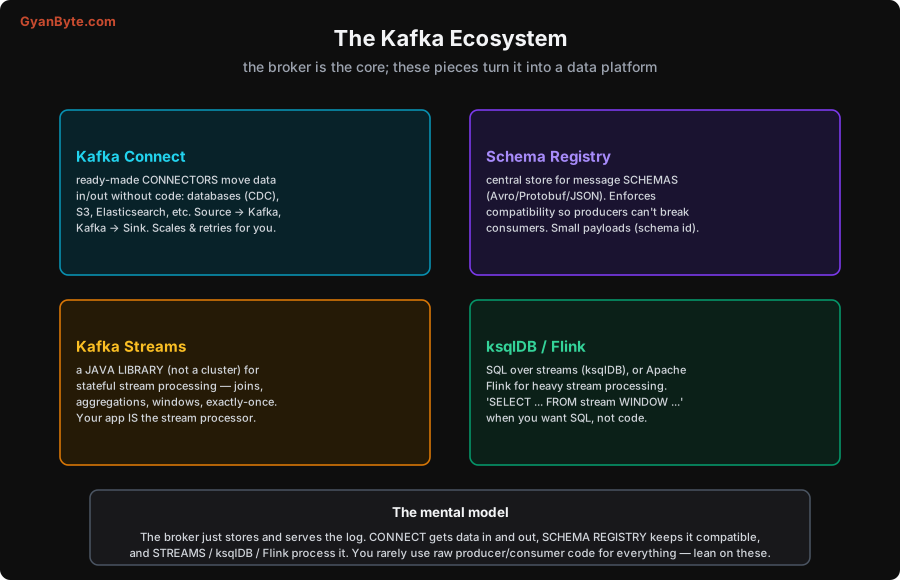
Kafka Connect — move data in and out, without code
Most Kafka data isn’t produced by bespoke application code — it’s moved from existing systems. Kafka Connect is a framework of ready-made connectors that do this without you writing producer/consumer code:
- Source connectors pull data into Kafka: a database (via CDC — Debezium streams every insert/update/delete), a REST API, log files.
- Sink connectors push data out of Kafka: into S3, Elasticsearch, a data warehouse, another database.
Connect runs as its own scalable, fault-tolerant cluster of workers, and handles the tedious parts — parallelism, offset tracking, retries, restarts — for you. “Get my Postgres changes into Kafka” or “land this topic in S3” is a configuration, not a coding project. For the huge class of “move data from A through Kafka to B” problems, Connect is the first thing to reach for (it’s the backbone of the ingestion patterns in the data engineering course).
Schema Registry — keep messages compatible
Kafka itself treats messages as opaque bytes — it doesn’t know or care what’s inside. That’s flexible but dangerous: if a producer changes the message format, every consumer can silently break. Schema Registry solves this. It’s a central service that stores the schemas (Avro, Protobuf, or JSON Schema) for your topics’ messages and enforces compatibility rules:
- A producer registers its schema; the registry rejects a change that would break existing consumers (e.g. removing a field consumers rely on), enforcing backward/forward compatibility.
- Messages carry a small schema id instead of the full schema, so payloads stay compact and consumers look up the schema to deserialize.
The payoff is safe schema evolution: producers and consumers can evolve independently without a flag day, and you can’t accidentally ship a format change that breaks downstream. For any shared, long-lived topic with multiple consumers, a schema registry is close to essential.
Kafka Streams — stateful processing as a library
Kafka Streams is how you process streams in your own application. Crucially, it’s a Java/Scala library, not a separate cluster — you add it to your app, and your app becomes the stream processor, reading from topics, transforming, and writing back. It handles the hard parts of stream processing: stateful operations (joins, aggregations), windowing, fault-tolerant local state, and exactly-once. Because there’s no extra cluster to run, it’s the lightweight choice when your processing lives inside an application you already deploy. (Full treatment in the next lesson.)
ksqlDB and Flink — SQL and heavy-duty processing
When you’d rather express stream processing as SQL than code, ksqlDB lets you write SELECT ... FROM stream WINDOW ... against Kafka topics — continuous queries that produce new topics. And for heavy-duty, large-scale stream processing — complex event processing, very large state, sophisticated windowing, or a mix of batch and stream — Apache Flink is the industrial-strength engine many teams run alongside Kafka. Streams for in-app processing, ksqlDB for SQL, Flink for the heavy lifting.
The mental model
The way to hold the ecosystem together:
- The broker just stores and serves the log — that’s its whole job.
- Connect gets data in and out (sources and sinks) without code.
- Schema Registry keeps the data compatible as it evolves.
- Streams / ksqlDB / Flink process the data (transform, aggregate, join, window).
So a typical Kafka-based platform looks like: Connect ingests from databases/APIs → Schema Registry governs the formats → Streams/ksqlDB/Flink process → Connect sinks the results to warehouses/search/services. You can hand-write producers and consumers for custom logic (and often do for application events), but for the common jobs — ingestion, egress, schema management, standard processing — the ecosystem has a purpose-built tool, and using it is almost always better than rolling your own. Next, we go deeper on the processing piece: Kafka Streams.
Pitfalls to Avoid
- Hand-coding ingestion that Connect already does. Writing a custom producer to pull from a database (and getting CDC, offset tracking, retries and scaling wrong) when a Debezium/Connect connector does it reliably. Reach for Connect first.
- No schema governance on shared topics. Without a Schema Registry, a producer format change silently breaks consumers. For multi-consumer, long-lived topics, register schemas and enforce compatibility.
- Treating Kafka Streams as a cluster to deploy. It’s a library inside your app — no separate cluster. Expecting a “Streams cluster” to provision leads to confusion.
- Reaching for Flink when Streams (or ksqlDB) would do. Flink is powerful but is another heavy system to operate. Use Streams for in-app processing and ksqlDB for SQL; bring in Flink for genuinely large/complex processing.
- Putting the full schema in every message. Without a registry, payloads bloat with repeated schema info. The registry lets messages carry a compact schema id instead.
- Ignoring the ecosystem entirely. Rebuilding connectors, schema handling and stream processing from raw producer/consumer code is a large, bug-prone undertaking. Use the purpose-built tools.
Quick Recap
- The broker just stores and serves the log; the ecosystem turns it into a platform.
- Kafka Connect: ready-made connectors move data in/out without code (CDC sources, S3/Elasticsearch sinks), handling scaling, offsets and retries.
- Schema Registry: central store for schemas (Avro/Protobuf/JSON) that enforces compatibility (safe evolution) and keeps payloads small (schema id).
- Kafka Streams: a library (not a cluster) for stateful in-app processing. ksqlDB: SQL over streams. Flink: heavy-duty processing.
- Mental model: Connect in/out · Schema Registry compatible · Streams/ksqlDB/Flink process — use the purpose-built tool instead of hand-rolling.
Next lesson: a deeper look at the processing piece — Kafka Streams and stream processing (state, windows, exactly-once).