


Most production systems are read-heavy. A typical web application sees 90-95% reads and 5-10% writes. Your user profile page, product listing, news feed, dashboard — all reads. Yet many teams optimize for writes first and wonder why their system crawls under load.
This article covers the patterns I’ve used to scale reads across systems handling millions of requests. Each pattern has tradeoffs. The goal is knowing when to reach for which one.
The Architecture at a Glance
Before diving into individual patterns, here’s how they fit together in a read-heavy system:
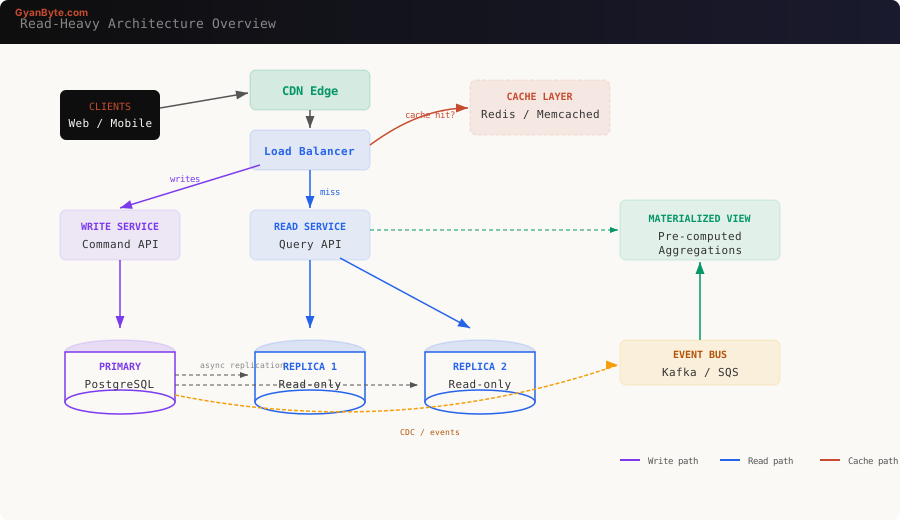
Every layer in this diagram serves a specific purpose. Let’s work through each pattern.
Pattern 1: Caching — The First Line of Defense
Caching is the single most impactful optimization for reads. A Redis lookup takes ~0.5ms. A PostgreSQL query with joins takes 10-100ms. That’s a 20-200x improvement.
Cache-Aside (Lazy Loading)
This is the most common pattern. The application checks the cache first, falls back to the database on a miss, then populates the cache.
class UserService {
  constructor(
    private redis: Redis,
    private db: Pool
  ) {}

  async getUserById(id: string): Promise<User> {
    // 1. Check cache
    const cached = await this.redis.get(`user:${id}`);
    if (cached) {
      return JSON.parse(cached);
    }

    // 2. Cache miss — query database
    const result = await this.db.query(
      'SELECT * FROM users WHERE id = $1',
      [id]
    );
    const user = result.rows[0];

    // 3. Populate cache with TTL
    await this.redis.set(
      `user:${id}`,
      JSON.stringify(user),
      'EX',
      3600 // 1 hour TTL
    );

    return user;
  }

  async updateUser(id: string, data: Partial<User>): Promise<void> {
    await this.db.query(
      'UPDATE users SET name = $1, email = $2 WHERE id = $3',
      [data.name, data.email, id]
    );

    // Invalidate cache — next read will repopulate
    await this.redis.del(`user:${id}`);
  }
}
Read-Through vs Write-Behind
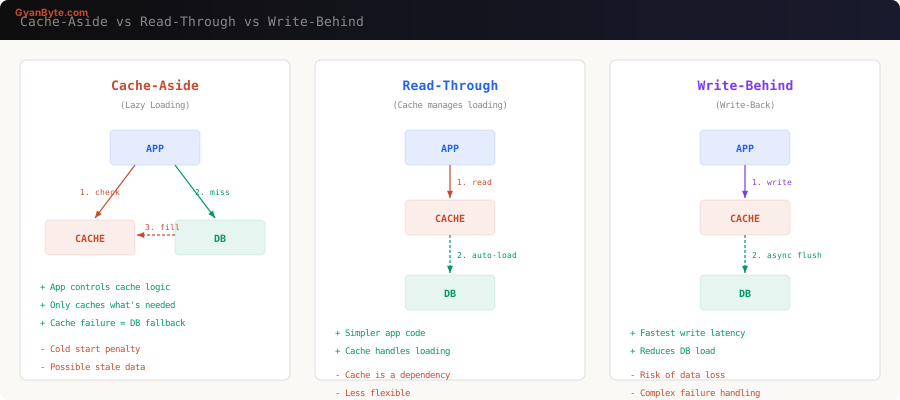
Cache-aside gives you the most control. Read-through simplifies application code by letting the cache handle database loading. Write-behind optimizes writes by buffering them in cache and flushing asynchronously — dangerous but fast.
When to use which:
| Pattern | Best For | Risk |
|---|---|---|
| Cache-aside | Most applications | Stale data window |
| Read-through | Simple read models | Cache is a hard dependency |
| Write-behind | Write-heavy + read-heavy | Data loss on cache failure |
Cache Invalidation — The Hard Part
There are only two hard things in computer science: cache invalidation and naming things. Here’s what actually works:
TTL-based expiration — simplest approach. Set a reasonable TTL and accept eventual consistency.
// Short TTL for frequently changing data
await redis.set(`feed:${userId}`, data, 'EX', 300);  // 5 min

// Long TTL for rarely changing data
await redis.set(`config:site`, data, 'EX', 86400);    // 24 hours
Event-driven invalidation — publish an event on write, subscribers invalidate relevant cache keys.
// On write
await db.query('UPDATE products SET price = $1 WHERE id = $2', [newPrice, id]);
await eventBus.publish('product.updated', { id, fields: ['price'] });

// Cache invalidation subscriber
eventBus.subscribe('product.updated', async (event) => {
  await redis.del(`product:${event.id}`);
  await redis.del(`category:${product.categoryId}:products`);
  // Invalidate any computed views that include this product
  await redis.del(`homepage:featured`);
});
Versioned keys — instead of invalidating, bump a version counter. Old keys expire naturally.
const version = await redis.incr(`user:${id}:version`);
await redis.set(`user:${id}:v${version}`, data, 'EX', 3600);
Pattern 2: Read Replicas
When your database CPU is saturated from read queries, add read replicas. The primary handles all writes; replicas handle reads via asynchronous replication.
Implementation with Connection Routing
import { Pool } from 'pg';

class DatabaseRouter {
  private writer: Pool;
  private readers: Pool[];
  private readerIndex = 0;

  constructor() {
    this.writer = new Pool({
      host: process.env.DB_PRIMARY_HOST,
      port: 5432,
      database: 'app',
      max: 20,
    });

    this.readers = [
      new Pool({
        host: process.env.DB_REPLICA_1_HOST,
        port: 5432,
        database: 'app',
        max: 30, // Higher pool for reads
      }),
      new Pool({
        host: process.env.DB_REPLICA_2_HOST,
        port: 5432,
        database: 'app',
        max: 30,
      }),
    ];
  }

  // Round-robin across read replicas
  getReader(): Pool {
    const reader = this.readers[this.readerIndex];
    this.readerIndex = (this.readerIndex + 1) % this.readers.length;
    return reader;
  }

  async query(sql: string, params?: any[], isWrite = false): Promise<any> {
    const pool = isWrite ? this.writer : this.getReader();
    return pool.query(sql, params);
  }

  // For read-after-write consistency — route to primary
  async queryConsistent(sql: string, params?: any[]): Promise<any> {
    return this.writer.query(sql, params);
  }
}
The Replication Lag Problem
Async replication means replicas can be milliseconds to seconds behind the primary. This causes the classic “I just updated my profile but I see the old version” bug.
Solutions:
- Read-your-writes consistency — after a write, route that user’s reads to the primary for a short window.
async updateProfile(userId: string, data: any): Promise<void> {
  await this.db.query(sql, params, true); // write to primary

  // Set a flag: route this user to primary for 5 seconds
  await this.redis.set(
    `read-primary:${userId}`,
    '1',
    'EX',
    5
  );
}

async getProfile(userId: string): Promise<User> {
  const forcePrimary = await this.redis.get(`read-primary:${userId}`);
  const pool = forcePrimary ? this.db.writer : this.db.getReader();
  return pool.query('SELECT * FROM users WHERE id = $1', [userId]);
}-
Monotonic reads — pin a user’s session to the same replica. They might see stale data, but they’ll never see time go backwards.
-
Synchronous replication — for critical reads, use synchronous replicas. Slower writes, but replicas are always consistent. PostgreSQL supports this natively.
-- On primary: require at least one sync replica
ALTER SYSTEM SET synchronous_standby_names = 'replica1';
SELECT pg_reload_conf();
Pattern 3: CQRS — Separate Read and Write Models
Command Query Responsibility Segregation (CQRS) is the idea that your read model and write model don’t need to be the same. Writes go to a normalized relational schema. Reads come from a denormalized, query-optimized store.
Why CQRS Works for Reads
Consider an e-commerce product listing page. The write model stores data across normalized tables: products, categories, reviews, inventory, pricing. A single page load requires 5+ JOINs.
With CQRS, an event consumer pre-builds the exact document the UI needs:
// Event consumer: builds the read model
async function onProductUpdated(event: ProductEvent) {
  const product = await fetchFromWriteDB(event.productId);
  const reviews = await fetchReviews(event.productId);
  const inventory = await fetchInventory(event.productId);

  // Pre-computed read document — no JOINs at query time
  const readDoc = {
    id: product.id,
    title: product.title,
    price: product.price,
    formattedPrice: `$${(product.price / 100).toFixed(2)}`,
    rating: calculateAvgRating(reviews),
    reviewCount: reviews.length,
    inStock: inventory.quantity > 0,
    stockLevel: inventory.quantity > 10 ? 'high' : 'low',
    categoryPath: product.category.path,
    updatedAt: new Date().toISOString(),
  };

  // Store in a read-optimized store
  await elasticsearch.index({
    index: 'products',
    id: product.id,
    body: readDoc,
  });

  // Also cache the hot path
  await redis.set(
    `product:${product.id}`,
    JSON.stringify(readDoc),
    'EX',
    1800
  );
}
Now reads are a single key lookup or a simple Elasticsearch query — no JOINs, no computation at request time.
When CQRS Is Overkill
CQRS adds significant complexity: eventual consistency, event processing infrastructure, two data stores to maintain. Only reach for it when:
- Your read and write patterns are fundamentally different
- Read queries require expensive JOINs or aggregations
- You need to scale reads and writes independently
- Different read consumers need different data shapes
For a CRUD app with simple queries? A cache layer is enough. Don’t CQRS your blog.
Pattern 4: Materialized Views
A materialized view is a precomputed query result stored as a table. The database does the expensive work once; subsequent reads hit the materialized result.
PostgreSQL Materialized Views
-- Create a materialized view for dashboard stats
CREATE MATERIALIZED VIEW dashboard_stats AS
SELECT
    date_trunc('day', o.created_at) AS day,
    COUNT(*)                        AS total_orders,
    SUM(o.total_amount)             AS revenue,
    COUNT(DISTINCT o.customer_id)   AS unique_customers,
    AVG(o.total_amount)             AS avg_order_value
FROM orders o
WHERE o.created_at > NOW() - INTERVAL '90 days'
GROUP BY date_trunc('day', o.created_at)
ORDER BY day DESC;

-- Add an index for fast lookups
CREATE UNIQUE INDEX idx_dashboard_stats_day
ON dashboard_stats (day);

-- Refresh periodically (not real-time)
REFRESH MATERIALIZED VIEW CONCURRENTLY dashboard_stats;
The CONCURRENTLY keyword lets reads continue during refresh — no downtime.
Automated Refresh with pg_cron
-- Refresh every 15 minutes
SELECT cron.schedule(
  'refresh-dashboard-stats',
  '*/15 * * * *',
  'REFRESH MATERIALIZED VIEW CONCURRENTLY dashboard_stats'
);
Application-Level Materialized Views
When you need more control than PostgreSQL offers, build materialized views in application code:
class LeaderboardService {
  private redis: Redis;
  private db: Pool;

  // Rebuild the leaderboard from source data
  async rebuild(): Promise<void> {
    const result = await this.db.query(`
      SELECT
        u.id,
        u.username,
        COUNT(p.id) as post_count,
        SUM(p.likes) as total_likes,
        SUM(p.likes) * 2 + COUNT(p.id) as score
      FROM users u
      JOIN posts p ON p.author_id = u.id
      WHERE p.created_at > NOW() - INTERVAL '30 days'
      GROUP BY u.id, u.username
      ORDER BY score DESC
      LIMIT 100
    `);

    // Store as sorted set in Redis
    const pipeline = this.redis.pipeline();
    pipeline.del('leaderboard:monthly');

    for (const row of result.rows) {
      pipeline.zadd('leaderboard:monthly', row.score, JSON.stringify({
        id: row.id,
        username: row.username,
        postCount: row.post_count,
        totalLikes: row.total_likes,
      }));
    }

    pipeline.expire('leaderboard:monthly', 900); // 15 min TTL
    await pipeline.exec();
  }

  // Reads are O(log N) from Redis sorted set
  async getTopN(n: number): Promise<LeaderboardEntry[]> {
    const entries = await this.redis.zrevrange(
      'leaderboard:monthly', 0, n - 1, 'WITHSCORES'
    );
    return parseEntries(entries);
  }
}
Pattern 5: CDN and Edge Caching
For content that doesn’t change per-user, push it to the edge. A CDN serves from the nearest point of presence — typically under 50ms globally.
Cache-Control Headers
// Express middleware for cache headers
function cacheControl(options: { maxAge: number; staleWhileRevalidate?: number }) {
  return (req: Request, res: Response, next: NextFunction) => {
    const directives = [`public`, `max-age=${options.maxAge}`];

    if (options.staleWhileRevalidate) {
      directives.push(
        `stale-while-revalidate=${options.staleWhileRevalidate}`
      );
    }

    res.set('Cache-Control', directives.join(', '));
    next();
  };
}

// Static assets: cache aggressively
app.use('/static', cacheControl({ maxAge: 31536000 })); // 1 year

// API responses: short cache + stale-while-revalidate
app.get('/api/products',
  cacheControl({ maxAge: 60, staleWhileRevalidate: 300 }),
  productController.list
);

// User-specific data: no CDN cache
app.get('/api/me', (req, res, next) => {
  res.set('Cache-Control', 'private, no-cache');
  next();
}, userController.profile);
Surrogate Keys for Targeted Invalidation
With Fastly or Cloudflare, you can tag cached responses and purge by tag instead of URL:
app.get('/api/products/:id', async (req, res) => {
  const product = await getProduct(req.params.id);

  // Tag with surrogate keys
  res.set('Surrogate-Key', [
    `product-${product.id}`,
    `category-${product.categoryId}`,
    'all-products'
  ].join(' '));

  res.set('Cache-Control', 'public, max-age=3600');
  res.json(product);
});

// When a product updates, purge all related cache
async function onProductUpdate(productId: string) {
  await fastly.purgeKey(`product-${productId}`);
}

// When you need a nuclear option
async function purgeAllProducts() {
  await fastly.purgeKey('all-products');
}
Putting It All Together: The Decision Framework
Not every system needs all five patterns. Here’s how I decide:
Is your bottleneck read latency?
├── Yes → Add caching (Redis)
│   └── Still slow?
│       ├── Database CPU saturated → Add read replicas
│       ├── Queries too complex → Materialized views
│       └── Global latency → CDN edge caching
└── No → Is it read throughput?
    ├── Yes → Read replicas + caching
    └── No → Are read/write models fundamentally different?
        ├── Yes → CQRS
        └── No → You probably don't have a read scaling problem
Cost vs Complexity Tradeoff
| Pattern | Complexity | Latency Improvement | When to Add |
|---|---|---|---|
| CDN | Low | 10-100x for static | Day 1 |
| Application cache (Redis) | Low | 20-200x | When DB becomes bottleneck |
| Read replicas | Medium | 2-5x throughput | When single DB CPU > 70% |
| Materialized views | Medium | 10-50x for aggregations | When dashboards/reports slow |
| CQRS | High | Varies | When patterns fundamentally differ |
The Golden Rule
Start simple. Add caching first — it solves 80% of read scaling problems. Only add complexity when you have evidence (metrics, not gut feelings) that you need it. I’ve seen teams implement CQRS for a system that would have been fine with a Redis cache and a couple of database indexes.
Measure first. Scale second. The cheapest infrastructure is the infrastructure you don’t need.
Further Reading
- Designing Data-Intensive Applications by Martin Kleppmann — the definitive reference
- PostgreSQL Replication Documentation
- Redis Patterns — official patterns guide
- CQRS by Martin Fowler


