Your application doesn’t run in a vacuum; it runs on infrastructure — servers, containers, networks, managed cloud services — and that infrastructure has its own large security surface. For most teams today that means the cloud, and cloud security has a distinctive character: the biggest risks aren’t exotic exploits but misconfigurations, settings that were left too open. The reassuring part is that one idea organises almost everything here: blast radius — minimising how much damage any single compromise can cause. Hold that lens and the specific practices follow naturally.
The Blast-Radius Decision: IAM
IAM (Identity and Access Management) — who and what can do which actions on which resources — is the heart of cloud security, and it’s where the single most common and most damaging mistake lives: the over-permissive policy.
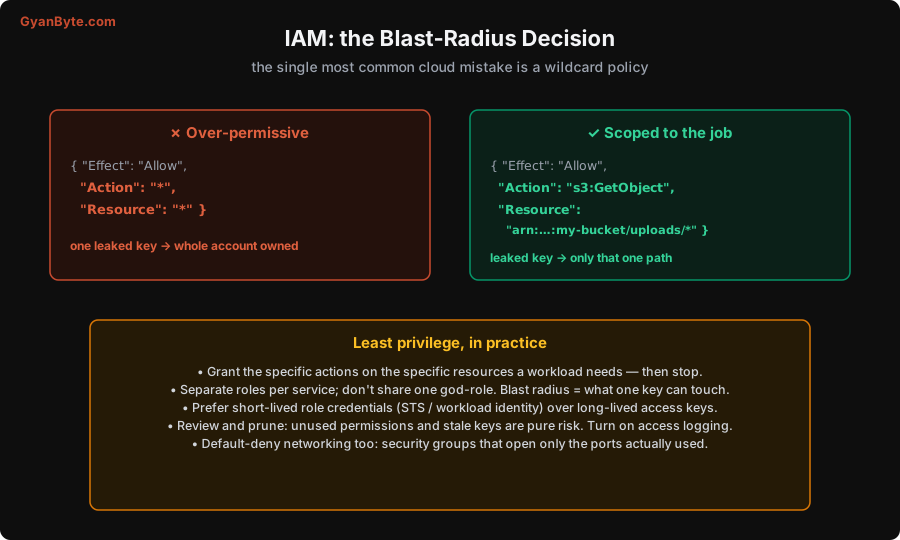
Compare two IAM policies. The first grants Action: "*" on Resource: "*" — permission to do anything to everything. It’s tempting because it “just works” and you never hit a permission error. But it means that one leaked key owns the entire account: every database, every bucket, every service. The second grants exactly s3:GetObject on arn:...:my-bucket/uploads/* — read one path in one bucket, nothing else. If that key leaks, the damage is one folder’s worth of files. Same convenience to the application; vastly different blast radius.
This is least privilege (Lesson 3) applied to infrastructure, and in practice it means:
- Grant specific actions on specific resources a workload actually needs — then stop. Start from nothing and add permissions as required, rather than starting from
*and never trimming. - Separate roles per service. Don’t share one powerful “god role” across everything; give each service its own minimal role so compromising one doesn’t hand over the others. Blast radius is literally “what can this one identity touch.”
- Prefer short-lived credentials. Use role assumption / workload identity (AWS STS, GCP/Azure workload identity) so services get temporary, auto-rotating credentials instead of long-lived static access keys. A credential that expires in an hour is far less valuable to steal, and there’s no static secret to leak (ties back to Lesson 7).
- Review and prune. Unused permissions, old access keys, and stale accounts are pure risk with no benefit. Periodically audit and remove them, and turn on access logging so you can see what’s actually being used.
The same default-deny thinking applies to networking: security groups / firewall rules should open only the ports genuinely in use, databases and internal services should never be directly reachable from the public internet (put them in private subnets), and egress should be restricted where practical (which also helps against SSRF, Lesson 5). “Closed by default, open a specific hole when needed” beats “open by default, try to close the bad ones.”
Defense in Depth
No single control is perfect, and no single wall holds forever. The organising principle for infrastructure security is defense in depth: layer independent defenses so that any one failure isn’t catastrophic. If an attacker gets through one layer, the next still stands.
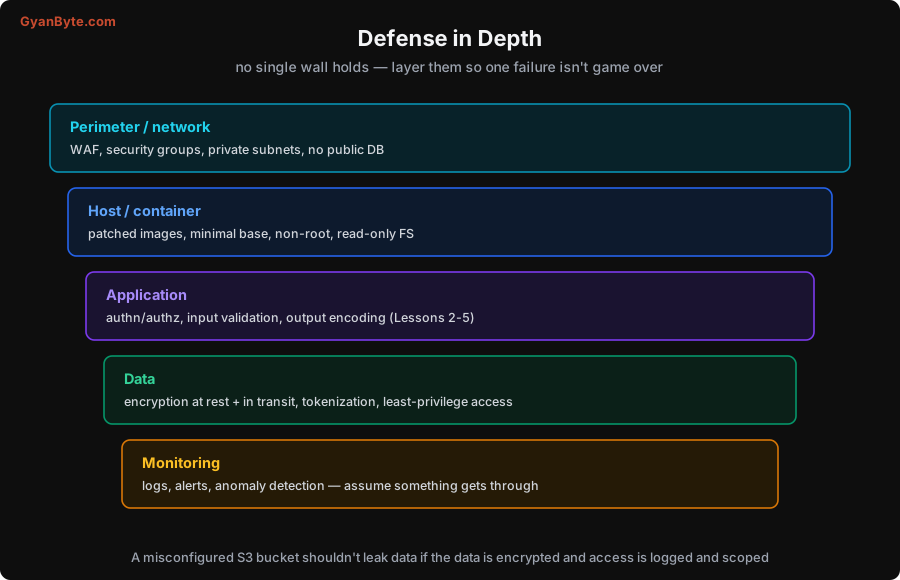
Think in layers, from the outside in:
- Perimeter / network — a WAF to filter obvious attacks, tight security groups, private subnets, nothing exposed that doesn’t need to be.
- Host / container — patched, minimal base images (less installed = less attack surface), running as a non-root user, read-only filesystems where possible, no unnecessary capabilities. (This mirrors the container-security practices from the Kubernetes material elsewhere on this site.)
- Application — everything from Lessons 2–5: authentication, authorization, input validation, output encoding. Your code is a layer, not the only one.
- Data — encryption at rest and in transit (Lesson 6), tokenization of the most sensitive fields, and least-privilege access to the datastore. This layer is what makes the others’ failures survivable.
- Monitoring — logging, alerting, and anomaly detection (Lesson 11), built on the assumption that something will eventually get through, so you can detect and respond.
The payoff of layering is concrete. The archetypal cloud breach is a misconfigured, publicly-readable storage bucket (S3 and its equivalents). With defense in depth, that single misconfiguration isn’t game over: if the data in the bucket is encrypted and the keys are properly managed (Lesson 7), and access is logged so you detect the unusual reads, and the bucket only ever held least-necessary data, then one wrong setting leaks far less, and you find out fast. Any one layer failing is survivable because the others still do their job.
The Shared-Responsibility Reality
One mental model is essential for cloud specifically: the shared-responsibility model. The cloud provider secures the underlying infrastructure — the physical data centres, the hypervisors, the managed-service internals (“security of the cloud”). But you are responsible for how you use it — your IAM policies, your network configuration, your application code, and above all your data (“security in the cloud”). The provider will happily let you make a bucket public or attach a wildcard role; those choices are yours.
This matters because it’s a common and dangerous misconception that “it’s in the cloud, so it’s secure.” The cloud gives you excellent tools to be secure — encryption, IAM, private networking, logging, managed secrets — but they’re tools you must actually configure correctly. The overwhelming majority of cloud breaches are not the provider being hacked; they’re customers misconfiguring what they were responsible for. So learn where the line is for the services you use, and own your side of it deliberately.
A few more practical infrastructure habits:
- Infrastructure as code (Terraform, etc.) so configurations are reviewed, version-controlled, and scannable (you can run security linters over them, catching a public bucket before it’s deployed).
- Patch the things you manage. Managed services are patched for you; your own VMs, containers, and base images are not. Keep them current (Lesson 9).
- Encrypt by default. Turn on encryption at rest for storage and databases (usually a checkbox) and enforce TLS in transit everywhere, including between internal services.
- Log control-plane actions. Enable cloud audit logs (CloudTrail and equivalents) so you have a record of who did what — essential for Lesson 11’s detection and response.
Pitfalls to Avoid
- Wildcard IAM policies (
Action:*,Resource:*). The top cloud mistake; one leaked key owns everything. Scope to specific actions and resources. - One shared god-role. Separate roles per service so a single compromise doesn’t cascade. Blast radius = what one identity can touch.
- Long-lived static access keys. Prefer short-lived role/workload-identity credentials; there’s then no static secret to leak.
- Public databases and wide-open security groups. Default-deny networking; keep datastores in private subnets, open only the ports in use.
- Assuming “cloud = secure.” Shared responsibility: the provider secures the infrastructure; your config, IAM, and data are yours. Misconfiguration is the classic breach.
- Relying on a single layer. Use defense in depth so a public bucket or one bypassed control isn’t catastrophic.
- No audit logging or encryption-at-rest. Turn both on by default; you need the logs to detect and the encryption to survive a leak.
Quick Recap
- Cloud security centres on blast radius — minimising what one compromise can reach.
- The top mistake is a wildcard IAM policy; fix with least privilege: specific actions on specific resources, separate roles per service, short-lived credentials, default-deny networking.
- Use defense in depth across perimeter, host, application, data, and monitoring so no single failure is game over — a misconfigured bucket shouldn’t leak if data is encrypted, access scoped, and reads logged.
- Own your side of the shared-responsibility model: the provider secures the infrastructure; your configuration, IAM, and data are on you. Encrypt by default and enable audit logs.
Next lesson: assuming something eventually gets through, how do you know? Logging the right things, detecting trouble, and a calm incident-response playbook.