Cryptography scares people, and that fear causes two opposite mistakes: avoiding it (storing things in plain text because crypto feels hard) or, worse, trying to be clever with it (inventing a custom scheme that looks secure and isn’t). As a backend engineer you rarely need to implement cryptographic primitives — that’s a specialist’s job, and the primitives already exist, battle-tested, in your standard library. What you do need is to understand what each tool is for, so you pick the right one and use it correctly. Get the concepts straight and crypto becomes just another well-stocked toolbox.
Four Things People Confuse
Most crypto errors trace back to muddling four distinct tools that feel similar but do completely different jobs. Keep them separate and half your mistakes vanish.
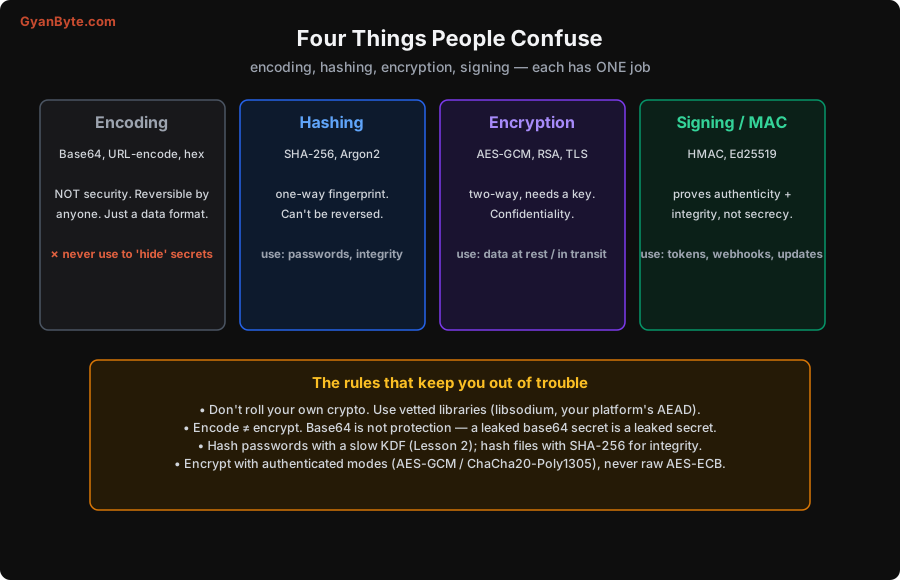
- Encoding (Base64, URL-encoding, hex) is not security at all. It’s a reversible data format — a way to represent bytes as text so they survive transport. Anyone can decode it instantly; there’s no key. The classic, dangerous mistake is “I’ll Base64 the token so it’s hidden.” It isn’t hidden; a Base64 secret in a log or URL is a leaked secret. Encoding solves formatting, never confidentiality.
- Hashing (SHA-256 for integrity; Argon2/bcrypt for passwords) is a one-way fingerprint. You can’t reverse it to recover the input. Use it to verify integrity (does this file still hash to the value I recorded?) and to store passwords (Lesson 2 — with a slow hash). Because it’s one-way, you never “decrypt” a hash; you only re-hash and compare.
- Encryption (AES-GCM, ChaCha20-Poly1305, RSA, and the TLS that wraps your traffic) is two-way and needs a key. It provides confidentiality — scrambling data so only a key-holder can read it. Use it for data at rest (database fields, files) and in transit (HTTPS). Lose or leak the key and the confidentiality is gone, so key management (Lesson 7) is the hard part.
- Signing / MAC (HMAC, Ed25519, RSA signatures) proves authenticity and integrity — that a message came from who you think and wasn’t altered — without hiding it. Use it for tokens (the JWT signature, Lesson 2), webhook verification, software-update signing, and API request signing. Signing is about trust, not secrecy.
A quick way to choose: do you need to hide it? → encryption. Prove it wasn’t changed / came from the right party? → signing/MAC. Store a password or verify a file? → hashing. Just format bytes as text? → encoding (and remember that’s not protection).
Two symmetry notes worth holding: symmetric crypto (AES, HMAC) uses one shared key for both sides — fast, but both parties must already share the secret. Asymmetric crypto (RSA, Ed25519, the key-exchange in TLS) uses a public/private key pair — slower, but it solves the “how do two strangers agree on a key” problem, which is exactly what TLS needs.
TLS: A Private Channel Between Strangers
Almost all the encryption you rely on daily is TLS — the S in HTTPS. It’s worth understanding at a conceptual level, because it elegantly combines all four tools above to solve a genuinely hard problem: two parties who’ve never met need a private, tamper-proof conversation over a network full of eavesdroppers.
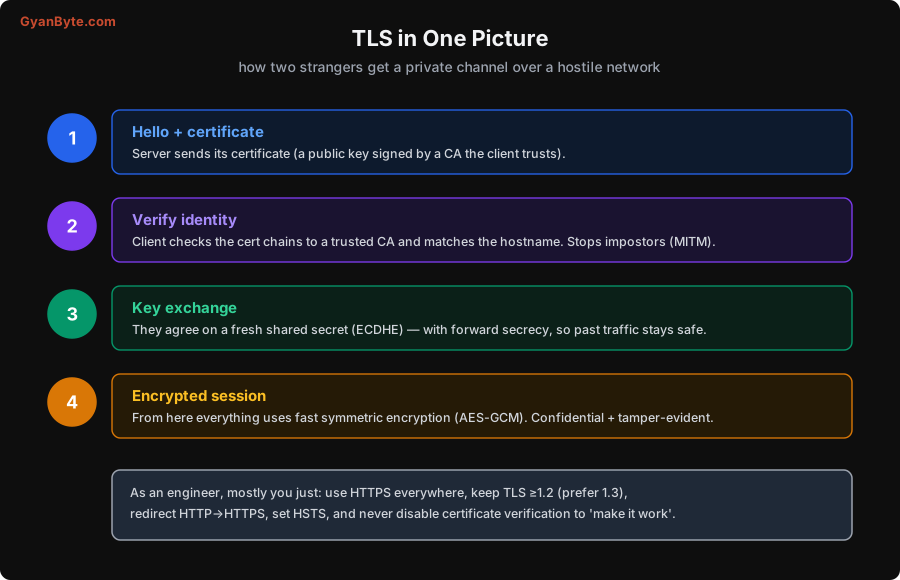
The flow, simplified:
- Certificate. The server presents a certificate: its public key, plus an identity (the hostname), signed by a Certificate Authority (CA) your client already trusts. (Signing — tool four.)
- Verify identity. The client checks the certificate chains up to a trusted CA and that the hostname matches. This step is what stops a man-in-the-middle from impersonating the server — an attacker can copy the certificate but can’t produce the matching private key. (Asymmetric crypto.)
- Key exchange. The two sides use the public-key machinery to agree on a fresh, random shared secret — modern TLS uses ephemeral Diffie-Hellman (ECDHE), which gives forward secrecy: even if the server’s long-term key is stolen later, past recorded traffic stays safe.
- Encrypted session. With a shared secret in hand, they switch to fast symmetric authenticated encryption (AES-GCM) for the actual data — confidential and tamper-evident.
As an engineer you almost never touch these internals. What you do need to do: use HTTPS everywhere (including internal service-to-service traffic), keep TLS at 1.2 or higher (prefer 1.3), redirect HTTP to HTTPS and set HSTS (Lesson 5), and — the cardinal sin — never disable certificate verification to “make it work.” Turning off cert checks (the infamous verify=False, rejectUnauthorized: false) throws away the entire point of TLS and re-opens man-in-the-middle attacks. If certs are failing, fix the certs, don’t disable the check.
The Rules That Keep You Safe
Cryptography punishes cleverness and rewards boring discipline. Internalise this short list and you’ll avoid the overwhelming majority of crypto mistakes:
- Don’t roll your own crypto. Not the algorithm, not the protocol, not the “I’ll just XOR it” scheme. Real crypto is broken by subtle flaws invisible to non-specialists — timing, padding, nonce reuse. Use vetted, high-level libraries (libsodium / NaCl, your platform’s AEAD, well-maintained TLS stacks) that make the safe choice the default.
- Use authenticated encryption (AEAD). When you encrypt, use a mode that also detects tampering — AES-GCM or ChaCha20-Poly1305. Avoid raw AES-ECB (it leaks patterns — identical plaintext blocks produce identical ciphertext) and unauthenticated modes (an attacker can flip bits undetected). “Encrypt-then-authenticate” is handled for you by AEAD; prefer it.
- Never reuse a nonce/IV with the same key, and generate randomness from a cryptographically secure source (
secrets/crypto.randomBytes, neverMath.randomorrand()). As Lesson 2’s experiment showed,secrets.token_urlsafe(32)gives ~256 bits of real entropy; a predictable token is no token at all. - Compare secrets in constant time. When checking a token, HMAC, or signature, use a constant-time comparison (
hmac.compare_digest) — a naive==short-circuits on the first wrong byte and can leak the secret through timing, as the experiment illustrated. - Encode ≠ encrypt. Say it until it’s reflexive. Base64 is formatting, not protection.
- Right tool for the job. Hash passwords with a slow KDF; hash files with SHA-256 for integrity; encrypt for confidentiality; sign for authenticity. Using encryption where you needed signing (or vice versa) is a real and common design error.
If you only remember one sentence from this lesson: use well-tested libraries at a high level, with authenticated encryption and secure randomness, and never invent your own scheme. That alone puts you ahead of most crypto-related breaches.
Pitfalls to Avoid
- Rolling your own crypto. Subtle flaws sink hand-made schemes. Use vetted libraries at a high level.
- Confusing encoding with encryption. Base64/hex hide nothing. A leaked encoded secret is a leaked secret.
- Using the wrong tool. Hide → encrypt; prove unchanged/authentic → sign; store a password → slow hash. Don’t mix them up.
- Unauthenticated or ECB encryption. Use AEAD (AES-GCM / ChaCha20-Poly1305); never raw AES-ECB or bit-flippable modes.
- Weak randomness and nonce reuse. Use a CSPRNG (
secrets/crypto.randomBytes); never reuse a nonce with the same key. - Non-constant-time secret comparison. Use
hmac.compare_digestor equivalent to avoid timing leaks. - Disabling certificate verification. Never. It re-opens man-in-the-middle. Fix the certs instead.
Quick Recap
- Keep the four tools separate: encoding (format, not security), hashing (one-way fingerprint), encryption (two-way confidentiality), signing/MAC (authenticity + integrity).
- TLS combines them: CA-signed certificate → verify identity → ephemeral key exchange (forward secrecy) → fast symmetric authenticated encryption.
- As an engineer: HTTPS everywhere, TLS ≥1.2, redirect + HSTS, never disable cert verification.
- The safety rules: don’t roll your own, use vetted libraries, use AEAD, secure randomness, constant-time compares, encode ≠ encrypt.
Next lesson: encryption is only as strong as your key management. We’ll cover secrets — getting them out of git, into a vault, rotated and audited — and how envelope encryption lets you protect data without ever touching the master key.