Injection has been at or near the top of every security risk list for two decades, and it keeps its place because it’s easy to introduce, easy to overlook, and catastrophic when exploited. The entire family — SQL injection, command injection, path traversal, template injection, and more — comes from a single underlying mistake, which is wonderful news: understand the one principle and you can defend against all of them. This lesson shows the mistake concretely, with a real demo, and then the one habit that fixes it everywhere.
The One Principle Behind All Injection
Here’s the whole idea: injection happens when untrusted data is allowed to become executable code, because it was combined with code in a way that lets an interpreter parse it as syntax. Your program builds a string — a SQL query, a shell command, a file path, an HTML template — by mixing trusted template text with untrusted user input. The interpreter on the other end (the database, the shell, the filesystem) can’t tell which parts you meant as commands and which parts came from a malicious user. So a user who includes the right syntax in their “data” can break out of the data slot and inject their own commands.
Let me make it concrete with SQL, because it’s the classic and because I ran it for real. Picture a login or search that builds a query by pasting the username straight into the SQL string:
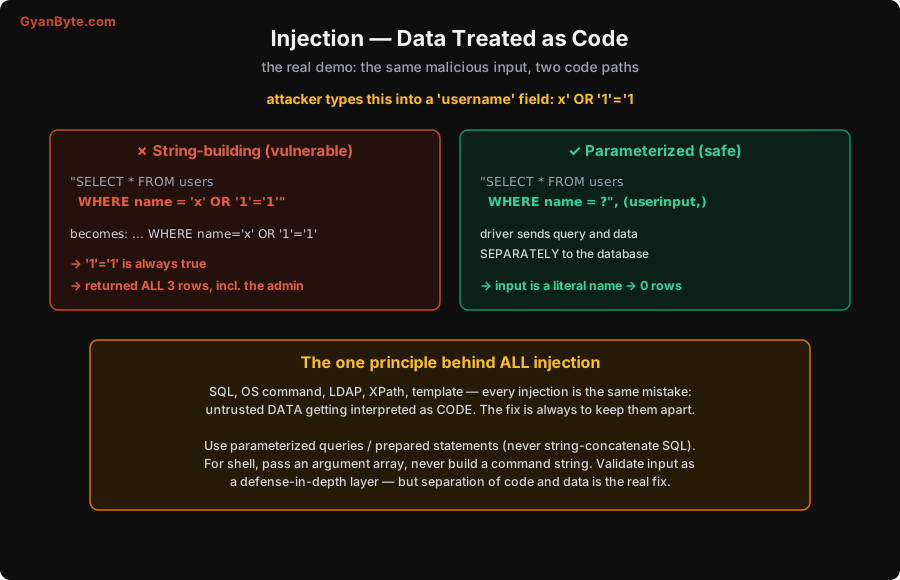
In my experiment, the table had three users (two normal, one admin). The attacker types x' OR '1'='1 into the username field. With string-building, the query becomes SELECT * FROM users WHERE name = 'x' OR '1'='1'. That trailing OR '1'='1' is always true, so the WHERE clause matches everything: the query returned all three rows, including the admin. The attacker’s data broke out of the string literal and changed the logic of the query. With a tiny amount more effort, the same technique dumps entire tables, bypasses logins, or (with stacked queries) modifies data.
Now the parameterized version. Instead of building a string, you write SELECT * FROM users WHERE name = ? and pass the user input separately as a parameter. The database driver sends the query structure and the data to the database over different channels — the data is never parsed as SQL syntax. In my experiment, the exact same malicious input x' OR '1'='1 was treated as a literal username, matched no one, and returned zero rows. Same input, same database, completely different outcome — because the code and the data were kept apart.
That’s the entire lesson in one comparison. The vulnerable path lets data become code; the safe path keeps them separate.
The Fix, Across Every Flavour
Because every injection is the same root cause, the fix is the same idea everywhere: keep code and data separate, structurally, so the interpreter can never mistake one for the other. How that looks depends on the interpreter.
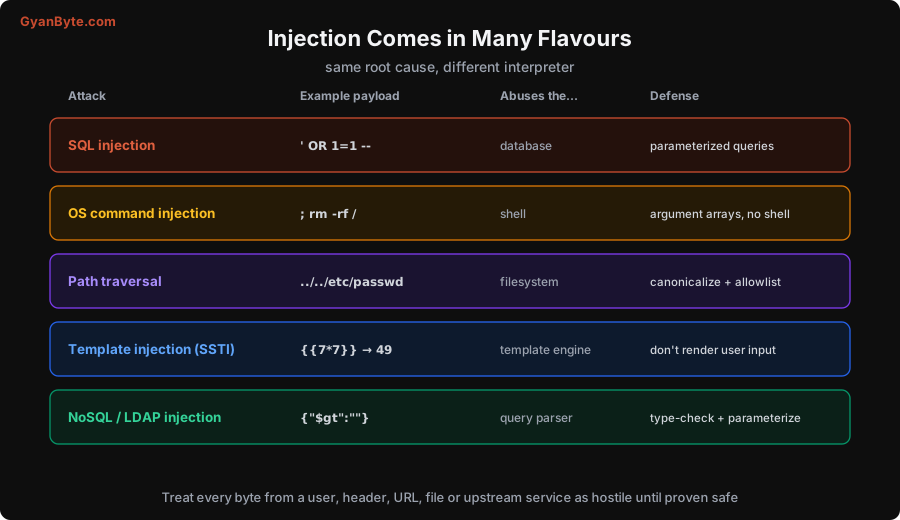
- SQL injection → parameterized queries / prepared statements, always. Use your ORM or query builder’s binding, never string concatenation or format strings to assemble SQL. This single habit eliminates the entire class. (Even with an ORM, watch for raw-query escape hatches — those still need parameters.)
- OS command injection → don’t build shell command strings from user input. Call programs with an argument array (e.g.
subprocess.run(["convert", filename]), notos.system("convert " + filename)) so the user input is a single argument, never shell syntax. Better still, avoid shelling out; use a library. A payload like; rm -rf /is only dangerous if it reaches a shell. - Path traversal → user input like
../../etc/passwdcan escape the directory you intended. Canonicalize the resolved path and verify it stays within an allowlisted base directory; reject anything that climbs out. Don’t let users specify raw file paths at all where you can avoid it. - Template injection (SSTI) → never render user input as a template. If
{{7*7}}comes back as49, your template engine is executing user input, which often leads to full code execution. Keep user data as data passed into a fixed template, never as the template itself. - NoSQL / LDAP / XPath injection → same story in a different interpreter. A JSON body like
{"$gt": ""}can subvert a MongoDB query that trusts its shape. Type-check inputs and use the driver’s safe query construction; don’t build query objects out of raw user-controlled structures.
Notice the pattern: in every case the fix is structural separation, not clever escaping. Hand-rolled escaping (trying to backslash-quote dangerous characters yourself) is a trap — there’s always a case you miss, an encoding you didn’t consider, a context where your escaping is wrong. Let the interpreter’s own parameterization keep the boundary for you.
Input Validation: Valuable, But Not the Main Fix
You should still validate input — but understand its role. Validation is defense-in-depth, not the primary fix. Allowlisting (accepting only input that matches an expected shape — “a username is 3–30 letters, digits, and underscores”) is genuinely useful: it rejects obviously malicious input early, reduces your attack surface, and catches mistakes. Prefer allowlisting (define what’s allowed) over denylisting (trying to enumerate what’s bad), because you can’t list every bad input but you can usually describe the good ones.
But validation is a second layer, not a substitute for parameterization. Why? Because sometimes legitimate data genuinely contains dangerous characters — the surname “O’Brien” has a quote in it; a search box should accept arbitrary text; a comment field should let people write DROP TABLE as a joke without consequence. If your safety depends on blocking quotes, you either break real users or miss an encoding. With parameterization, O'Brien is just a name and the joke comment is just text — no escaping, no breakage, no vulnerability. So: validate to reject nonsense and shrink attack surface, and parameterize to make the data physically incapable of becoming code. Do both; rely on the second.
A final mindset note that ties back to Lesson 1: the input you must treat as hostile isn’t only the obvious form field. It’s query parameters, headers, cookies, file names and contents of uploads, webhook payloads, data from another internal service, and even data you read back from your own database that a user placed there earlier (so-called “second-order” injection). Every byte that crosses into an interpreter is a potential injection point. Treat them all as hostile until they’re safely parameterized or validated.
Pitfalls to Avoid
- Building SQL (or any command) by string concatenation or interpolation. This is the bug. Use parameterized queries / prepared statements, every time.
- Relying on manual escaping. Hand-rolled escaping always misses a case. Let the interpreter’s parameterization enforce the boundary.
- Shelling out with user input in the command string. Use argument arrays or a library; never paste user input into a shell command.
- Letting users control file paths. Canonicalize and allowlist to a base directory; reject traversal (
..). - Rendering user input as a template. Pass user data into a fixed template; never execute it as one.
- Treating validation as the whole fix. Allowlist validation is defense-in-depth; structural separation of code and data is the real fix. Do both.
- Forgetting non-obvious inputs. Headers, cookies, uploads, upstream services, and your own stored data are all injection vectors.
Quick Recap
- Every injection — SQL, command, path, template, NoSQL — is the same mistake: untrusted data interpreted as code.
- The real demo proved it:
x' OR '1'='1concatenated into SQL leaked all rows; the same input parameterized returned zero. - The universal fix is structural separation of code and data: parameterized queries, argument arrays, canonicalized+allowlisted paths, data-not-templates.
- Validation (allowlisting) is valuable defense-in-depth, but not a substitute for parameterization — legitimate data can contain dangerous characters.
- Treat every input as hostile: form fields, headers, cookies, uploads, upstream data, and your own stored data.
Next lesson: the attacks that live in the browser — XSS, CSRF, and SSRF — and the small set of HTTP headers and cookie flags that shut most of them down.