Replicas and Sentinel (Lesson 8) give you high availability, but every write still goes to one primary and the whole dataset must fit in one machine’s RAM. When you outgrow that — too much data for one box, or more write throughput than one core can serve — you need to shard: split the data across multiple machines. Redis Cluster does this, and it comes with one important design constraint you must plan for. This lesson is sharding, the constraint, and when to actually use it.
How Cluster shards: 16,384 hash slots
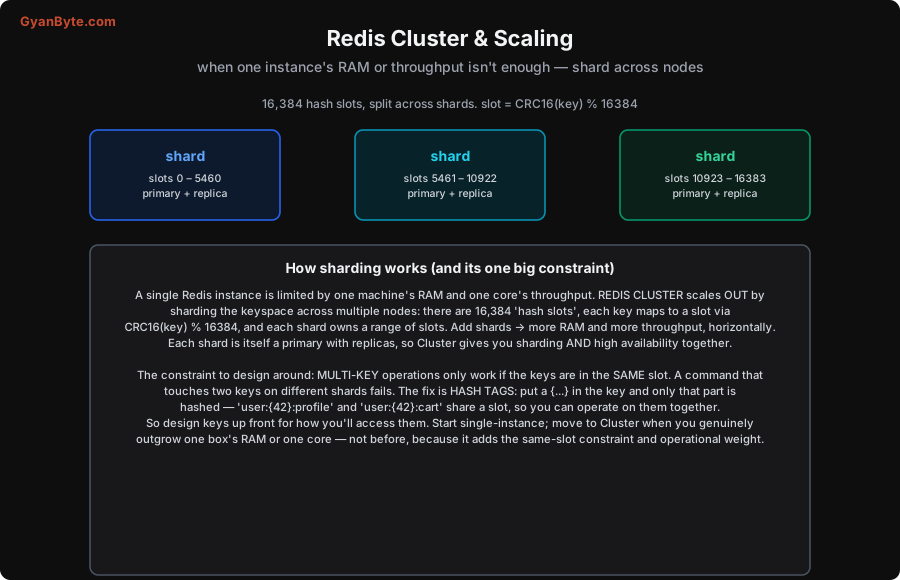
Redis Cluster divides the keyspace into exactly 16,384 hash slots. Every key is deterministically mapped to a slot by CRC16(key) % 16384, and each shard (a node, or a primary-plus-replicas group) owns a contiguous range of slots. With 3 shards, one might own slots 0–5460, the next 5461–10922, the last 10923–16383. When a client issues a command, it (via a cluster-aware library) computes the key’s slot, looks up which shard owns it, and talks to that shard directly.
Two things fall out of this design:
- Horizontal scale. Add shards, redistribute slots, and you get more total RAM and more total throughput — the dataset and the load spread across machines. This is how Redis scales past one box: the data is partitioned, and each shard handles its slice independently.
- HA built in. Each shard is itself a primary with replicas (Lesson 8), and Cluster handles failover: if a shard’s primary dies, one of its replicas is promoted automatically. So Cluster gives you sharding and high availability together — you don’t run Sentinel separately; the cluster nodes coordinate failover themselves.
The one big constraint: same-slot for multi-key ops
Here’s the catch you must design around. Because keys are scattered across shards by their hash, a command that touches multiple keys only works if all those keys are in the same slot (and therefore on the same shard). A MGET a b, an SINTER set1 set2, a transaction touching two keys, or a Lua script reading two keys — these fail in Cluster if the keys live on different shards, because no single shard has both and Cluster won’t do a cross-shard operation.
The fix is hash tags: if a key contains a substring in curly braces {...}, only that braced part is hashed to pick the slot. So you force related keys into the same slot by giving them the same tag:
user:{42}:profileanduser:{42}:cartboth hash on42, so they land in the same slot — now you canMGETthem, operate on them in a transaction, or run a Lua script across them.- Without the tag,
user:42:profileanduser:42:cartwould hash on their full names and likely land on different shards, breaking any multi-key operation.
So Cluster forces you to think about key co-location up front: group keys that you’ll access together under a common hash tag, so they share a slot. This is a real design cost — you can’t freely do multi-key operations across arbitrary keys anymore — and it’s the main reason not to jump to Cluster before you need it.
When to actually use Cluster
The guidance is: don’t reach for Cluster until you genuinely need it.
- Start single-instance (with replicas + Sentinel for HA, Lesson 8). One Redis instance is extremely capable — ~100k+ ops/sec (far more with pipelining), and modern machines have enormous RAM (hundreds of GB). A single primary with read replicas serves a lot of workloads, and it has no same-slot constraint: multi-key operations, transactions and Lua scripts work freely across all your keys.
- Move to Cluster when you truly outgrow one machine — the dataset no longer fits in one box’s RAM, or write throughput exceeds what one core can serve, or you need more aggregate capacity than replicas provide. Then the horizontal scale is worth the same-slot constraint and the extra operational complexity (more nodes, slot management, resharding, cluster-aware clients).
Jumping to Cluster prematurely buys you the constraints and operational weight without needing the scale. Because adding the same-slot thinking after the fact (retrofitting hash tags into an existing keyspace) is painful, the practical move is: run single-instance until you can see you’ll outgrow it, and if you know Cluster is in your future, design keys with hash tags from the start. Managed Redis offerings make Cluster much easier to operate, but the key-design constraint is yours to handle regardless.
With scaling covered, the next lessons turn to what makes Redis special for coordination and advanced patterns — distributed locks, and the structures that unlock leaderboards, rate limiting and more.
Pitfalls to Avoid
- Adopting Cluster before you need it. It adds the same-slot constraint (no free multi-key ops) and operational complexity. A single primary + replicas handles most workloads. Shard only when you outgrow one machine.
- Multi-key operations across different slots.
MGET,SINTER, transactions and Lua across keys on different shards fail in Cluster. Co-locate keys you access together with hash tags ({...}). - Over-using one hash tag. If you force too many keys into one tag/slot to enable multi-key ops, that slot (and its shard) becomes a hotspot — the skew problem again. Group only keys genuinely accessed together.
- Retrofitting hash tags late. Adding co-location to an existing keyspace means renaming keys — painful. If Cluster is likely, design key names with hash tags up front.
- Using a non-cluster-aware client. Cluster clients must understand slot routing and redirections (MOVED/ASK). A plain client will fail or misroute. Use a cluster-aware library.
- Assuming Cluster scales writes to a single key. Sharding spreads different keys across shards; a single hot key still lives on one shard and one core. Cluster scales the keyspace, not a single hot key — design to spread load.
Quick Recap
- A single instance is capped by one machine’s RAM and one core. Redis Cluster shards across nodes via 16,384 hash slots (
CRC16(key) % 16384); each shard owns a slot range → horizontal RAM + throughput. Each shard is a primary + replicas, so Cluster gives sharding and HA together. - The constraint: multi-key operations require keys in the same slot. Use hash tags (
user:{42}:profile) to co-locate keys you access together. - When: start single-instance (+ replicas/Sentinel) — it has no same-slot constraint and handles a lot. Move to Cluster only when you genuinely outgrow one box’s RAM or write throughput.
- Design keys for co-location up front if Cluster is likely; use a cluster-aware client; a single hot key still lives on one shard.
Next lesson: what Redis’s atomic nature makes easy — distributed locks and coordination (SETNX, Redlock, rate limits, Lua).