Redis keeps everything in RAM, which raises an obvious worry: what happens when it restarts, crashes, or the machine reboots? Is all the data gone? The answer is “only if you let it” — Redis has two persistence mechanisms that let it survive a restart. Which (if any) you need depends entirely on what Redis is in your system: a disposable cache, or the only home for important data. Getting that judgment wrong is a classic, painful mistake.
RDB and AOF
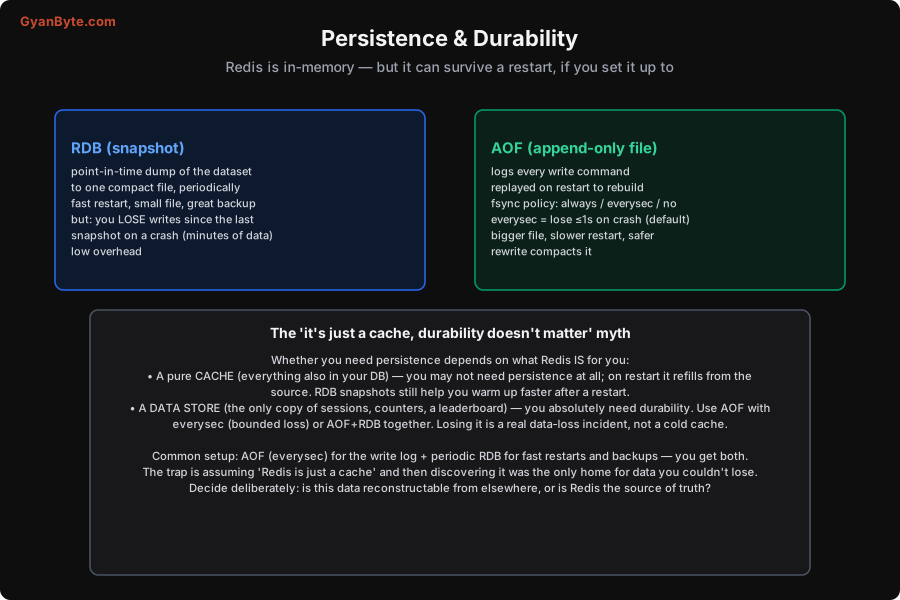
Redis offers two persistence mechanisms, with different trade-offs.
RDB (Redis Database) — snapshots. RDB takes a point-in-time snapshot of the entire dataset and writes it to a single compact file (dump.rdb), periodically (e.g. “every 5 minutes if at least 100 keys changed”). Its strengths:
- Fast restart — loading one compact binary file is quick, even for large datasets.
- Small files, great for backups — a single file you can copy off for disaster recovery.
- Low runtime overhead — snapshots are taken by a forked child process, so they barely affect the serving thread.
Its weakness: you lose everything written since the last snapshot if Redis crashes between snapshots. With a 5-minute snapshot interval, a crash can cost up to 5 minutes of writes. Fine for a cache; a problem for a store.
AOF (Append-Only File) — the write log. AOF logs every write command to a file as it happens; on restart, Redis replays the log to rebuild the dataset. Its durability depends on the fsync policy — how often the OS flushes the log to disk:
always— fsync after every write. Safest (lose nothing), but slow (a disk sync per write).everysec— fsync once a second (the default). You lose at most ~1 second of writes on a crash — an excellent balance of safety and speed.no— let the OS decide when to flush. Fastest, least safe.
AOF’s trade-off vs RDB: it’s safer (second-level durability vs minutes) but produces a bigger file and a slower restart (replaying a log of commands vs loading a snapshot). AOF files are periodically rewritten (compacted) to stop them growing unbounded.
Do you even need persistence? The “just a cache” myth
Here’s the judgment that actually matters, and where teams go wrong. Whether you need persistence — and which kind — depends entirely on what role Redis plays:
- If Redis is a pure cache — every value is also in your database, and Redis just holds fast copies — you may not need persistence at all. If Redis restarts empty, it simply refills from the source on cache misses (Lesson 4). (RDB snapshots can still help: a restart that loads a recent snapshot “warms up” the cache instantly instead of a cold-start stampede against the database. But losing the cache isn’t a data-loss incident — it’s a cold cache.)
- If Redis is a data store — it holds the only copy of something (sessions, counters, a leaderboard, a rate-limit state that matters, Streams you can’t lose) — you absolutely need durability. Losing it on a restart is a genuine data-loss incident, not a cold cache. Use AOF with
everysec(bounded ~1s loss), or AOF + RDB together for both durability and fast restarts/backups.
The trap — and it’s a common one — is the “it’s just a cache, so durability doesn’t matter” myth: a team runs Redis with persistence off, treating it as disposable, and then slowly, without quite deciding to, starts storing things in Redis that aren’t in any database — session state, a counter that drives billing, a leaderboard users care about. One restart later, that data is gone, and it turns out Redis was the source of truth for it all along. Decide deliberately, per piece of data: is this reconstructable from elsewhere, or is Redis its only home? If it’s the only home, it needs durability — and probably a backup strategy.
A sensible default
For most “Redis as a store” deployments, the common, recommended setup is both:
- AOF with
everysec— the write log, for durability (lose ≤1s on a crash). - Periodic RDB snapshots — for fast restarts and easy backups (copy the compact file off-box).
You get AOF’s safety and RDB’s fast restart and backup convenience. For a pure cache, you might run with persistence off (or RDB only, for warm restarts) and accept that a restart cold-starts the cache. Either way, the decision should be made, not defaulted into — and reviewed whenever Redis’s role in your system grows. Managed Redis services handle the mechanics, but you still decide whether the data is cache or store. Next we look at surviving more than a restart — replication and high availability.
Pitfalls to Avoid
- The “just a cache” myth. Running with persistence off, then accumulating data in Redis that lives nowhere else. One restart loses it. Decide per data: cache (reconstructable) or store (needs durability).
- RDB-only for a data store. Snapshots lose everything since the last one — minutes of writes on a crash. For a store, use AOF (
everysec) so loss is bounded to ~1 second. - AOF
alwaysfor throughput-sensitive workloads. An fsync per write is slow.everysecis almost always the right balance (≤1s loss) unless you truly cannot lose a single write. - Forgetting backups. Persistence survives a restart, not a disk failure or a bad deploy. Copy RDB snapshots off-box regularly if Redis holds data you can’t lose.
- Not accounting for persistence overhead/memory. RDB forks a child (needs memory headroom for copy-on-write); AOF rewrites use CPU/IO. Size the box for it (Lesson 3’s headroom), especially with large datasets.
- Assuming a managed Redis is durable by default. Check the persistence and backup configuration of your managed service — defaults vary, and “in-memory” can mean “gone on restart” if you didn’t enable it.
Quick Recap
- Redis is in-memory but can persist to disk to survive restarts, two ways. RDB = periodic snapshot (fast restart, small file, great backups; but lose minutes on a crash). AOF = log every write, replayed on restart; fsync
everysec(default) loses ≤1s (bigger file, slower restart, safer). - Need depends on role: a pure cache may need no persistence (refills from source; RDB helps warm restarts); a data store (only copy of the data) needs durability — AOF everysec, or AOF + RDB.
- The “just a cache” myth: don’t quietly let Redis become the only home for data you can’t lose. Decide deliberately per data.
- Common store default: AOF (everysec) + periodic RDB — durability and fast restart/backups. Keep off-box backups.
Next lesson: surviving more than a restart — replication and high availability (replicas, Sentinel).