Redis’s speed comes from living in RAM — and that same fact makes memory the hard constraint of every Redis deployment. Unlike a disk-backed database that can spill to storage, Redis simply runs out when memory fills, and how it behaves at that moment is something you configure, not something that’s handled for you. Running out of memory is, by a wide margin, the most common Redis production incident. This lesson is how to not have it.
TTL, maxmemory, eviction
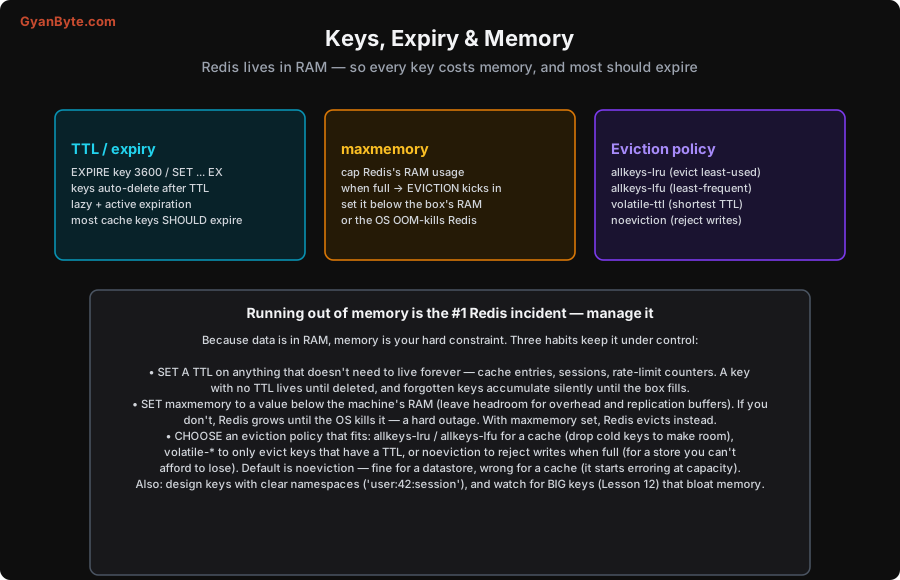
Three mechanisms, used together, keep memory under control.
1. TTL (time-to-live): make keys expire. You can attach an expiry to any key — EXPIRE key 3600 (seconds), or set it when writing: SET session:abc "..." EX 1800. When the TTL passes, Redis deletes the key automatically (lazily on access, plus a background active-expiry sweep). The habit: put a TTL on anything that doesn’t genuinely need to live forever — cache entries, sessions, rate-limit counters, temporary tokens. A key with no TTL lives until something explicitly deletes it, and in practice forgotten, un-expiring keys pile up silently until the instance fills. If a key represents transient or cacheable data, give it a TTL.
2. maxmemory: cap the usage. Set maxmemory to a limit below the machine’s physical RAM — leaving headroom for Redis’s own overhead, replication buffers, and the OS. This matters enormously: if you don’t set maxmemory, Redis will keep allocating as data grows until it exhausts the machine’s RAM, at which point the OS OOM-killer terminates the Redis process — a hard, abrupt outage. With maxmemory set, Redis instead triggers eviction when it hits the cap, keeping the process alive. Always set maxmemory.
3. Eviction policy: decide what to drop. When Redis reaches maxmemory, the eviction policy chooses what happens:
allkeys-lru— evict the least-recently-used key (any key). The standard choice for a cache: drop cold keys to make room for hot ones.allkeys-lfu— evict the least-frequently-used key. Often better than LRU for caches, as it keeps keys that are popular over time rather than just recently touched.volatile-lru/volatile-ttl/volatile-lfu— only evict keys that have a TTL set, by LRU / shortest-TTL / LFU. Use when some keys must never be evicted (no TTL = protected) and others are cache-like (have a TTL).noeviction— don’t evict; reject writes with an error when full (reads still work). The right choice for a data store where losing a key silently would be a correctness bug — better to fail writes loudly than drop data.
Crucially, noeviction is the default. That’s correct for a store but wrong for a cache: a cache running with noeviction starts erroring on writes when it fills instead of evicting cold keys. Many “Redis suddenly started failing” incidents are a cache left on the default noeviction. Set the policy to match the role: allkeys-lru/lfu for a cache, volatile-* for a mix, noeviction only for a pure store (with enough RAM and TTLs that it won’t fill).
Key hygiene
Beyond the memory mechanics, a couple of key-design habits pay off:
- Namespace your keys with a clear convention, usually colon-separated:
user:42:session,cache:product:99,rate:ip:1.2.3.4. This makes keys self-describing, groups related data, and lets you reason about (andSCANfor) categories of keys. Avoid one giant undifferentiated keyspace. - Keep keys reasonably short but readable — key names themselves cost memory at scale (millions of keys), though readability usually wins over micro-optimising a few bytes.
- Watch for big keys — a single key holding a huge value (a million-element list, a giant hash) is both a memory hog and a performance hazard (operating on it blocks the single thread, Lesson 12). Split big collections (per-day, per-shard) or cap them (
LTRIM). Useredis-cli --bigkeysto find them.
Memory management isn’t glamorous, but it’s the difference between a Redis that runs for years and one that falls over every few weeks. The rules are simple: TTL everything transient, set maxmemory with headroom, pick an eviction policy that matches the role, and avoid big keys. Next we put Redis to its most common use — caching — and the bugs that come with it.
Pitfalls to Avoid
- No
maxmemoryset. Redis grows until the OS OOM-kills it — a hard outage. Always setmaxmemorybelow the machine’s RAM (with headroom) so Redis evicts instead of dying. noeviction(the default) on a cache. When full, the cache starts rejecting writes instead of dropping cold keys. Setallkeys-lru/allkeys-lfufor caches.- Keys with no TTL that should have one. Cache entries, sessions and counters without a TTL accumulate until memory fills. TTL anything transient.
- A TTL-less store on an evicting policy. The flip side: running a data store with
allkeys-*eviction can silently drop data you needed. Usenoevictionorvolatile-*for data you can’t lose, with enough RAM. - Big keys. A single huge value hogs memory and blocks the single thread on every operation, and is hard to evict atomically. Split or cap large collections; hunt them with
--bigkeys. - Unstructured key names. A flat, inconsistent keyspace is impossible to reason about or clean up. Use namespaced, colon-separated conventions.
Quick Recap
- Redis lives in RAM, so memory is the hard limit and running out is the #1 incident. Manage it with three habits.
- TTL anything transient (
EXPIRE/SET ... EX) — a key with no TTL lives until deleted and forgotten keys fill the box. maxmemorybelow the machine’s RAM (with headroom) — without it, the OS OOM-kills Redis; with it, Redis evicts instead.- Eviction policy to match the role:
allkeys-lru/lfufor a cache,volatile-*for a mix,noeviction(the default) only for a store. A cache left on the defaultnoevictionerrors when full. - Key hygiene: namespaced keys (
user:42:session), and avoid big keys (split/cap; find with--bigkeys).
Next lesson: Redis’s most common job and its classic bugs — caching patterns (cache-aside, invalidation, stampedes).