On a payments team I worked with, the orders table had a column called payment_status. Over three years, 14 different values had appeared in it: success, SUCCESS, paid, captured, completed, done, failed, failure, cancelled, canceled, pending, in_progress, refunded, and my favourite, success_but_refunded. Different developers, different gateways, different years.
Nobody could answer a simple question like “how many orders were paid last month” without a 40-line SQL query full of CASE statements. And worse, some orders were in states that made no sense: refunded with no refund record, failed with a captured payment attached.
The fix was not more careful coding. It was a proper state machine. This lesson shows how to design one.
Why a State Machine?
A payment moves through a small number of states, and only some moves make sense. A payment can go from authorized to captured. It can’t go from refunded back to created. If you write these rules down in one place and enforce them, a whole class of bugs disappears:
- No impossible states.
- Every status change is visible and auditable.
- Out-of-order or duplicate events can’t corrupt your data.
- Reports become simple queries.
The Payment States
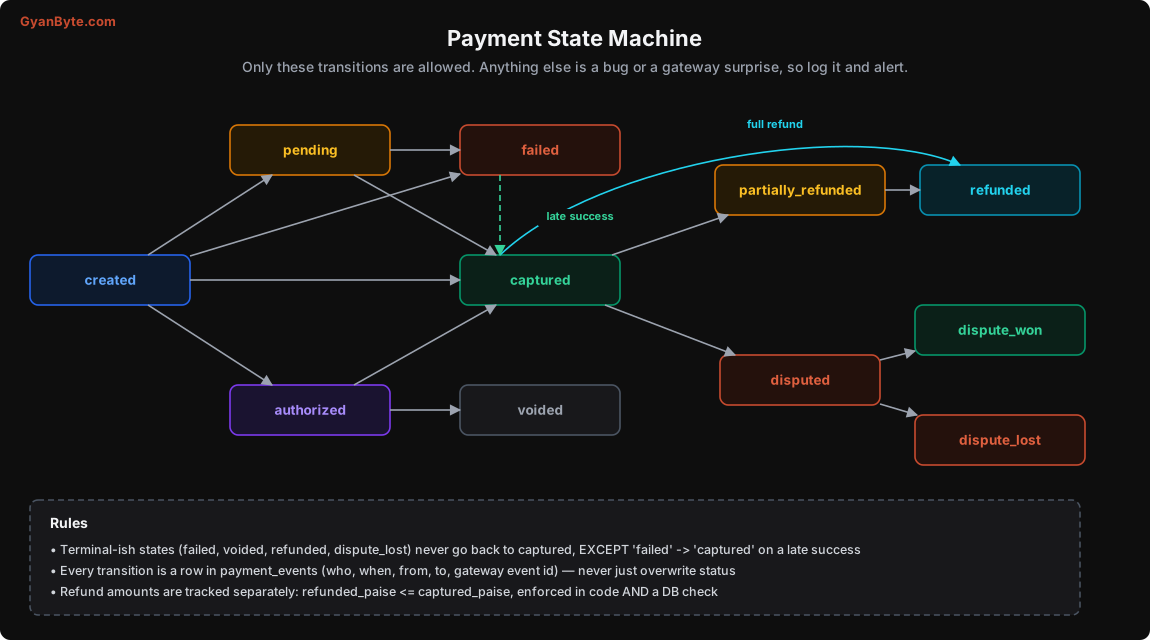
| State | Meaning |
|---|---|
created |
We created a gateway order; customer hasn’t paid yet |
pending |
Customer tried to pay; outcome not known yet (common with UPI) |
authorized |
Card approved and amount blocked; not yet charged |
captured |
Money taken. This is “paid” |
failed |
Payment did not go through |
voided |
Authorisation released without capture |
partially_refunded |
Some of the captured amount refunded |
refunded |
Full captured amount refunded |
disputed |
Customer raised a chargeback or dispute |
dispute_won / dispute_lost |
Outcome of the dispute |
Notice the special arrow from failed to captured. This is the late success case from Lesson 2. A payment the gateway reported as failed (or that you gave up on) can later turn out to be successful. Your state machine must allow this one “backwards” move, or you’ll reject real money.
Enforcing Transitions in Code
Write the allowed moves as data, in one place:
ALLOWED = {
    "created":            {"pending", "authorized", "captured", "failed"},
    "pending":            {"authorized", "captured", "failed"},
    "authorized":         {"captured", "voided", "failed"},
    "failed":             {"captured"},                       # late success only
    "captured":           {"partially_refunded", "refunded", "disputed"},
    "partially_refunded": {"partially_refunded", "refunded", "disputed"},
    "disputed":           {"dispute_won", "dispute_lost"},
    "dispute_won":        {"partially_refunded", "refunded"},
    "voided":             set(),
    "refunded":           set(),
    "dispute_lost":       set(),
}

class IllegalTransition(Exception): ...
Then a single function changes status. It locks the row, checks the move, writes the history, and updates the current status, all in one transaction:
def transition(conn, payment_id: int, to_state: str, *, source: str,
               source_event_id: str | None = None, details: dict | None = None) -> bool:
    with conn.transaction():
        p = conn.fetchrow("SELECT id, status FROM payments WHERE id=$1 FOR UPDATE", payment_id)
        frm = p["status"]

        if frm == to_state and to_state != "partially_refunded":
            return False                                   # duplicate event, nothing to do

        if to_state not in ALLOWED[frm]:
            conn.execute("""
                INSERT INTO payment_anomalies (payment_id, from_state, to_state, source, details)
                VALUES ($1, $2, $3, $4, $5)
            """, payment_id, frm, to_state, source, json.dumps(details or {}))
            alert("illegal payment transition", payment_id=payment_id, frm=frm, to=to_state)
            raise IllegalTransition(f"{frm} -> {to_state}")

        conn.execute("""
            INSERT INTO payment_events (payment_id, from_state, to_state, source,
                                        source_event_id, details)
            VALUES ($1, $2, $3, $4, $5, $6)
        """, payment_id, frm, to_state, source, source_event_id, json.dumps(details or {}))
        conn.execute("UPDATE payments SET status=$2, updated_at=now() WHERE id=$1",
                     payment_id, to_state)
    return True
And the history table:
CREATE TABLE payment_events (
    id               BIGSERIAL PRIMARY KEY,
    payment_id       BIGINT NOT NULL REFERENCES payments(id),
    from_state       TEXT NOT NULL,
    to_state         TEXT NOT NULL,
    source           TEXT NOT NULL,       -- 'webhook', 'status_poll', 'checkout_verify', 'ops:ravi'
    source_event_id  TEXT,                -- gateway event id, if any
    details          JSONB,
    created_at       TIMESTAMPTZ NOT NULL DEFAULT now(),
    UNIQUE (payment_id, source_event_id)
);
This table is append-only. You never update or delete rows in it. When someone asks “why is this payment refunded?”, you look at its events: created by checkout at 9:41, pending from status poll at 9:42, captured by webhook at 9:44, refunded by ops:priya at 11:15 with reason “customer cancelled”. Support, finance and auditors will love you for this.
A few details worth noting:
- Illegal transitions are recorded, not silently ignored. If the gateway sends something you didn’t expect, you want to know. Often it means a new gateway behaviour, or a bug in your code.
- Same-state transitions are no-ops, which makes duplicate events harmless (except
partially_refunded, which can happen several times with different amounts). sourceincludes humans. Manual changes by ops staff go through the same function withsource="ops:<name>", never through direct SQL.
Amounts are part of the state too
Refunds come in amounts, not just states. Keep amounts on the payment and check them in the same transaction:
ALTER TABLE payments
  ADD COLUMN captured_paise BIGINT NOT NULL DEFAULT 0,
  ADD COLUMN refunded_paise BIGINT NOT NULL DEFAULT 0,
  ADD CONSTRAINT refund_not_more_than_captured CHECK (refunded_paise <= captured_paise);
That CHECK constraint is a safety net. Even if some code path has a bug, the database will refuse to record refunding more than you captured.
Orders and Payments Are Different Things
This is the most common modelling mistake I see: putting payment status directly on the order, with one payment_id column.
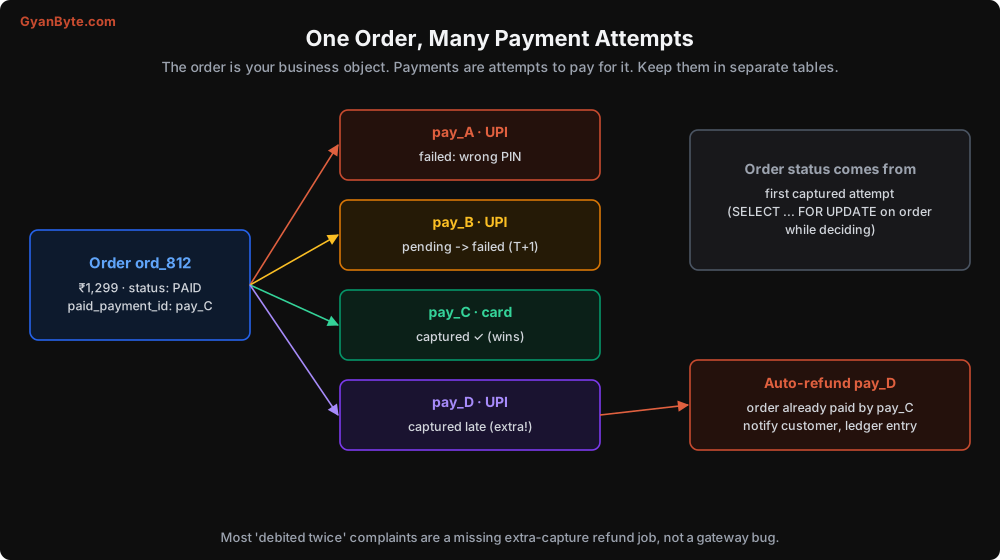
An order is your business object: what the customer is buying. A payment is an attempt to pay for it. One order can have:
- Several failed attempts (wrong PIN, then insufficient balance, then success by card).
- A pending attempt that resolves later.
- Occasionally two successful attempts (Lesson 2), where one must be refunded.
So keep them in separate tables, as we did in Lesson 4, and give the order its own, simpler state machine:
ORDER_ALLOWED = {
    "pending_payment":  {"payment_pending", "paid", "cancelled", "expired"},
    "payment_pending":  {"paid", "failed_final", "pending_payment"},   # back to pending_payment = customer can retry
    "failed_final":     {"paid", "cancelled"},                          # 'paid' = late success
    "expired":          {"paid"},                                       # late success on an expired order
    "paid":             {"fulfilled", "cancelled_after_payment"},
    "fulfilled":        {"returned"},
    "cancelled":        set(),
}
The order moves to paid when the first payment for it is captured (the conditional update from Lesson 5). Every later capture for the same order goes to the extra-payment refund path. The order doesn’t care about the details of each attempt; that’s what the payments table is for.
Your business code (shipping, enrolment, access to a course) should look at the order status only. Your finance code (ledger, reconciliation) looks at payments.
Mapping Gateway Statuses to Yours
Each gateway has its own status names and quirks. One might say captured, another SUCCESS, a third PAID with a separate settled flag. If these leak into your database, you get the 14-status mess from my story.
Write one mapping function per gateway, and only your own states go past it:
RAZORPAY_MAP = {
    "created": "created",
    "authorized": "authorized",
    "captured": "captured",
    "failed": "failed",
    "refunded": "refunded",       # full refund; partial refunds come from refund entities
}

CASHFREE_MAP = {
    "ACTIVE": "created",
    "PENDING": "pending",
    "SUCCESS": "captured",
    "FAILED": "failed",
    "USER_DROPPED": "failed",
    "CANCELLED": "failed",
}

def to_internal_status(gateway: str, raw_status: str) -> str:
    mapping = {"razorpay": RAZORPAY_MAP, "cashfree": CASHFREE_MAP}[gateway]
    if raw_status not in mapping:
        alert("unknown gateway status", gateway=gateway, status=raw_status)
        return "pending"            # safest default: don't fail, don't fulfil, keep checking
    return mapping[raw_status]
(Status names above are examples. Check your gateway’s current docs; they do add new ones.)
Notice the default for an unknown status: pending. Not failed (you might be rejecting real money) and not captured (you might ship without payment). Pending means “keep checking”, which is the safe choice when you don’t know.
This mapping layer also makes it much easier to add a second gateway later, which many companies do for redundancy or better pricing.
Out-of-Order Events
Webhooks can arrive in any order. Some examples:
refund.processedarrives beforepayment.captured(because the capture webhook failed the first time and is being retried).payment.failedfor attempt A arrives afterpayment.capturedfor attempt B on the same order.- An old, delayed webhook says
pendingafter you’ve already marked the paymentcaptured.
Two rules handle almost all of this:
- The state machine rejects moves that don’t make sense.
captured → pendingisn’t allowed, so the oldpendingevent is dropped (and recorded as an anomaly if you want visibility). - When in doubt, fetch the current status from the gateway. The webhook tells you something changed. The status API tells you what is true now. For important transitions, many teams always re-fetch before applying.
For the refund-before-capture case, if the event refers to a payment you don’t have in captured state yet, put the event back in the queue with a delay, or first fetch and apply the payment’s current status, then process the refund.
Handling Pending Over Time
We talked about pending in Lesson 2. Here’s the full plan as a timeline:
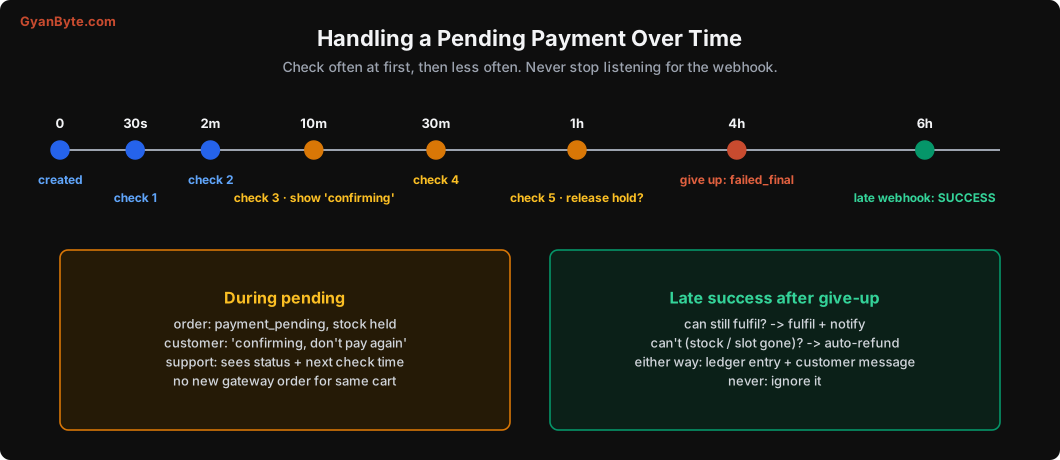
The exact times are up to you and your business. Some guidelines:
- Check frequently at first. Most pending payments resolve within a few minutes.
- Decide how long to hold stock. For limited stock (flash sales, event tickets), you may need to release it sooner and handle late success with a refund. For normal products, holding for an hour is fine.
- “Give up” is not the end.
failed_finaljust means you stop actively checking and tell the customer. You still accept late webhooks, and you can run a daily reconciliation that catches any capture you missed (Lesson 9). - Show the status to support. When a customer calls, the support agent should see: payment pending since 9:42, last checked 10:12, next check 10:42. That answers 80% of calls in one look.
Abandoned orders
Lots of orders never get paid: the customer closed the app, changed their mind. You’ll want a job that expires them (say, after 24 hours) to release stock and clean up dashboards.
Be careful: an expired order can still receive a late payment. That’s why expired → paid is allowed in the order state machine above. If you can’t fulfil it any more, the late payment goes to the auto-refund path. Never make an order state that silently swallows payments.
Making It Visible
A state machine is only useful if people can see it. Build a simple internal page for each order showing:
- The order’s state history.
- Each payment attempt with its state history (from
payment_events). - Webhooks received for it (from
webhook_events). - Refunds and their status.
- Ledger entries (next lesson).
This one page will save your support and engineering teams hours every week.
Pitfalls to Avoid
- Free-text status columns. Define a fixed set of states and allowed transitions in code.
- Overwriting status without history. Record every change in an append-only events table.
- Payment status on the order. Separate orders from payment attempts.
- Not allowing
failed → captured. Late successes are real; rejecting them means keeping money you shouldn’t. - Gateway status names in your database. Map them to your own states in one function per gateway.
- Defaulting unknown statuses to failed or success. Default to pending and alert.
- Trusting webhook order. Validate transitions and re-fetch the current status when in doubt.
- Manual SQL fixes by ops. All changes go through the same transition function, with the person’s name as the source.
- Expiry jobs that swallow late payments. Expired orders must still accept payments, then fulfil or refund.
- No internal timeline view. Support will keep asking engineers to “check the DB”.
Quick Recap
- Payments are a state machine: explicit states, explicit allowed moves, one function to change state.
- Every change is recorded in an append-only history. Illegal moves are recorded and alerted.
- Orders and payments are separate. The first capture pays the order; extra captures are refunded.
- Map each gateway’s statuses into yours; unknown means pending.
- Handle out-of-order events with transition checks and fresh status fetches.
- Plan pending over time, with holds, messages, a give-up point, and a late-success path.
We now know when money moves and how to track its status. Next lesson is about how much and where: designing a double-entry ledger, so that every paisa in your system can be explained.