A team I knew ran their session cache on four Redis servers. The client library picked a server with hash(session_id) % 4. It worked well for two years. Then, on the morning of a big sale, they added a fifth server to handle the expected load.
The moment the new config went out, % 4 became % 5, and almost every session ID now pointed to a different server than before. Every lookup was a cache miss. Every user was logged out. The login service, which normally handled a trickle of traffic, got the whole user base at once and fell over. The extra server, added to handle more load, caused the outage.
This lesson is about splitting data across machines without hurting yourself like that.
Why Partition?
Replication (Lesson 4) copies the same data to many machines. That helps with reads and availability, but every machine still holds everything and every write goes everywhere. At some point:
- The data doesn’t fit on one machine.
- The write rate is more than one machine can handle.
- Even reads of a single hot dataset overwhelm one node.
Then you partition (also called sharding): each machine holds a subset of the data. Usually you do both: partition the data, and replicate each partition for safety. Kafka topics, Cassandra, Elasticsearch, MongoDB sharded clusters, Redis Cluster and DynamoDB all work this way.
The central question is: given a key, which partition holds it?
Range vs Hash Partitioning
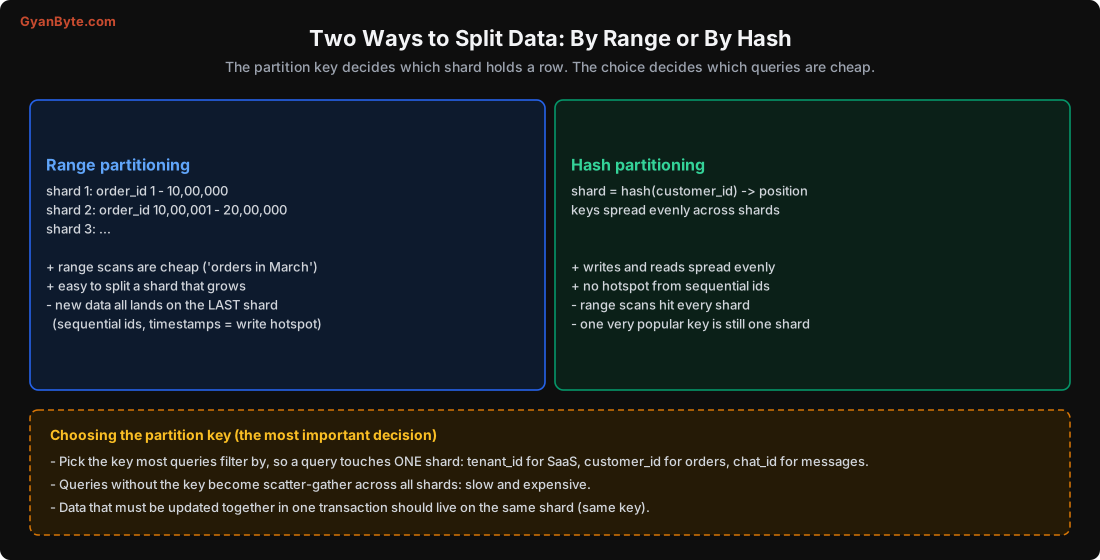
Range partitioning gives each partition a continuous range of keys: A-F, G-M, and so on, or order IDs 1-10 lakh, 10-20 lakh. It’s great for range queries (“orders between these dates” only touches the relevant partitions) and easy to split when one range grows. HBase, Bigtable, CockroachDB and TiKV use it.
Its weakness is sequential keys. If the key is a timestamp or an auto-increment ID, every new write goes to the last range. One partition takes all the writes while the others sit idle. Systems that use range partitioning work around this with random or hashed key prefixes, or by splitting hot ranges automatically.
Hash partitioning runs the key through a hash function and uses the result to pick a partition. Similar keys land in different places, so load spreads evenly, and sequential IDs aren’t a problem. Cassandra, DynamoDB, Redis Cluster, Kafka (for keyed messages) and most sharded caches use it.
Its weakness is range queries: “all orders from yesterday” is scattered across every partition, so you have to ask all of them and merge the results (scatter-gather).
The partition key is the most important decision
Whichever scheme you use, the choice of partition key decides almost everything about performance:
- Pick the key that most queries filter by. For a SaaS product,
tenant_id; for orders, usuallycustomer_id(customers look at their own orders); for chat,chat_id. Then most queries touch exactly one partition. - Queries without the key are scatter-gather. “Find orders by restaurant” on a table partitioned by
customer_idasks every shard. If that query matters, you need a second copy of the data partitioned byrestaurant_id(a secondary index, or a separate table maintained from events). - Things that must change together should live together. Transactions within one partition are easy. Transactions across partitions need the techniques in Lesson 10. If an order and its line items are always updated together, give them the same partition key.
- Avoid keys with very few values or skewed values. Partitioning by
citysounds natural for an Indian food app, until you realise that two or three metros produce a big share of all orders, while dozens of smaller cities barely register.
The Trap: hash(key) % N
The simplest hash scheme is partition = hash(key) % N, where N is the number of servers. It spreads keys evenly. And it’s a trap, because when N changes, almost every key moves.
I measured it: 1,00,000 keys (user:0 to user:99999), MD5 hash, going from 4 to 5 servers.
hash mod N, 4 -> 5 servers: keys moved: 79,825 (79.8%)Four out of five keys change servers. For a cache, that’s the story at the top: nearly a 100% miss rate. For a database, it means copying 80% of all data across the network. Ideally, adding a fifth server should move only one fifth of the keys (20%), just enough to give the new server its fair share.
Consistent Hashing
Consistent hashing solves this. Picture the output of the hash function as a ring (0 to 2^32, wrapping around). Each server is placed on the ring at the position hash(server_name). Each key is placed at hash(key), and belongs to the next server clockwise.
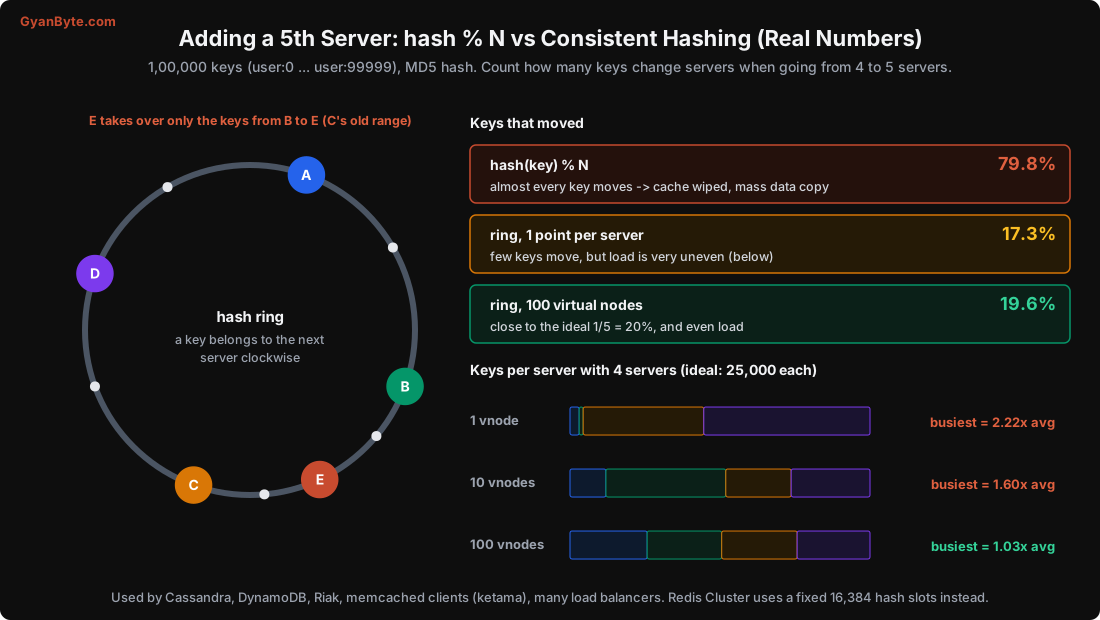
When you add server E, it takes over only the keys between its position and the previous server. Everything else stays where it was. When a server leaves, its keys move to the next server clockwise, and nothing else moves.
But with only one point per server, the ring is lumpy: servers get random-sized arcs. My run showed it clearly:
vnodes=  1: moved 17.3%  load per server (4 nodes): [3057, 1332, 40206, 55405]  max/avg=2.22
vnodes= 10: moved 24.9%  load per server (4 nodes): [11983, 39943, 21795, 26279]  max/avg=1.60
vnodes=100: moved 19.6%  load per server (4 nodes): [25720, 24845, 25154, 24281]  max/avg=1.03
With one point each, one server had 55,405 keys and another had 1,332. The fix is virtual nodes: put each server on the ring many times (hash("A#0"), hash("A#1"), … hash("A#99")). The many small arcs average out. With 100 virtual nodes per server, the busiest server had just 3% more than average, and adding a server moved 19.6% of keys, almost exactly the ideal 20%.
Virtual nodes have a second benefit: when a server leaves, its load spreads across all remaining servers (because its virtual nodes were scattered around the ring), instead of dumping everything on one neighbour. And you can give a bigger machine more virtual nodes to give it a bigger share.
A minimal implementation, close to what I used for the measurements:
import bisect, hashlib

def h(s):
    return int(hashlib.md5(s.encode()).hexdigest()[:12], 16)

class Ring:
    def __init__(self, nodes, vnodes=100):
        points = sorted((h(f"{n}#{v}"), n) for n in nodes for v in range(vnodes))
        self.hashes = [p for p, _ in points]
        self.nodes = [n for _, n in points]

    def owner(self, key):
        i = bisect.bisect(self.hashes, h(key)) % len(self.hashes)
        return self.nodes[i]

ring = Ring(["cache-a", "cache-b", "cache-c", "cache-d"])
print(ring.owner("session:8f2c91"))
Consistent hashing is used by Cassandra and DynamoDB for data placement, by memcached client libraries (the “ketama” algorithm), by load balancers that want the same user to hit the same backend (Envoy’s ring hash and Maglev), and by many CDNs.
Fixed hash slots: the other common approach
Redis Cluster takes a simpler route. There are always exactly 16,384 hash slots. A key’s slot is CRC16(key) % 16384, which never changes. Each server owns a set of slots. Adding a server means moving some slots to it, which the cluster does live, slot by slot.
Kafka does something similar with a fixed number of partitions per topic, and Elasticsearch with a fixed number of primary shards per index. The idea: choose many more partitions than servers up front (say 16,384 slots, or 64 partitions for 4 brokers), so that rebalancing means moving whole partitions around, never re-hashing keys.
The catch in Kafka and Elasticsearch: changing the number of partitions or primary shards later does change where keys go. In Kafka, increasing partitions breaks per-key ordering for keys that move (Lesson 9). So choose the count generously at the start.
Rebalancing Without Downtime
When you add capacity, data has to move. Some rules that keep this boring:
- Move whole partitions, not individual keys. Copying a partition is a bulk operation you can throttle, verify and retry.
- Throttle the copy. Rebalancing competes with live traffic for disk and network. Most systems let you set a bandwidth limit; use it, especially during peak hours.
- Don’t rebalance automatically on every failure. If a node is down for two minutes because of a restart, you don’t want the cluster to start copying terabytes. Cassandra and Elasticsearch wait for a configurable delay before re-replicating.
- Clients must find the new location. Either a routing layer knows the current map (Kafka clients fetch metadata; Redis Cluster replies with a
MOVEDredirect), or a coordination service stores it (often etcd or ZooKeeper, from Lesson 6). - Add capacity before you need it. Rebalancing is extra load. Doing it during a traffic peak, like the team in my story, makes the peak worse.
Hot Keys: The Problem Partitioning Can’t Solve
Hashing spreads keys evenly. It doesn’t spread traffic evenly if some keys are much more popular than others. And in real life, popularity is very uneven: a celebrity’s profile, a restaurant running a flash sale, a viral post, the cricket score during an India-Pakistan match.
I simulated this: 8 shards, 1,00,000 restaurants with typical Zipf-like popularity, plus one restaurant running a sale that receives 23.6% of all requests.
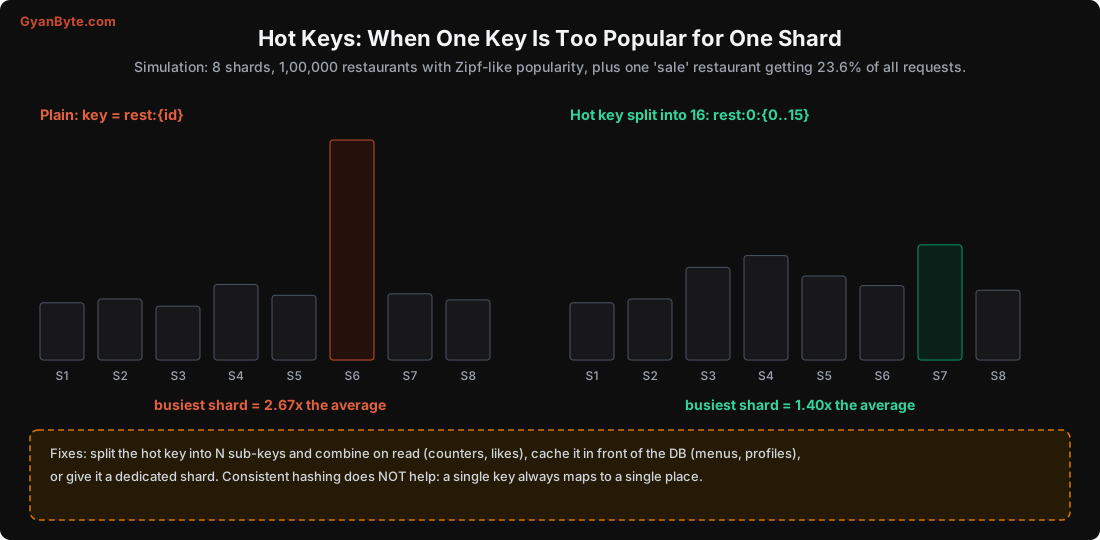
plain:               busiest shard = 2.67x the average
salted hot key x16:  busiest shard = 1.40x the average
One shard had 2.67 times its fair share of traffic, because one key lives in one place, however clever the hashing. Adding more shards doesn’t help at all: the hot key still goes to exactly one of them.
What does help:
- Split the hot key into N sub-keys (
rest:0:0…rest:0:15) spread across shards. For writes like “increment the like count” or “add to the order queue”, each write picks a random sub-key; reads combine all of them. In my simulation, splitting into 16 brought the busiest shard down from 2.67x to 1.40x. - Cache it. For read-heavy hot keys (the menu of the sale restaurant, a celebrity profile), a cache in front of the database (or even an in-process cache with a 1-second TTL in each app server) absorbs almost all of the load.
- Give it a dedicated partition. Some systems let you pin a known hot tenant to its own shard or even its own cluster. Common in B2B SaaS, where one big customer can be 30% of all traffic.
- Detect it. Hot keys often appear suddenly. Redis has
redis-cli --hotkeys(with an LFU eviction policy), and most managed databases show per-partition metrics. Alert on one partition being much busier than the rest.
Pitfalls to Avoid
hash(key) % Nfor anything that will ever be resized. Adding one server moved 79.8% of keys.- Consistent hashing without virtual nodes. In my run, one server got 2.22x its fair share.
- A partition key most queries don’t use. Everything becomes scatter-gather.
- Sequential keys with range partitioning. All writes hit the last partition.
- Too few partitions at the start. Changing the count later re-maps keys and breaks per-key ordering in Kafka.
- Rebalancing during peak traffic, or automatically on short outages.
- Assuming more shards fix a hot key. One key is always one shard. Split it, cache it, or isolate it.
- Cross-partition transactions by accident. Keep data that changes together under the same key.
Quick Recap
- Partitioning splits data across machines; replication then protects each partition.
- Range partitioning: good for scans, bad for sequential keys. Hash partitioning: even load, bad for scans.
- The partition key should match your main queries and keep data that changes together in one place.
hash % Nmoved 79.8% of keys when adding a server; consistent hashing with 100 virtual nodes moved 19.6% and balanced load within 3%.- Hot keys need special treatment: splitting one cut the busiest shard from 2.67x to 1.40x average load.
Next lesson: distributed locks. A real Redis lock that let two workers write at the same time, and the fencing tokens that stop it.