Some time ago, I was helping debug a strange complaint from a delivery app: “I changed my address, the app showed the new one, and the order still went to the old address.” It happened rarely, maybe a few times a week, and nobody could reproduce it.
The profile service stored user data in a replicated store that resolved conflicts with last-write-wins: if two writes conflict, keep the one with the later timestamp. The timestamps came from the clock of whichever server handled the request. One of those servers had a clock that had drifted about half a second behind. If a user edited their address twice within half a second (the app was sending one save on blur and another on submit), and the second edit hit the server with the slow clock, the second edit got an earlier timestamp. Last-write-wins kept the first one. No error. No log. Just the wrong address.
This lesson is about why time is so slippery across machines, and what to use instead.
Two Clocks on Every Machine
Every computer has (at least) two kinds of clocks, and mixing them up is a common source of bugs.
The wall clock (time-of-day clock): time.time() in Python, System.currentTimeMillis() in Java, Date.now() in JavaScript. It tells you the date and time. It’s synchronised with the outside world using NTP, which means it can jump: forward or backward when NTP corrects it, or when someone fixes a wrong system time.
The monotonic clock: time.monotonic() in Python, System.nanoTime() in Java, performance.now() in the browser. It only moves forward, at a steady rate. Its absolute value means nothing (it might be “seconds since boot”), but the difference between two readings is a reliable duration.
import time

start = time.time()
do_work()
elapsed = time.time() - start          # WRONG: can be negative or huge if NTP adjusts the clock

start = time.monotonic()
do_work()
elapsed = time.monotonic() - start     # RIGHT: always a real duration
Rule: wall clock for “what time is it”, monotonic clock for “how long did it take”. Timeouts, rate limiters, lease expiry and latency metrics should all use the monotonic clock.
Why Clocks Disagree
A computer’s clock is a quartz crystal. Crystals drift with temperature and age: a typical server clock can drift by tens of milliseconds per day without correction. NTP fixes this by asking time servers and adjusting, but:
- Normal accuracy is milliseconds, not microseconds. Within a cloud region, with the provider’s time service (AWS Time Sync, Google’s NTP), clocks usually agree within a millisecond or so. Over the public internet, 10-100 ms is common.
- NTP can fail quietly. A firewall rule blocks UDP 123, the NTP daemon dies, a container image doesn’t run it. The clock drifts for weeks and nobody notices until something breaks.
- VMs pause. When a VM is paused or live-migrated, its clock falls behind and then jumps forward when corrected.
- Leap seconds have broken many systems over the years (cloud providers now “smear” them over a day instead).
So the honest statement is: two clocks on different machines agree approximately, with an error you don’t know exactly, and that error is occasionally large. This makes timestamps from different machines unreliable for deciding which event came first when they’re close together.
Last-Write-Wins and Silent Data Loss
Last-write-wins (LWW) is the simplest conflict rule: each write carries a timestamp, and the highest timestamp wins. Cassandra uses it by default; many caches and custom sync systems do too. It’s attractive because it’s simple and always converges.
Here’s what it does with a skewed clock:
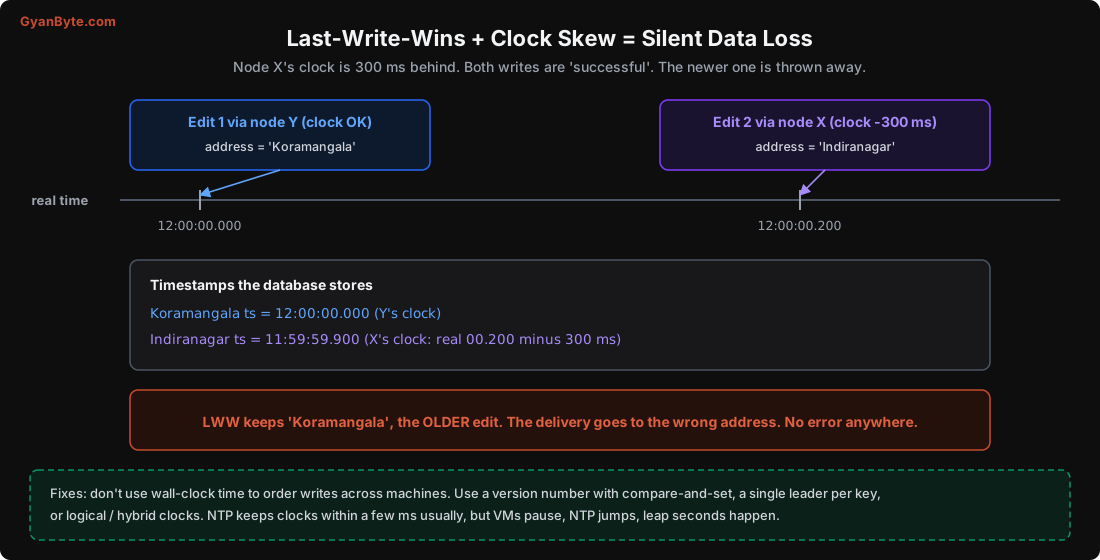
The second edit happened later in real time, but it got an earlier timestamp. LWW keeps the older edit and silently throws away the newer one. Nothing fails. Both writes returned success.
This isn’t limited to databases. I’ve seen the same bug in:
- Mobile apps that sync offline edits using the phone’s clock (users set their phone time manually all the time, especially to cheat in games).
- Event processing that sorts events from different services by their
created_at, then applies them in that order. - Caches that compare “last updated” timestamps from different writers.
What to do instead
- Let one place decide the order. If all writes for a key go through one leader (or one database primary), its order is the order. That’s what most SQL databases give you.
- Use version numbers with compare-and-set. Read the row with its version, write back
WHERE version = 7, and bump the version. If someone else wrote in between, your write affects zero rows, and you retry with fresh data. This is optimistic concurrency control, and it doesn’t need any clock.
UPDATE user_profiles
SET address = 'Indiranagar', version = version + 1
WHERE user_id = 42 AND version = 7; -- 0 rows updated = someone else wrote first- Use logical clocks when there’s no single leader. That’s next.
Lamport Clocks: Order by Cause and Effect
In 1978, Leslie Lamport pointed out that what we usually care about isn’t the exact time, but causality: if event A could have influenced event B (A happened before B, and information could have flowed from A to B), then A should be ordered before B.
A Lamport clock is just a counter in each process, with two rules:
- Before each event (including sending a message), increment your counter.
- When you receive a message, set your counter to
max(your counter, the counter in the message) + 1.
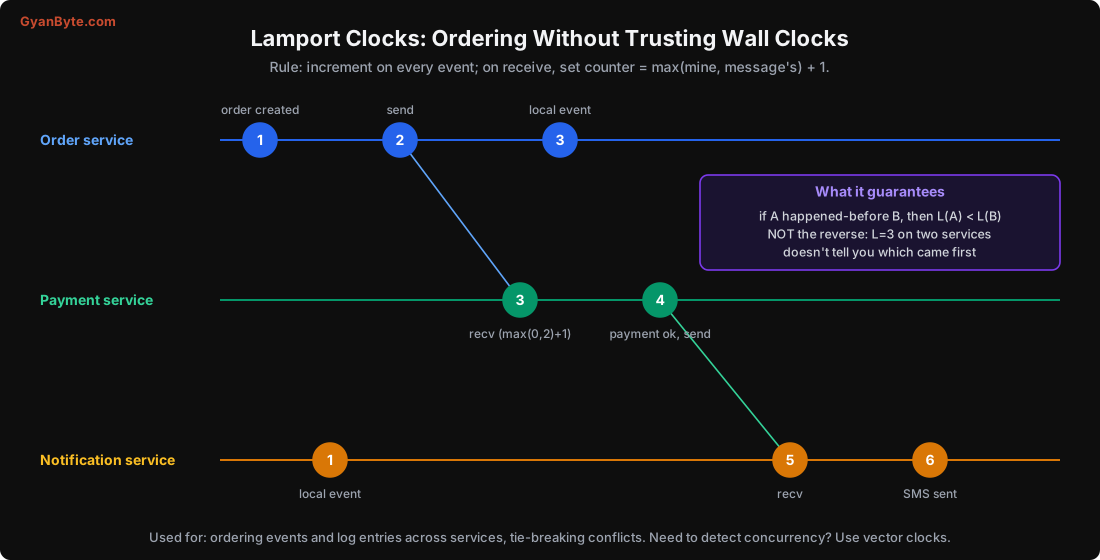
In code, it’s tiny:
class LamportClock:
    def __init__(self):
        self.counter = 0

    def tick(self):                      # local event or before sending
        self.counter += 1
        return self.counter

    def receive(self, msg_counter):      # on receiving a message
        self.counter = max(self.counter, msg_counter) + 1
        return self.counter
The guarantee: if A happened before B, then L(A) < L(B). The SMS (6) is guaranteed to be numbered after the payment (4), which is after the order (1), because each caused the next. You can sort events across services by Lamport time (with process ID as a tie-breaker) and get an order that never shows an effect before its cause.
The limitation: the reverse isn’t true. If L(A) < L(B), A might have happened before B, or they might be completely unrelated events on different machines. Lamport clocks can’t tell you “these two edits were concurrent, nobody saw the other”. For that, you need more information.
Vector Clocks: Detecting Concurrent Edits
A vector clock keeps one counter per replica (or per writer). Each replica increments its own slot when it writes, and merges (takes the max of each slot) when it receives data from another replica.
Comparing two vector clocks gives one of three answers:
- Every slot of V1 is ≤ V2: V1 happened before V2. Keep V2.
- Every slot of V2 is ≤ V1: keep V1.
- Neither: the writes were concurrent. Neither saw the other. It’s a real conflict.
![Vector clocks on a shopping cart: version 0 is [dal] with clock A:1 B:0 on both replicas. The phone writes [dal, rice] to replica A giving A:2 B:0, while the laptop writes [dal, paneer] to replica B giving A:1 B:1. Comparing A:2 B:0 with A:1 B:1, each is bigger in one slot, so they are concurrent and both are kept. The app merges them into [dal, rice, paneer] with clock A:2 B:1. Last-write-wins would have silently dropped rice or paneer](/images/ds-vector-clocks.svg)
This is the famous Amazon shopping cart example from the Dynamo paper. A user adds rice on their phone and paneer on their laptop at about the same time, and the writes go to different replicas. LWW would keep one cart and lose an item. Vector clocks detect that the writes were concurrent, so the system keeps both versions (“siblings”) and lets the application merge them. For a cart, the merge is a union.
A small implementation:
def compare(v1, v2):
    keys = set(v1) | set(v2)
    le = all(v1.get(k, 0) <= v2.get(k, 0) for k in keys)
    ge = all(v1.get(k, 0) >= v2.get(k, 0) for k in keys)
    if le and ge:
        return "equal"
    if le:
        return "before"        # v1 happened before v2
    if ge:
        return "after"
    return "concurrent"        # conflict: keep both or merge

def merge(v1, v2):
    return {k: max(v1.get(k, 0), v2.get(k, 0)) for k in set(v1) | set(v2)}

print(compare({"A": 2, "B": 0}, {"A": 1, "B": 1}))   # concurrent
The cost: the vector grows with the number of writers. With thousands of clients each writing, vectors get big, so real systems limit them (one slot per server replica rather than per client, pruning old entries, or “dotted version vectors” in Riak). Today you’re more likely to meet this idea inside CRDTs (conflict-free replicated data types), which are used in collaborative editors and offline-first apps, than to implement vector clocks yourself.
Hybrid Logical Clocks
Logical clocks are safe but their numbers mean nothing to humans: “event 4,817” doesn’t tell you it happened yesterday. Physical clocks are meaningful but unsafe. Hybrid logical clocks (HLC) combine both: a timestamp that stays close to wall-clock time but also follows the Lamport rule, so it never goes backwards and always respects cause and effect.
Roughly, an HLC timestamp is (physical time, logical counter). When the physical clock moves forward, use it. When it doesn’t (or when you receive a message stamped “in the future” from a node with a faster clock), keep the larger physical part and bump the counter.
CockroachDB and YugabyteDB use HLCs to order transactions across nodes, and MongoDB uses a similar “cluster time” for causal consistency. They still depend on clocks being roughly right: CockroachDB, for example, assumes clocks are within a configured maximum offset (500 ms by default) and a node shuts itself down if it detects its clock is too far off. That’s a design choice worth noticing: when the safety of the system depends on clock accuracy, it should check the clocks and refuse to run if they’re wrong, rather than silently corrupting data.
At the far end, Google Spanner uses TrueTime: GPS receivers and atomic clocks in each data centre give a time interval with a known error bound (a few milliseconds), and Spanner waits out that uncertainty before committing. That’s how it gets strongly consistent global ordering. Most of us don’t have atomic clocks, which is why the rest of us use leaders and logical clocks.
Practical Rules for Ordering Events
Putting it all together, here’s what I recommend in day-to-day backend work:
- Need a total order for one entity? Route all writes for it through one place: a database row with a version column, a single leader, or a Kafka partition keyed by entity ID (Lesson 9). The order in that one place is the truth.
- Need to detect concurrent updates? Use version numbers with compare-and-set, or vector clocks / CRDTs if there are multiple leaders.
- Need human-readable time? Store wall-clock time for display and analytics, but don’t use it to decide which write wins.
- Comparing timestamps across services? Remember they can be off by milliseconds normally, and by seconds when something’s wrong. Treat close timestamps as “about the same time”, not as an order.
- Logs from many services? Correlate them with a trace ID (Lesson 12), not by sorting on timestamps alone.
- Monitor clock offset on every server (
chronyc trackingshows it) and alert above a threshold, say 100 ms. It’s a cheap check that catches a silent problem.
Pitfalls to Avoid
- Measuring durations with the wall clock. Use the monotonic clock for timeouts, latency and leases.
- Last-write-wins across machines for data you can’t afford to lose.
- Trusting client device clocks. Users change them. Use server-assigned order.
- Sorting events from different services by
created_atand assuming that’s the real order. - Assuming NTP is running everywhere, including inside containers and on old VMs.
- Using a Lamport timestamp as proof of order between unrelated events. It only guarantees that causes come before effects.
- Implementing vector clocks or CRDTs by hand for production when a tested library exists.
Quick Recap
- Wall clocks can drift and jump; monotonic clocks are for durations.
- Clocks on different machines only agree approximately. Last-write-wins with skewed clocks silently keeps older data.
- Lamport clocks give an order that respects cause and effect. Vector clocks also detect concurrent updates so you can merge them.
- Hybrid logical clocks combine physical and logical time; databases using them still check that clocks are close enough.
- In practice, let one place decide the order: a leader, a version number, or a partition.
Next lesson: keeping copies of data on many machines. Leaders, followers, quorums, and a simulation of how often you read stale data with different settings.