A few years back, during a big sale, a friend’s team at an e-commerce company got a flood of complaints: “money debited, order failed”. The payment gateway was working. The bank was working. The order service was working. Every dashboard was green.
What had happened was simple, and it happened thousands of times that night. The order service called the payment service, which called the gateway. The gateway was slow under load, so the payment service hit its 5-second timeout and told the order service “payment failed”. The order service marked the order failed and showed the user an error. Meanwhile the gateway finished the payment a few seconds later. Money debited, order failed.
Nobody wrote a buggy line of code. Every service did exactly what it was told. The bug lived in the space between the services. That space is what this course is about.
What Makes a System “Distributed”?
A distributed system is just a set of programs, on different machines, that work together by sending messages over a network. By that definition, almost everything you build is one:
- Your API server and its database, connected over TCP.
- Three pods of the same service behind a load balancer.
- An order service, a payment service and a notification service talking over HTTP or Kafka.
- Your app and Razorpay, or your app and the UPI network.
Even a “simple monolith” usually has a database, a cache, a queue, and two or three external APIs. That’s already six machines that can fail independently.
Partial Failure: The Big Difference
On a single machine, failures are mostly total. If the process crashes, everything in it stops. If the machine loses power, everything is gone. That’s painful, but it’s simple: either the whole thing works, or it doesn’t.
In a distributed system, parts fail while other parts keep running. And the parts that are running often can’t tell what happened to the parts that aren’t.
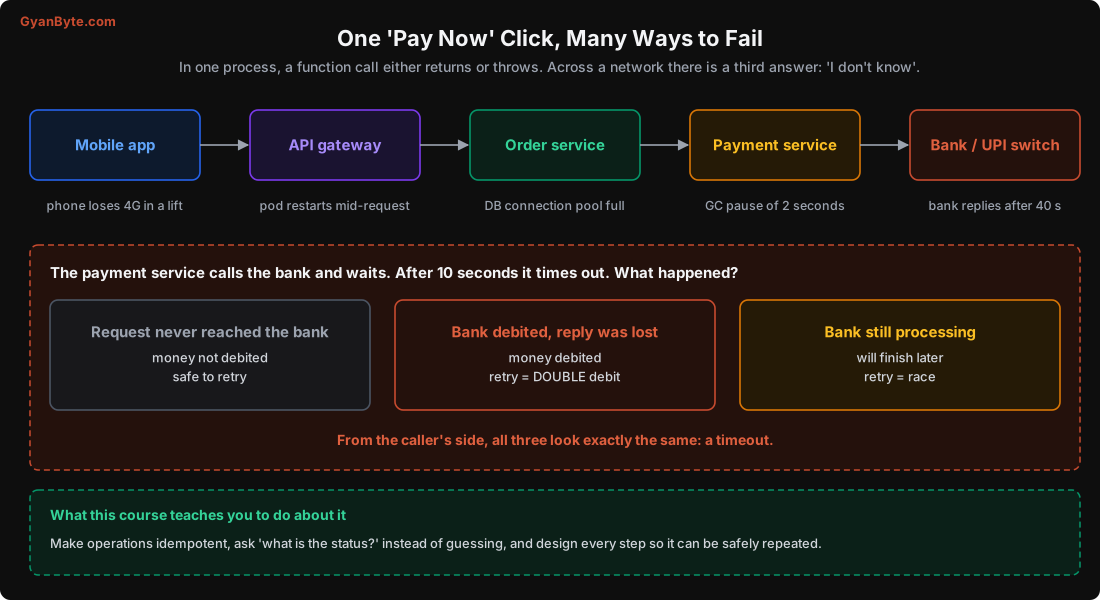
Think about what a normal function call gives you:
def charge(amount):
    ...  # either returns a result or raises an exception

result = charge(49900)   # you KNOW which one happened
Now make it a network call:
import requests

try:
    r = requests.post("https://payments.internal/charge", json={"amount": 49900}, timeout=5)
except requests.Timeout:
    # Did the charge happen? You have no idea.
    ...
When you get a timeout, any of these could be true:
- The request never reached the payment service (network dropped it).
- It reached, the charge happened, and the response was lost or slow.
- It reached and the service is still working on it.
- The service crashed halfway through.
From your side, all of these look exactly the same. This is the third outcome that single-machine programming never prepares you for: unknown. We’ll spend the whole next lesson on how to deal with it, and in that lesson I’ll show you a real database “failing” a write that actually succeeded.
The 8 Fallacies of Distributed Computing
In the 1990s, engineers at Sun Microsystems wrote down eight assumptions that people new to distributed systems make, all of which turn out to be false. Thirty years later, every new service still makes most of them.
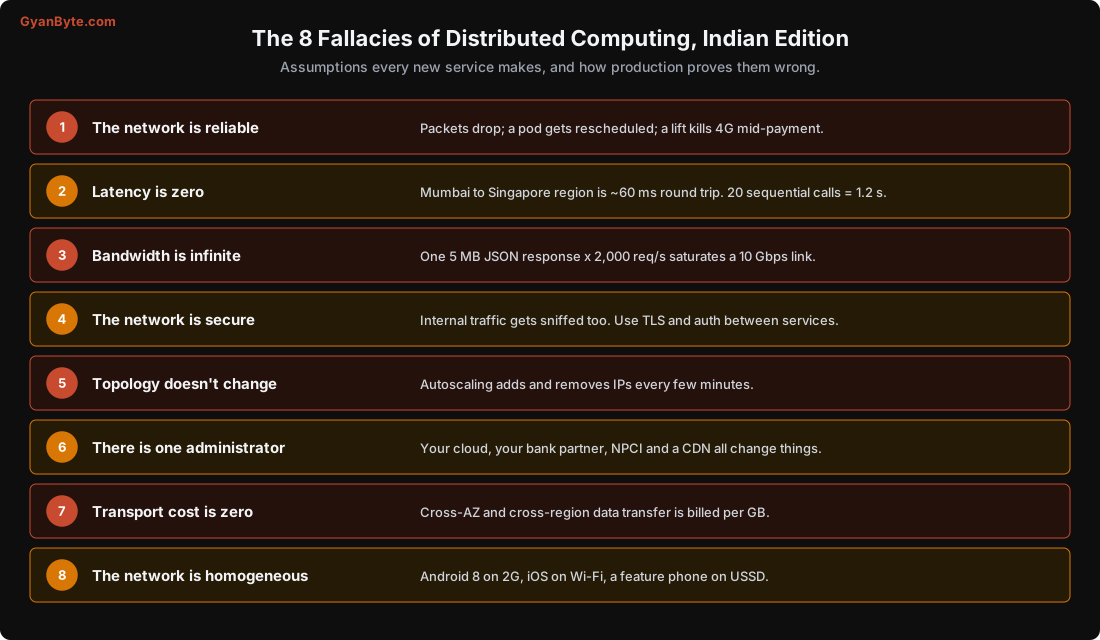
The ones that cause the most incidents in my experience:
“The network is reliable.” Packets get dropped. Connections get reset when a load balancer is redeployed. A pod gets killed mid-request during a rollout. Your user walks into a lift. Every network call needs a timeout and a plan for what happens when it fails.
“Latency is zero.” A function call takes nanoseconds. A call to another service in the same zone takes 0.5-2 ms, to another zone 1-3 ms, from Mumbai to Singapore about 60 ms. That doesn’t sound like much until a request makes 20 calls one after another. An ORM that loads 50 related objects one at a time (the N+1 problem) turns a 5 ms page into a 100 ms page.
“Topology doesn’t change.” In Kubernetes, pods come and go every few minutes. IPs change. A client that resolved DNS once at startup and cached it forever will keep calling a pod that no longer exists.
“There is one administrator.” Your payment flow depends on your cloud provider, your payment gateway, the bank, NPCI, and maybe a fraud-check vendor. Any of them can change behaviour, rate-limit you, or go down for maintenance at 2 AM on a Sunday without telling you.
Availability Multiplies Down
Here’s a small piece of maths worth remembering. Suppose your checkout request needs five services, and each has 99.9% availability (about 43 minutes of downtime a month). If the request needs all five to succeed:
0.999 × 0.999 × 0.999 × 0.999 × 0.999 = 0.995 → 99.5%That’s about 3.6 hours of failed checkouts a month, even though every individual service team proudly reports “three nines”. Add 10 more dependencies and it gets worse.
This is why reliable systems try to:
- Keep the critical path short. Does checkout really need the recommendations service to respond? No. Call it asynchronously or skip it on failure.
- Degrade gracefully. If the loyalty-points service is down, let the order go through and add the points later.
- Make each dependency optional where possible, with a timeout and a fallback.
Tail Latency Multiplies With Fan-Out
The same multiplication happens with slowness. Say each backend service is fast 99% of the time and slow (100 ms or more) 1% of the time. Its p99 latency is 100 ms. Looks fine on its own dashboard.
Now your app’s home screen calls many services in parallel: menus, offers, delivery ETA, wallet balance, ads, recommendations. The page is only as fast as the slowest call. If any one call is slow, the page is slow.
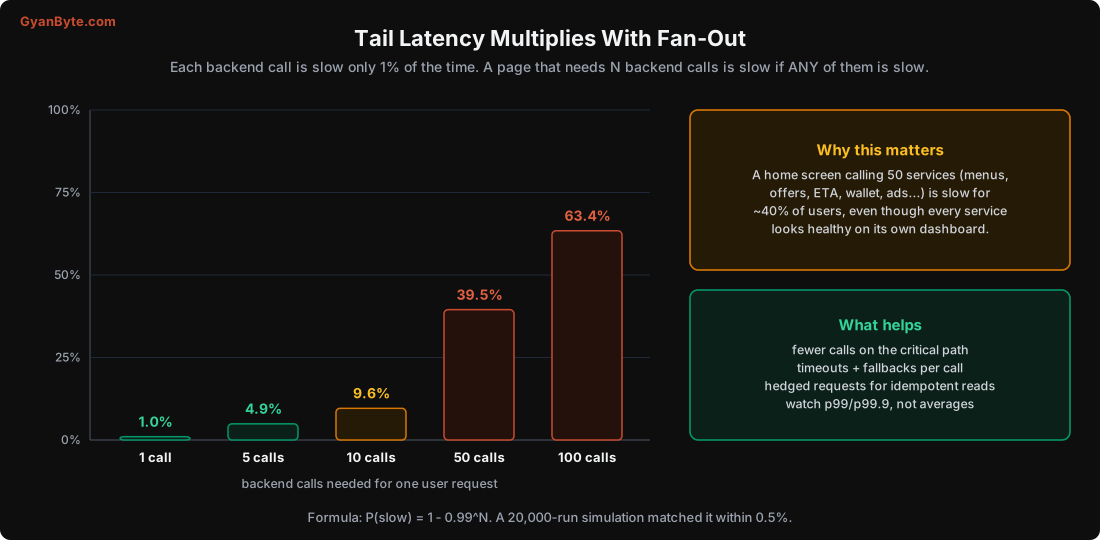
The formula is 1 - 0.99^N. I also ran a quick simulation with 20,000 random page loads, and it matched the formula within half a percent. With 50 calls, about 40% of page loads hit at least one slow call. Every service team’s p99 looks great, and users still complain that the app is slow.
Two practical lessons from this:
- Look at p99 and p99.9, not averages. The average hides exactly the requests users complain about.
- The more services a request touches, the more each one’s tail matters. Google’s well-known paper “The Tail at Scale” is about exactly this, and it introduced tricks like hedged requests: if a read hasn’t answered within the p95 time, send the same request to another replica and use whichever answers first. This only works for idempotent reads, which brings us back to the next lesson.
Things Fail All the Time, Even Without Bugs
Before we go further, let’s get the mindset right. In a large system, failure is not an exception, it’s background noise:
- Processes pause. A garbage collection pause of 1-2 seconds in Java or Go is normal under memory pressure. A VM can be paused by the hypervisor. To the rest of the system, a paused process looks dead, and then suddenly comes back to life and continues as if nothing happened. We’ll see this break a lock in Lesson 8.
- Disks get slow. Cloud disks have bad minutes. A process stuck on a slow fsync looks like a hung process.
- Networks get partitioned. Two halves of a cluster can each be healthy but unable to talk to each other.
- Deploys restart things. Every rollout kills pods mid-request unless you drain connections properly.
- Dependencies degrade, not just die. A dependency that’s slow is often worse than one that’s down, because a down service fails fast while a slow one ties up your threads and connections. Lesson 11 is all about this.
So the right question is never “how do we make sure X never fails?“. It’s ”when X fails, what does the rest of the system do?”
Setting Up the Lab
Throughout this course, I’ll break real systems to show these failures. If you want to repeat the experiments, here’s the setup. I used Ubuntu 24.04, but anything with these tools works.
A 3-node etcd cluster on one machine. etcd is the Raft-based key-value store behind Kubernetes. We’ll use it for Lessons 2, 5 and 6.
sudo apt install etcd-server etcd-client     # etcd 3.4 on Ubuntu 24.04

CLUSTER="n1=http://127.0.0.1:2380,n2=http://127.0.0.1:22380,n3=http://127.0.0.1:32380"
for i in 1 2 3; do
  p=$([ $i = 1 ] && echo "" || echo $i)      # ports 2379, 22379, 32379
  etcd --name n$i --data-dir /tmp/etcd-n$i \
    --listen-client-urls http://127.0.0.1:${p}2379 \
    --advertise-client-urls http://127.0.0.1:${p}2379 \
    --listen-peer-urls http://127.0.0.1:${p}2380 \
    --initial-advertise-peer-urls http://127.0.0.1:${p}2380 \
    --initial-cluster $CLUSTER > /tmp/etcd-n$i.log 2>&1 &
done

ETCDCTL_API=3 etcdctl --endpoints=127.0.0.1:2379,127.0.0.1:22379,127.0.0.1:32379 \
  endpoint status -w table
You should see three endpoints, one of them with IS LEADER = true.
Redis for the lock and messaging experiments (Lessons 8 and 9):
sudo apt install redis-server
redis-server --port 6380 --save "" --daemonize yes
pip install redis
A tip that cost me a few minutes: to “pause” a node and simulate a network partition or a long GC pause, I use kill -STOP <pid> and later kill -CONT <pid>. Be careful how you find the PID. My first attempt used pgrep -f '127.0.0.1:22379', which also matched my own shell command (because the shell’s command line contained that same text), so I paused my own terminal. Pick the PID from pgrep -x etcd and check its command line, or read it from the process list by hand.
Pitfalls to Avoid
- Treating network calls like function calls. Every remote call needs a timeout, error handling, and a decision about retries.
- Assuming a timeout means failure. It means unknown. The action may have happened.
- Long chains of synchronous calls on the critical path. Availability and latency both multiply down.
- Watching averages. Users feel the p99, and fan-out makes the p99 everyone’s problem.
- Designing only for “up” and “down”. Slow, paused, partitioned and half-deployed are the states that actually cause outages.
- Testing only on localhost. Local networks hide latency, packet loss and partitions. Inject failures on purpose (we’ll do that in every lesson).
Quick Recap
- A distributed system is any set of machines cooperating over a network. That’s almost every backend.
- Parts fail independently, and the caller often can’t tell what happened: the outcome of a remote call can be unknown.
- The 8 fallacies (reliable network, zero latency and so on) are still the root of most distributed bugs.
- Availability multiplies: five services at 99.9% give about 99.5%.
- Tail latency multiplies with fan-out: 1% slow per call becomes about 40% slow pages at 50 calls.
Next lesson: how to deal with “unknown” in practice. Timeouts, retries that don’t make things worse, and idempotency keys, starting with a real etcd write that “failed” and then turned out to have succeeded.