Where the last lesson got data in, this one is about storing it well — and the single most important storage decision in analytics is the file format. It is not a minor detail: choosing a columnar format over a row format routinely makes queries several times faster and halves your storage bill, for free, by matching how the data is laid out to how analytics reads it. This lesson shows why, with numbers I measured.
Row vs Columnar
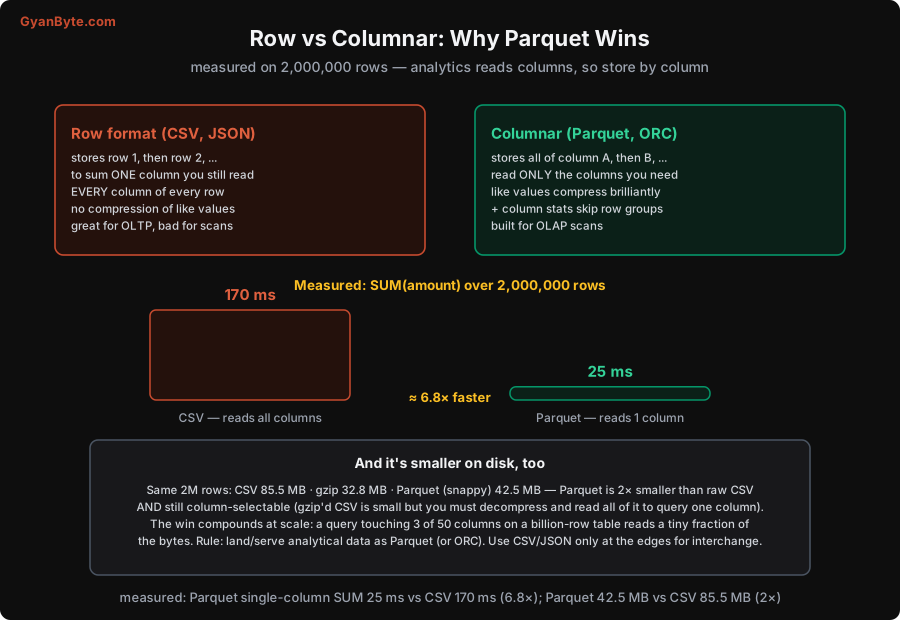
The difference is simply how the bytes are arranged on disk:
- Row formats (CSV, JSON) store a whole row together, then the next row:
(1, Mumbai, 500, ...),(2, Delhi, 300, ...), and so on. To read any column you read the whole file. This is great for OLTP (fetch a whole row by id) but bad for analytics: to sum one column, you must read every column of every row off disk, discarding most of what you read. And because adjacent values are different types (an id, then a city, then an amount), they don’t compress well. - Columnar formats (Parquet, ORC) store all of column A together, then all of column B:
[1, 2, 3, ...], then[Mumbai, Delhi, ...], then[500, 300, ...]. Now a query that needs only theamountcolumn reads only that column’s bytes and skips the rest entirely. And storing like values together makes them compress brilliantly (a column of city names has lots of repetition; a column of similar numbers encodes tightly). Parquet also keeps per-column statistics (min/max per chunk) so the engine can skip whole row groups that can’t match a filter.
Analytics is overwhelmingly “read a few columns across many rows and aggregate” — exactly what columnar is built for. That’s why every analytical system (warehouses, lakes, query engines) uses columnar storage underneath.
Measured: 6.8× Faster, Half the Size
I didn’t want to leave this as theory, so I measured it on 2,000,000 rows (id, city, amount, qty, ref).
Query speed — compute SUM(amount):
- CSV: 170 ms. The engine must read all five columns off disk to get at
amount. - Parquet: 25 ms. It reads only the
amountcolumn. - That’s ≈ 6.8× faster — for the identical query, just by storing the data column-wise so the query touches one column instead of five.
Storage size — the same 2M rows:
- CSV: 85.5 MB · gzip’d CSV: 32.8 MB · Parquet (snappy): 42.5 MB.
- Parquet is 2× smaller than raw CSV and still column-selectable. Note the subtlety with gzip: gzip’d CSV is even smaller on disk (32.8 MB), but it’s a dead weight — to query one column you must decompress the whole thing and read every column anyway. Parquet gives you small size and the ability to read just the columns you need. Compression that preserves selective reads beats compression that doesn’t.
And here is the crucial point: this win compounds at scale. My test had 5 columns; real analytical tables have 50 or 100. A query that touches 3 of 50 columns on a billion-row table reads roughly 3/50ths of the data with columnar storage — a tiny fraction of the bytes, a tiny fraction of the time and the cloud scan cost. The 6.8× on a 5-column toy becomes far larger on a wide real table. This is why “use Parquet” is close to the highest-leverage, lowest-effort decision in a data pipeline.
Practical Guidance
A few rules for formats in a real pipeline:
- Store analytical data as Parquet (or ORC — very similar; Parquet is the common default). It’s the standard for lakes, lakehouses, and warehouse external tables. This is where your data should live for querying.
- Use CSV/JSON only at the edges — for interchange with systems that demand them, for small hand-edited config, for a quick human-readable export. They are fine for moving small data between systems; they are the wrong home for data you’ll query repeatedly at scale.
- Know the other formats you’ll meet: Avro is a row-oriented binary format good for streaming/write-heavy workloads and schema evolution (common in Kafka pipelines, Lesson 9) — it’s the row-format counterpart often paired with columnar Parquet for storage. Protobuf is for compact message serialisation. Parquet for storage/analytics, Avro for streams-in-flight is a common and sensible split.
- Pick a compression codec deliberately: Snappy (fast, moderate ratio — the usual default for query-heavy Parquet) vs Zstd/Gzip (smaller, slower — better for cold archival data you rarely read). Faster codec for hot data, higher-ratio codec for cold.
- Columnar also enables predicate pushdown and column projection in query engines (Lesson 8): the engine pushes
WHEREfilters and column selection down into the file read, so it skips row groups and columns before they ever leave disk. Row formats can’t do this.
The bottom line is simple and high-value: analytical data should be columnar (Parquet). It makes queries multiple-times faster, halves storage, and the advantage only grows as tables get wider and bigger. Combined with the partitioning in Lesson 6, columnar storage is the foundation that makes querying huge datasets cheap and fast.
Pitfalls to Avoid
- Storing analytical data as CSV/JSON. Row formats force every query to read every column and don’t compress well — measured 6.8× slower and 2× bigger than Parquet here, far worse on wide tables. Use Parquet for data you query.
- Thinking gzip’d CSV solves it. It’s small on disk but you must decompress and read all columns to query one — you lose selective reads. Columnar compression (Parquet) keeps both small size and column projection.
- Many tiny Parquet files. Columnar’s benefits assume reasonably sized files (row groups need room to work); thousands of tiny files reintroduce overhead (the small-files problem, Lesson 6). Aim for ~100 MB–1 GB files.
- Wrong compression codec for the access pattern. Zstd/Gzip on hot, frequently-queried data wastes CPU on every read; Snappy on cold archival data wastes storage. Match codec to how often the data is read.
- Using a columnar format for OLTP-style single-row access. Columnar is for scans and aggregates; fetching one full row by id is slow in Parquet. That’s an OLTP job for a row store (Lesson 1) — don’t force analytics formats onto transactional workloads.
- Ignoring Avro for streams. Trying to use Parquet for row-by-row streaming writes is awkward; Avro (row-oriented) fits in-flight event data and schema evolution better. Parquet for storage, Avro for streams.
Quick Recap
- Analytics reads columns (sum this, group by that), so store by column. Row formats (CSV, JSON) store whole rows — to read one column you read them all, and like values don’t compress. Columnar (Parquet, ORC) stores each column together — read only the columns you need, compress like values, and skip row groups via column stats.
- Measured (2M rows):
SUM(amount)was 170 ms on CSV vs 25 ms on Parquet (≈6.8× faster); size was CSV 85.5 MB, gzip 32.8 MB, Parquet 42.5 MB — Parquet 2× smaller than CSV and still column-selectable. - The win compounds: a query touching 3 of 50 columns on a billion-row table reads a tiny fraction of the bytes. “Use Parquet” is a top-leverage, low-effort decision.
- Parquet for analytical storage; CSV/JSON only at the edges; Avro for streams. Pick compression by access pattern (Snappy hot, Zstd/Gzip cold). Columnar enables predicate pushdown and column projection (Lesson 8).
Next lesson: where those Parquet files live — the data lake, warehouse, and lakehouse, and the table formats (Iceberg, Delta) that make a pile of files behave like a database.