Before any tool or technique, it helps to be clear about what data engineering is — because it is a distinct discipline, not just “programming with data” or “the boring part of data science.” This lesson defines the job, lays out the pipeline that every lesson after this is a stage of, and explains the single idea that the whole discipline exists to serve: the split between the databases that run a business and the ones that analyse it.
The Data Pipeline, End to End
A data engineer builds and operates pipelines: systems that reliably move data from where it is produced to where it is useful. At a high level, every pipeline has the same four stages.
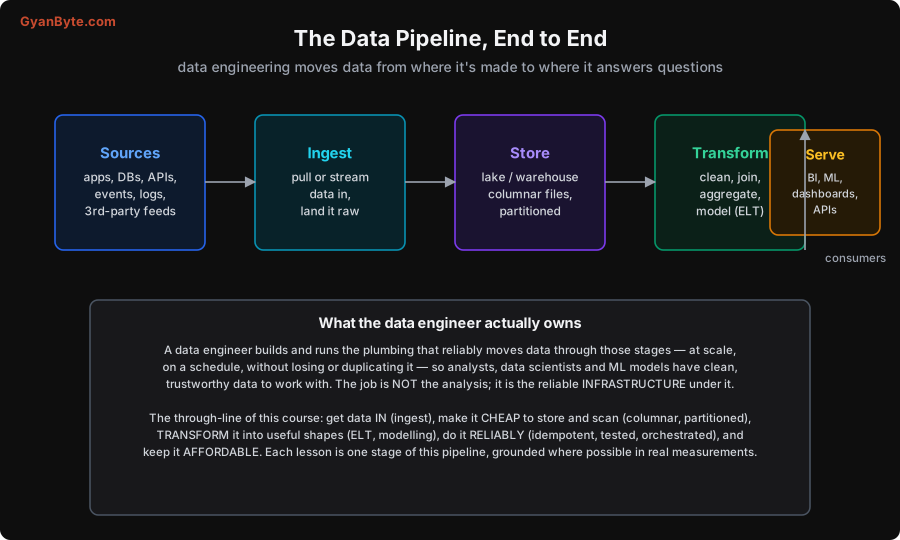
- Ingest — get data in from its sources (application databases, APIs, event streams, logs, third-party feeds). Pull it on a schedule or stream it continuously, and land it.
- Store — put it somewhere cheap and queryable. For analytics this means columnar files (Lesson 4), partitioned for fast access (Lesson 6), on a lake or in a warehouse (Lesson 5).
- Transform — turn raw data into useful shapes: clean it, join it, aggregate it, and model it into tables that answer business questions (Lesson 7).
- Serve — make it available to the consumers: BI dashboards, analysts’ SQL, ML models, and data-hungry application features.
The crucial framing: the data engineer owns the plumbing, not the analysis. You are not (primarily) the one drawing conclusions from the data — you are the one making sure clean, complete, trustworthy data reliably arrives where the analysts and models need it, at scale, on schedule, without loss or duplication. When a dashboard is wrong, late, or missing, that is a data-engineering problem. The discipline is infrastructure — reliable, scalable, cost-aware infrastructure for data — and the whole of this course is the stages above, in order: get data in, make it cheap to store and scan, transform it into useful shapes, do it reliably, and keep it affordable.
OLTP vs OLAP: Why the Discipline Exists
Here is the idea underneath everything. There are two fundamentally different kinds of database workload, and they want opposite designs.
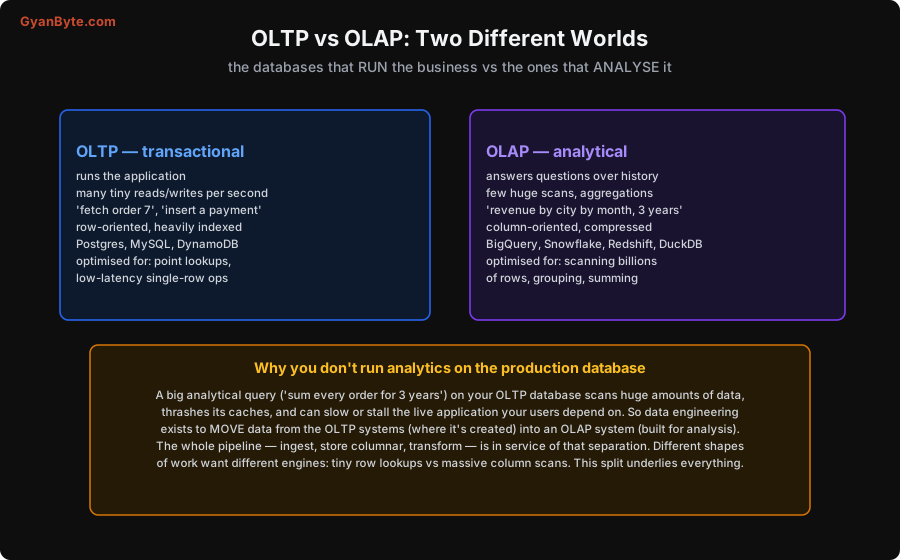
- OLTP (Online Transaction Processing) is the database that runs the application. It handles many tiny operations per second — “fetch order 7,” “insert this payment,” “update this user’s address.” These are point lookups and single-row writes, so OLTP databases are row-oriented (a whole row stored together) and heavily indexed for fast lookups. PostgreSQL, MySQL, DynamoDB. This is what the backend courses on this site (and the Database Internals course especially) are about.
- OLAP (Online Analytical Processing) is the system that analyses history. It handles a few enormous queries — “total revenue by city by month for the last three years” — that scan huge numbers of rows and aggregate them. So OLAP systems are column-oriented (Lesson 4) and compressed, optimised for scanning billions of rows and grouping/summing them. BigQuery, Snowflake, Redshift, DuckDB.
Now the punchline, and the reason data engineering exists as a discipline: you must not run big analytical queries on your production OLTP database. A query that sums every order for three years scans an enormous amount of data, thrashes the database’s caches and locks, and can slow or outright stall the live application your users depend on — the OLTP database is tuned for tiny fast operations, and a giant scan is exactly what it is bad at. So you move the data out of the OLTP systems (where it is created) into an OLAP system (built for analysis). That movement — safely, at scale, keeping it fresh and correct — is the pipeline. Ingesting from OLTP sources, storing in columnar OLAP-friendly formats, transforming into analytical models: every stage serves this one separation.
What the Rest of the Course Builds
With that frame, the shape of the course is just “do each stage well, and do the whole thing reliably and affordably”:
- Get data in reliably — batch vs streaming (Lesson 2), ingestion and change data capture (Lesson 3).
- Store it cheaply and scannably — columnar formats and compression (Lesson 4), lakes/warehouses/lakehouse (Lesson 5), partitioning and layout (Lesson 6).
- Transform it into useful shapes — ETL vs ELT and dimensional modelling (Lesson 7), distributed processing at scale (Lesson 8).
- Handle real-time where it’s needed — streaming with Kafka (Lesson 9).
- Do it reliably — orchestration and idempotency (Lesson 10), data quality (Lesson 11).
- Keep it affordable and trustworthy — serving, cost and governance (Lesson 12).
A data engineer is, in the end, the person who makes an organisation’s data dependable: there when needed, correct, complete, fast enough, and not ruinously expensive. That is less glamorous than the ML headlines, and far more foundational — none of the analysis or modelling on top is worth anything if the data underneath cannot be trusted. Let’s build that foundation, starting in the next lesson with the most basic choice in any pipeline: process data in scheduled batches, or event by event as it streams in.
Pitfalls to Avoid
- Running analytics on the production OLTP database. A big aggregate scan thrashes the database tuned for tiny operations and can stall the live app. Move analytical data into an OLAP system built for scans — that’s the whole point of the pipeline.
- Thinking data engineering is just scripting. It’s reliability, scale and cost engineering for data — idempotency, partitioning, orchestration, quality. Treating it as “a few Python scripts” is how you get a fragile pipeline that silently corrupts dashboards.
- Confusing the engineer’s job with the analyst’s. You own the plumbing — that data arrives clean, complete and on time — not (primarily) the conclusions. Blurring this leaves the infrastructure under-owned.
- Skipping the “store it well” stage. Dumping raw JSON/CSV and querying it directly works until it doesn’t — scans get slow and expensive. Columnar + partitioned storage (Lessons 4, 6) is foundational, not optional.
- Choosing OLAP tools for OLTP work (or vice versa). A warehouse is terrible at single-row lookups; an OLTP database is terrible at billion-row scans. Match the system to the workload shape.
Quick Recap
- Data engineering builds and runs the pipeline that reliably moves data from where it’s made to where it answers questions: Ingest → Store → Transform → Serve, at scale, on schedule, without loss or duplication. The job is the infrastructure, not the analysis.
- The discipline exists because of the OLTP vs OLAP split: OLTP (Postgres/MySQL) runs the app — tiny row-oriented reads/writes, indexed; OLAP (BigQuery/Snowflake/DuckDB) analyses history — huge column scans and aggregations, columnar, compressed.
- You don’t run analytics on the production OLTP database — a giant scan can stall the live app — so you move data into an OLAP system built for it. Every pipeline stage serves that separation.
- The course does each stage well and the whole thing reliably and affordably.
Next lesson: the most basic choice in any pipeline — batch vs streaming processing, and how to pick based on the latency the business actually needs.