
Deploying code manually is a career risk. One fat-fingered command and your production database is gone. CI/CD pipelines remove humans from the deployment path — every change goes through the same automated build, test, and deploy process.
AWS has a full suite of CI/CD services. Some are excellent. Some are frustrating. This lesson covers what you actually need to build reliable deployment pipelines.
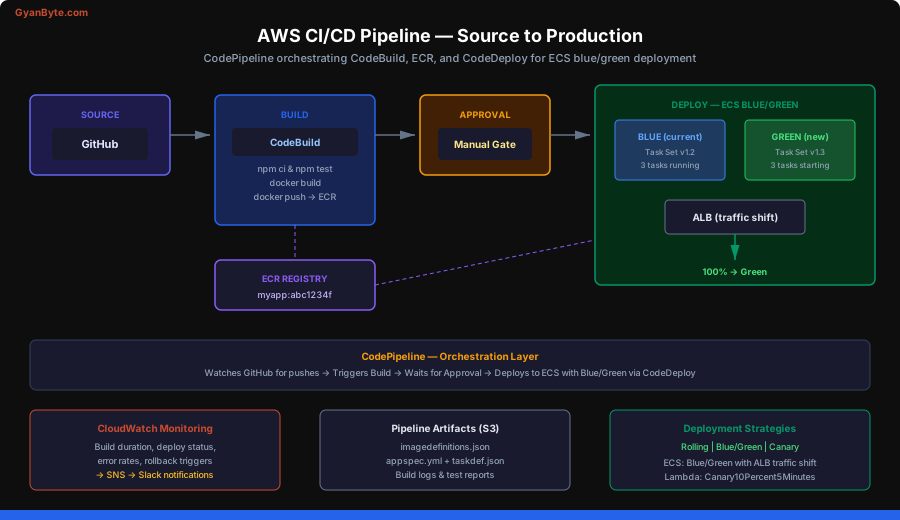
The AWS CI/CD Service Map
AWS breaks CI/CD into four discrete services:
CodeCommit — Git repository hosting. It is basically a stripped-down GitHub. Most teams skip this entirely and use GitHub or GitLab. CodeCommit works but lacks the ecosystem (PR reviews, actions, integrations) that GitHub provides. AWS announced it is no longer accepting new customers for CodeCommit as of 2024.
CodeBuild — Managed build service. This is the workhorse. It spins up a container, runs your build commands, and produces artifacts. Think of it as managed Jenkins without the maintenance headaches.
CodePipeline — Orchestration layer. It connects source, build, test, and deploy stages into a pipeline. It watches for changes and triggers the flow.
CodeDeploy — Deployment agent. It handles rolling updates, blue/green deployments, and canary releases to EC2 instances, ECS services, or Lambda functions.
CodeBuild Deep Dive
CodeBuild is where most of the actual work happens. You define your build in a buildspec.yml file at the root of your repository.
buildspec.yml Structure
version: 0.2

env:
  variables:
    NODE_ENV: "production"
    AWS_DEFAULT_REGION: "us-east-1"
  parameter-store:
    DB_PASSWORD: "/myapp/prod/db-password"
  secrets-manager:
    API_KEY: "prod/myapp:api_key"

phases:
  install:
    runtime-versions:
      nodejs: 18
    commands:
      - echo "Installing dependencies..."
      - npm ci

  pre_build:
    commands:
      - echo "Running tests..."
      - npm test
      - echo "Logging in to ECR..."
      - aws ecr get-login-password --region $AWS_DEFAULT_REGION | docker login --username AWS --password-stdin $ECR_REPO_URI

  build:
    commands:
      - echo "Building Docker image..."
      - docker build -t $ECR_REPO_URI:$CODEBUILD_RESOLVED_SOURCE_VERSION .
      - docker tag $ECR_REPO_URI:$CODEBUILD_RESOLVED_SOURCE_VERSION $ECR_REPO_URI:latest

  post_build:
    commands:
      - echo "Pushing to ECR..."
      - docker push $ECR_REPO_URI:$CODEBUILD_RESOLVED_SOURCE_VERSION
      - docker push $ECR_REPO_URI:latest
      - echo "Writing image definitions file..."
      - printf '[{"name":"myapp","imageUri":"%s"}]' $ECR_REPO_URI:$CODEBUILD_RESOLVED_SOURCE_VERSION > imagedefinitions.json

artifacts:
  files:
    - imagedefinitions.json
    - appspec.yml
    - taskdef.json

cache:
  paths:
    - '/root/.npm/**/*'
    - 'node_modules/**/*'
Key points about this buildspec:
- Phases run sequentially. If any command fails, the build stops.
env.parameter-storepulls secrets from SSM Parameter Store at build time. Never hardcode secrets.env.secrets-managerpulls from Secrets Manager — use this for database passwords and API keys.- The
artifactssection defines what gets passed to the next pipeline stage. For ECS deployments, you needimagedefinitions.json. - Cache paths persist between builds. Caching
node_modulescan cut build times by 60 percent.
CodeBuild Environment
CodeBuild runs your build inside a Docker container. You choose:
- Compute type —
BUILD_GENERAL1_SMALL(3 GB RAM, 2 vCPU),MEDIUM(7 GB, 4 vCPU), orLARGE(15 GB, 8 vCPU). Pick the smallest that works — you pay per build-minute. - Image — AWS provides managed images with common runtimes pre-installed. You can also use a custom Docker image from ECR.
- Privileged mode — Required if you are building Docker images inside CodeBuild (Docker-in-Docker).
{
  "environment": {
    "type": "LINUX_CONTAINER",
    "image": "aws/codebuild/amazonlinux2-x86_64-standard:5.0",
    "computeType": "BUILD_GENERAL1_MEDIUM",
    "privilegedMode": true,
    "environmentVariables": [
      {
        "name": "ECR_REPO_URI",
        "value": "123456789.dkr.ecr.us-east-1.amazonaws.com/myapp",
        "type": "PLAINTEXT"
      }
    ]
  }
}
Build Caching Strategies
CodeBuild supports two caching modes:
Local caching — Fastest, but only works if the build runs on the same host. Good for frequently-triggered builds.
S3 caching — Persists cache to S3 between builds. Slightly slower but reliable. Use this for node_modules, .m2 (Maven), or Docker layer caching.
cache:
  paths:
    - '/root/.npm/**/*'
    - '/root/.cache/pip/**/*'
For Docker layer caching, enable it in the project configuration — it is not a buildspec setting.
CodePipeline — Orchestrating the Flow
CodePipeline connects stages into an automated workflow. A typical pipeline looks like this:
Source → Build → Approval (optional) → Deploy Staging → Approval → Deploy Production
Pipeline Definition with CloudFormation
Resources:
  MyPipeline:
    Type: AWS::CodePipeline::Pipeline
    Properties:
      Name: myapp-pipeline
      RoleArn: !GetAtt PipelineRole.Arn
      ArtifactStore:
        Type: S3
        Location: !Ref ArtifactBucket
      Stages:
        - Name: Source
          Actions:
            - Name: GitHubSource
              ActionTypeId:
                Category: Source
                Owner: ThirdParty
                Provider: GitHub
                Version: "1"
              Configuration:
                Owner: my-org
                Repo: my-app
                Branch: main
                OAuthToken: !Ref GitHubToken
              OutputArtifacts:
                - Name: SourceOutput

        - Name: Build
          Actions:
            - Name: DockerBuild
              ActionTypeId:
                Category: Build
                Owner: AWS
                Provider: CodeBuild
                Version: "1"
              Configuration:
                ProjectName: !Ref CodeBuildProject
              InputArtifacts:
                - Name: SourceOutput
              OutputArtifacts:
                - Name: BuildOutput

        - Name: ApproveStaging
          Actions:
            - Name: ManualApproval
              ActionTypeId:
                Category: Approval
                Owner: AWS
                Provider: Manual
                Version: "1"
              Configuration:
                NotificationArn: !Ref ApprovalSNSTopic

        - Name: DeployProduction
          Actions:
            - Name: DeployECS
              ActionTypeId:
                Category: Deploy
                Owner: AWS
                Provider: ECS
                Version: "1"
              Configuration:
                ClusterName: !Ref ECSCluster
                ServiceName: !Ref ECSService
              InputArtifacts:
                - Name: BuildOutput
Pipeline Triggers
CodePipeline can trigger from:
- GitHub webhooks — Triggers on push to a branch. Use CodeStar Connections (V2) instead of OAuth tokens (V1).
- S3 uploads — Triggers when an object is uploaded to a bucket. Useful for artifact-based pipelines.
- ECR image push — Triggers when a new container image is pushed. Good for separating build and deploy pipelines.
- CloudWatch Events — Triggers on any EventBridge rule. Maximum flexibility.
Deployment Strategies
This is where CI/CD gets interesting. How you ship code determines your blast radius when something breaks.
Rolling Deployment
Updates instances in batches. At any point, some instances run the old version and some run the new version.
- Pros: Simple, no extra infrastructure cost.
- Cons: Mixed versions during deployment. Rollback requires another full deployment.
- Use when: Your application handles mixed-version traffic gracefully.
Blue/Green Deployment
Stands up a complete copy of your environment (green), routes traffic to it, then tears down the old one (blue).
- Pros: Instant rollback (just switch traffic back). No mixed versions.
- Cons: Double the infrastructure during deployment. More complex setup.
- Use when: You need zero-downtime deployments with fast rollback.
Canary Deployment
Routes a small percentage of traffic to the new version first. If metrics look good, gradually shifts all traffic.
- Pros: Catches issues with minimal user impact. Data-driven deployment decisions.
- Cons: Requires good observability. More complex traffic management.
- Use when: You have solid monitoring and want to minimize blast radius.
Deploying to ECS with Blue/Green
ECS blue/green deployments use CodeDeploy under the hood. You need three files:
appspec.yml
version: 0.0
Resources:
  - TargetService:
      Type: AWS::ECS::Service
      Properties:
        TaskDefinition: <TASK_DEFINITION>
        LoadBalancerInfo:
          ContainerName: "myapp"
          ContainerPort: 8080
        PlatformVersion: "LATEST"
taskdef.json
{
  "family": "myapp",
  "networkMode": "awsvpc",
  "requiresCompatibilities": ["FARGATE"],
  "cpu": "512",
  "memory": "1024",
  "executionRoleArn": "arn:aws:iam::123456789:role/ecsTaskExecutionRole",
  "containerDefinitions": [
    {
      "name": "myapp",
      "image": "<IMAGE1_NAME>",
      "essential": true,
      "portMappings": [
        {
          "containerPort": 8080,
          "protocol": "tcp"
        }
      ],
      "logConfiguration": {
        "logDriver": "awslogs",
        "options": {
          "awslogs-group": "/ecs/myapp",
          "awslogs-region": "us-east-1",
          "awslogs-stream-prefix": "ecs"
        }
      },
      "environment": [
        {
          "name": "NODE_ENV",
          "value": "production"
        }
      ]
    }
  ]
}
The <IMAGE1_NAME> placeholder gets replaced by CodePipeline with the actual ECR image URI from your build stage.
How Blue/Green Works on ECS
- CodeDeploy creates a new task set (green) with the updated task definition.
- It registers the green task set with the test listener on the ALB.
- You can run integration tests against the test listener port.
- CodeDeploy shifts traffic from the blue target group to the green target group.
- After a configurable wait period, it terminates the blue task set.
You configure the traffic shifting in the deployment group:
{
  "deploymentStyle": {
    "deploymentType": "BLUE_GREEN",
    "deploymentOption": "WITH_TRAFFIC_CONTROL"
  },
  "blueGreenDeploymentConfiguration": {
    "terminateBlueInstancesOnDeploymentSuccess": {
      "action": "TERMINATE",
      "terminationWaitTimeInMinutes": 60
    },
    "deploymentReadyOption": {
      "actionOnTimeout": "CONTINUE_DEPLOYMENT",
      "waitTimeInMinutes": 0
    }
  }
}
Deploying Lambda with SAM
For serverless, AWS SAM handles deployments through CloudFormation:
# template.yaml
AWSTemplateFormatVersion: '2010-09-09'
Transform: AWS::Serverless-2016-10-31

Globals:
  Function:
    Timeout: 30
    Runtime: nodejs18.x
    MemorySize: 256

Resources:
  MyFunction:
    Type: AWS::Serverless::Function
    Properties:
      CodeUri: src/
      Handler: index.handler
      AutoPublishAlias: live
      DeploymentPreference:
        Type: Canary10Percent5Minutes
        Alarms:
          - !Ref MyFunctionErrorAlarm
        Hooks:
          PreTraffic: !Ref PreTrafficHook
          PostTraffic: !Ref PostTrafficHook
SAM supports these deployment preference types:
Canary10Percent5Minutes— 10 percent traffic for 5 minutes, then 100 percent.Linear10PercentEvery1Minute— Adds 10 percent every minute.AllAtOnce— Instant switch (use for non-critical functions).
ECR — Container Registry
Amazon Elastic Container Registry stores your Docker images. Key operations:
# Create a repository
aws ecr create-repository \
  --repository-name myapp \
  --image-scanning-configuration scanOnPush=true

# Authenticate Docker to ECR
aws ecr get-login-password --region us-east-1 | \
  docker login --username AWS --password-stdin \
  123456789.dkr.ecr.us-east-1.amazonaws.com

# Build, tag, and push
docker build -t myapp .
docker tag myapp:latest 123456789.dkr.ecr.us-east-1.amazonaws.com/myapp:latest
docker push 123456789.dkr.ecr.us-east-1.amazonaws.com/myapp:latest
Lifecycle policies are critical — without them, your ECR bill grows forever. Set a policy to keep only the last 10 tagged images and expire untagged images after 1 day:
{
  "rules": [
    {
      "rulePriority": 1,
      "description": "Expire untagged images",
      "selection": {
        "tagStatus": "untagged",
        "countType": "sinceImagePushed",
        "countUnit": "days",
        "countNumber": 1
      },
      "action": { "type": "expire" }
    },
    {
      "rulePriority": 2,
      "description": "Keep last 10 images",
      "selection": {
        "tagStatus": "tagged",
        "tagPrefixList": ["v"],
        "countType": "imageCountMoreThan",
        "countNumber": 10
      },
      "action": { "type": "expire" }
    }
  ]
}
Cross-Account Deployments
Production-grade AWS setups use separate accounts for dev, staging, and production. Your pipeline in the dev account deploys to the production account.
The pattern:
- Pipeline runs in the tooling account.
- CodeBuild assumes a cross-account role in the target account.
- The target account role trusts the tooling account.
{
  "Version": "2012-10-17",
  "Statement": [
    {
      "Effect": "Allow",
      "Principal": {
        "AWS": "arn:aws:iam::111111111111:role/CodeBuildRole"
      },
      "Action": "sts:AssumeRole"
    }
  ]
}
In your buildspec, assume the role before deploying:
commands:
  - CREDENTIALS=$(aws sts assume-role --role-arn arn:aws:iam::222222222222:role/DeployRole --role-session-name deploy)
  - export AWS_ACCESS_KEY_ID=$(echo $CREDENTIALS | jq -r '.Credentials.AccessKeyId')
  - export AWS_SECRET_ACCESS_KEY=$(echo $CREDENTIALS | jq -r '.Credentials.SecretAccessKey')
  - export AWS_SESSION_TOKEN=$(echo $CREDENTIALS | jq -r '.Credentials.SessionToken')
  - aws ecs update-service --cluster prod --service myapp --force-new-deployment
GitHub Actions vs CodePipeline
This is the real question most teams face. Here is an honest comparison:
| Aspect | CodePipeline | GitHub Actions |
|---|---|---|
| Source integration | Works with GitHub, but CodeStar Connections can be flaky | Native GitHub integration — seamless |
| Build service | CodeBuild (managed, powerful) | GitHub-hosted runners (convenient) or self-hosted |
| Deploy to AWS | Native integration with ECS, Lambda, etc. | Requires AWS credentials and CLI setup |
| Pricing | Pay per pipeline ($1/month/active pipeline) + CodeBuild minutes | Free tier generous, then per-minute pricing |
| Complexity | More boilerplate, CloudFormation-heavy | YAML-based, simpler to get started |
| Ecosystem | Limited marketplace | 15,000+ community actions |
| Visibility | CloudWatch + console | GitHub UI + checks integration |
My recommendation: Use GitHub Actions for most teams. Use CodePipeline when you need deep AWS integration (blue/green ECS, cross-account with IAM roles), when your organization mandates AWS-native tooling, or when you need pipeline approval gates tied to IAM.
A practical GitHub Actions workflow for ECS deployment:
name: Deploy to ECS
on:
  push:
    branches: [main]

jobs:
  deploy:
    runs-on: ubuntu-latest
    permissions:
      id-token: write
      contents: read
    steps:
      - uses: actions/checkout@v4

      - name: Configure AWS credentials
        uses: aws-actions/configure-aws-credentials@v4
        with:
          role-to-assume: arn:aws:iam::123456789:role/GitHubActionsRole
          aws-region: us-east-1

      - name: Login to ECR
        id: ecr-login
        uses: aws-actions/amazon-ecr-login@v2

      - name: Build and push image
        env:
          ECR_REGISTRY: ${{ steps.ecr-login.outputs.registry }}
          IMAGE_TAG: ${{ github.sha }}
        run: |
          docker build -t $ECR_REGISTRY/myapp:$IMAGE_TAG .
          docker push $ECR_REGISTRY/myapp:$IMAGE_TAG

      - name: Deploy to ECS
        uses: aws-actions/amazon-ecs-deploy-task-definition@v1
        with:
          task-definition: taskdef.json
          service: myapp-service
          cluster: production
          wait-for-service-stability: true
Infrastructure as Code — CloudFormation and CDK
CI/CD is not just about application code. Your infrastructure should be versioned and deployed through pipelines too.
CloudFormation is AWS’s native IaC. It is verbose but predictable:
Resources:
  MyQueue:
    Type: AWS::SQS::Queue
    Properties:
      QueueName: orders-queue
      VisibilityTimeout: 300
      MessageRetentionPeriod: 1209600
      RedrivePolicy:
        deadLetterTargetArn: !GetAtt DeadLetterQueue.Arn
        maxReceiveCount: 3
CDK lets you define infrastructure in TypeScript, Python, or other languages. It synthesizes to CloudFormation:
import * as cdk from 'aws-cdk-lib';
import * as sqs from 'aws-cdk-lib/aws-sqs';

export class MyStack extends cdk.Stack {
  constructor(scope: cdk.App, id: string) {
    super(scope, id);

    const dlq = new sqs.Queue(this, 'DLQ', {
      queueName: 'orders-dlq',
    });

    new sqs.Queue(this, 'OrdersQueue', {
      queueName: 'orders-queue',
      visibilityTimeout: cdk.Duration.seconds(300),
      retentionPeriod: cdk.Duration.days(14),
      deadLetterQueue: {
        queue: dlq,
        maxReceiveCount: 3,
      },
    });
  }
}
CDK is better for complex infrastructure. CloudFormation is better when you want maximum portability and auditability.
Pipeline Best Practices
Tag images with git SHA, not “latest.” The latest tag is meaningless in production. Use $CODEBUILD_RESOLVED_SOURCE_VERSION or $GITHUB_SHA so every deployment is traceable to a commit.
Run tests before building images. Put unit tests in the pre_build phase. If tests fail, you do not waste time building a Docker image that will never ship.
Use manual approval gates for production. Automated deploys to staging are fine. Production should require a human to click “approve” after verifying staging looks good.
Set up notifications. Connect pipeline events to SNS → Slack/email so the team knows when deployments succeed or fail.
Keep pipelines fast. A 30-minute pipeline means engineers avoid deploying. Cache aggressively, parallelize tests, use the right compute size.
Version your pipeline definitions. Store CloudFormation/CDK templates for your pipeline in the same repo as your application code. The pipeline is part of your system.
What You Should Remember
AWS CI/CD is modular — CodeBuild for building, CodePipeline for orchestrating, CodeDeploy for shipping. For ECS, blue/green deployments give you instant rollback. For Lambda, SAM canary deployments catch errors early. Most teams are better served by GitHub Actions unless they need deep AWS-native integration. Whatever you choose, automate everything — manual deployments are a liability.