
Most backend engineers treat VPC as “that networking thing the platform team handles.” Then one day your Lambda cannot reach DynamoDB, your RDS instance is unreachable, or your ECS service cannot pull container images — and you realize networking is not optional knowledge.
This lesson covers VPC from a developer’s perspective. Not the networking theory, but the practical patterns you need to build, debug, and operate backend services on AWS.
What Is a VPC
A Virtual Private Cloud is your own isolated network within AWS. Think of it as your private data center in the cloud. Every resource you launch — EC2 instances, RDS databases, Lambda functions in a VPC, ECS tasks — lives inside a VPC.
Every AWS account comes with a default VPC in each region. It works out of the box but has no isolation. For production, you always create custom VPCs.
CIDR Blocks
A VPC is defined by its CIDR (Classless Inter-Domain Routing) block — the range of IP addresses available inside it.
10.0.0.0/16 = 65,536 IP addresses (10.0.0.0 to 10.0.255.255)
10.0.0.0/24 = 256 IP addresses (10.0.0.0 to 10.0.0.255)
172.16.0.0/16 = 65,536 IP addresses
192.168.0.0/16 = 65,536 IP addresses
Rule of thumb: Use /16 for your VPC (65,536 addresses) and /24 for subnets (256 addresses each). This gives you room for 256 subnets.
Important: Choose CIDR blocks that do not overlap with other VPCs or your corporate network. If you ever need VPC peering or a VPN connection, overlapping CIDRs will block it.
Subnets — Public vs Private
A subnet is a slice of your VPC’s IP range, placed in a single Availability Zone. Subnets are either public or private, depending on their route table.
Public Subnet
A subnet with a route to an Internet Gateway (IGW). Resources in a public subnet can have public IP addresses and communicate directly with the internet.
Route Table for Public Subnet:
  Destination     Target
  10.0.0.0/16     local          (traffic within VPC)
  0.0.0.0/0       igw-abc123     (everything else → Internet)
Use public subnets for: load balancers, bastion hosts, NAT gateways.
Private Subnet
A subnet with no route to an Internet Gateway. Resources cannot be reached from the internet and cannot reach the internet directly.
Route Table for Private Subnet:
  Destination     Target
  10.0.0.0/16     local          (traffic within VPC)
  0.0.0.0/0       nat-xyz789     (everything else → NAT Gateway)
Use private subnets for: application servers, databases, Lambda functions, internal services.
The Key Difference
It is just the route table. The subnet itself is not inherently public or private — it is the route to an IGW that makes it public.
Internet Gateway vs NAT Gateway
Internet Gateway (IGW)
Allows bidirectional communication between your VPC and the internet. Attached to the VPC (not to a subnet). Free to use — you only pay for data transfer.
NAT Gateway
Allows resources in private subnets to reach the internet (for downloading packages, calling external APIs) while preventing inbound connections from the internet. It is one-directional — outbound only.
Resources:
  # NAT Gateway lives in a PUBLIC subnet
  NATGateway:
    Type: AWS::EC2::NatGateway
    Properties:
      AllocationId: !GetAtt ElasticIP.AllocationId
      SubnetId: !Ref PublicSubnet1

  ElasticIP:
    Type: AWS::EC2::EIP
    Properties:
      Domain: vpc

  # Private subnet routes through NAT Gateway
  PrivateRouteTable:
    Type: AWS::EC2::RouteTable
    Properties:
      VpcId: !Ref VPC

  PrivateRoute:
    Type: AWS::EC2::Route
    Properties:
      RouteTableId: !Ref PrivateRouteTable
      DestinationCidrBlock: 0.0.0.0/0
      NatGatewayId: !Ref NATGateway
Cost warning: NAT Gateways cost $0.045/hour (~$32/month) plus $0.045/GB of data processed. For a service making frequent external API calls, this adds up fast. We will cover VPC endpoints as a cost-saving alternative.
The 3-Tier VPC Architecture
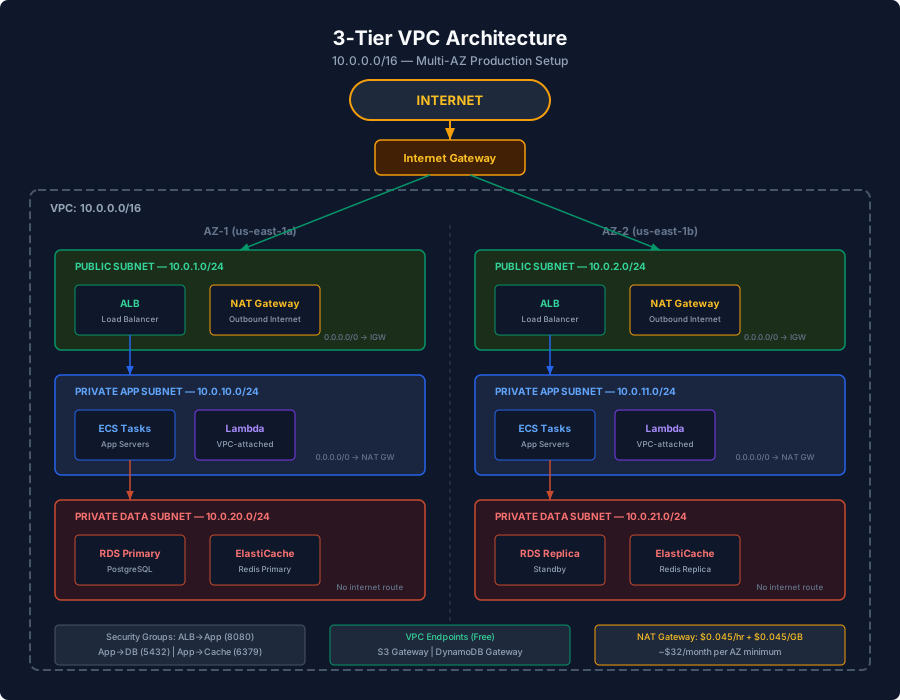
This is the standard production VPC layout. Three layers of subnets across multiple Availability Zones.
Layer 1 — Public Subnets
Contains the Application Load Balancer and NAT Gateways. These are the only resources with internet access.
Layer 2 — Private Application Subnets
Contains your application servers (ECS tasks, EC2 instances, Lambda functions). They reach the internet through the NAT Gateway and receive traffic from the ALB.
Layer 3 — Private Data Subnets
Contains databases (RDS, ElastiCache) and other data stores. These subnets have no internet access at all — not even through a NAT Gateway. They only communicate with the application subnets.
CloudFormation Template
Resources:
  VPC:
    Type: AWS::EC2::VPC
    Properties:
      CidrBlock: 10.0.0.0/16
      EnableDnsSupport: true
      EnableDnsHostnames: true
      Tags:
        - Key: Name
          Value: production-vpc

  # Public Subnets (2 AZs)
  PublicSubnet1:
    Type: AWS::EC2::Subnet
    Properties:
      VpcId: !Ref VPC
      CidrBlock: 10.0.1.0/24
      AvailabilityZone: !Select [0, !GetAZs '']
      MapPublicIpOnLaunch: true

  PublicSubnet2:
    Type: AWS::EC2::Subnet
    Properties:
      VpcId: !Ref VPC
      CidrBlock: 10.0.2.0/24
      AvailabilityZone: !Select [1, !GetAZs '']
      MapPublicIpOnLaunch: true

  # Private App Subnets (2 AZs)
  AppSubnet1:
    Type: AWS::EC2::Subnet
    Properties:
      VpcId: !Ref VPC
      CidrBlock: 10.0.10.0/24
      AvailabilityZone: !Select [0, !GetAZs '']

  AppSubnet2:
    Type: AWS::EC2::Subnet
    Properties:
      VpcId: !Ref VPC
      CidrBlock: 10.0.11.0/24
      AvailabilityZone: !Select [1, !GetAZs '']

  # Private Data Subnets (2 AZs)
  DataSubnet1:
    Type: AWS::EC2::Subnet
    Properties:
      VpcId: !Ref VPC
      CidrBlock: 10.0.20.0/24
      AvailabilityZone: !Select [0, !GetAZs '']

  DataSubnet2:
    Type: AWS::EC2::Subnet
    Properties:
      VpcId: !Ref VPC
      CidrBlock: 10.0.21.0/24
      AvailabilityZone: !Select [1, !GetAZs '']
Security Groups vs NACLs
Two layers of firewall protection in a VPC. They serve different purposes.
Security Groups
Stateful firewalls attached to individual resources (EC2, RDS, Lambda, ECS tasks). If you allow inbound traffic, the response is automatically allowed.
Resources:
  # Application security group — allows traffic from ALB only
  AppSecurityGroup:
    Type: AWS::EC2::SecurityGroup
    Properties:
      GroupDescription: Application tier
      VpcId: !Ref VPC
      SecurityGroupIngress:
        - IpProtocol: tcp
          FromPort: 8080
          ToPort: 8080
          SourceSecurityGroupId: !Ref ALBSecurityGroup

  # Database security group — allows traffic from App tier only
  DatabaseSecurityGroup:
    Type: AWS::EC2::SecurityGroup
    Properties:
      GroupDescription: Database tier
      VpcId: !Ref VPC
      SecurityGroupIngress:
        - IpProtocol: tcp
          FromPort: 5432
          ToPort: 5432
          SourceSecurityGroupId: !Ref AppSecurityGroup

  # ALB security group — allows traffic from the internet
  ALBSecurityGroup:
    Type: AWS::EC2::SecurityGroup
    Properties:
      GroupDescription: ALB tier
      VpcId: !Ref VPC
      SecurityGroupIngress:
        - IpProtocol: tcp
          FromPort: 443
          ToPort: 443
          CidrIp: 0.0.0.0/0
Notice the chain: Internet → ALB (port 443) → App (port 8080) → Database (port 5432). Each layer only accepts traffic from the layer above it.
Network ACLs (NACLs)
Stateless firewalls at the subnet level. Both inbound and outbound rules must explicitly allow traffic. NACLs process rules in order by rule number.
Resources:
  DataSubnetNACL:
    Type: AWS::EC2::NetworkAcl
    Properties:
      VpcId: !Ref VPC

  # Allow inbound PostgreSQL from app subnets only
  InboundRule:
    Type: AWS::EC2::NetworkAclEntry
    Properties:
      NetworkAclId: !Ref DataSubnetNACL
      RuleNumber: 100
      Protocol: 6          # TCP
      RuleAction: allow
      CidrBlock: 10.0.10.0/23  # App subnets
      PortRange:
        From: 5432
        To: 5432

  # Allow outbound ephemeral ports (response traffic)
  OutboundRule:
    Type: AWS::EC2::NetworkAclEntry
    Properties:
      NetworkAclId: !Ref DataSubnetNACL
      RuleNumber: 100
      Protocol: 6
      Egress: true
      RuleAction: allow
      CidrBlock: 10.0.10.0/23
      PortRange:
        From: 1024
        To: 65535
When to use which:
- Security Groups — your primary tool. Use for all resource-level access control.
- NACLs — defense in depth. Use to block entire IP ranges or as a subnet-level emergency shutoff. Most teams leave NACLs at the default (allow all) and rely on security groups.
VPC Endpoints — Saving Money and Adding Security
Every time your Lambda in a private subnet calls DynamoDB, S3, or SQS, the traffic goes through the NAT Gateway (costing $0.045/GB). VPC endpoints keep that traffic on the AWS private network — faster, cheaper, and more secure.
Gateway Endpoints (Free)
Available for S3 and DynamoDB only. Adds a route to the route table. No additional cost.
Resources:
  S3Endpoint:
    Type: AWS::EC2::VPCEndpoint
    Properties:
      VpcId: !Ref VPC
      ServiceName: !Sub 'com.amazonaws.${AWS::Region}.s3'
      VpcEndpointType: Gateway
      RouteTableIds:
        - !Ref PrivateRouteTable

  DynamoDBEndpoint:
    Type: AWS::EC2::VPCEndpoint
    Properties:
      VpcId: !Ref VPC
      ServiceName: !Sub 'com.amazonaws.${AWS::Region}.dynamodb'
      VpcEndpointType: Gateway
      RouteTableIds:
        - !Ref PrivateRouteTable
Always create these. There is zero downside — they are free, reduce NAT costs, and improve latency.
Interface Endpoints ($0.01/hour + $0.01/GB)
Available for most AWS services (SQS, SNS, KMS, Secrets Manager, CloudWatch, etc.). Creates an ENI in your subnet with a private IP.
Resources:
  SQSEndpoint:
    Type: AWS::EC2::VPCEndpoint
    Properties:
      VpcId: !Ref VPC
      ServiceName: !Sub 'com.amazonaws.${AWS::Region}.sqs'
      VpcEndpointType: Interface
      SubnetIds:
        - !Ref AppSubnet1
        - !Ref AppSubnet2
      SecurityGroupIds:
        - !Ref EndpointSecurityGroup
      PrivateDnsEnabled: true

  EndpointSecurityGroup:
    Type: AWS::EC2::SecurityGroup
    Properties:
      GroupDescription: VPC Endpoint access
      VpcId: !Ref VPC
      SecurityGroupIngress:
        - IpProtocol: tcp
          FromPort: 443
          ToPort: 443
          SourceSecurityGroupId: !Ref AppSecurityGroup
With PrivateDnsEnabled: true, your existing code works without changes — the standard AWS endpoint DNS names resolve to the private IP.
Cost math: An interface endpoint costs ~$7.20/month per AZ. If your NAT Gateway data transfer for that service exceeds 160 GB/month ($7.20 / $0.045), the endpoint saves money.
VPC Peering and Transit Gateway
VPC Peering
Connects two VPCs so they can communicate using private IPs. Works across accounts and regions.
Resources:
  PeeringConnection:
    Type: AWS::EC2::VPCPeeringConnection
    Properties:
      VpcId: !Ref VPC1
      PeerVpcId: !Ref VPC2

  # Add route in VPC1 to reach VPC2
  Route1to2:
    Type: AWS::EC2::Route
    Properties:
      RouteTableId: !Ref VPC1RouteTable
      DestinationCidrBlock: 10.1.0.0/16  # VPC2 CIDR
      VpcPeeringConnectionId: !Ref PeeringConnection
Peering is not transitive. If VPC-A peers with VPC-B, and VPC-B peers with VPC-C, VPC-A cannot reach VPC-C through VPC-B.
Transit Gateway
A central hub for connecting multiple VPCs, VPNs, and Direct Connect. Use it when you have more than 3-4 VPCs to interconnect.
   VPC-A ──┐
   VPC-B ──┤── Transit Gateway ──── On-premises (VPN)
   VPC-C ──┤
   VPC-D ──┘
Transit Gateway costs $0.05/hour per attachment plus $0.02/GB. It is worth it when VPC peering becomes unmanageable (peering requires N*(N-1)/2 connections).
Connecting to Private Resources
Bastion Host (Old Way)
A bastion host is an EC2 instance in a public subnet that you SSH into, then hop to private resources. It works but requires managing SSH keys, patching the instance, and opening port 22.
SSM Session Manager (Better Way)
AWS Systems Manager Session Manager provides shell access to private instances without opening any inbound ports. No SSH keys, no bastion host, full audit logging.
# Connect to a private EC2 instance — no SSH key needed
aws ssm start-session --target i-0abc123def456

# Port forwarding to a private RDS instance
aws ssm start-session \
  --target i-0abc123def456 \
  --document-name AWS-StartPortForwardingSessionToRemoteHost \
  --parameters '{
    "host": ["mydb.cluster-abc123.us-east-1.rds.amazonaws.com"],
    "portNumber": ["5432"],
    "localPortNumber": ["5432"]
  }'

# Now connect locally: psql -h localhost -p 5432 -U myuser mydb
Requirements:
- SSM Agent installed on the instance (pre-installed on Amazon Linux 2 and newer)
- Instance IAM role with
AmazonSSMManagedInstanceCorepolicy - VPC endpoint for SSM (or NAT Gateway access)
VPC Flow Logs
Flow logs capture metadata about IP traffic in your VPC. Essential for debugging connectivity issues and security auditing.
Resources:
  FlowLog:
    Type: AWS::EC2::FlowLog
    Properties:
      ResourceType: VPC
      ResourceId: !Ref VPC
      TrafficType: ALL  # or ACCEPT, REJECT
      LogDestinationType: cloud-watch-logs
      LogGroupName: /vpc/flow-logs
      MaxAggregationInterval: 60
A flow log record looks like this:
2 123456789012 eni-abc123 10.0.1.5 10.0.20.10 49152 5432 6 20 4000 1711843200 1711843260 ACCEPT OKTranslated: ENI eni-abc123, source 10.0.1.5:49152 → destination 10.0.20.10:5432, TCP, 20 packets, 4000 bytes, ACCEPTED.
Debugging with Flow Logs
Query flow logs with CloudWatch Logs Insights:
-- Find rejected traffic to your database subnet
fields @timestamp, srcAddr, dstAddr, dstPort, action
| filter action = "REJECT" and dstAddr like /10\.0\.20\./
| sort @timestamp desc
| limit 50

-- Traffic volume by source
fields srcAddr, dstAddr
| filter dstPort = 5432
| stats sum(bytes) as totalBytes, count(*) as connections by srcAddr
| sort totalBytes desc
DNS Resolution
Enable DNS in Your VPC
Two settings that must be enabled:
VPC:
  Type: AWS::EC2::VPC
  Properties:
    CidrBlock: 10.0.0.0/16
    EnableDnsSupport: true      # VPC can resolve DNS
    EnableDnsHostnames: true    # Instances get public DNS hostnames
Route 53 Private Hosted Zones
Create internal DNS names that only resolve within your VPC:
Resources:
  PrivateZone:
    Type: AWS::Route53::HostedZone
    Properties:
      Name: internal.myapp.com
      VPCs:
        - VPCId: !Ref VPC
          VPCRegion: !Ref AWS::Region

  DatabaseDNS:
    Type: AWS::Route53::RecordSet
    Properties:
      HostedZoneId: !Ref PrivateZone
      Name: db.internal.myapp.com
      Type: CNAME
      TTL: 300
      ResourceRecords:
        - !GetAtt RDSCluster.Endpoint.Address
Now your application connects to db.internal.myapp.com instead of the auto-generated RDS endpoint. If you swap databases, update the DNS record — no application changes needed.
Lambda in a VPC
Lambda functions can be placed inside a VPC to access private resources like RDS or ElastiCache. But this comes with trade-offs.
Resources:
  MyFunction:
    Type: AWS::Serverless::Function
    Properties:
      Handler: index.handler
      Runtime: nodejs20.x
      VpcConfig:
        SubnetIds:
          - !Ref AppSubnet1
          - !Ref AppSubnet2
        SecurityGroupIds:
          - !Ref LambdaSecurityGroup
      Policies:
        - VPCAccessPolicy: {}
What changes when Lambda is in a VPC:
- It can access private resources (RDS, ElastiCache, internal services)
- It cannot access the internet unless the subnet has a NAT Gateway
- It cannot access AWS services (DynamoDB, S3, SQS) unless you have VPC endpoints or a NAT Gateway
- Cold starts are no longer impacted (AWS improved this with Hyperplane ENIs in 2019)
Best practice: Only put Lambda in a VPC if it needs to access private resources. Use VPC endpoints for S3, DynamoDB, SQS, and other AWS services to avoid NAT Gateway costs.
Common Networking Mistakes
1. Forgetting the NAT Gateway
Your Lambda or ECS task in a private subnet suddenly cannot reach any AWS service. Check if there is a NAT Gateway (or VPC endpoint) — private subnets have no internet access by default.
2. Overlapping CIDR Blocks
You create two VPCs with 10.0.0.0/16 and later need to peer them. It will not work. Plan your CIDR allocation upfront:
Production: 10.0.0.0/16
Staging:    10.1.0.0/16
Dev:        10.2.0.0/16
Corporate:  172.16.0.0/16
3. Security Group Referencing Mistakes
You reference a security group in another VPC or use a CIDR block when you should reference a security group. Security group references are more maintainable and automatically adapt when instances scale.
4. Single AZ Deployment
Deploying everything in one AZ means a single AZ outage takes down your entire application. Always spread across at least 2 AZs.
5. Not Using VPC Endpoints for S3/DynamoDB
These gateway endpoints are free. Every VPC that accesses S3 or DynamoDB should have them. You are literally paying NAT Gateway fees for no reason.
6. Running Out of IP Addresses
A /24 subnet gives you 251 usable IPs (AWS reserves 5). If your ECS service scales to 200 tasks and each task needs an IP, you are close to the limit. Plan subnet sizes based on expected scale.
7. Putting Everything in Public Subnets
The “it works” approach that creates security risks. Databases, application servers, and internal services should always be in private subnets. Only load balancers and NAT Gateways need public subnet placement.
Quick Reference: What Goes Where
| Resource | Subnet Type | Why |
|---|---|---|
| Application Load Balancer | Public | Needs internet-facing access |
| NAT Gateway | Public | Needs IGW route for outbound |
| API servers (ECS/EC2) | Private App | No direct internet exposure |
| Lambda (VPC-attached) | Private App | Access private resources |
| RDS / Aurora | Private Data | Maximum isolation |
| ElastiCache | Private Data | Maximum isolation |
| Bastion host (if used) | Public | SSH entry point |
Summary
VPC networking is the plumbing of your AWS infrastructure. The 3-tier architecture with public, private app, and private data subnets gives you security and flexibility. Use security groups as your primary access control — they are stateful and reference-friendly. Create free gateway endpoints for S3 and DynamoDB in every VPC. Use SSM Session Manager instead of bastion hosts. Plan your CIDR blocks to avoid overlaps, spread across multiple AZs, and put resources in the right subnet tier.
Understanding VPC networking turns you from a developer who writes code that runs on AWS into an engineer who builds systems that are secure, cost-effective, and resilient by design.