
Every backend engineer knows S3 as “the place you put files.” Upload an image, store a backup, host a static site. But that barely scratches the surface. S3 is one of the most versatile building blocks in AWS — a durable, scalable object store that underpins everything from data lakes to real-time processing pipelines.
The difference between using S3 as a dumb file bucket and using it as an architecture component is understanding its features. Storage classes can cut your bill by 80%. Presigned URLs let users upload directly without touching your servers. Event notifications trigger entire processing pipelines. Let’s dig in.
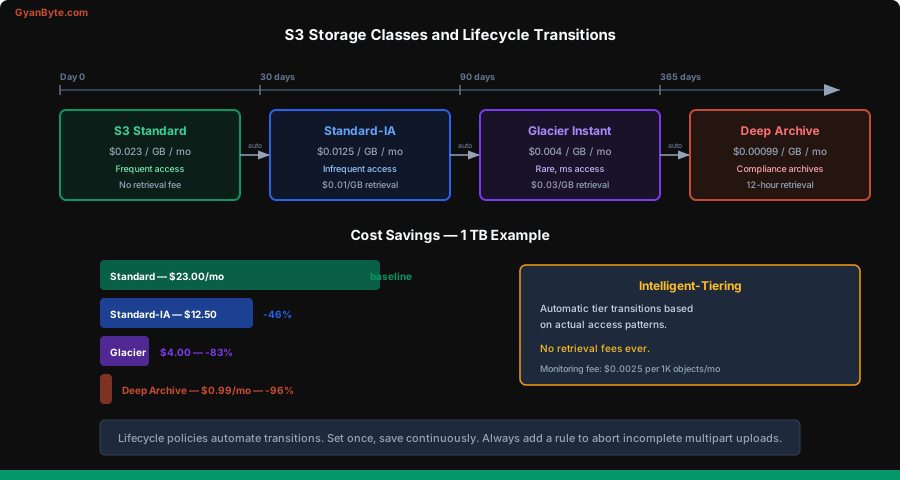
Storage Classes — Stop Overpaying
Not all data is accessed equally. A user’s profile photo is hit thousands of times a day. Last month’s logs get accessed once for debugging. Last year’s compliance archives might never be touched again. S3 charges differently based on how you classify your data.
| Storage Class | Access Pattern | Storage Cost (GB/mo) | Retrieval Cost | Min Duration |
|---|---|---|---|---|
| Standard | Frequent access | $0.023 | None | None |
| Intelligent-Tiering | Unknown/changing | $0.023 + monitoring fee | None | None |
| Standard-IA | Infrequent (1x/month) | $0.0125 | $0.01/GB | 30 days |
| One Zone-IA | Infrequent, non-critical | $0.01 | $0.01/GB | 30 days |
| Glacier Instant | Rare, milliseconds access | $0.004 | $0.03/GB | 90 days |
| Glacier Flexible | Archives, minutes-hours | $0.0036 | $0.01-$12/GB | 90 days |
| Glacier Deep Archive | Compliance, 12-hour retrieval | $0.00099 | $0.02/GB | 180 days |
Intelligent-Tiering deserves special attention. It automatically moves objects between access tiers based on usage patterns. There’s a small monitoring fee (~$0.0025 per 1,000 objects), but for data with unpredictable access patterns, it’s the safest choice. You never pay retrieval fees, and objects automatically move to cheaper tiers when not accessed.
Lifecycle Policies — Automate Cost Savings
Lifecycle policies are rules that automatically transition or delete objects based on age. This is where the real cost savings happen.
{
  "Rules": [
    {
      "ID": "logs-lifecycle",
      "Filter": { "Prefix": "logs/" },
      "Status": "Enabled",
      "Transitions": [
        {
          "Days": 30,
          "StorageClass": "STANDARD_IA"
        },
        {
          "Days": 90,
          "StorageClass": "GLACIER_IR"
        },
        {
          "Days": 365,
          "StorageClass": "DEEP_ARCHIVE"
        }
      ],
      "Expiration": {
        "Days": 2555
      }
    },
    {
      "ID": "cleanup-incomplete-uploads",
      "Filter": { "Prefix": "" },
      "Status": "Enabled",
      "AbortIncompleteMultipartUpload": {
        "DaysAfterInitiation": 7
      }
    }
  ]
}
That second rule is critical and often missed. Incomplete multipart uploads sit in your bucket invisibly, accumulating storage charges. Always add a cleanup rule.
A real-world example: a media company storing user uploads had 2 TB of log data in Standard storage at $46/month. After adding lifecycle rules — IA after 30 days, Glacier after 90 days, Deep Archive after a year — the same data cost under $8/month. The lifecycle policy paid for itself in a day.
Versioning
Enable versioning and S3 keeps every version of every object. Delete a file? It gets a delete marker, but all previous versions remain. Overwrite a file? The old version is preserved.
This is essential for:
- Accidental deletion recovery — restore any previous version
- Audit trails — see who changed what and when
- Concurrent writes — no data lost from race conditions
import { S3Client, GetObjectCommand, ListObjectVersionsCommand } from '@aws-sdk/client-s3';

const s3 = new S3Client({ region: 'us-east-1' });

// List all versions of an object
async function listVersions(bucket, key) {
  const response = await s3.send(new ListObjectVersionsCommand({
    Bucket: bucket,
    Prefix: key
  }));

  return response.Versions.map(v => ({
    versionId: v.VersionId,
    lastModified: v.LastModified,
    size: v.Size,
    isLatest: v.IsLatest
  }));
}

// Get a specific version
async function getVersion(bucket, key, versionId) {
  const response = await s3.send(new GetObjectCommand({
    Bucket: bucket,
    Key: key,
    VersionId: versionId
  }));
  return response.Body;
}
Combine versioning with lifecycle policies to expire old versions after N days. Otherwise, you’re paying to store every version forever.
Presigned URLs — Direct Client Uploads
This is the pattern that changes how you think about file uploads. Instead of your server receiving the file and forwarding it to S3 (doubling your bandwidth and latency), generate a presigned URL that lets the client upload directly to S3.
import { S3Client, PutObjectCommand, GetObjectCommand } from '@aws-sdk/client-s3';
import { getSignedUrl } from '@aws-sdk/s3-request-presigner';

const s3 = new S3Client({ region: 'us-east-1' });

// Generate a presigned URL for upload
async function getUploadUrl(userId, fileName, contentType) {
  const key = `uploads/${userId}/${Date.now()}-${fileName}`;

  const command = new PutObjectCommand({
    Bucket: process.env.UPLOAD_BUCKET,
    Key: key,
    ContentType: contentType,
    Metadata: {
      'uploaded-by': userId
    }
  });

  const url = await getSignedUrl(s3, command, {
    expiresIn: 300  // URL valid for 5 minutes
  });

  return { url, key };
}

// Generate a presigned URL for download
async function getDownloadUrl(key) {
  const command = new GetObjectCommand({
    Bucket: process.env.UPLOAD_BUCKET,
    Key: key
  });

  return getSignedUrl(s3, command, {
    expiresIn: 3600  // 1 hour
  });
}
The client-side upload is then simple:
// Client-side: upload directly to S3 using the presigned URL
async function uploadFile(file) {
  // 1. Get presigned URL from your API
  const { url, key } = await fetch('/api/upload-url', {
    method: 'POST',
    body: JSON.stringify({
      fileName: file.name,
      contentType: file.type
    })
  }).then(r => r.json());

  // 2. Upload directly to S3
  await fetch(url, {
    method: 'PUT',
    body: file,
    headers: { 'Content-Type': file.type }
  });

  // 3. Tell your API the upload is complete
  await fetch('/api/upload-complete', {
    method: 'POST',
    body: JSON.stringify({ key })
  });
}
Your server never touches the file data. It generates a short-lived URL, the client uploads directly, and your server is notified when it’s done. This works for files of any size and dramatically reduces server load.
Multipart Uploads
For files larger than 100 MB, multipart uploads are a must. They break the file into parts, upload them in parallel, and can resume from where they left off if a part fails.
import {
  CreateMultipartUploadCommand,
  UploadPartCommand,
  CompleteMultipartUploadCommand,
  AbortMultipartUploadCommand
} from '@aws-sdk/client-s3';

async function multipartUpload(bucket, key, fileBuffer) {
  const PART_SIZE = 10 * 1024 * 1024; // 10 MB parts

  // Step 1: Initiate
  const { UploadId } = await s3.send(new CreateMultipartUploadCommand({
    Bucket: bucket,
    Key: key
  }));

  try {
    // Step 2: Upload parts in parallel
    const parts = [];
    const totalParts = Math.ceil(fileBuffer.length / PART_SIZE);

    const uploadPromises = [];
    for (let i = 0; i < totalParts; i++) {
      const start = i * PART_SIZE;
      const end = Math.min(start + PART_SIZE, fileBuffer.length);
      const partNumber = i + 1;

      uploadPromises.push(
        s3.send(new UploadPartCommand({
          Bucket: bucket,
          Key: key,
          UploadId,
          PartNumber: partNumber,
          Body: fileBuffer.slice(start, end)
        })).then(response => ({
          PartNumber: partNumber,
          ETag: response.ETag
        }))
      );
    }

    const completedParts = await Promise.all(uploadPromises);

    // Step 3: Complete
    await s3.send(new CompleteMultipartUploadCommand({
      Bucket: bucket,
      Key: key,
      UploadId,
      MultipartUpload: {
        Parts: completedParts.sort((a, b) => a.PartNumber - b.PartNumber)
      }
    }));
  } catch (err) {
    // Abort on failure — don't leave incomplete uploads
    await s3.send(new AbortMultipartUploadCommand({
      Bucket: bucket,
      Key: key,
      UploadId
    }));
    throw err;
  }
}
In practice, use the @aws-sdk/lib-storage Upload utility which handles all of this for you. But understanding the underlying mechanics matters when debugging upload failures.
Event Notifications — S3 as a Trigger
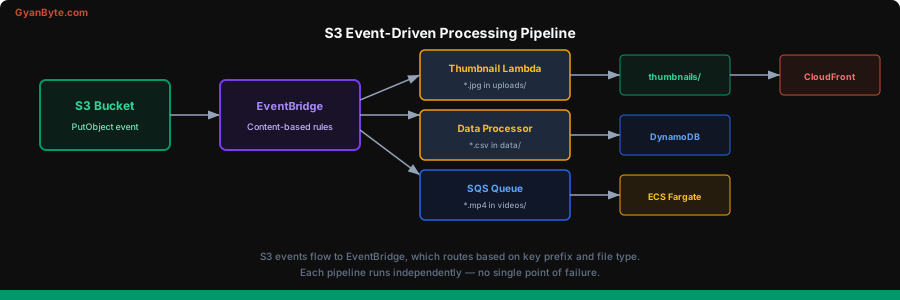
S3 can fire events when objects are created, deleted, or restored. These events can trigger Lambda functions, send messages to SQS, or publish to SNS.
// Lambda triggered by S3 event
export async function handler(event) {
  for (const record of event.Records) {
    const bucket = record.s3.bucket.name;
    const key = decodeURIComponent(record.s3.object.key.replace(/\+/g, ' '));
    const size = record.s3.object.size;
    const eventType = record.eventName;

    console.log(`${eventType}: ${bucket}/${key} (${size} bytes)`);

    if (key.startsWith('uploads/') && key.endsWith('.jpg')) {
      await generateThumbnail(bucket, key);
    }

    if (key.startsWith('data/') && key.endsWith('.csv')) {
      await processDataFile(bucket, key);
    }
  }
}
Common patterns:
- Image processing pipeline: upload → S3 event → Lambda → generate thumbnails → save back to S3
- Data ingestion: CSV dropped in S3 → Lambda → parse and load into DynamoDB
- Video transcoding: video uploaded → S3 event → SQS → ECS/Fargate task picks up and transcodes
- Audit trail: any object change → S3 event → EventBridge → audit log in DynamoDB
For EventBridge integration (recommended over direct S3 notifications for new architectures):
# Enable EventBridge notifications on a bucket
aws s3api put-bucket-notification-configuration \
  --bucket my-bucket \
  --notification-configuration '{"EventBridgeConfiguration":{}}'
Now all S3 events for that bucket flow to EventBridge, where you can write sophisticated matching rules.
S3 + CloudFront — Global Content Delivery
Serving S3 content directly works, but users far from your S3 region see high latency. CloudFront caches content at 400+ edge locations worldwide.
The setup is straightforward:
- Create a CloudFront distribution with your S3 bucket as the origin
- Use an Origin Access Control (OAC) so only CloudFront can read from S3
- Your bucket stays private — CloudFront is the only public entry point
{
  "S3BucketPolicy": {
    "Version": "2012-10-17",
    "Statement": [{
      "Sid": "AllowCloudFrontServicePrincipal",
      "Effect": "Allow",
      "Principal": {
        "Service": "cloudfront.amazonaws.com"
      },
      "Action": "s3:GetObject",
      "Resource": "arn:aws:s3:::my-bucket/*",
      "Condition": {
        "StringEquals": {
          "AWS:SourceArn": "arn:aws:cloudfront::123456789:distribution/EDFDVBD6EXAMPLE"
        }
      }
    }]
  }
}
Benefits beyond caching:
- HTTPS with custom domains — CloudFront handles SSL termination
- Edge functions — CloudFront Functions or Lambda@Edge for URL rewrites, auth, A/B testing
- Compression — automatic gzip/brotli for text-based content
- DDoS protection — AWS Shield Standard is included free
Access Control
S3 access control has evolved through multiple layers. Here’s what to use in 2026:
-
Block Public Access — enable this at the account level. It prevents accidental public exposure. Turn it on and forget about it.
-
Bucket Policies — the primary access control mechanism. JSON policies attached to the bucket that define who can do what.
-
IAM Policies — control what your services and users can do. Prefer this for application access.
-
ACLs — legacy. AWS recommends disabling them entirely with the “BucketOwnerEnforced” setting.
// Good: IAM role-based access. Your Lambda/ECS task gets an execution
// role with exactly the permissions it needs.
{
  "Version": "2012-10-17",
  "Statement": [{
    "Effect": "Allow",
    "Action": [
      "s3:GetObject",
      "s3:PutObject"
    ],
    "Resource": "arn:aws:s3:::my-app-uploads/uploads/*"
  }]
}
// This role can only read/write objects under the uploads/ prefix.
// Nothing else. Least privilege.
S3 Select — Query in Place
Instead of downloading an entire CSV or JSON file to process one field, S3 Select lets you run SQL queries directly on the object. S3 does the filtering and only returns the matching data.
import { SelectObjectContentCommand } from '@aws-sdk/client-s3';

async function queryCSV(bucket, key) {
  const response = await s3.send(new SelectObjectContentCommand({
    Bucket: bucket,
    Key: key,
    ExpressionType: 'SQL',
    Expression: "SELECT s.name, s.amount FROM s3object s WHERE s.amount > '1000'",
    InputSerialization: {
      CSV: { FileHeaderInfo: 'USE', Comments: '#' }
    },
    OutputSerialization: {
      JSON: { RecordDelimiter: '\n' }
    }
  }));

  const records = [];
  for await (const event of response.Payload) {
    if (event.Records) {
      records.push(event.Records.Payload);
    }
  }

  return Buffer.concat(records).toString('utf-8')
    .trim()
    .split('\n')
    .map(line => JSON.parse(line));
}
This is perfect for log analysis, data exploration, and any scenario where you need a small slice of a large file. You pay only for the data scanned and returned, not the entire object.
Performance Optimization
Prefix Partitioning
S3 automatically partitions your data by key prefix for performance. Modern S3 handles 5,500 GET and 3,500 PUT requests per second per prefix. If you need more, spread your keys across multiple prefixes:
// Bad — all keys under one prefix
logs/2026-03-31-001.gz
logs/2026-03-31-002.gz

// Better — date-partitioned
logs/2026/03/31/001.gz
logs/2026/03/31/002.gz

// Best for high throughput — add a hash prefix
logs/a1/2026/03/31/001.gz
logs/b2/2026/03/31/002.gz
Transfer Acceleration
For uploads from distant regions, S3 Transfer Acceleration routes data through CloudFront edge locations. Enable it on your bucket and use the accelerated endpoint. Speed improvements of 50-500% are common for cross-continent uploads.
Static Website Hosting
S3 can serve a static website directly with:
- Index document (index.html)
- Error document (404.html)
- Redirect rules
But for production, always put CloudFront in front. S3 website endpoints don’t support HTTPS, and CloudFront gives you caching, custom domains, and edge functions.
Cost Optimization Checklist
- Lifecycle policies — move old data to cheaper tiers automatically
- Intelligent-Tiering — for data with unpredictable access patterns
- Abort incomplete multipart uploads — they silently accumulate charges
- S3 Storage Lens — dashboard showing usage patterns and savings opportunities
- Requester Pays — make the downloader pay for transfer (useful for shared datasets)
- Same-region access — cross-region data transfer costs $0.02/GB
- VPC endpoints — free data transfer from EC2/Lambda to S3 within the same region
- Compression — gzip your files before upload when possible
S3 is deceptively simple on the surface. PutObject, GetObject, done. But the services built on top of that simple interface — lifecycle management, event-driven processing, global distribution, in-place querying — make it one of the most powerful components in your AWS toolkit. Use it as a building block, not just a bucket.