
AWS has three messaging services that overlap just enough to confuse everyone. SQS, SNS, and EventBridge all move messages between services, but they solve fundamentally different problems. Pick the wrong one and you’ll fight the service instead of building features. Pick the right one and distributed communication becomes almost boring.
Let’s cut through the marketing and understand what each service actually does, when to use it, and how to combine them for real-world architectures.
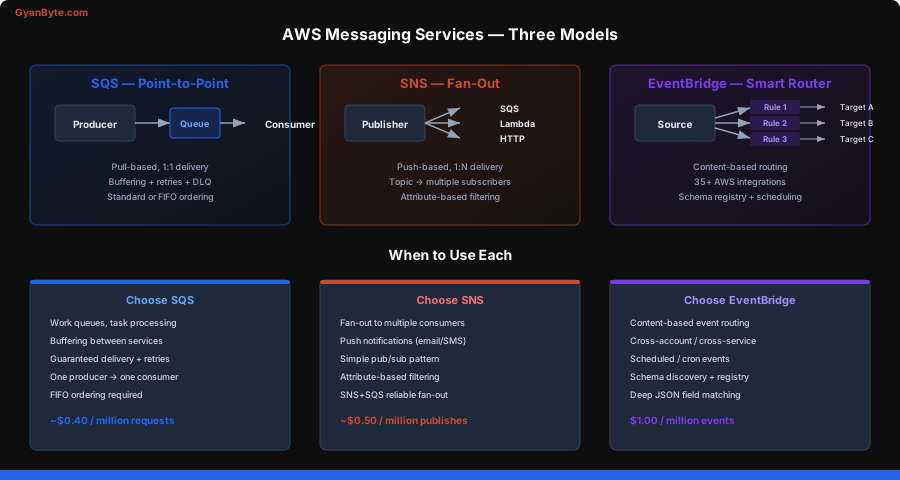
SQS — The Reliable Queue
SQS is the simplest of the three. One producer puts messages in. One consumer takes messages out. Messages wait in the queue until someone processes them. That’s it.
But the details matter.
Standard vs FIFO Queues
Standard queues give you nearly unlimited throughput. Messages are delivered at least once but might arrive out of order or be delivered twice. For most workloads — sending emails, processing images, updating search indexes — this is perfectly fine. Your consumer should be idempotent anyway.
FIFO queues guarantee ordering and exactly-once processing. They top out at 3,000 messages per second with batching (300 without). Use them when order matters: financial transactions, inventory updates, sequential workflow steps.
import { SQSClient, SendMessageCommand, ReceiveMessageCommand, DeleteMessageCommand } from '@aws-sdk/client-sqs';

const sqs = new SQSClient({ region: 'us-east-1' });

// Send a message to a standard queue
async function sendOrder(order) {
  await sqs.send(new SendMessageCommand({
    QueueUrl: process.env.ORDER_QUEUE_URL,
    MessageBody: JSON.stringify(order),
    MessageAttributes: {
      'orderType': {
        DataType: 'String',
        StringValue: order.type
      }
    }
  }));
}

// Send to a FIFO queue — requires MessageGroupId and DeduplicationId
async function sendFifoOrder(order) {
  await sqs.send(new SendMessageCommand({
    QueueUrl: process.env.ORDER_FIFO_QUEUE_URL,
    MessageBody: JSON.stringify(order),
    MessageGroupId: order.customerId,       // messages within a group are ordered
    MessageDeduplicationId: order.orderId   // prevents duplicate delivery
  }));
}
The MessageGroupId in FIFO queues is crucial. Messages with the same group ID are processed in order. Messages with different group IDs can be processed in parallel. So if you use customerId as the group ID, each customer’s orders are processed in sequence, but different customers’ orders run concurrently.
Visibility Timeout
When a consumer picks up a message, SQS doesn’t delete it. It hides it for the “visibility timeout” period (default: 30 seconds). If the consumer finishes and deletes the message, great. If the consumer crashes, the message becomes visible again and another consumer can pick it up.
This is your retry mechanism. Set the visibility timeout longer than your processing time, or you’ll get duplicate processing.
// Consumer: receive, process, delete
async function processMessages() {
  const response = await sqs.send(new ReceiveMessageCommand({
    QueueUrl: process.env.ORDER_QUEUE_URL,
    MaxNumberOfMessages: 10,     // batch up to 10
    WaitTimeSeconds: 20,          // long polling — saves money
    VisibilityTimeout: 60         // 60 seconds to process
  }));

  if (!response.Messages) return;

  for (const message of response.Messages) {
    try {
      const order = JSON.parse(message.Body);
      await fulfillOrder(order);

      // Success — delete the message
      await sqs.send(new DeleteMessageCommand({
        QueueUrl: process.env.ORDER_QUEUE_URL,
        ReceiptHandle: message.ReceiptHandle
      }));
    } catch (err) {
      console.error('Failed to process message:', err);
      // Don't delete — message will become visible again after timeout
    }
  }
}
Long Polling
By default, ReceiveMessage returns immediately, even if the queue is empty. This wastes API calls and money. Set WaitTimeSeconds to up to 20 seconds. The call will wait for messages to arrive before returning. This single setting can cut your SQS costs by 90%.
Dead Letter Queues
After a message fails processing N times (you configure the threshold), SQS moves it to a dead letter queue (DLQ). This prevents poison messages from blocking your queue forever.
// When creating the queue, configure the DLQ
// In CloudFormation or CDK:
const mainQueue = {
  RedrivePolicy: JSON.stringify({
    deadLetterTargetArn: dlqArn,
    maxReceiveCount: 3    // after 3 failures, move to DLQ
  })
};
Always set up a DLQ. Always monitor the DLQ length with a CloudWatch alarm. Messages in the DLQ are bugs you need to investigate.
Batch Operations
SQS supports sending and deleting up to 10 messages at once. Always use batching in production — it reduces API calls and costs.
import { SendMessageBatchCommand } from '@aws-sdk/client-sqs';

async function sendOrderBatch(orders) {
  const entries = orders.map((order, i) => ({
    Id: `msg-${i}`,
    MessageBody: JSON.stringify(order),
  }));

  // SendMessageBatch handles up to 10 messages
  const chunks = [];
  for (let i = 0; i < entries.length; i += 10) {
    chunks.push(entries.slice(i, i + 10));
  }

  for (const chunk of chunks) {
    await sqs.send(new SendMessageBatchCommand({
      QueueUrl: process.env.ORDER_QUEUE_URL,
      Entries: chunk
    }));
  }
}
SNS — Pub/Sub Fan-Out
SNS flips the model. Instead of one consumer pulling from a queue, SNS pushes to multiple subscribers. You publish to a “topic” and every subscriber gets a copy.
Subscribers can be SQS queues, Lambda functions, HTTP endpoints, email addresses, or SMS numbers. The fan-out pattern is the primary reason SNS exists.
When One Event Needs Multiple Actions
An order is placed. You need to:
- Process the payment (SQS queue → payment service)
- Send a confirmation email (Lambda function)
- Update analytics (SQS queue → analytics service)
- Notify the warehouse (HTTP endpoint)
Without SNS, the order service needs to know about all four downstream systems. With SNS, it publishes one message to a topic. Done.
import { SNSClient, PublishCommand } from '@aws-sdk/client-sns';

const sns = new SNSClient({ region: 'us-east-1' });

async function publishOrderEvent(order) {
  await sns.send(new PublishCommand({
    TopicArn: process.env.ORDER_TOPIC_ARN,
    Message: JSON.stringify({
      eventType: 'order.placed',
      orderId: order.id,
      customerId: order.customerId,
      amount: order.total,
      items: order.items
    }),
    MessageAttributes: {
      'eventType': {
        DataType: 'String',
        StringValue: 'order.placed'
      },
      'orderAmount': {
        DataType: 'Number',
        StringValue: order.total.toString()
      }
    }
  }));
}
Message Filtering
This is SNS’s underrated killer feature. Subscribers can define filter policies so they only receive messages they care about. The filtering happens at SNS — no wasted deliveries, no filtering logic in your consumers.
// Subscribe with a filter — only get high-value orders
// This is done via AWS CLI or SDK subscription setup:
// aws sns subscribe \
//   --topic-arn arn:aws:sns:us-east-1:123456789:orders \
//   --protocol sqs \
//   --notification-endpoint arn:aws:sqs:us-east-1:123456789:high-value-orders \
//   --attributes '{"FilterPolicy":"{\"orderAmount\":[{\"numeric\":[\">\",100]}]}"}'

// Or via SDK:
import { SubscribeCommand } from '@aws-sdk/client-sns';

await sns.send(new SubscribeCommand({
  TopicArn: process.env.ORDER_TOPIC_ARN,
  Protocol: 'sqs',
  Endpoint: process.env.HIGH_VALUE_QUEUE_ARN,
  Attributes: {
    FilterPolicy: JSON.stringify({
      orderAmount: [{ numeric: ['>', 100] }]
    })
  }
}));
EventBridge — The Smart Event Bus
EventBridge is the newest and most powerful of the three. Think of it as SNS with superpowers: content-based routing, schema discovery, scheduled events, and native integration with 35+ AWS services.
Event Bus and Rules
EventBridge events have a structured format: source, detail-type, and detail. You create rules that match events based on any field in the payload and route them to targets.
import { EventBridgeClient, PutEventsCommand } from '@aws-sdk/client-eventbridge';

const eb = new EventBridgeClient({ region: 'us-east-1' });

async function emitOrderEvent(order) {
  await eb.send(new PutEventsCommand({
    Entries: [{
      Source: 'com.myapp.orders',
      DetailType: 'OrderPlaced',
      Detail: JSON.stringify({
        orderId: order.id,
        customerId: order.customerId,
        amount: order.total,
        items: order.items,
        region: order.shippingRegion
      }),
      EventBusName: 'my-app-bus'
    }]
  }));
}
Rules do the routing. This is far more flexible than SNS filter policies:
{
  "source": ["com.myapp.orders"],
  "detail-type": ["OrderPlaced"],
  "detail": {
    "amount": [{ "numeric": [">", 500] }],
    "region": ["us-west-2", "us-east-1"]
  }
}
This rule matches orders over $500 from specific regions. The matching can go arbitrarily deep into nested JSON. You can match on prefix, suffix, exact value, numeric ranges, existence of a field, and more.
Schema Registry
EventBridge can auto-discover event schemas from your bus and generate code bindings. When your events flow through EventBridge, it learns their structure and you can generate TypeScript interfaces or Java classes from the discovered schemas. This is invaluable for large teams where different services publish events.
Scheduled Events
EventBridge also replaces CloudWatch Events (it’s literally the same service under the hood). You can create cron-based or rate-based rules:
// Create a rule that triggers every 5 minutes
// aws events put-rule \
//   --name "cleanup-expired-sessions" \
//   --schedule-expression "rate(5 minutes)" \
//   --state ENABLED

// Cron syntax is also supported:
// --schedule-expression "cron(0 12 * * ? *)"  → noon UTC daily
The Comparison Table
| Feature | SQS | SNS | EventBridge |
|---|---|---|---|
| Model | Queue (pull) | Pub/sub (push) | Event bus (push) |
| Consumers | 1 per message | Many subscribers | Many rules/targets |
| Ordering | FIFO queues only | FIFO topics only | No guarantee |
| Retry | Visibility timeout | Delivery retries | DLQ + retry policy |
| Filtering | None (consumer-side) | Message attributes | Content-based rules |
| Max message size | 256 KB | 256 KB | 256 KB |
| Throughput | Nearly unlimited | Nearly unlimited | Soft limits, raise via support |
| Latency | Consumer polls | ~30ms push | ~500ms typical |
| Cost | Per request | Per publish + delivery | Per event |
| AWS integrations | Lambda trigger | Lambda, SQS, HTTP | 35+ services native |
| Best for | Work queues, buffering | Fan-out, notifications | Event routing, cross-service |
When to Use Each
Use SQS when:
- One service produces work, another consumes it
- You need buffering between fast producers and slow consumers
- You need guaranteed processing with retries and DLQ
- Order matters (FIFO) within a partition
Use SNS when:
- One event needs to reach multiple consumers
- You want simple push-based fan-out
- Subscribers are SQS queues, Lambda, HTTP, email, or SMS
- You need basic attribute-based filtering
Use EventBridge when:
- You’re routing events between microservices
- You need content-based routing on deeply nested fields
- You want first-class integration with AWS services (S3 events, CodePipeline, etc.)
- You need schema discovery and registry
- You’re building scheduled/cron-based workflows
The Killer Pattern: SNS + SQS Fan-Out
The most common production pattern combines SNS and SQS. SNS handles the fan-out, SQS handles the reliable processing.
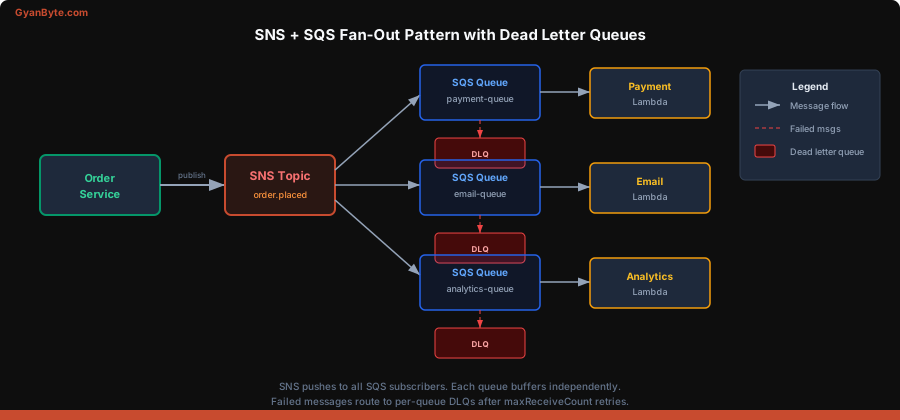
Why not just use SNS → Lambda directly? Because SQS gives you:
- Buffering — if your Lambda hits concurrency limits, messages wait in the queue
- Retry control — visibility timeout + DLQ vs SNS’s limited retry policy
- Batching — SQS can trigger Lambda with batches of up to 10 messages
- Cost — SQS long polling is cheaper than SNS pushing to Lambda for high-volume workloads
// Producer: publish to SNS topic
async function handleOrderPlaced(order) {
  await sns.send(new PublishCommand({
    TopicArn: process.env.ORDER_TOPIC_ARN,
    Message: JSON.stringify({
      eventType: 'order.placed',
      order
    }),
    MessageAttributes: {
      eventType: {
        DataType: 'String',
        StringValue: 'order.placed'
      }
    }
  }));
  // That's it. The producer doesn't know or care
  // who subscribes to this topic.
}

// Consumer 1: Payment processing Lambda triggered by SQS
export async function paymentHandler(event) {
  for (const record of event.Records) {
    const snsMessage = JSON.parse(record.body);
    const orderEvent = JSON.parse(snsMessage.Message);
    await processPayment(orderEvent.order);
  }
}

// Consumer 2: Email service Lambda triggered by different SQS queue
export async function emailHandler(event) {
  for (const record of event.Records) {
    const snsMessage = JSON.parse(record.body);
    const orderEvent = JSON.parse(snsMessage.Message);
    await sendConfirmationEmail(orderEvent.order);
  }
}
Notice the message nesting: when SNS delivers to SQS, the original message is wrapped in an SNS envelope. You parse the SQS record body to get the SNS message, then parse the SNS Message field to get your actual payload. Every team gets bitten by this double-parse the first time.
EventBridge + SQS for Complex Routing
For more sophisticated routing, use EventBridge as the front door and SQS as the processing backend:
// Emit a rich event to EventBridge
await eb.send(new PutEventsCommand({
  Entries: [{
    Source: 'com.myapp.orders',
    DetailType: 'OrderPlaced',
    Detail: JSON.stringify({
      orderId: '12345',
      amount: 750,
      items: [{ sku: 'WIDGET-A', qty: 3 }],
      customer: { tier: 'premium', region: 'eu-west-1' }
    }),
    EventBusName: 'my-app-bus'
  }]
}));

// EventBridge rule routes premium EU orders to a specific SQS queue
// Rule pattern:
// {
//   "source": ["com.myapp.orders"],
//   "detail": {
//     "customer": {
//       "tier": ["premium"],
//       "region": [{ "prefix": "eu-" }]
//     }
//   }
// }
This level of content-based routing would require custom code with SNS. EventBridge gives it to you declaratively.
Real-World Architecture Patterns
Pattern 1: Order Processing Pipeline Order API → SNS topic → [Payment SQS, Inventory SQS, Notification SQS] → Each with its own Lambda consumer and DLQ
Pattern 2: Cross-Account Events Service A (Account 1) → EventBridge → EventBridge (Account 2) → Lambda/SQS in Account 2. EventBridge’s cross-account event bus is the cleanest way to do this.
Pattern 3: S3 Event Processing S3 upload → EventBridge rule (match *.jpg in uploads/ prefix) → Lambda (generate thumbnails). EventBridge natively captures S3 events without configuring S3 event notifications separately.
Pattern 4: Saga/Choreography Each step in a distributed transaction publishes an event. EventBridge routes completion/failure events to the appropriate next step or compensation handler. No central orchestrator needed.
Cost Quick Reference
- SQS: ~$0.40 per million requests. First million free per month. Long polling reduces request count.
- SNS: ~$0.50 per million publishes. Delivery to SQS is free. Delivery to HTTP is $0.60/million.
- EventBridge: $1.00 per million events. Custom bus events. AWS service events are free.
For high-throughput workloads (millions of events per hour), SQS is cheapest. For moderate throughput with complex routing needs, EventBridge’s cost is justified by the routing logic you don’t have to build.
Common Mistakes
- Not setting up DLQs — messages silently fail and you never know
- Visibility timeout shorter than processing time — causes duplicate processing
- Not using long polling on SQS — wastes money on empty receives
- Using SNS when you need one consumer — just use SQS directly
- Building custom routing logic — use EventBridge rules or SNS filters instead
- Forgetting the SNS→SQS double-parse — your message is wrapped in an SNS envelope
- Not setting maxReceiveCount on DLQ policy — poison messages loop forever
Start with the simplest service that meets your needs. SQS for point-to-point work queues. SNS when you need fan-out. EventBridge when you need smart routing. And combine them freely — that’s how production AWS architectures actually work.