
Lambda is AWS’s serverless compute service — you upload code, define a trigger, and AWS handles the rest. No servers to patch, no capacity to plan. But Lambda is not a silver bullet. Understanding its execution model, limitations, and cost profile is essential before you bet your architecture on it.
The Lambda Execution Model
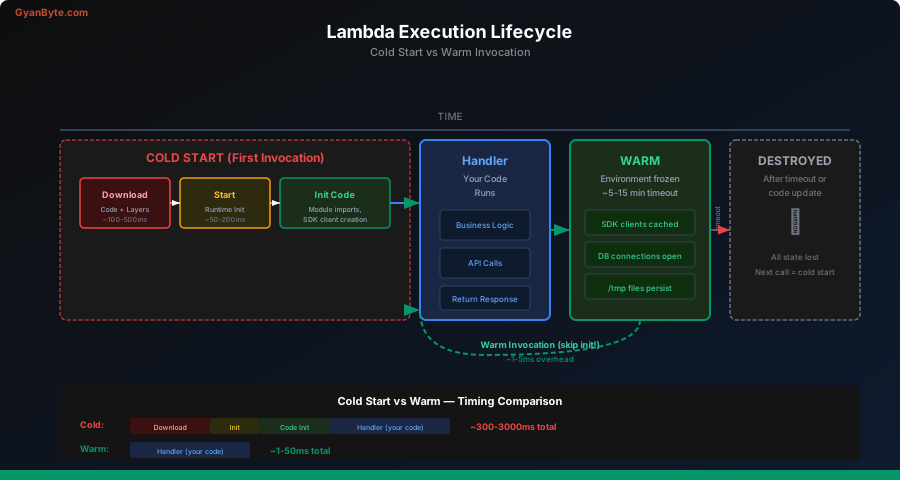
When you invoke a Lambda function, AWS does the following behind the scenes:
- Finds or creates an execution environment — a lightweight microVM (Firecracker) with your runtime, code, and dependencies
- Runs your handler function with the event payload
- Returns the response and keeps the environment warm for reuse
- Freezes the environment after a period of inactivity (typically 5-15 minutes)
- Destroys the environment if it remains unused
This lifecycle has a critical implication: the first invocation after a cold period is slower.
Cold Starts — The Numbers
A cold start happens when Lambda must create a new execution environment. Here are real-world numbers:
| Runtime | Cold Start (p50) | Cold Start (p99) | Warm Invocation |
|---|---|---|---|
| Node.js 20 | 150-300ms | 500-800ms | 1-5ms |
| Python 3.12 | 150-300ms | 400-700ms | 1-5ms |
| Java 21 | 800-2000ms | 3000-6000ms | 1-5ms |
| .NET 8 | 400-800ms | 1000-2000ms | 1-5ms |
| Rust (custom) | 10-30ms | 50-100ms | <1ms |
Key factors that increase cold start time:
- Package size — a 50MB deployment package adds 1-3 seconds
- VPC attachment — adds 1-5 seconds (mostly eliminated with Hyperplane ENIs, but still measurable)
- Runtime — JVM and .NET have heavier initialization
- Memory allocation — more memory = more CPU = faster init
Mitigating Cold Starts
// 1. Initialize SDK clients OUTSIDE the handler
// This code runs once during init, not on every invocation
const { DynamoDBClient } = require('@aws-sdk/client-dynamodb');
const { DynamoDBDocumentClient, GetCommand } = require('@aws-sdk/lib-dynamodb');

const client = new DynamoDBClient({ region: 'us-east-1' });
const ddb = DynamoDBDocumentClient.from(client);

// 2. The handler runs on every invocation
exports.handler = async (event) => {
  const result = await ddb.send(new GetCommand({
    TableName: 'users',
    Key: { userId: event.pathParameters.id },
  }));

  return {
    statusCode: 200,
    body: JSON.stringify(result.Item),
  };
};
Other mitigation strategies:
- Provisioned Concurrency — pre-warms a fixed number of environments (costs money)
- SnapStart (Java only) — snapshots the initialized JVM, reducing cold starts to ~200ms
- Smaller packages — use tree-shaking, exclude dev dependencies, consider Lambda Layers
- ARM64 (Graviton) — 10-15% better cold start performance and 20% cheaper
Memory and CPU Allocation
Lambda doesn’t let you choose CPU directly. Instead, CPU scales linearly with memory:
| Memory | vCPU Equivalent | Cost per ms |
|---|---|---|
| 128 MB | 0.08 vCPU | $0.0000000021 |
| 512 MB | 0.33 vCPU | $0.0000000083 |
| 1024 MB | 0.58 vCPU | $0.0000000167 |
| 1769 MB | 1.0 vCPU | $0.0000000288 |
| 3008 MB | 1.75 vCPU | $0.0000000490 |
| 10240 MB | 6.0 vCPU | $0.0000001667 |
Pro tip: Increasing memory often makes functions faster AND cheaper. A function at 128MB running for 1000ms might cost the same as 512MB running for 200ms — but the user gets a 5x faster response.
# Use AWS Lambda Power Tuning to find the optimal memory
# https://github.com/alexcasalboni/aws-lambda-power-tuning
aws lambda update-function-configuration \
  --function-name my-function \
  --memory-size 1024
Lambda Layers
Layers let you share code and dependencies across functions without bundling them in every deployment package:
# Create a layer from a zip file
# The zip must have the correct directory structure:
# nodejs/node_modules/... (for Node.js)
# python/lib/python3.12/site-packages/... (for Python)

zip -r layer.zip nodejs/

aws lambda publish-layer-version \
  --layer-name shared-utils \
  --zip-file fileb://layer.zip \
  --compatible-runtimes nodejs20.x

# Attach the layer to a function
aws lambda update-function-configuration \
  --function-name my-function \
  --layers arn:aws:lambda:us-east-1:123456789012:layer:shared-utils:1
A function can use up to 5 layers, and the total unzipped size (function + layers) must be under 250 MB.
Environment Variables
Store configuration outside your code:
aws lambda update-function-configuration \
  --function-name my-function \
  --environment "Variables={DB_HOST=mydb.cluster.us-east-1.rds.amazonaws.com,CACHE_TTL=300}"
import os
def handler(event, context):
db_host = os.environ['DB_HOST']
cache_ttl = int(os.environ.get('CACHE_TTL', 60))
# ...For secrets, use AWS Secrets Manager or SSM Parameter Store with the Lambda extension:
import json
import urllib.request

def get_secret(secret_name):
    """Fetch from Secrets Manager via Lambda extension (port 2773)"""
    url = f'http://localhost:2773/secretsmanager/get?secretId={secret_name}'
    headers = {'X-Aws-Parameters-Secrets-Token': os.environ['AWS_SESSION_TOKEN']}
    req = urllib.request.Request(url, headers=headers)
    response = urllib.request.urlopen(req)
    return json.loads(response.read())['SecretString']
Event Sources
Lambda integrates with dozens of AWS services. Here are the most important ones for backend engineers:
API Gateway (Synchronous)
// API Gateway → Lambda (REST API)
exports.handler = async (event) => {
  const { httpMethod, path, pathParameters, queryStringParameters, body } = event;

  if (httpMethod === 'GET' && path.startsWith('/users/')) {
    const user = await getUser(pathParameters.id);
    return {
      statusCode: 200,
      headers: { 'Content-Type': 'application/json' },
      body: JSON.stringify(user),
    };
  }

  return { statusCode: 404, body: 'Not Found' };
};
SQS (Asynchronous, Batch)
import json

def handler(event, context):
    """Process a batch of SQS messages"""
    failed_ids = []

    for record in event['Records']:
        try:
            body = json.loads(record['body'])
            process_order(body['order_id'], body['items'])
        except Exception as e:
            print(f"Failed to process {record['messageId']}: {e}")
            failed_ids.append(record['messageId'])

    # Partial batch failure reporting
    return {
        'batchItemFailures': [
            {'itemIdentifier': mid} for mid in failed_ids
        ]
    }
S3 (Event Notification)
def handler(event, context):
    """Triggered when a file is uploaded to S3"""
    for record in event['Records']:
        bucket = record['s3']['bucket']['name']
        key = record['s3']['object']['key']
        size = record['s3']['object']['size']

        print(f"New file: s3://{bucket}/{key} ({size} bytes)")

        if key.endswith('.csv'):
            process_csv(bucket, key)
        elif key.endswith('.jpg') or key.endswith('.png'):
            generate_thumbnail(bucket, key)
EventBridge (Event Bus)
// EventBridge rule triggers Lambda when an order is placed
exports.handler = async (event) => {
  // event.detail contains the custom event payload
  const { orderId, customerId, total } = event.detail;

  await sendConfirmationEmail(customerId, orderId);
  await updateAnalytics('order_placed', { orderId, total });

  return { status: 'processed' };
};
DynamoDB Streams
def handler(event, context):
    """React to changes in a DynamoDB table"""
    for record in event['Records']:
        event_name = record['eventName']  # INSERT, MODIFY, REMOVE

        if event_name == 'INSERT':
            new_image = record['dynamodb']['NewImage']
            # Sync new record to Elasticsearch, send notification, etc.
            index_to_search(new_image)
        elif event_name == 'REMOVE':
            old_image = record['dynamodb']['OldImage']
            remove_from_search(old_image)
Concurrency
Lambda concurrency = number of function instances running simultaneously.
Account-Level Default
Each AWS account gets 1,000 concurrent executions per region by default (can be increased to tens of thousands via support ticket).
Reserved Concurrency
Guarantees a fixed number of concurrent executions for a specific function — and caps it there.
# Reserve 100 concurrent executions for this function
aws lambda put-function-concurrency \
  --function-name order-processor \
  --reserved-concurrent-executions 100
Use case: Protect a downstream database from being overwhelmed. If your RDS instance can handle 100 connections, reserve 100 concurrency.
Provisioned Concurrency
Pre-initializes a fixed number of execution environments. Eliminates cold starts but costs money even when idle.
# Keep 50 environments warm at all times
aws lambda put-provisioned-concurrency-config \
  --function-name api-handler \
  --qualifier production \
  --provisioned-concurrent-executions 50
Use case: User-facing APIs where cold start latency is unacceptable (e.g., p99 < 100ms requirement).
Lambda@Edge and CloudFront Functions
Run code at CloudFront edge locations for ultra-low latency:
// Lambda@Edge — modify the origin response to add security headers
exports.handler = async (event) => {
  const response = event.Records[0].cf.response;

  response.headers['strict-transport-security'] = [{
    key: 'Strict-Transport-Security',
    value: 'max-age=63072000; includeSubdomains; preload',
  }];
  response.headers['x-content-type-options'] = [{
    key: 'X-Content-Type-Options',
    value: 'nosniff',
  }];

  return response;
};
Lambda@Edge runs Node.js or Python, up to 5 seconds for origin events, 128-10240 MB memory. CloudFront Functions are lighter — JavaScript only, sub-millisecond, 2 MB max, for simple header manipulation or URL rewrites.
Deployment: Zip vs. Container
Zip Package (traditional)
# Package and deploy
zip -r function.zip index.js node_modules/
aws lambda update-function-code \
  --function-name my-function \
  --zip-file fileb://function.zip
Max size: 50 MB zipped, 250 MB unzipped.
Container Image
FROM public.ecr.aws/lambda/nodejs:20
COPY index.js package*.json ./
RUN npm ci --production
CMD ["index.handler"]
# Build and push to ECR
docker build -t my-lambda .
docker tag my-lambda:latest 123456789012.dkr.ecr.us-east-1.amazonaws.com/my-lambda:latest
docker push 123456789012.dkr.ecr.us-east-1.amazonaws.com/my-lambda:latest
# Deploy
aws lambda update-function-code \
--function-name my-function \
--image-uri 123456789012.dkr.ecr.us-east-1.amazonaws.com/my-lambda:latestMax size: 10 GB. Use containers when you need large ML models, system libraries, or want consistent local/cloud development.
When Lambda Wins
Lambda is the right choice when:
- Event-driven workloads — S3 uploads trigger processing, SQS messages trigger handlers, cron jobs via EventBridge
- Low and variable traffic — APIs with < 100 RPS, or bursty traffic with long idle periods
- Glue code — connecting AWS services (S3 → process → DynamoDB → SNS)
- You want zero ops — no patching, no scaling decisions, no capacity planning
- Cost sensitivity at low scale — the free tier (1M invocations/month) is generous
Cost Example: Low Traffic API
100,000 requests/month
Average duration: 200ms
Memory: 512 MB

Compute: 100,000 × 0.2s × 0.5GB = 10,000 GB-seconds
Cost: 10,000 × $0.0000166667 = $0.17
Requests: 100,000 × $0.20/1M = $0.02

Total: $0.19/month (probably free tier)
When Lambda Doesn’t Win
Lambda is the wrong choice when:
- Consistent low latency required — cold starts make p99 unpredictable. A container on ECS/Fargate gives you consistent startup.
- Long-running tasks — 15-minute max timeout. Use ECS, Step Functions, or EC2 for longer jobs.
- Heavy compute — ML training, video transcoding at scale, massive data processing. Use EC2 with GPUs or AWS Batch.
- High sustained traffic — at thousands of RPS 24/7, EC2 or Fargate is cheaper:
10,000,000 requests/month (sustained ~3.8 RPS)
Average duration: 200ms
Memory: 512 MB

Lambda cost:  ~$19/month
Fargate cost: ~$15/month (0.25 vCPU, 512MB, 1 task)

At 100M requests/month:
Lambda cost:  ~$190/month
Fargate cost: ~$15/month (same task, handles the load)
The crossover point depends on your traffic pattern, but for sustained high-throughput, containers win on cost.
- WebSocket connections — Lambda can handle WebSocket via API Gateway, but long-lived connections are better served by ECS or App Runner.
- Local development experience — testing Lambda locally is possible (SAM, docker-lambda) but never identical to production. A containerized Express/Fastify app runs the same everywhere.
Real-World Architecture Patterns
Pattern 1: API Gateway + Lambda + DynamoDB
The “serverless trifecta” for CRUD APIs:
Client → API Gateway → Lambda → DynamoDB
                     ↘ Lambda Authorizer (JWT validation)
Pattern 2: Event Processing Pipeline
S3 Upload → S3 Event → Lambda (validate)
                      → SQS (buffer)
                      → Lambda (process)
                      → DynamoDB (store results)
                      → SNS (notify)
Pattern 3: Scheduled Tasks
EventBridge Rule (cron) → Lambda → RDS (cleanup old records)
                                 → S3 (archive old data)
                                 → SNS (send daily report)
# Create a scheduled rule (every day at 2 AM UTC)
aws events put-rule \
--name daily-cleanup \
--schedule-expression "cron(0 2 * * ? *)"
aws events put-targets \
--rule daily-cleanup \
--targets "Id"="1","Arn"="arn:aws:lambda:us-east-1:123456789012:function:cleanup"Decision Framework
Ask these questions before choosing Lambda:
| Question | Lambda | Container (ECS/Fargate) | EC2 |
|---|---|---|---|
| Traffic pattern? | Bursty / low | Steady / medium | Steady / high |
| Max execution time? | < 15 min | Unlimited | Unlimited |
| Cold start OK? | Yes | N/A | N/A |
| Ops budget? | Zero | Low | Medium-High |
| Need GPUs? | No | Limited | Yes |
| Cost priority at scale? | Low scale wins | Medium scale wins | High scale wins |
What’s Next
You now understand Lambda’s execution model, when it shines, and when to reach for containers instead. In the next lesson, we’ll explore API Gateway — the front door for your serverless APIs — including REST vs HTTP APIs, authorization strategies, and throttling.