
Before you deploy your first Lambda function or spin up an RDS instance, you need a solid mental model of how AWS is organized. This article gives you that foundation — the physical infrastructure, the security contract, the pricing levers, and the CLI that ties it all together.
The Physical Layer — Regions, Availability Zones, and Edge Locations
AWS runs one of the largest networks of data centers on the planet. Understanding its topology is the first step to building reliable systems.
Regions
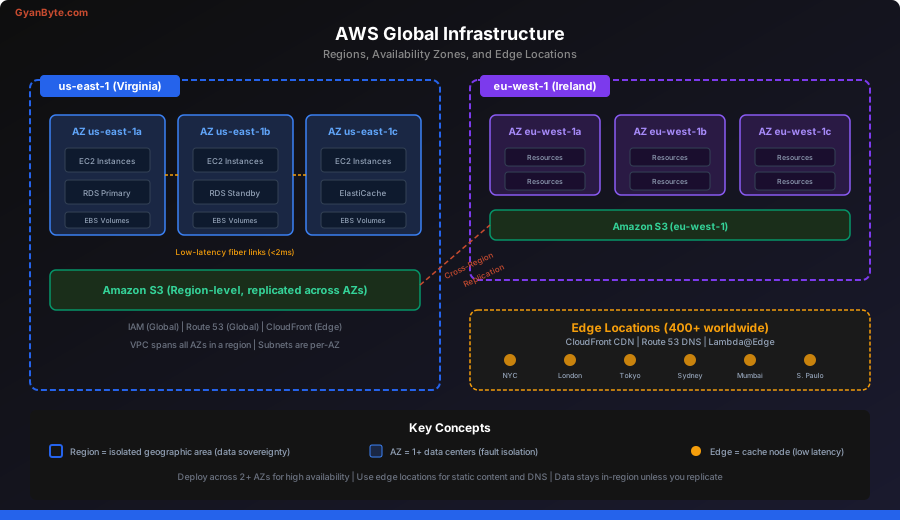
A Region is a geographic cluster of data centers — us-east-1 (N. Virginia), eu-west-1 (Ireland), ap-southeast-1 (Singapore), and so on. As of 2026, AWS operates 30+ regions worldwide.
Each region is fully independent. Data never leaves a region unless you explicitly copy or replicate it. This matters for:
- Latency — pick the region closest to your users
- Compliance — GDPR may require data to stay in the EU
- Service availability — not every service launches in every region on day one
Availability Zones (AZs)
Each region contains at least 3 Availability Zones. An AZ is one or more discrete data centers with redundant power, networking, and cooling. AZs within a region are connected by low-latency fiber but are physically separated — typically 10-100 km apart — so a flood or power outage affecting one AZ won’t take down another.
This is the core building block for high availability:
Region: us-east-1
├── AZ: us-east-1a  (data center cluster A)
├── AZ: us-east-1b  (data center cluster B)
├── AZ: us-east-1c  (data center cluster C)
├── AZ: us-east-1d  (data center cluster D)
├── AZ: us-east-1e  (data center cluster E)
└── AZ: us-east-1f  (data center cluster F)
When you deploy an RDS Multi-AZ database, AWS puts a standby replica in a different AZ. When you run an ECS service, you spread tasks across AZs. The pattern is always the same: distribute across AZs to survive hardware and facility failures.
Edge Locations
Edge locations are lightweight caches deployed in 400+ cities worldwide. They power CloudFront (CDN), Route 53 (DNS), and Lambda@Edge. They don’t run your core application — they cache content and terminate TLS close to users.
Here is an architecture diagram showing how regions, AZs, and edge locations relate to each other:
The Shared Responsibility Model
This is the single most important security concept in AWS. Get it wrong and you’ll either over-engineer (wasting money) or under-engineer (leaving gaps).
AWS is responsible for security of the cloud:
- Physical data center security
- Hardware, firmware, hypervisor patching
- Network infrastructure
- Managed service internals (e.g., RDS engine patching)
You are responsible for security in the cloud:
- IAM policies and credentials
- Security group and NACL rules
- OS patching on EC2 instances
- Application-level encryption
- Data classification and access controls
The split shifts depending on the service type:
| Service Type | AWS Manages | You Manage |
|---|---|---|
| IaaS (EC2) | Hardware, hypervisor | OS, runtime, app, data |
| Managed (RDS, ElastiCache) | Hardware, OS, engine patching | Schema, access, backups config |
| Serverless (Lambda, DynamoDB) | Everything below your code | Code, IAM, config |
The more managed the service, the less you own — but you always own IAM and data.
AWS Service Categories
AWS has 200+ services. Here’s the mental map that matters for backend engineers:
Compute
- EC2 — virtual machines, full control
- Lambda — event-driven functions (we cover this in lesson 3)
- ECS / EKS — container orchestration
- Fargate — serverless containers (no EC2 management)
Storage
- S3 — object storage (files, backups, static assets)
- EBS — block storage attached to EC2
- EFS — managed NFS for shared file systems
Database
- RDS — managed relational databases (PostgreSQL, MySQL, etc.)
- DynamoDB — serverless NoSQL
- ElastiCache — managed Redis / Memcached
- Aurora — AWS-optimized MySQL/PostgreSQL
Networking
- VPC — your private network
- ALB / NLB — load balancers
- Route 53 — DNS
- CloudFront — CDN
- API Gateway — managed REST/HTTP/WebSocket APIs
Security & Identity
- IAM — identity and access management (lesson 2)
- KMS — encryption key management
- Secrets Manager — store API keys and credentials
- WAF — web application firewall
Messaging & Integration
- SQS — message queues
- SNS — pub/sub notifications
- EventBridge — event bus for event-driven architectures
- Step Functions — workflow orchestration
The AWS Well-Architected Framework
AWS distills decades of cloud architecture experience into six pillars. Every design decision you make should be evaluated against them:
1. Operational Excellence
Automate everything. Use Infrastructure as Code (CloudFormation, CDK, Terraform). Monitor with CloudWatch. Run game days.
2. Security
Apply least privilege (see lesson 2). Encrypt at rest and in transit. Enable CloudTrail for audit logging. Automate security checks.
3. Reliability
Design for failure. Spread across AZs. Use auto-scaling. Test recovery procedures. Set appropriate timeouts and retries.
4. Performance Efficiency
Right-size your resources. Use caching aggressively. Pick the right database for the access pattern. Benchmark before and after.
5. Cost Optimization
Use the pricing model that fits your workload (see below). Tag everything. Set billing alerts. Delete unused resources. Right-size instances.
6. Sustainability
Minimize resource usage. Use managed services over self-hosted (higher utilization). Pick the right region for carbon intensity.
IAM Basics Preview
IAM (Identity and Access Management) controls who can do what in your AWS account. We’ll go deep in lesson 2, but here’s the 30-second version:
- Users — human identities with long-lived credentials
- Roles — temporary identities assumed by services or users
- Policies — JSON documents that define permissions
- Groups — collections of users that share policies
The golden rule: never use root credentials for day-to-day work. Create an IAM user, enable MFA, and lock the root keys away.
{
  "Version": "2012-10-17",
  "Statement": [
    {
      "Effect": "Allow",
      "Action": "s3:GetObject",
      "Resource": "arn:aws:s3:::my-bucket/*"
    }
  ]
}
This policy allows reading objects from a single S3 bucket — nothing more. That’s least privilege in action.
Pricing Model — Think Before You Spend
AWS pricing has three main levers:
Pay-As-You-Go (On-Demand)
You pay per second/hour of usage with no commitment. This is the default for EC2, Lambda, and most services.
Best for: variable workloads, development environments, short-term experiments.
# Example: t3.medium On-Demand in us-east-1
# ~$0.0416/hour = ~$30/month (24/7)
Reserved Instances / Savings Plans
Commit to 1 or 3 years of usage and save 30-72% over On-Demand. Savings Plans are the modern, flexible version.
Best for: stable production workloads where you know the baseline.
# Same t3.medium with a 1-year Savings Plan
# ~$0.026/hour = ~$19/month (37% savings)
Spot Instances
Use spare EC2 capacity at up to 90% discount. AWS can reclaim the instance with 2 minutes notice.
Best for: batch processing, CI/CD runners, fault-tolerant workloads, data processing pipelines.
# Same t3.medium as Spot
# ~$0.0125/hour = ~$9/month (70% savings)
# But it can be interrupted at any time
The Free Tier
AWS offers a generous free tier for new accounts (12 months):
- 750 hours/month of t2.micro or t3.micro EC2
- 5 GB S3 storage
- 1 million Lambda invocations/month
- 25 GB DynamoDB storage
Some services have an always-free tier (Lambda’s 1M invocations, DynamoDB’s 25 GB) that doesn’t expire.
AWS CLI Basics
The AWS CLI is your command-line interface to every AWS service. Install it, configure it, and use it daily.
Installation
# macOS
brew install awscli

# Linux
curl "https://awscli.amazonaws.com/awscli-exe-linux-x86_64.zip" -o "awscliv2.zip"
unzip awscliv2.zip
sudo ./aws/install

# Verify
aws --version
# aws-cli/2.x.x Python/3.x.x ...
Configuration
# Configure with your IAM user credentials
aws configure
# AWS Access Key ID: AKIA...
# AWS Secret Access Key: ********
# Default region name: us-east-1
# Default output format: json

# Or use named profiles for multiple accounts
aws configure --profile staging
aws configure --profile production
Essential Commands
# List S3 buckets
aws s3 ls

# Upload a file to S3
aws s3 cp ./backup.sql s3://my-bucket/backups/

# Describe running EC2 instances
aws ec2 describe-instances \
  --filters "Name=instance-state-name,Values=running" \
  --query "Reservations[].Instances[].[InstanceId,InstanceType,State.Name]" \
  --output table

# Invoke a Lambda function
aws lambda invoke \
  --function-name my-function \
  --payload '{"key": "value"}' \
  response.json

# Get caller identity (who am I?)
aws sts get-caller-identity
The —query Flag
The --query flag uses JMESPath to filter JSON output. This is essential for scripting:
# Get just the instance IDs of running instances
aws ec2 describe-instances \
  --filters "Name=instance-state-name,Values=running" \
  --query "Reservations[].Instances[].InstanceId" \
  --output text

# Get the ARN of a specific Lambda function
aws lambda get-function \
  --function-name my-function \
  --query "Configuration.FunctionArn" \
  --output text
The Mental Model for Cloud Services
When you evaluate any AWS service, ask these five questions:
-
What failure modes does it have? Every service fails differently. S3 is designed for 99.999999999% durability but can have brief availability blips. EC2 instances can die at any time.
-
What’s the pricing dimension? Lambda charges per invocation + duration. DynamoDB charges per read/write unit. EC2 charges per second. Know the unit of billing.
-
What’s the blast radius? If this service goes down, what breaks? A single-AZ RDS instance takes your entire app down. A multi-AZ setup survives one AZ failure.
-
Where does my responsibility end? Refer to the shared responsibility model. On Lambda, you own the code and IAM. On EC2, you own everything from the OS up.
-
Can I replace it later? Prefer services with standard APIs (PostgreSQL on RDS over Aurora Serverless custom protocols) to avoid lock-in. But don’t over-optimize for portability at the cost of productivity.
What’s Next
With this foundation, you understand how AWS is physically organized, where the security boundaries lie, how pricing works, and how to interact with services from the command line.
In the next lesson, we’ll dive deep into IAM — the service that controls access to everything else. You’ll learn to write policies, assume roles, and implement least privilege in practice.