Kafka’s superpower — retaining and replaying events — has a physical cost: all those events live on disk, replicated. How Kafka stores them, how long it keeps them, and how to size the disk for it are practical questions every Kafka operator faces. This lesson covers the storage model, the two cleanup policies (retention vs compaction), and disk sizing as the simple arithmetic it actually is.
Segments: how a partition sits on disk
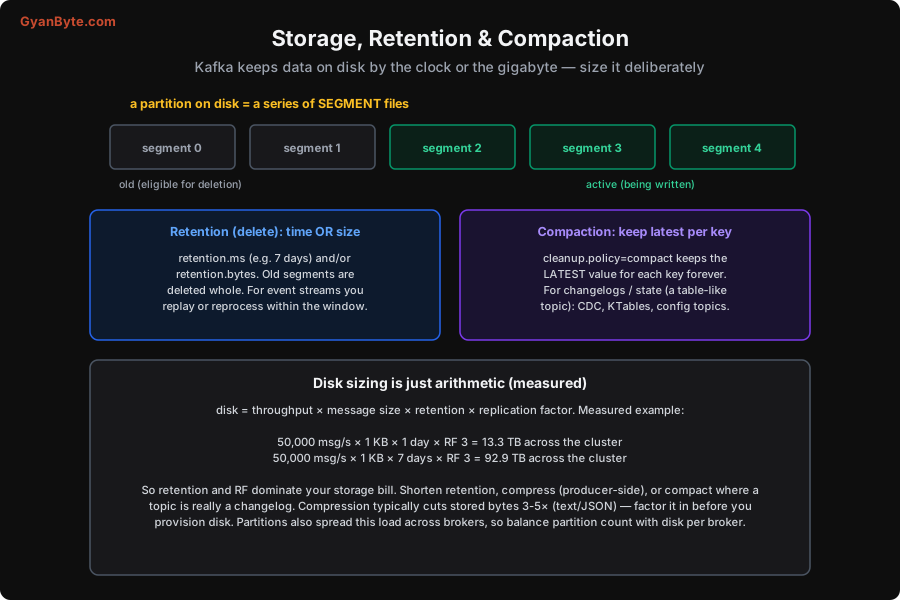
A partition isn’t one giant file — it’s a series of segment files. Kafka appends new messages to the active segment; when it reaches a size or age limit, Kafka closes it and starts a new one. Older, closed segments are the ones eligible for cleanup (deletion or compaction). This segmented design is why Kafka’s writes are fast (sequential appends to one file) and why deletion is cheap (drop whole old segment files, no per-message bookkeeping). It also leans heavily on the OS page cache and zero-copy transfer to serve reads fast — reads of recent data often come straight from memory.
What happens to old segments depends on the topic’s cleanup policy, and there are two very different ones.
Retention: keep data by time or size
The default policy is delete (retention): Kafka keeps data for a bounded window and then deletes old segments. You bound it by:
- Time —
retention.ms(e.g. 7 days). Segments older than this are deleted. - Size —
retention.bytes(per partition). When a partition exceeds this, the oldest segments are deleted. - Or both — whichever limit is hit first.
This is the model for event streams: orders, clicks, logs, metrics. You keep a window of history long enough to serve your consumers and to replay/reprocess within (Lesson 1), and old data ages out. Pick retention based on how far back you’d ever need to replay — a day, a week, 30 days — balancing that against the disk cost (below). Note that reducing retention doesn’t help a consumer that’s already lagging past the window — data it hasn’t read can be deleted out from under it, which is a real production hazard (Lesson 11).
Compaction: keep the latest value per key
The second policy, cleanup.policy=compact, is fundamentally different and incredibly useful: instead of deleting by age, compaction keeps the latest value for each key, forever, and discards older values for that key. The topic becomes a table-like record of “current state per key” rather than a stream of events.
This is exactly what you want for changelogs and state:
- CDC / database replication — a compacted topic holds the current row for each primary key, so a consumer replaying it rebuilds the latest state of the table.
- Kafka Streams state (Lesson 10) — the backup of a state store is a compacted changelog, so a crashed app rebuilds its latest state.
- Config / reference topics — the latest config value per key.
With compaction, a new consumer reading from offset 0 gets the latest value of every key (the whole current state) without wading through all historical changes. (A special “tombstone” — a null value for a key — tells compaction to delete that key entirely, e.g. for GDPR or deletions.) Retention is “a window of events”; compaction is “a table of current state.” Choose per topic based on whether the topic is really a stream of events or a changelog of state.
Disk sizing is just arithmetic
The question operators actually need answered — “how much disk?” — is pure multiplication:
disk = throughput × message size × retention × replication factor
I worked a measured example:
- 50,000 msg/s × 1 KB × 1 day × RF 3 = 13.3 TB across the cluster.
- 50,000 msg/s × 1 KB × 7 days × RF 3 = 92.9 TB across the cluster.
Two things jump out. First, retention and RF dominate — going from 1 day to 7 days multiplied the bill 7×, and RF=3 triples whatever the raw figure is. Second, the numbers get big fast: a modest 50k msg/s stream at a week’s retention is ~93 TB replicated. So the levers to control the storage bill are:
- Shorten retention to what you actually replay (don’t keep 30 days “just in case” if you never replay past 2).
- Compress at the producer (lz4/zstd), which typically shrinks text/JSON 3–5× — factor compression into the estimate before provisioning disk.
- Compact topics that are really changelogs, so they store “current state” (bounded by key count) instead of all history.
- Spread across brokers — partitions distribute the data, so more brokers (and partitions) mean less disk per broker; balance partition count with disk capacity.
The takeaway: Kafka’s storage cost is predictable arithmetic, and retention × RF is where it’s decided. Size deliberately, compress always, and compact where the topic is state rather than events. Next we look at how the cluster itself is organised — KRaft and architecture.
Pitfalls to Avoid
- Retention too short for your consumers. If a consumer lags past
retention.ms, unread data is deleted out from under it — permanent loss for that consumer. Set retention comfortably longer than your worst-case consumer lag, and alert on lag (Lesson 11). - Retention too long “just in case.” Every extra day of retention multiplies the (replicated) disk bill. Keep what you’ll actually replay; measured, 1→7 days was 13.3→92.9 TB.
- Using delete-retention for a changelog topic. If a topic represents current state per key (CDC, config, Streams state), use compaction — otherwise you lose the ability to rebuild state and store endless history.
- Using compaction for an event stream. Compaction keeps only the latest value per key, so it destroys the event history. Don’t compact
ordersif you need every order event. - Sizing disk without compression. Raw estimates overshoot 3–5× for text/JSON. Factor in producer-side compression, but also don’t forget RF triples it.
- Giant messages. Large payloads bloat storage and strain the network. Keep messages small; put big blobs in object storage with a reference in Kafka.
Quick Recap
- A partition on disk = segment files; Kafka appends to the active one and cleans up old ones. Sequential writes + page cache + zero-copy make it fast.
- Two cleanup policies: retention/delete (keep by time
retention.msand/or sizeretention.bytes— for event streams, replay within the window) and compaction (cleanup.policy=compact— keep the latest value per key forever — for changelogs/state: CDC, Streams state, config). - Disk = throughput × message size × retention × RF. Measured: 50k msg/s × 1 KB × 1 day × RF3 = 13.3 TB; × 7 days = 92.9 TB. Retention and RF dominate the bill.
- Control it: shorten retention, compress (3–5× on JSON), compact changelogs, spread across brokers/partitions.
Next lesson: how the cluster itself is organised — KRaft and cluster architecture, Kafka after ZooKeeper.