Events get into Kafka through a producer — a client that appends messages to a topic. The producer API is small, but a handful of its settings determine three different things at once: where a message lands (ordering), how durably it’s stored (data safety), and how fast you can push (throughput). This lesson is those settings, and the one place producers most often go wrong: partition skew from a bad key.
The key decides the partition
Every message can carry a key, and the key is what the producer’s partitioner uses to choose a partition: it hashes the key and maps it to one of the topic’s partitions.
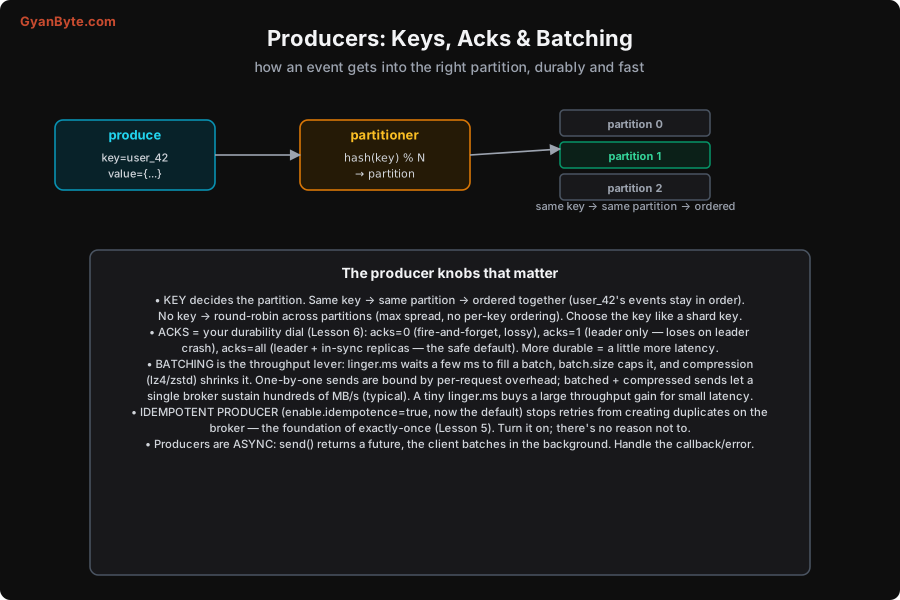
- With a key: same key → same partition → ordered together. Key by
user_idand all of one user’s events stay in order (Lesson 2). - Without a key: the producer spreads messages round-robin (actually “sticky” batching) across partitions for maximum, even throughput — but with no per-entity ordering.
So the key is both your ordering unit and your load-balancing unit. And that’s exactly where it can go wrong.
Measured: a hot key creates skew
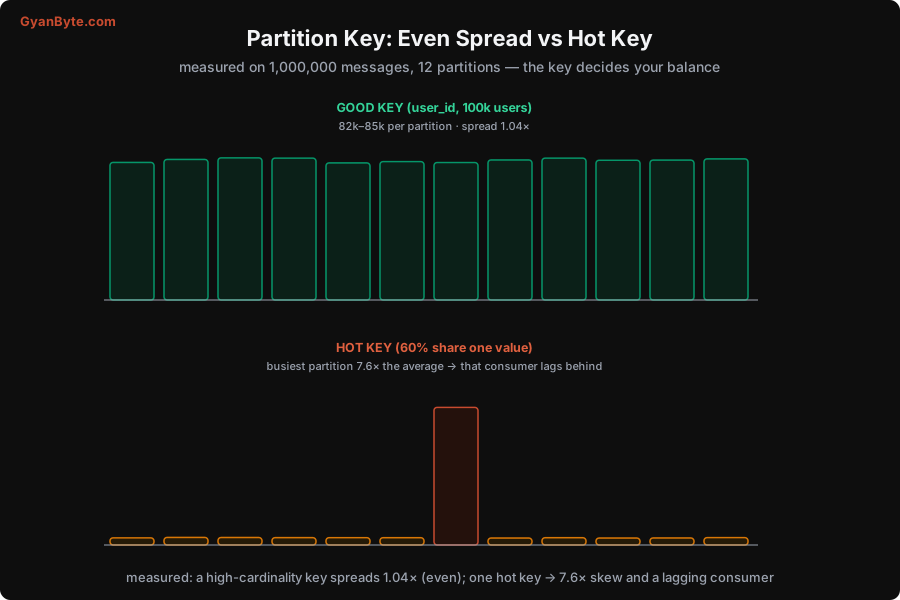
Choosing a key with good cardinality (many distinct, evenly-used values) spreads load evenly. Choosing one dominated by a single value concentrates load on one partition — skew — and that partition’s consumer falls behind. I measured both on 1,000,000 messages across 12 partitions:
- Good key (a
user_idover 100,000 users): every partition got 82,000–85,000 messages — a spread of just 1.04×. Beautifully even. - Hot key (one value taking 60% of traffic): the busiest partition got 7.6× the average, while the others sat nearly empty. In production that one partition’s consumer lags badly while the rest idle — your throughput is now limited by the single overloaded partition, and “add more consumers” doesn’t help (Lesson 4).
The lesson: pick a partition key with high cardinality and even distribution. If a natural key is skewed (a few huge customers, lots of NULLs, one dominant tenant), either choose a different key, or salt the hot key (append a bucket suffix to split it across partitions, then recombine downstream), or handle the hot entity separately. Always look at the distribution of your key before trusting it.
acks: the durability dial
The acks setting controls how many replicas must confirm a write before the producer considers it sent — trading durability against latency (full detail in Lesson 6):
acks=0— fire and forget. Fastest, but if the broker fails you silently lose data. Only for truly disposable streams (some metrics).acks=1— the partition leader confirms. Fast, but if the leader crashes before followers replicate, you lose those messages.acks=all— the leader and all in-sync replicas confirm. The safe default: no acknowledged message is lost as long as one in-sync replica survives. Slightly higher latency, dramatically safer.
For anything you care about, use acks=all (paired with min.insync.replicas=2 on RF=3 — Lesson 6).
Batching and compression: the throughput lever
Producers are asynchronous and batched, and this is where throughput comes from. Instead of sending each message as its own network request, the producer accumulates messages into a batch per partition and sends them together:
linger.ms— how long to wait for a batch to fill before sending. Even a few milliseconds lets many messages ride in one request, hugely improving throughput for a tiny latency cost.batch.size— the maximum batch size in bytes.- Compression (
compression.type=lz4orzstd) — compresses each batch, often shrinking text/JSON 3–5×, which means less network and disk.
The difference is large: one-message-per-request is bound by per-request overhead (tens of thousands of messages/sec), while batched + compressed sends let a single broker sustain hundreds of MB/s (typical). A small linger.ms is almost always worth it. Producers return a future from send() and batch in the background — so always handle the callback/error; a silent send failure is a lost event.
The idempotent producer
Finally, the setting that quietly prevents a whole class of bugs: the idempotent producer (enable.idempotence=true, now the default in modern Kafka). Without it, a producer that retries after an uncertain failure (it didn’t get an ack but the write may have succeeded) can write the message twice, creating a duplicate on the broker. The idempotent producer gives each producer a session id and sequence numbers so the broker deduplicates retries automatically — a retry writes the message exactly once.
This is the foundation of exactly-once (Lesson 5): with idempotence on, retries no longer create duplicates at the broker, so combined with transactional or idempotent consumers, you get end-to-end correctness. There’s essentially no reason to turn it off — leave it on.
Put together, a well-configured producer: keys by a high-cardinality field (even spread, ordered per key), uses acks=all (durable), batches with a small linger.ms and compression (high throughput), and runs idempotent (no duplicate writes). Next we go to the other side — consumers.
Pitfalls to Avoid
- A hot / low-cardinality partition key. Measured, one hot key made a partition do 7.6× the work while others idled, and its consumer lagged. Pick a high-cardinality, evenly-distributed key; salt or split a naturally hot one.
acks=1(oracks=0) for data you care about. The leader can crash before replication, silently losing acknowledged messages. Useacks=all+min.insync.replicas=2(Lesson 6) for durability.- No batching /
linger.ms=0for high throughput. One request per message wastes most of the broker’s capacity. A few ms oflinger.msplus compression multiplies throughput for negligible latency. - Ignoring the send callback.
send()is async; a failure you don’t handle is a silently dropped event. Check the callback/future and have a retry or dead-letter strategy. - Disabling idempotence. It’s the default and prevents retry-created duplicates for free. Turning it off reintroduces a subtle duplicate-on-retry bug.
- Not sizing / compressing for message bloat. Huge uncompressed messages strain the network and disk. Compress (lz4/zstd), and keep messages reasonably small (big blobs belong in object storage, with a reference in Kafka).
Quick Recap
- The key picks the partition (
hash(key) % N): same key → same partition → ordered; no key → round-robin spread. The key is your ordering and load-balancing unit. - Measured: a good key spreads 1.04× (even) across 12 partitions; a hot key causes 7.6× skew and a lagging consumer. Choose a high-cardinality key; salt or split hot ones.
acksis the durability dial:0lossy,1leader-only (loses on crash),allthe safe default.- Batching (
linger.ms,batch.size) + compression is the throughput lever — one broker sustains hundreds of MB/s batched vs tens of thousands of msg/s un-batched. - The idempotent producer (default) stops retries creating duplicates — the base of exactly-once (Lesson 5). Handle the async send callback.
Next lesson: the other side of the log — consumers and consumer groups, and why the partition count caps your parallelism (measured).