

So far you’ve built systems that work with text — chatbots, search agents, research tools. But the real world is multi-modal. Users want images, videos, and audio — not just text. This lesson teaches you how generative models produce visual and audio content, and then you’ll build an agent that orchestrates all of them.
Overview of Image and Video Generation
Four major architectures have powered generative AI for images and video:
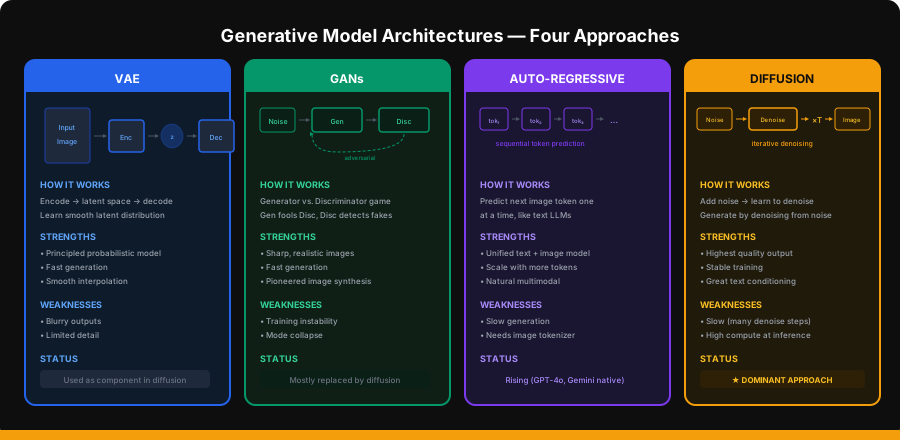
VAE (Variational Autoencoder)
VAEs learn to compress images into a latent space and reconstruct them. They’re trained to make the latent space smooth and continuous, which allows interpolation between images.
# Conceptual VAE architecture
# Encoder: image → latent distribution (mean, variance)
# Decoder: sample from latent → reconstructed image
# Loss = reconstruction_loss + KL_divergence(latent, standard_normal)
VAEs produce blurry images on their own, but they’re a critical component of modern diffusion models — the “latent” in Latent Diffusion Models is a VAE latent space.
GANs (Generative Adversarial Networks)
Two networks in competition: a Generator creates fake images, a Discriminator tries to detect fakes. They train each other — the generator gets better at fooling the discriminator, and the discriminator gets better at detecting fakes.
GANs produced the first photorealistic AI images (StyleGAN faces) but suffered from training instability and mode collapse (generating only a few types of images).
Auto-Regressive Models
Treat images as sequences of tokens — just like text. Tokenize the image into discrete codes (using a VQ-VAE), then predict the next token one at a time.
This is how GPT-4o and Gemini generate images natively — they use the same transformer architecture for both text and images. The advantage: unified multimodal models that can interleave text and images naturally.
Diffusion Models
The dominant approach today. The core idea is beautifully simple:
- Forward process: gradually add noise to an image until it’s pure random noise
- Train a model to predict and remove the noise at each step
- Generate: start from random noise and iteratively denoise to create an image
Diffusion models produce the highest quality images and are behind DALL·E 3, Stable Diffusion, Midjourney, and Flux.
Text-to-Image (T2I)
Let’s go deep on how text-to-image generation works in practice.
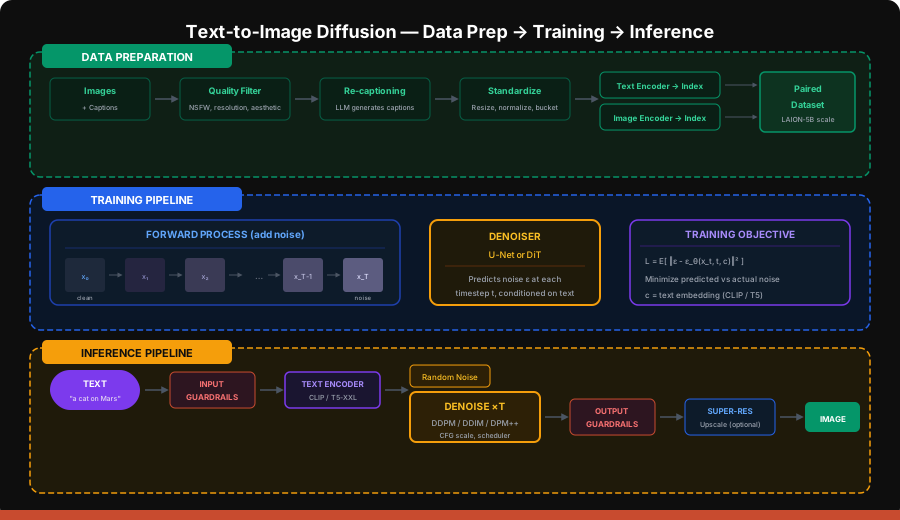
Data Preparation
Training a T2I model requires millions of image-caption pairs:
- Collection — Scrape the web for images with alt text, or use datasets like LAION-5B
- Quality filtering — Remove low-resolution, NSFW, duplicates, and aesthetically poor images
- Re-captioning — Original alt text is often terrible. Modern pipelines use LLMs (like LLaVA or CogVLM) to generate detailed, accurate captions
- Standardization — Resize to standard aspect ratio buckets, normalize pixel values
# Conceptual data preparation pipeline
import pandas as pd


def prepare_dataset(raw_data: pd.DataFrame) -> pd.DataFrame:
    """Filter and prepare image-caption pairs for training."""
    # Quality filtering
    filtered = raw_data[
        (raw_data["width"] >= 512) &
        (raw_data["height"] >= 512) &
        (raw_data["aesthetic_score"] >= 5.0) &
        (raw_data["nsfw_score"] < 0.1) &
        (raw_data["watermark_prob"] < 0.3)
    ]

    # Re-captioning with an LLM (conceptual)
    # For each image, generate a detailed caption:
    # "A golden retriever sitting on a red velvet couch in a warmly lit
    #  living room, soft bokeh background, professional photography"
    # Instead of: "dog on couch"

    return filtered
Diffusion Architectures
Two main architectures for the denoiser:
U-Net (used in SD 1.5, SD 2.1, DALL·E 2):
- Encoder-decoder with skip connections
- Cross-attention layers inject text embeddings
- Processes at spatial resolution (e.g., 64×64 latent)
DiT — Diffusion Transformer (used in SD 3, Flux, DALL·E 3, Sora):
- Replaces U-Net with a standard transformer
- Patches image into tokens (like ViT)
- Scales better with compute — transformers are well-understood
- Currently the state-of-the-art
# The shift from U-Net to DiT
architecture_comparison = {
    "U-Net": {
        "used_by": ["SD 1.5", "SD 2.1", "DALL·E 2"],
        "pros": ["Proven", "Efficient at lower res"],
        "cons": ["Hard to scale", "Custom architecture"],
    },
    "DiT": {
        "used_by": ["SD 3", "Flux", "DALL·E 3", "Sora"],
        "pros": ["Scales with compute", "Standard transformer", "Better quality"],
        "cons": ["More compute at inference", "Newer, less tooling"],
    }
}
Diffusion Training
Forward process: Add Gaussian noise to the image over T timesteps:
x_t = √(ᾱ_t) · x_0 + √(1 - ᾱ_t) · ε where ε ~ N(0, I)Training objective: The model ε_θ learns to predict the noise ε that was added:
L = E_{t, x_0, ε}[ ‖ε - ε_θ(x_t, t, c)‖² ]Where c is the text conditioning (CLIP or T5 text embedding).
Classifier-Free Guidance (CFG): At inference, amplify the text signal:
ε_guided = ε_uncond + w · (ε_cond - ε_uncond)Higher w (guidance scale) = stronger adherence to the prompt, but less diversity.
Diffusion Sampling
Starting from noise, iteratively remove noise to generate an image:
| Sampler | Steps | Speed | Quality | Notes |
|---|---|---|---|---|
| DDPM | 1000 | Very slow | Excellent | Original, theoretical foundation |
| DDIM | 20-50 | Moderate | Good | Deterministic, allows interpolation |
| DPM++ 2M | 20-30 | Fast | Very good | Popular default in SD |
| Euler | 20-30 | Fast | Good | Simple, reliable |
| LCM | 4-8 | Very fast | Good | Latent Consistency Models, distilled |
Evaluation Metrics
How to measure if your T2I model is good:
| Metric | What It Measures | Range | Target |
|---|---|---|---|
| FID (Fréchet Inception Distance) | Distribution similarity to real images | 0–∞ | Lower is better (< 10 is excellent) |
| IS (Inception Score) | Image quality + diversity | 1–∞ | Higher is better |
| CLIP Score | Image-text alignment | 0–1 | Higher = better prompt following |
| Aesthetic Score | Human aesthetic preference | 1–10 | > 6 is good |
Text-to-Video (T2V)
Video generation extends image generation into the temporal dimension — and that makes everything harder.
Latent Diffusion Modeling for Video
The key innovation: work in a compressed latent space rather than pixel space.
Video (H×W×T×3) → VAE Encoder → Latent (h×w×t×c) → Diffusion → VAE Decoder → VideoA 10-second, 720p, 30fps video is ~650 million pixels. Working in latent space compresses this by 64× or more.
Compression Networks
Video requires a 3D VAE that compresses both spatially (H,W) and temporally (T):
| Component | Spatial Compression | Temporal Compression | Total |
|---|---|---|---|
| Image VAE | 8× | 1× | 8× |
| Video VAE (basic) | 8× | 4× | 32× |
| Video VAE (aggressive) | 8× | 8× | 64× |
Data Preparation for Video
Much harder than images:
# Video data preparation pipeline (conceptual)
video_prep_steps = [
    "1. Scene detection — split long videos into individual scenes/shots",
    "2. Motion filtering — remove static or too-shaky clips",
    "3. Quality filtering — resolution, compression artifacts, watermarks",
    "4. Caption generation — use video LLMs (Gemini, GPT-4o) for temporal descriptions",
    "5. Standardization — fixed FPS, resolution buckets, frame count",
    "6. Video latent caching — pre-encode all frames through VAE (saves training compute)",
]
DiT Architecture for Videos
The same DiT transformer works for video — just with additional temporal tokens:
- Image: patch tokens arranged in a 2D grid
- Video: patch tokens arranged in a 3D grid (H × W × T)
- Temporal attention layers capture motion between frames
Large-Scale Training Challenges
| Challenge | Why It’s Hard | Mitigation |
|---|---|---|
| Compute | Training Sora-class models costs $10-100M+ | Progressive training (low-res → high-res) |
| Data | Video data is 100× larger than image data | Pre-compute VAE latents, efficient data loading |
| Temporal coherence | Frames must be consistent over time | Joint spatial-temporal attention |
| Motion quality | Physics, object permanence | More training data, physics priors |
| Length | Longer videos = exponentially more compute | Hierarchical generation (keyframes → interpolation) |
T2V’s Overall System
A production T2V system typically:
- Takes a text prompt + optional image/video input
- Enhances the prompt with an LLM for more detail
- Generates a short clip (2-10 seconds) with the diffusion model
- Optionally extends via video-to-video continuation
- Applies super-resolution for final output
- Runs safety filters
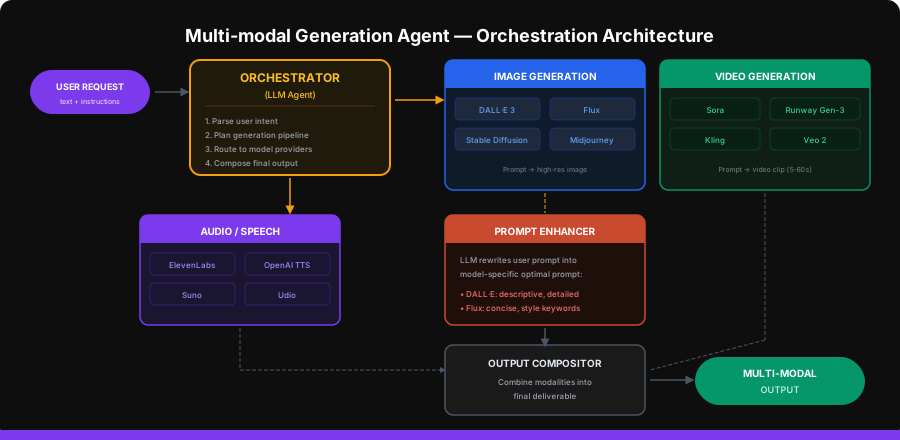
Project: Build the Multi-modal Generation Agent
Now let’s build an agent that can generate images, video, and audio by orchestrating multiple APIs.
Provider Clients
# providers.py
import os
import httpx
import base64
from openai import OpenAI
from pathlib import Path

client = OpenAI()


def generate_image_dalle(prompt: str, size: str = "1024x1024",
                         quality: str = "hd") -> dict:
    """Generate image with DALL·E 3."""
    response = client.images.generate(
        model="dall-e-3",
        prompt=prompt,
        size=size,
        quality=quality,
        n=1,
    )
    return {
        "url": response.data[0].url,
        "revised_prompt": response.data[0].revised_prompt,
        "provider": "dall-e-3",
    }


def generate_image_flux(prompt: str) -> dict:
    """Generate image with Flux via Replicate."""
    response = httpx.post(
        "https://api.replicate.com/v1/predictions",
        headers={"Authorization": f"Bearer {os.getenv('REPLICATE_API_TOKEN')}"},
        json={
            "version": "black-forest-labs/flux-1.1-pro",
            "input": {"prompt": prompt, "aspect_ratio": "16:9"},
        },
        timeout=60,
    )
    result = response.json()
    # Poll for completion
    while result.get("status") not in ("succeeded", "failed"):
        import time
        time.sleep(2)
        poll = httpx.get(
            result["urls"]["get"],
            headers={"Authorization": f"Bearer {os.getenv('REPLICATE_API_TOKEN')}"},
        )
        result = poll.json()

    return {
        "url": result["output"][0] if result["output"] else None,
        "provider": "flux-1.1-pro",
    }


def generate_speech(text: str, voice: str = "nova") -> dict:
    """Generate speech with OpenAI TTS."""
    response = client.audio.speech.create(
        model="tts-1-hd",
        voice=voice,
        input=text,
    )
    output_path = "/tmp/speech_output.mp3"
    response.stream_to_file(output_path)
    return {
        "file_path": output_path,
        "provider": "openai-tts",
        "voice": voice,
    }


def generate_video_runway(prompt: str, duration: int = 5) -> dict:
    """Generate video with Runway Gen-3 Alpha (conceptual — API may differ)."""
    response = httpx.post(
        "https://api.rev.ai/runway/v1/generate",
        headers={"Authorization": f"Bearer {os.getenv('RUNWAY_API_KEY')}"},
        json={
            "prompt": prompt,
            "duration": duration,
            "model": "gen3a_turbo",
        },
        timeout=120,
    )
    result = response.json()
    return {
        "url": result.get("video_url"),
        "provider": "runway-gen3",
        "duration": duration,
    }
The Prompt Enhancer
Different models respond best to different prompt styles:
# prompt_enhancer.py
from openai import OpenAI

client = OpenAI()

ENHANCER_PROMPTS = {
    "image": """Enhance this image generation prompt. Make it highly descriptive with:
- Specific visual details (lighting, composition, colors)
- Style keywords (photorealistic, cinematic, illustration, etc.)
- Camera/lens details if photographic
- Mood and atmosphere
Keep it under 200 words. Only return the enhanced prompt.""",

    "video": """Enhance this video generation prompt. Include:
- Scene description with specific movements and actions
- Camera motion (pan, zoom, tracking shot, etc.)
- Temporal details (what happens first, then, finally)
- Visual style and mood
Keep it under 150 words. Only return the enhanced prompt.""",

    "speech": """You are preparing text for text-to-speech. Clean up the text:
- Add natural pauses with commas and periods
- Spell out numbers and abbreviations
- Remove markdown formatting
- Add emphasis markers if needed
Only return the cleaned text.""",
}


def enhance_prompt(prompt: str, modality: str) -> str:
    system = ENHANCER_PROMPTS.get(modality, ENHANCER_PROMPTS["image"])
    response = client.chat.completions.create(
        model="gpt-4o-mini",
        messages=[
            {"role": "system", "content": system},
            {"role": "user", "content": prompt},
        ],
        temperature=0.7,
    )
    return response.choices[0].message.content
The Orchestrator Agent
# multimodal_agent.py
import json
from openai import OpenAI
from providers import (
    generate_image_dalle, generate_image_flux,
    generate_speech, generate_video_runway,
)
from prompt_enhancer import enhance_prompt

client = OpenAI()

TOOLS = [
    {
        "type": "function",
        "function": {
            "name": "generate_image",
            "description": "Generate an image from a text description. Use for any visual content creation.",
            "parameters": {
                "type": "object",
                "properties": {
                    "prompt": {"type": "string", "description": "Detailed image description"},
                    "provider": {
                        "type": "string",
                        "enum": ["dalle3", "flux"],
                        "description": "dalle3 for photorealistic, flux for artistic/creative",
                    },
                    "size": {"type": "string", "default": "1024x1024"},
                },
                "required": ["prompt", "provider"]
            }
        }
    },
    {
        "type": "function",
        "function": {
            "name": "generate_video",
            "description": "Generate a short video clip from a text description.",
            "parameters": {
                "type": "object",
                "properties": {
                    "prompt": {"type": "string", "description": "Video scene description with motion"},
                    "duration": {"type": "integer", "default": 5, "description": "Duration in seconds (5-15)"},
                },
                "required": ["prompt"]
            }
        }
    },
    {
        "type": "function",
        "function": {
            "name": "generate_speech",
            "description": "Convert text to natural-sounding speech audio.",
            "parameters": {
                "type": "object",
                "properties": {
                    "text": {"type": "string", "description": "Text to convert to speech"},
                    "voice": {
                        "type": "string",
                        "enum": ["alloy", "echo", "fable", "onyx", "nova", "shimmer"],
                        "default": "nova",
                    },
                },
                "required": ["text"]
            }
        }
    },
    {
        "type": "function",
        "function": {
            "name": "enhance_prompt",
            "description": "Enhance a generation prompt for better results. Call before generating.",
            "parameters": {
                "type": "object",
                "properties": {
                    "prompt": {"type": "string"},
                    "modality": {"type": "string", "enum": ["image", "video", "speech"]},
                },
                "required": ["prompt", "modality"]
            }
        }
    },
]

SYSTEM_PROMPT = """You are a multi-modal content creation agent. You can generate images, videos, and speech audio.

## Your Process
1. Understand what the user wants to create
2. Enhance the prompt for the target modality
3. Choose the right provider and generate
4. Describe what was created

## Guidelines
- Always enhance prompts before generating for better quality
- For images: use dalle3 for photorealistic, flux for artistic/creative styles
- For video: keep descriptions action-oriented with camera movements
- For speech: clean up text for natural delivery
- If the user wants multiple outputs, generate them in sequence
- Describe the generated content so the user knows what to expect"""


def execute_tool(name: str, args: dict) -> str:
    if name == "generate_image":
        provider = args.get("provider", "dalle3")
        if provider == "dalle3":
            result = generate_image_dalle(args["prompt"], args.get("size", "1024x1024"))
        else:
            result = generate_image_flux(args["prompt"])
        return json.dumps(result)

    elif name == "generate_video":
        result = generate_video_runway(args["prompt"], args.get("duration", 5))
        return json.dumps(result)

    elif name == "generate_speech":
        result = generate_speech(args["text"], args.get("voice", "nova"))
        return json.dumps(result)

    elif name == "enhance_prompt":
        enhanced = enhance_prompt(args["prompt"], args["modality"])
        return json.dumps({"enhanced_prompt": enhanced})

    return json.dumps({"error": f"Unknown tool: {name}"})


class MultiModalAgent:
    def __init__(self, model: str = "gpt-4o"):
        self.model = model
        self.generated_assets = []

    def create(self, request: str, max_steps: int = 10) -> dict:
        messages = [
            {"role": "system", "content": SYSTEM_PROMPT},
            {"role": "user", "content": request},
        ]
        self.generated_assets = []

        for step in range(max_steps):
            response = client.chat.completions.create(
                model=self.model,
                messages=messages,
                tools=TOOLS,
                tool_choice="auto",
            )
            msg = response.choices[0].message
            messages.append(msg)

            if msg.tool_calls:
                for tc in msg.tool_calls:
                    name = tc.function.name
                    args = json.loads(tc.function.arguments)
                    print(f"  [{step + 1}] {name}: {json.dumps(args)[:80]}...")

                    result = execute_tool(name, args)
                    result_data = json.loads(result)

                    if "url" in result_data or "file_path" in result_data:
                        self.generated_assets.append({
                            "type": name.replace("generate_", ""),
                            **result_data,
                        })

                    messages.append({
                        "role": "tool",
                        "tool_call_id": tc.id,
                        "content": result,
                    })
            else:
                return {
                    "response": msg.content,
                    "assets": self.generated_assets,
                }

        return {
            "response": "Generation complete.",
            "assets": self.generated_assets,
        }


if __name__ == "__main__":
    agent = MultiModalAgent()

    # Example: Generate a complete social media post
    result = agent.create(
        "Create a social media post about AI in healthcare. I need: "
        "1) A hero image showing a futuristic hospital with AI assistance, "
        "2) A short narration audio reading the post caption."
    )

    print(f"\nAgent response: {result['response']}")
    print(f"\nGenerated assets: {len(result['assets'])}")
    for asset in result["assets"]:
        print(f"  - {asset['type']}: {asset.get('url', asset.get('file_path', 'N/A'))}")
Adding a REST API
# server.py
from fastapi import FastAPI
from pydantic import BaseModel
from multimodal_agent import MultiModalAgent

app = FastAPI(title="Multi-modal Generation Agent")
agent = MultiModalAgent()


class GenerateRequest(BaseModel):
    prompt: str
    max_steps: int = 10


@app.post("/generate")
async def generate(req: GenerateRequest):
    result = agent.create(req.prompt, req.max_steps)
    return result
Running It
# Install dependencies
pip install openai httpx replicate fastapi uvicorn

# Set API keys
export OPENAI_API_KEY=sk-your-key
export REPLICATE_API_TOKEN=r8-your-key

# Run
python multimodal_agent.py
Evaluation Metrics Cheat Sheet
| Modality | Metric | What It Measures |
|---|---|---|
| Image | FID | Distribution quality |
| Image | CLIP Score | Text-image alignment |
| Image | Aesthetic Score | Human preference |
| Video | FVD | Video quality distribution |
| Video | Temporal Consistency | Frame-to-frame coherence |
| Video | Motion Quality | Realistic movement |
| Audio | MOS (Mean Opinion Score) | Human-rated speech quality |
| Audio | WER (Word Error Rate) | Speech intelligibility |
| All | Human preference | Side-by-side comparisons |
Key Takeaways
- Diffusion models dominate image and video generation — they learn to denoise, and generate by starting from pure noise
- DiT (Diffusion Transformer) is replacing U-Net as the backbone — it scales better with compute, just like text transformers
- Data quality >> model size for T2I — filtering, re-captioning, and aesthetic scoring matter enormously
- Video is image generation + temporal coherence — latent diffusion in 3D with massive compute requirements
- Multi-modal agents orchestrate, not generate — the LLM chooses which specialist model to call and how to compose the outputs
- Prompt enhancement is critical — model-specific prompt optimization dramatically improves output quality
- The modality APIs are commoditizing — the value is in orchestration, prompt engineering, and compositing, not in running the models yourself
What’s Next
In the final lesson, you’ll tackle a Capstone Project that combines everything — LLM APIs, RAG, agents, reasoning, and multi-modal generation — into a single production-grade application.